
[UGUI]图文混排(二):Text源码分析
UGUI源码:
https://bitbucket.org/Unity-Technologies/ui/downloads/?tab=tags
首先下载一份UGUI源码,这里我下载的版本是5.3.2f1。然后找到Text.cs,里面有方法OnPopulateMesh,这个方法会修改文字的顶点。而图文混排,涉及到顶点数据的修改。因此,我们的重点就是对这个方法进行修改,这里给出一个最简单的重写版本,它和普通的text是一样的。Text的渲染过程是由TextGenerator产生顶点数据,配合字体产生的贴图最终显示在屏幕上。
 using System.Collections.Generic;

 using System.Text.RegularExpressions;

 using System.Text;

 using UnityEngine.EventSystems;

 using System;

 using UnityEngine;

 using UnityEngine.UI;

 //下划线<material=underline c=#ffffff h=1 n=*** p=***>blablabla...</material>

 public class RichTextTest : Text {

     private FontData fontData = FontData.defaultFontData;

     protected RichTextTest()

     {

         fontData = typeof(Text).GetField("m_FontData", System.Reflection.BindingFlags.NonPublic | System.Reflection.BindingFlags.Instance).GetValue(this) as FontData;

     }

     readonly UIVertex[] m_TempVerts = new UIVertex[];

     protected override void OnPopulateMesh(VertexHelper toFill)

     {

         if (font == null)

             return;

         // We don't care if we the font Texture changes while we are doing our Update.

         // The end result of cachedTextGenerator will be valid for this instance.

         // Otherwise we can get issues like Case 619238.

         m_DisableFontTextureRebuiltCallback = true;

         Vector2 extents = rectTransform.rect.size;

         var settings = GetGenerationSettings(extents);

         cachedTextGenerator.Populate(text, settings);

         Rect inputRect = rectTransform.rect;

         // get the text alignment anchor point for the text in local space

         Vector2 textAnchorPivot = GetTextAnchorPivot(fontData.alignment);

         Vector2 refPoint = Vector2.zero;

         refPoint.x = Mathf.Lerp(inputRect.xMin, inputRect.xMax, textAnchorPivot.x);

         refPoint.y = Mathf.Lerp(inputRect.yMin, inputRect.yMax, textAnchorPivot.y);

         // Determine fraction of pixel to offset text mesh.

         Vector2 roundingOffset = PixelAdjustPoint(refPoint) - refPoint;

         // Apply the offset to the vertices

         IList<UIVertex> verts = cachedTextGenerator.verts;

         float unitsPerPixel =  / pixelsPerUnit;

         //Last 4 verts are always a new line...

         int vertCount = verts.Count - ;

         toFill.Clear();

         if (roundingOffset != Vector2.zero)

         {

             for (int i = ; i < vertCount; ++i)

             {

                 int tempVertsIndex = i & ;

                 m_TempVerts[tempVertsIndex] = verts[i];

                 m_TempVerts[tempVertsIndex].position *= unitsPerPixel;

                 m_TempVerts[tempVertsIndex].position.x += roundingOffset.x;

                 m_TempVerts[tempVertsIndex].position.y += roundingOffset.y;

                 if (tempVertsIndex == )

                     toFill.AddUIVertexQuad(m_TempVerts);

             }

         }

         else

         {

             for (int i = ; i < vertCount; ++i)

             {

                 int tempVertsIndex = i & ;

                 m_TempVerts[tempVertsIndex] = verts[i];

                 m_TempVerts[tempVertsIndex].position *= unitsPerPixel;

                 if (tempVertsIndex == )

                     toFill.AddUIVertexQuad(m_TempVerts);

             }

         }

         m_DisableFontTextureRebuiltCallback = false;

     }

 }
分析一下上面的代码是怎么实现的:
首先,复制OnPopulateMesh这个方法,发现需要m_TempVerts这个变量,这个变量其实充当临时变量的作用,因此直接复制过来即可。然后提示需要m_FontData这个变量,这个变量是FontData类型的,因此跳到FontData.cs,发现FontData这个东西几乎就是Text在Inspector面板上的东西,但是m_FontData是私有的,这里可以通过反射去获取这个私有变量,又因为序列化的原因,不能同名,所以这里使用变量名fontData。
内部源码分析:
1.unitsPerPixel
意思为每像素单位,即一个像素占几个unity单位。因此可以推出这个cachedTextGenerator.verts是像素单位(cachedTextGenerator.verts赋值给m_TempVerts,然后再做乘法)。那么这个变量的作用是什么呢?可以通过改变Game视图的分辨率,然后打印下,发现随分辨率变化,这个值也在变化,不过文字在矩形框的位置还是不变的,因此可以推测这个是用于自适应的。

2.m_TempVerts
在Text控件中赋值2个字,然后在循环中添加代码:Debug.LogWarning(i + "_" + tempVertsIndex + "_" + m_TempVerts[tempVertsIndex].position);,结果如下图。
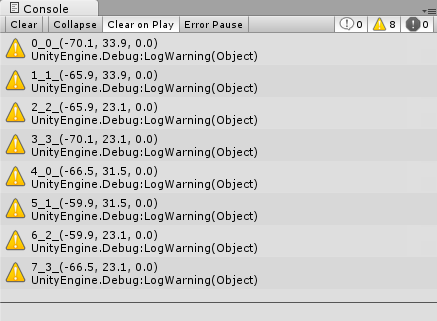
可以看到,1个字符有4个顶点,而顶点的排列如下:

3.顶点的生成
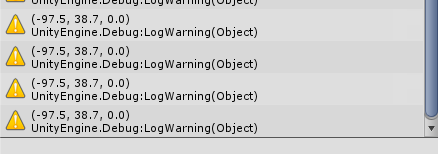
通过OnPopulateMesh这个方法可以看到,生成顶点的方法如下。不过生成的顶点要去掉最后四个点,可以打印一下看看最后四个点的位置。至于为什么要这样处理呢,因为TextGenerator这个类是在UnityEngine命名空间下的,所以我们就不得而知了...
Vector2 extents = rectTransform.rect.size;

var settings = GetGenerationSettings(extents);

cachedTextGenerator.Populate(text, settings);

IList<UIVertex> verts = cachedTextGenerator.verts;

//Last 4 verts are always a new line...

int vertCount = verts.Count - ;
4.获取字符串的长度
TextGenerator类中的GetPreferredWidth方法可以获取字符串的长度。具体使用方式可以看Text类中的preferredWidth,这个方法得到的宽度同样是像素单位的,因此要做转换处理。

[UGUI]图文混排(二):Text源码分析的更多相关文章
- Unity UGUI图文混排源码(二)
Unity UGUI图文混排源码(一):http://blog.csdn.net/qq992817263/article/details/51112304 Unity UGUI图文混排源码(二):ht ...
- Unity UGUI图文混排源码(一)
Unity UGUI图文混排源码(一):http://blog.csdn.net/qq992817263/article/details/51112304 Unity UGUI图文混排源码(二):ht ...
- Unity UGUI图文混排源码(三) -- 动态表情
这里是根据图文混排源码(二)进一步修改的,其他链接也不贴了,就贴一个链接就好了,第一次看这文章的同学可以先去看看其他几篇文章 Unity UGUI图文混排源码(二):http://blog.csdn. ...
- Unity琐碎(3) UGUI 图文混排解决方案和优化
感觉使用Unity之后总能看到各种各样解决混排的方案,只能说明Unity不够体恤下情啊.这篇文章主要讲一下个人在使用过程中方案选择和优化过程,已做记录.顺便提下,开源很多意味着坑,还是要开实际需求. ...
- Spring PropertyResolver 占位符解析(二)源码分析
Spring PropertyResolver 占位符解析(二)源码分析 Spring 系列目录(https://www.cnblogs.com/binarylei/p/10198698.html) ...
- Spring Environment(二)源码分析
Spring Environment(二)源码分析 Spring 系列目录(https://www.cnblogs.com/binarylei/p/10198698.html) Spring Envi ...
- Spring 循环引用(二)源码分析
Spring 循环引用(二)源码分析 Spring 系列目录(https://www.cnblogs.com/binarylei/p/10198698.html) Spring 循环引用相关文章: & ...
- Spring Boot REST(二)源码分析
Spring Boot REST(二)源码分析 Spring 系列目录(https://www.cnblogs.com/binarylei/p/10117436.html) SpringBoot RE ...
- Alink漫谈(二十二) :源码分析之聚类评估
Alink漫谈(二十二) :源码分析之聚类评估 目录 Alink漫谈(二十二) :源码分析之聚类评估 0x00 摘要 0x01 背景概念 1.1 什么是聚类 1.2 聚类分析的方法 1.3 聚类评估 ...
随机推荐
- C#3.0:新特性
1.自动属性 下面两种写法作用相同 1 public int Age { get; set;} 1 2 3 4 5 6 private int age; public int Age { get { ...
- SSH实现隧道功能穿墙
Putty和SSH tunnel 目前寻求FQ的方式无非就几种: 寻找web代理(这个可以进我放置的在线代理进行测试) 自行寻找http/sock5代理(这个可以去网上搜索代理ip) vpnFQ(目前 ...
- ui选型
基本思路是风格必须适合博客风格,必须独树一帜. 选中的ui框架必须符合上述两个条件,另外,如果需要自身做一些css修改,修改量必须尽可能小. 1) 不用bootstrap的自带ui.bootstrap ...
- %cd% 与 %~dp0% 区别
@echo off echo path:%~dpnx0% ipconfig /all|findstr "\<IPv4 适配器\>" %cd% 在批处理和命令窗口都能使 ...
- 从错误0x80070522,谈强制完整性控制(MIC)。
在Windows 7碰到一个奇怪的问题,DE二个盘,NTFS的权限(属性--安全页)一模一样,没有任何区别,但在E盘根目录可以创建文件或文件夹,而在D盘根目录下报错:0x80070522,如果使用应用 ...
- Node.js 0.12: 正确发送HTTP POST请求
Node.js 0.12: 正确发送HTTP POST请求 本文针对版本:Node.js 0.12.4 之前写过一篇Node.js发送和接收HTTP的GET请求的文章,今天再写一篇,讲发送POST的请 ...
- Java第11次实验(数据库)
参考资料 数据结构实验参考文件 数据库初始化文件 MySQL操作视频 数据库相关jar文件请参考QQ群文件. 第1次实验 1. MySQL数据库基本操作 完整演示一遍登录.打开数据库.建表.插入 常见 ...
- DS二叉树--左叶子数量
题目描述 计算一颗二叉树包含的叶子结点数量. 左叶子是指它的左右孩子为空,而且它是父亲的左孩子 提示:可以用三叉链表法,也可以用现有算法对两层结点进行判断 建树方法采用“先序遍历+空树用0表示”的方法 ...
- 详细记录sql运行时间(精确到毫秒)
写程序的人,往往需要分析所写的SQL语句是否已经优化过了,服务器的响应时间有多快,这个时候就需要用到SQL的STATISTICS状态值来查看了. 通过设置STATISTICS我们可以查看执行SQL时的 ...
- Elasticsearch 5.2.x 使用 Head 插件连接不上集群
如果访问elasticsearch出现跨域的问题,如下: 修改elasticsearch.yml文件 vim $ES_HOME$/config/elasticsearch.yml # 增加如下字段 h ...