
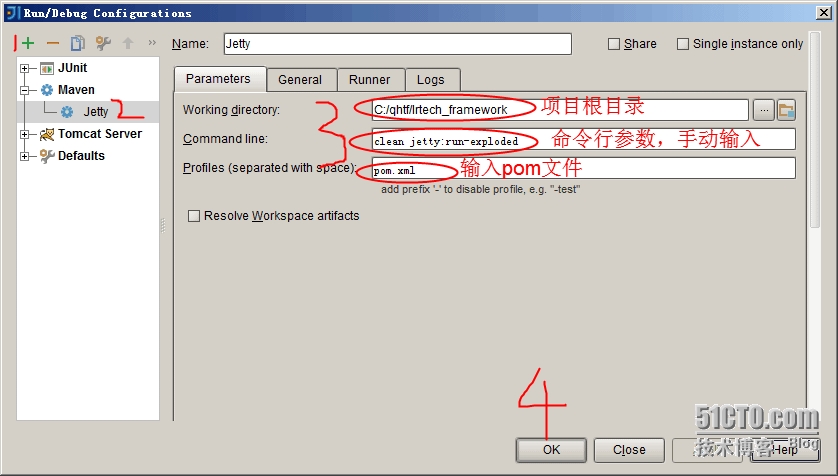
spring 3 mvc hello world + mavern +jetty
Spring 3 MVC hello world example
By mkyong | August 2, 2011 | Updated : June 15, 2015
In this tutorial, we show you a Spring 3 MVC hello world example, using Maven build tool.
Technologies used :
- Spring 3.2.13.RELEASE
- Maven 3
- JDK 1.6
- Eclipse 4.4
- Boostrap 3
Try this Spring 4 MVC hello world example.
Try this Spring 3 MVC hello world annotation example.
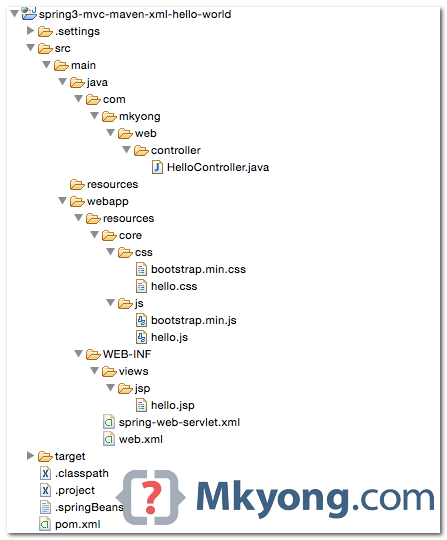
1. Project Structure
Download the project source code and review the project folder structure :
2. Maven
A pom.xml template to quick start a Spring MVC project, it defines Spring 3 dependencies, an embedded Jetty container and Eclipse workspace configuration.
<project xmlns="http://maven.apache.org/POM/4.0.0"

        xmlns:xsi="http://www.w3.org/2001/XMLSchema-instance"

	xsi:schemaLocation="http://maven.apache.org/POM/4.0.0

	http://maven.apache.org/maven-v4_0_0.xsd">

	<modelVersion>4.0.0</modelVersion>

	<groupId>com.mkyong</groupId>

	<artifactId>spring3-web</artifactId>

	<packaging>war</packaging>

	<version>1.0-SNAPSHOT</version>

	<name>spring css</name>

	<properties>

		<jdk.version>1.6</jdk.version>

		<spring.version>3.2.13.RELEASE</spring.version>

		<jstl.version>1.2</jstl.version>

	</properties>

	<dependencies>

		<dependency>

			<groupId>org.springframework</groupId>

			<artifactId>spring-webmvc</artifactId>

			<version>${spring.version}</version>

		</dependency>

		<dependency>

			<groupId>javax.servlet</groupId>

			<artifactId>jstl</artifactId>

			<version>${jstl.version}</version>

		</dependency>

	</dependencies>

	<build>

	  <plugins>

		<plugin>

			<groupId>org.apache.maven.plugins</groupId>

			<artifactId>maven-compiler-plugin</artifactId>

			<version>3.3</version>

			<configuration>

				<source>${jdk.version}</source>

				<target>${jdk.version}</target>

			</configuration>

		</plugin>

		<!-- embedded Jetty server, for testing -->

		<plugin>

			<groupId>org.eclipse.jetty</groupId>

			<artifactId>jetty-maven-plugin</artifactId>

			<version>9.2.11.v20150529</version>

			<configuration>

				<scanIntervalSeconds>10</scanIntervalSeconds>

				<webApp>

					<contextPath>/spring3</contextPath>

				</webApp>

			</configuration>

		</plugin>

		<!-- configure Eclipse workspace -->

		<plugin>

			<groupId>org.apache.maven.plugins</groupId>

			<artifactId>maven-eclipse-plugin</artifactId>

			<version>2.9</version>

			<configuration>

				<downloadSources>true</downloadSources>

				<downloadJavadocs>true</downloadJavadocs>

				<wtpversion>2.0</wtpversion>

				<wtpContextName>spring3</wtpContextName>

			</configuration>

		</plugin>

	  </plugins>

	</build>

  </project>
3. Controller & Mapping
The @RequestMapping has been available since 2.5, but now enhanced to support REST style URLs.
package com.mkyong.web.controller;

import org.springframework.stereotype.Controller;

import org.springframework.ui.ModelMap;

import org.springframework.web.bind.annotation.PathVariable;

import org.springframework.web.bind.annotation.RequestMapping;

import org.springframework.web.bind.annotation.RequestMethod;

import org.springframework.web.servlet.ModelAndView;

@Controller

public class HelloController {

	@RequestMapping(value = "/", method = RequestMethod.GET)

	public String printWelcome(ModelMap model) {

		model.addAttribute("message", "Spring 3 MVC Hello World");

		return "hello";

	}

	@RequestMapping(value = "/hello/{name:.+}", method = RequestMethod.GET)

	public ModelAndView hello(@PathVariable("name") String name) {

		ModelAndView model = new ModelAndView();

		model.setViewName("hello");

		model.addObject("msg", name);

		return model;

	}

}
4. JSP Views
A JSP page to display the value, and include bootstrap css and js.
<%@ taglib prefix="spring" uri="http://www.springframework.org/tags"%>

<%@ taglib prefix="c" uri="http://java.sun.com/jsp/jstl/core"%>

<!DOCTYPE html>

<html lang="en">

<head>

<spring:url value="/resources/core/css/hello.css" var="coreCss" />

<spring:url value="/resources/core/css/bootstrap.min.css" var="bootstrapCss" />

<link href="${bootstrapCss}" rel="stylesheet" />

<link href="${coreCss}" rel="stylesheet" />

</head>

<nav class="navbar navbar-inverse navbar-fixed-top">

  <div class="container">

	<div class="navbar-header">

		<a class="navbar-brand" href="#">Spring 3 MVC Project</a>

	</div>

  </div>

</nav>

<div class="jumbotron">

  <div class="container">

	<h1>${title}</h1>

	<p>

		<c:if test="${not empty name}">

			Hello ${name}

		</c:if>

		<c:if test="${empty name}">

			Welcome Welcome!

		</c:if>

    </p>

    <p>

	<a class="btn btn-primary btn-lg" href="#" role="button">Learn more</a>

    </p>

  </div>

</div>

<div class="container">

  <div class="row">

	<div class="col-md-4">

		<h2>Heading</h2>

		<p>ABC</p>

		<p>

		<a class="btn btn-default" href="#" role="button">View details</a>

		</p>

	</div>

	<div class="col-md-4">

		<h2>Heading</h2>

		<p>ABC</p>

		<p>

		<a class="btn btn-default" href="#" role="button">View details</a>

		</p>

	</div>

	<div class="col-md-4">

		<h2>Heading</h2>

		<p>ABC</p>

		<p>

		<a class="btn btn-default" href="#" role="button">View details</a>

		</p>

	</div>

  </div>

  <hr />

  <footer>

	<p>© Mkyong.com 2015</p>

  </footer>

</div>

<spring:url value="/resources/core/css/hello.js" var="coreJs" />

<spring:url value="/resources/core/css/bootstrap.min.js" var="bootstrapJs" />

<script src="${coreJs}"></script>

<script src="${bootstrapJs}"></script>

<script src="https://ajax.googleapis.com/ajax/libs/jquery/1.11.2/jquery.min.js"></script>

</body>

</html>
5. Spring XML Configuration
5.1 Enable component scanning, view resolver and resource mapping.
<beans xmlns="http://www.springframework.org/schema/beans"

	xmlns:context="http://www.springframework.org/schema/context"

	xmlns:xsi="http://www.w3.org/2001/XMLSchema-instance"

	xmlns:mvc="http://www.springframework.org/schema/mvc"

	xsi:schemaLocation="

        http://www.springframework.org/schema/beans

        http://www.springframework.org/schema/beans/spring-beans-3.2.xsd

        http://www.springframework.org/schema/mvc

        http://www.springframework.org/schema/mvc/spring-mvc-3.2.xsd

        http://www.springframework.org/schema/context

        http://www.springframework.org/schema/context/spring-context-3.2.xsd">

	<context:component-scan base-package="com.mkyong.web" />

	<bean

		class="org.springframework.web.servlet.view.InternalResourceViewResolver">

		<property name="prefix">

			<value>/WEB-INF/views/jsp/</value>

		</property>

		<property name="suffix">

			<value>.jsp</value>

		</property>

	</bean>

	<mvc:resources mapping="/resources/**" location="/resources/" />

	<mvc:annotation-driven />

</beans>
5.2 Declares a DispatcherServlet in web.xml. If the Spring XML configuration file is NOT specified, Spring will look for the {servlet-name}-servlet.xml.
In this example, Spring will look for the spring-web-servlet.xml file.
<web-app xmlns="http://java.sun.com/xml/ns/javaee"

	xmlns:xsi="http://www.w3.org/2001/XMLSchema-instance"

	xsi:schemaLocation="http://java.sun.com/xml/ns/javaee

	http://java.sun.com/xml/ns/javaee/web-app_2_5.xsd"

	version="2.5">

	<display-name>Spring3 MVC Application</display-name>

	<servlet>

		<servlet-name>spring-web</servlet-name>

		<servlet-class>

                    org.springframework.web.servlet.DispatcherServlet

                </servlet-class>

		<load-on-startup>1</load-on-startup>

	</servlet>

	<servlet-mapping>

		<servlet-name>spring-web</servlet-name>

		<url-pattern>/</url-pattern>

	</servlet-mapping>

</web-app>
You can define a Spring XML file via contextConfigLocation.
	<servlet>

		<servlet-name>spring-web</servlet-name>

		<servlet-class>

                     org.springframework.web.servlet.DispatcherServlet

                </servlet-class>

		<load-on-startup>1</load-on-startup>

		<init-param>

			<param-name>contextConfigLocation</param-name>

			<param-value>/WEB-INF/spring-mvc-config.xml</param-value>

		</init-param>

	</servlet>

        <servlet-mapping>

		<servlet-name>spring-web</servlet-name>

		<url-pattern>/</url-pattern>

	</servlet-mapping>
6. Demo
The pom.xml file defines an embedded Jetty container. Issues mvn jetty:run to start the project.
$ mvn jetty:run

...

[INFO] Started Jetty Server

[INFO] Starting scanner at interval of 10 seconds.
URL : http://localhost:8080/spring3
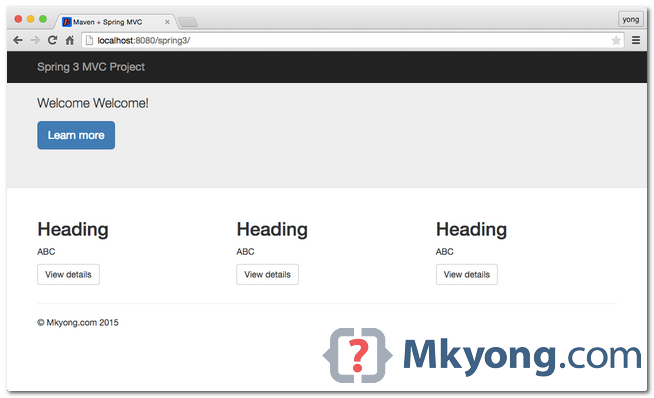
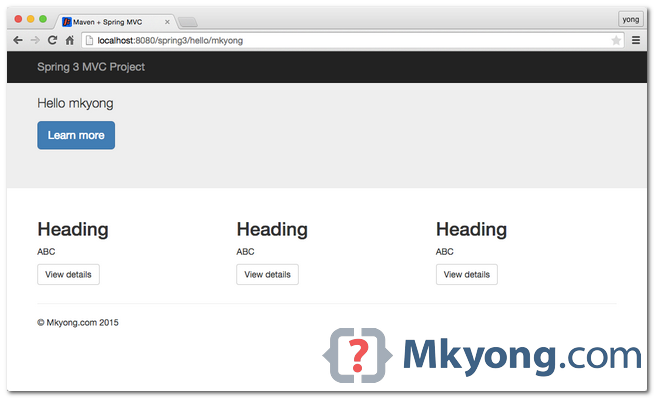
URL : http://localhost:8080/spring3/hello/mkyong
7. WAR File
To create a WAR file for deployment :
your-project$ mvn war:war
A WAR file will be created in project\target\ folder.
${Project}\target\spring3-web-1.0-SNAPSHOT.war
Download Source Code
References
spring 3 mvc hello world + mavern +jetty的更多相关文章
- Spring Boot——2分钟构建spring web mvc REST风格HelloWorld
之前有一篇<5分钟构建spring web mvc REST风格HelloWorld>介绍了普通方式开发spring web mvc web service.接下来看看使用spring b ...
- Gradle – Spring 4 MVC Hello World Example
In this tutorial, we will show you a Gradle + Spring 4 MVC, Hello World Example (JSP view), XML conf ...
- [转]Spring Boot——2分钟构建spring web mvc REST风格HelloWorld
Spring Boot——2分钟构建spring web mvc REST风格HelloWorld http://projects.spring.io/spring-boot/ http://spri ...
- Spring Framework------>version4.3.5.RELAESE----->Reference Documentation学习心得----->Spring Framework中的spring web MVC模块
spring framework中的spring web MVC模块 1.概述 spring web mvc是spring框架中的一个模块 spring web mvc实现了web的MVC架构模式,可 ...
- 菜鸟学习Spring Web MVC之二
有文章从结构上详细讲解了Spring Web MVC,我个菜鸟就不引据来讲了.说说强悍的XP环境如何配置运行环境~~ 最后我配好的环境Tomcat.Spring Tool Suites.Maven目前 ...
- 【Spring】Spring系列7之Spring整合MVC框架
7.Spring整合MVC框架 7.1.web环境中使用Spring 7.2.整合MVC框架 目标:使用Spring管理MVC的Action.Controller 最佳实践参考:http://www. ...
- 4.Spring Web MVC处理请求的流程
- 1.Spring Web MVC有什么
Spring Web MVC使用了MVC架构模式的思想,将web层进行职责解耦. 同样也是基于请求驱动的,也就是使用请求-响应模型.它主要包含如下组件: DispatcherServlet :前端控制 ...
- Spring REST实践之Spring Web MVC
Spring概要 Spring Framework提供了依赖注入模型和面向切面编程,简化了基础型代码的编写工作以及更好的能够与其它框架和技术整合起来.Spring Framework由data acc ...
随机推荐
- linux下tar.gz、tar、bz2、zip等解压缩、压缩命令小结
Linux下最常用的打包程序就是tar了,使用tar程序打出来的包我们常称为tar包,tar包文件的命令通常都是以.tar结尾的.生成tar包后,就可以用其它的程序来进 行压缩了,所以首先就来讲讲ta ...
- Ubuntu 16.04.1下修改MySQL默认编码
在Ubuntu 下配置 MySQL 的字符编码.安装完 MySQL 后,系统默认的字符编码是 latin1 ,输入的是中文,可是输出却是一堆乱码.现在要做的就是把 MySQL的默认字符编码设置为支持中 ...
- css做三角形
<!DOCTYPE html> <html> <head lang="en"> <meta charset="UTF-8&quo ...
- 【安全测试】 WebScarab安装方法
Webscarab同样需要java环境,下载j2_webscarab-installer.jar包. 1.进入cmd,执行java -jar j2_webscarab-installer.jar命令( ...
- Spring3博客(内含ppt和代码的github地址)
我们的Spring3相当于给我们的项目来了一次大整容!因为上次演示的时候,老师给我们的建议是做得小清新一点,所以我们项目改动挺大的. PPT地址:http://files.cnblogs.com/fi ...
- css-九宫格自适应的实现
高度自适应使用padding 或 padding-bottom + 百分比来实现: 宽度自适应使用width + 百分比来实现. 下面是实现九宫格自适应的代码: <!DOCTYPE html&g ...
- Oracle创建定时器
--创建日志信息表(测试表) create table T_LOG( id number, datetime DATE); --插入测试数据insert into t_log values (1,'2 ...
- bootstrap之消息提示
<!DOCTYPE html><html> <head> <title>Bootstrap</title> < ...
- ios 打包
/usr/bin/xcodebuild -scheme Moon -sdk iphoneos -workspace Moon.xcworkspace -configuration Release cl ...
- UE3:SkeletalMesh的绘制流程
[目标] SkeletalMesh的绘制流程 [思路] 1 顶点缓冲流 静态数据流向 动态数据流向(紫红色箭头) 2 FGPUSkinVertexFactory.ShaderDataType.Bone ...