
shell & dialog
最近使用dialog写图形自动化shell脚本, 功能很强大,功能不是非常多但是足够用。想写一篇linux下dialog的使用方法,虽然命令不多,但是写起来也需要下很大功夫,而且不一定写得更好,在网上发现一篇linux shell图形化脚本文件,于是转过来了.
liunx 下的dialog 工具是一个可以和shell脚本配合使用的文本界面下的创建对话框的工具。
每个对话框提供的输出有两种形式:
1. 将所有输出到stderr 输出,不显示到屏幕。
2. 使用退出状态码,“OK”为0,“NO”为1,"ESC"为255
[--colors] 解读嵌入式“\ Z”的对话框中的特殊文本序列,序列由下面的字符 0-7, b B, u, U等,恢复正常的设置使用“\Zn”。
[--no-shadow] 禁止阴影出现在每个对话框的底部
[--shadow] 应该是出现阴影效果[--insecure] 输入部件的密码时,明文显示不安全,使用星号来代表每个字符[--no-cancel] 设置在输入框,菜单,和复选框中,不显示“cancel”项
[--clear] 完成清屏操作。在框体显示结束后,清除框体。这个参数只能单独使用,不能和别的参数联合使用。
[--ok-label <str>] 覆盖使用“OK”按钮的标签,换做其他字符。
[--cancel-label <str>] 功能同上
[--backtitle <backtitle>] 指定的backtitle字符串显示在背景顶端。
[--begin <y> <x>] 指定对话框左上角在屏幕的上的做坐标
[--timeout <secs>] 超时(返回的错误代码),如果用户在指定的时间内没有给出相应动作,就按超时处理
[--defaultno] 使的是默认值 yes/no,使用no
[--sleep <secs>]
[--stderr] 以标准错误方式输出
[--stdout] 以标准方式输出
[--default-item <str>] 设置在一份清单,表格或菜单中的默认项目。通常在框中的第一项是默认
窗体类型:
[ --yesno ] 提供一个带有yes和no按钮的简单信息框 (是/否框)
如果没有此包请先安装
yum -y install dialog
命令示例:
1.消息框 格式:dialog - -msgbox text height width
|
1
|
#dialog - -title TESTING - -msgbox “this is a test “ 10 20
|

例子:
|
1
2
|
#dialog --title "yes/no" --no-shadow --yesno \
"Delete the file /tmp/chensiyao.txt?" 10 30
|

例子:
|
1
2
3
|
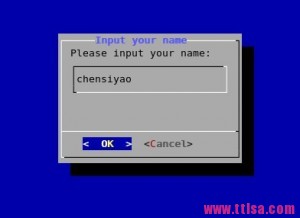
# dialog --title "Input your name" \
--inputbox "Please input your name:" 10 30 2> /tmp/name.txt
#(这里的2>是将错误信息输出重定向到了/tmp/name.txt文件中)
|
 4.密码框
4.密码框|
1
2
|
# dialog --title "Password" --passwordbox \
"Please give a password for the new user:" 10 35
|
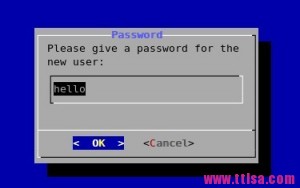
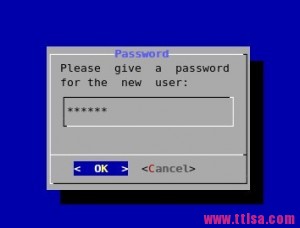
这样我们的密码就暴露出来了,是不是很不安全,所以通常我们会加上一个安全选项
|
1
2
|
# dialog --title "Password" --insecure \
--passwordbox "Please give a password for the new user:" 10 30
|
|
1
|
#dialog --title "The fstab" --textbox /etc/fstab 17 40
|

|
1
2
|
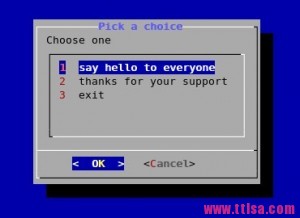
#dialog --title "Pick a choice" --menu "Choose one" 12 35 5 \
1 "say hello to everyone" 2 "thanks for your support" 3 "exit"
|
|
1
|
#dialog --title "Pick one file" --fselect /root/ 7 40
|
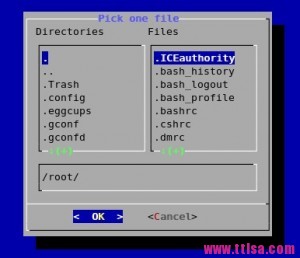
8.复选框
格式:dialog --checklist "Test" height width menu-height tag1 item1 tag2 item2 …
例子:
|
1
2
|
# dialog --backtitle "Checklist" --checklist "Test" 20 50 10 \
Memory Memory_Size 1 Dsik Disk_Size 2<b></b>
|

9.显示日历
格式:dialog --calendar "Date" height width day month year
例子:
#显示当前日期
|
1
|
# dialog --title "Calendar" --calendar "Date" 5 50
|

#显示指定日期
|
1
|
# dialog --title "Calendar" --calendar "Date" 5 50 1 2 2013
|

#固定进度显示
|
1
|
#dialog --title "installation pro" --gauge "installation" 10 30 10
|
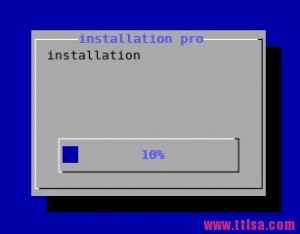
#实时动度进度
|
1
2
|
#for i in {1..100} ;do echo $i;done | dialog --title \
"installation pro" --gauge "installation" 10 30
|

编辑一个gauge.sh 的脚本
|
1
2
3
4
5
6
7
8
9
10
11
12
13
14
15
16
|
#!/bin/bash
# vim gauge.sh
declare -i PERCENT=0
(
for I in /etc/*;do
if [ $PERCENT -le 100 ];then
cp -r $I /tmp/test 2> /dev/null
echo "XXX"
echo "Copy the file $I ..."
echo "XXX"
echo $PERCENT
fi
let PERCENT+=1
sleep 0.1
done
) | dialog --title "coping" --gauge "starting to copy files..." 6 50 0
|
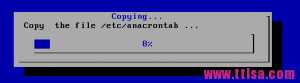

综合应用示例:
|
1
2
3
4
5
6
7
8
9
10
11
12
13
14
15
16
17
18
19
20
21
22
23
24
25
26
27
28
29
30
31
32
33
34
35
36
37
38
39
40
41
42
43
44
45
46
47
48
49
50
51
52
53
54
55
56
57
58
59
60
61
62
63
|
#!/bin/bash
yesno() {
dialog --title "First screen" --backtitle "Test Program" --clear --yesno \
"Start this test program or not ? \nThis decesion have to make by you. " 16 51
# yes is 0, no is 1 , esc is 255
result=$?
if [ $result -eq 1 ] ; then
exit 1;
elif [ $result -eq 255 ]; then
exit 255;
fi
username
}
username() {
cat /dev/null >/tmp/test.username
dialog --title "Second screen" --backtitle "Test Program" --clear --inputbox \
"Please input your username (default: hello) " 16 51 "hello" 2>/tmp/test.username
result=$?
if [ $result -eq 1 ] ; then
yesno
elif [ $result -eq 255 ]; then
exit 255;
fi
password
}
password() {
cat /dev/null >/tmp/test.password
dialog --insecure --title "Third screen" --backtitle "Test Program" --clear --passwordbox \
"Please input your password (default: 123456) " 16 51 "123456" 2>/tmp/test.password
result=$?
if [ $result -eq 1 ] ; then
username
elif [ $result -eq 255 ]; then
exit 255;
fi
occupation
}
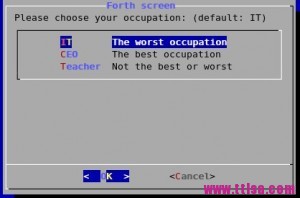
occupation() {
cat /dev/null >/tmp/test.occupation
dialog --title "Forth screen" --backtitle "Test Program" --clear --menu \
"Please choose your occupation: (default: IT)" 16 51 3 \
IT "The worst occupation" \
CEO "The best occupation" \
Teacher "Not the best or worst" 2>/tmp/test.occupation
result=$?
if [ $result -eq 1 ] ; then
password
elif [ $result -eq 255 ]; then
exit 255;
fi
finish
}
finish() {
dialog --title "Fifth screen" --backtitle "Test Program" --clear --msgbox \
"Congratulations! The test program has finished!\n Username: $(cat /tmp/test.username)\n Password: $(cat /tmp/test.password)\n Occupation: $(cat /tmp/test.occupation)" 16 51
result=$?
if [ $result -eq 1 ] ; then
occupation
elif [ $result -eq 255 ]; then
exit 255;
fi
}
yesno
|
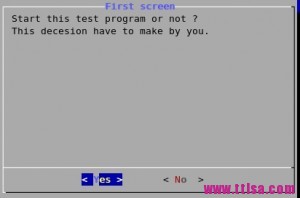



shell & dialog的更多相关文章
- 关于JFace的自定义对话框(Dialog类)
仅仅是使用MessageDialog,InputDialog等JFace中现成的对话框类是无法满足实际项目开发需要的. 很多时候都需要自己定制对话框,自定义对话框只要在Dialog类的基础上作扩展就行 ...
- 关于JFace中的进度条对话框(ProgressMonitorDialog类)
在Windows操作系统中,最常用的进度条对话框就是文件复制时的弹出框,如果想让用户愉快的使用你开发 的软件,那么在执行某个较长时间的操作时候,就应该弹出一个进度条提示框,告诉用户程序正在做什么. 做 ...
- 关于JFace中的对话框MessageDialog类等其它类型对话框
对话框是软件系统中最常用到的界面,对话框无处不在,从界面结构来说,对话框主要是由主体的界面组件和底部窗体按钮组成. 之前的例子中已经频繁的使用到了MessageDialog.openInformati ...
- 简介SWT Jface
可以使用标准窗口小部件工具箱(Standard Widget Toolkit,SWT)和 JFace 库来开发用于 Eclipse 环境的图形用户界面,而且还可以将它们用于开发单独的 GUI 本机应用 ...
- 3java面试题 传智 发的 有用
第一章内容介绍 20 第二章JavaSE基础 21 一.Java面向对象 21 1. 面向对象都有哪些特性以及你对这些特性的理解 21 2. 访问权限修饰符public.private.protect ...
- linux dialog详解(图形化shell)
liunx 下的dialog 工具是一个可以和shell脚本配合使用的文本界面下的创建对话框的工具.每个对话框提供的输出有两种形式: 1. 将所有输出到stderr 输出,不显示到屏幕. 2 ...
- dialog - 从 shell 显示对话框
总览 (SYNOPSIS) dialog --clear dialog --create-rc file dialog --print-maxsize dialog common-options bo ...
- shell之dialog提示窗口
dialog 提示窗口 1.msgbox dialog --msgbox text 20 10 2.yesno dialog --title "Please answer&q ...
- 详解Linux交互式shell脚本中创建对话框实例教程_linux服务器
本教程我们通过实现来讲讲Linux交互式shell脚本中创建各种各样对话框,对话框在Linux中可以友好的提示操作者,感兴趣的朋友可以参考学习一下. 当你在终端环境下安装新的软件时,你可以经常看到信息 ...
随机推荐
- zju(4)使用busybox制作根文件系统
1.实验目的 1.学习和掌握busybox相关知识及应用: 2.学会使用交叉编译器定制一个busybox: 3.利用该busybox制作一个文件系统: 4.熟悉根文件系统组织结构: 5.定制.编译ra ...
- JavaScript入门篇 第三天(认识DOM)
认识DOM 文档对象模型DOM(Document Object Model)定义访问和处理HTML文档的标准方法.DOM 将HTML文档呈现为带有元素.属性和文本的树结构(节点树). 先来看看下面代码 ...
- 网页FLASH幻灯片播放带链接源代码 pixviewer.swf使用(转)
<script type="text/javascript"> <!-- var focus_width=360 var focus_height=270 ...
- 在VPS上部署fq环境
VPS购买地址 1. 由于我选择的是CentOS 6 x86版本, 需要安装如下准备工具: git, gcc-c++, zlib-devel, openssl-devel, pcre-devel 2. ...
- 【iCore3 双核心板】例程十一:DMA实验——存储器到存储器的传输
实验指导书及代码包下载: http://pan.baidu.com/s/1bcY5JK iCore3 购买链接: https://item.taobao.com/item.htm?id=5242294 ...
- 【C++】int、const char*、char*、char、string之间的转换
#include "stdafx.h" #include<string> #include<vector> #include<iostream> ...
- iOS 深浅拷贝
-(void)copyDemo { // 在非集合类对象中:对immutable对象进行copy操作,是指针复制,mutableCopy操作时内容复制:对mutable对象进行copy和mutable ...
- Jquery使select、radio某项选中
select $("#class").find("option[value='123']").attr("selected",true); ...
- JAVASE02-Unit01: API文档 、 字符串基本操作
API文档 . 字符串基本操作 文档注释 package day01; /** * 文档注释只能定义在三个地方: * 类,方法,常量 * * 文档注释是功能注释,用来说明功能作用 * 在类上使用的目的 ...
- Python学习【第一篇】Python简介
Python简介 Python前世今生 Python是著名的“龟叔”Guido van Rossum在1989年圣诞节期间,为了打发无聊的圣诞节而编写的一个编程语言. 现在,全世界差不多有600多种编 ...