
python---使用字典来实现链接表图
最后一章,坚持!!!
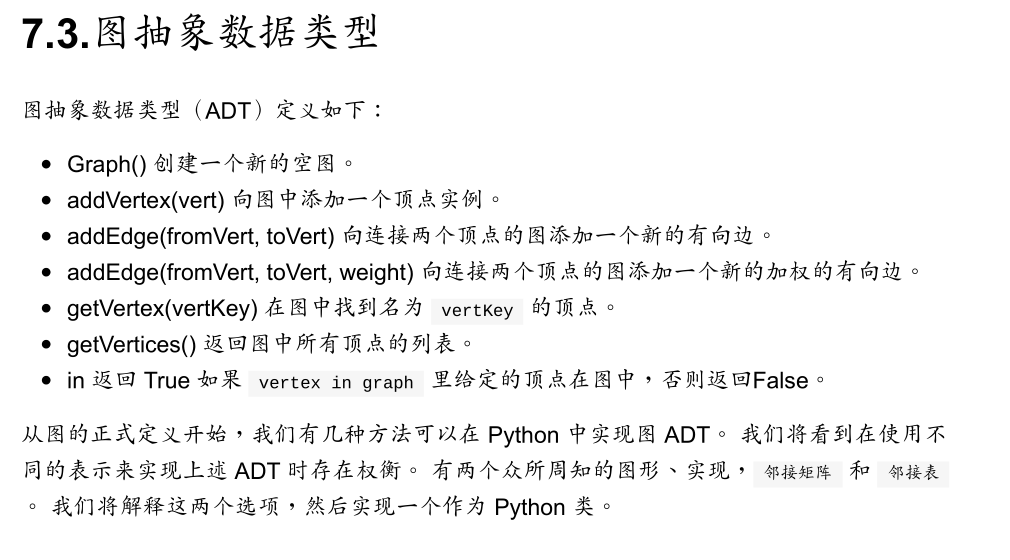
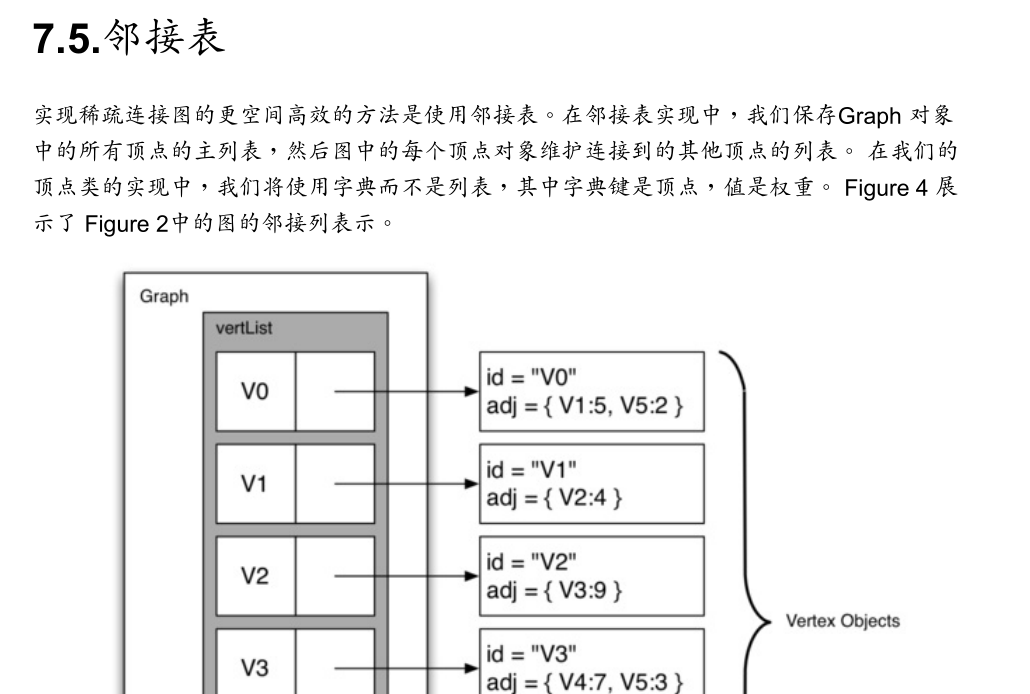
# coding = utf-8

class Vertex:
    def __init__(self, key):
        self.id = key
        self.connected_to = {}

    def add_neighbor(self, nbr, weight=0):
        self.connected_to[nbr] = weight

    def __str__(self):
        return str(self.id) + ' connected to: ' + str([x.id for x in self.connected_to])

    def get_connections(self):
        return self.connected_to.keys()

    def get_id(self):
        return self.id

    def get_weight(self, nbr):
        return self.connected_to[nbr]

class Graph:
    def __init__(self):
        self.vertex_list = {}
        self.num_vertices = 0

    def add_vertex(self, key):
        self.num_vertices = self.num_vertices + 1
        new_vertex = Vertex(key)
        self.vertex_list[key] = new_vertex
        return new_vertex

    def get_vertex(self, n):
        if n in self.vertex_list:
            return self.vertex_list[n]
        else:
            return None

    def __contains__(self, item):
        return item in self.vertex_list

    def add_edge(self, f, t, cost=0):
        if f not  in self.vertex_list:
            nv = self.add_vertex(f)
        if t not in self.vertex_list:
            nv = self.add_vertex(t)
        self.vertex_list[f].add_neighbor(self.vertex_list[t], cost)

    def get_vertices(self):
        return self.vertex_list.keys()

    def __iter__(self):
        return iter(self.vertex_list.values())

g = Graph()
for i in range(6):
    g.add_vertex(i)
print(g.vertex_list)
g.add_edge(0, 1, 5)
g.add_edge(0, 5, 2)
g.add_edge(1, 2, 4)
g.add_edge(2, 3, 9)
g.add_edge(3, 4, 7)
g.add_edge(3, 5, 3)
g.add_edge(4, 0, 1)
g.add_edge(5, 4, 8)
g.add_edge(5, 2, 1)

for v in g:
    for w in v.get_connections():
        print("( %s, %s )" % (v.get_id(), w.get_id()))
C:\Users\Sahara\.virtualenvs\test\Scripts\python.exe C:/Users/Sahara/PycharmProjects/test/python_search.py
{0: <__main__.Vertex object at 0x0000000001E83DA0>, 1: <__main__.Vertex object at 0x0000000001E83DD8>, 2: <__main__.Vertex object at 0x0000000001E83E10>, 3: <__main__.Vertex object at 0x0000000001E83E48>, 4: <__main__.Vertex object at 0x0000000001E83E80>, 5: <__main__.Vertex object at 0x0000000001E83EB8>}
( 0, 1 )
( 0, 5 )
( 1, 2 )
( 2, 3 )
( 3, 4 )
( 3, 5 )
( 4, 0 )
( 5, 4 )
( 5, 2 )

Process finished with exit code 0
python---使用字典来实现链接表图的更多相关文章
- Python中字典和集合
Python中字典和集合 映射类型: 表示一个任意对象的集合,且可以通过另一个几乎是任意键值的集合进行索引 与序列不同,映射是无序的,通过键进行索引 任何不可变对象都可用作字典的键,如字符串.数字.元 ...
- Python的字典
1. Python的字典 1.1. 字典的定义 在Python中,字典是一种key-value的数据类型,也是唯一的映射类型:字典还是另一种可变容器类型,且可存储任意类型对象,其中也可包括其他容器 ...
- Python的字典和JSON
Python的字典和JSON在表现形式上非常相似 #这是Python中的一个字典 dic = { 'str': 'this is a string', 'list': [1, 2, 'a', 'b'] ...
- python基础--字典
Python基础--字典 字典的常用函数: dict.clear( )--->无任何返回值 说明: 清除字典内的所有的元素 语法: In [5]: dict.clear? Type: metho ...
- Python dictionary 字典 常用法
Python dictionary 字典 常用法 d = {} d.has_key(key_in) # if has the key of key_in d.keys() ...
- python有序字典OrderedDict()
转python创建有序字典OrderedDict # -*- coding:utf-8 -*- """ python有序字典 需导入模块collections " ...
- python:字典嵌套列表
Python的字典{ }以键值对的形式保存数据,可以以键来访问字典中保存的值而不能用下标访问.字典中几乎可以包含任意的变量,字典,数列,元组.数列也一样. python的列表[ ]与字典不同,列表通过 ...
- Python的网络编程--思维导图
Python的网络编程--思维导图
- Python的字典类型
Python的字典类型为dict,用{}来表示,字典存放键值对数据,每个键值对用:号分隔,每个键值对之间用,号分隔,其基本格式如下: d = {key1 : value1, key2 : value2 ...
随机推荐
- Linux查看本机IP:curl cip.cc
curl http://members.3322.org/dyndns/getip curl ip.6655.com/ip.aspx curl ifconfig.me curl icanhazip.c ...
- Linker Scripts3--简单的链接脚本命令1
1.前言 这个部分我们描述了简单的链接脚本命令 2.设置entry point 程序中第一条运行的指令被称为入口点entry point,可以使用ENTRY链接脚本命令设置entry point,参数 ...
- git-bisect last updated in 2.19.1【转】
转自:https://git-scm.com/docs/git-bisect NAME git-bisect - Use binary search to find the commit that i ...
- 虚拟化之kvm --(vnc控制台)
作者:邓聪聪 随着日益不同的需求增多,为了满足主机供求,get到这一招虚拟化技术,以增加点见识! 1.使用yum安装: yum -y install qemu-kvm libvirt python-v ...
- DbProviderFactory
背景 在此之前,我一直以为调用哪个数据库就要用它专门的链接,除非是odbc方式.后来用了java,想.net怎么没有通用的链接呢,尤其是oracle,还要装他的客户端,如此不方便竟然能流行起来.后来知 ...
- css3时钟
参考资料: 奇舞团: http://www.75team.com/archives/851 DEMO:demo 截图: 代码: <!DOCTYPE html> <html lang= ...
- Centos 7 安装Docker-ce记录
以前尝试过在centos 6上安装Docker , 需要升级内核,支持aufs,比较麻烦:在使用过程中出现过Docker挂掉的情况,官方建议在64 位 centos 7 上运行,本文将安装步骤记录下来 ...
- Jmeter之模拟文件上传、下载接口操作
上周群里有位同学,问我用jmeter怎么上传文件?因好久没用jmeter了,顺便自己也复习下,现整理出来和大家分享 一.准备工作: 上传接口一个(自行开发解决了) 下载接口 ps:没有困难创造困难也要 ...
- [C]控制外部变量访问权限的extern和static关键字
一.extern 概述 编译器是由上至下编译源文件的,当遇到一些函数引用外部全局变量,而这个变量被定义在该函数声明主体的下方,又或者引用自其它的编译单元,这个情况就需要extern来向编译器表明此变量 ...
- Jquyer轮播带数字和提示文字
效果图如下: 代码如下: <!DOCTYPE html PUBLIC "-//W3C//DTD XHTML 1.0 Transitional//EN" "http: ...