
集腋成裘-03-css基础-02
1.1 三种写法
内嵌式:样式只作用于当前文件,没有真正实现结构表现分离
外链式:作用范围是当前站点,真正实现了内容与表现分离
行内样式:仅限于当前标签,结构混在一起
1.2 标签分类
1.2.1 块元素
代表标签:Div;p;ul;li
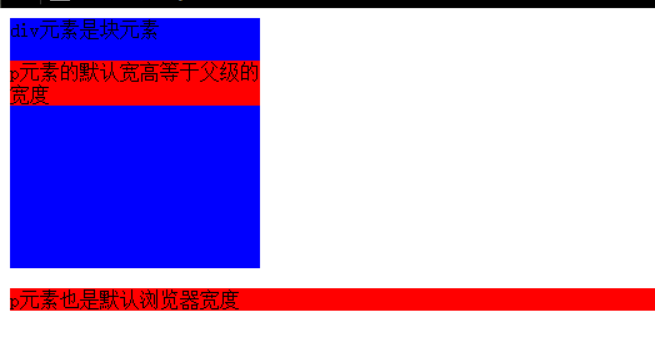
特点:独占一行;可设置宽高;子元素的宽高默认为父元素的宽高
<!DOCTYPE html>

<html lang="en">

<head>

    <meta charset="UTF-8">

    <title>Document</title>

    <style type="text/css">

        div{

            width:200px;

            height:200px;

            background-color: blue

        }

         p{

             background-color: red;

         }

    </style>

</head>

<body>

    <div>

        div元素是块元素

        <p>p元素的默认宽高等于父级的宽度</p>

    </div>

    <p>p元素也是默认浏览器宽度</p>

</body>

</html>
块元素
1.2.2 行内样式
代表标签:span;a;strong;
特点:一行显示;不可设置宽高;
<!DOCTYPE html>

<html lang="en">

<head>

    <meta charset="UTF-8">

    <title>Document</title>

    <style type="text/css">

        span{

            width:200px;

            height:200px;

            background-color: blue

        }

         a{

             width:200px;

            height:200px;

             background-color: red;

         }

    </style>

</head>

<body>

    <span>

        我是span标签中的元素<a href="#">a标签</a>

    </span>

    <span>

        不能设置宽高

    </span>

    <a href="#">

        不能设置宽高

    </a>

</body>

</html>
行内元素

1.2.3 行内块
代表标签:input;img;
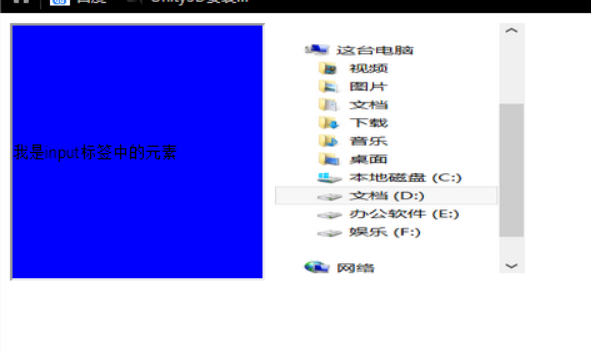
特点:一行显示;可设置宽高;
<!DOCTYPE html>

<html lang="en">

<head>

    <meta charset="UTF-8">

    <title>Document</title>

    <style type="text/css">

        input{

            width:200px;

            height:200px;

            background-color: blue

        }

        img{

             width:200px;

            height:200px;

             background-color: red;

             vertical-align: top;

         }

    </style>

</head>

<body>

    <input type="text" name="" value="我是input标签中的元素">

    </span>

     <img src="1.png" alt="">

</body>

</html>
行内块
1.3 互相转换
1.3.1 块=>行内
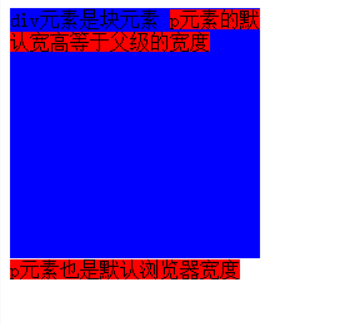
display:inline;
<!DOCTYPE html>

<html lang="en">

<head>

    <meta charset="UTF-8">

    <title>Document</title>

    <style type="text/css">

        div{

            width:200px;

            height:200px;

            background-color: blue;

        }

         p{

             background-color: red;

             display:inline;

         }

    </style>

</head>

<body>

    <div>

        div元素是块元素

        <p>p元素的默认宽高等于父级的宽度</p>

    </div>

    <p>p元素也是默认浏览器宽度</p>

</body>

</html>
块转化为行内
 1.3.2 行内=>块
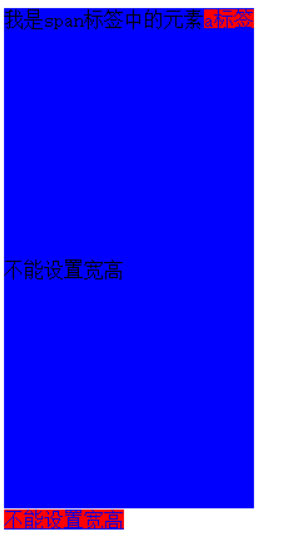
display: block;
<!DOCTYPE html>

<html lang="en">

<head>

    <meta charset="UTF-8">

    <title>Document</title>

    <style type="text/css">

        span{

            width:200px;

            height:200px;

            background-color: blue;

            display: block;

        }

         a{

             width:200px;

            height:200px;

             background-color: red;

         }

    </style>

</head>

<body>

    <span>

        我是span标签中的元素<a href="#">a标签</a>

    </span>

    <span>

        不能设置宽高

    </span>

    <a href="#">

        不能设置宽高

    </a>

</body>

</html>
行内转化为块
1.3.3 =>行内块
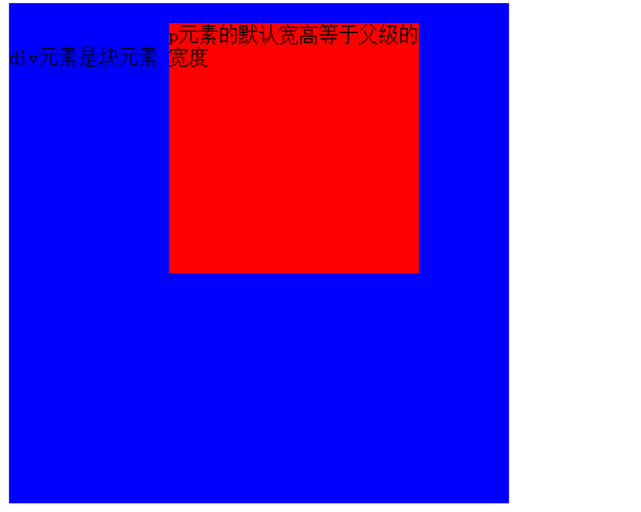
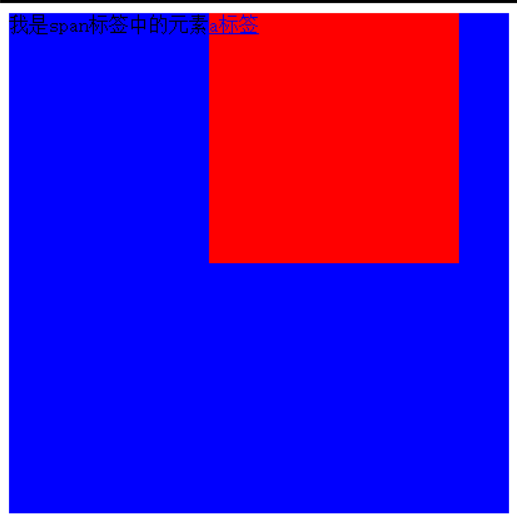
display:inline-block;
<!DOCTYPE html>

<html lang="en">

<head>

    <meta charset="UTF-8">

    <title>Document</title>

    <style type="text/css">

        div{

            width:400px;

            height:400px;

            background-color: blue;

        }

         p{

             width:200px;

            height:200px;

             background-color: red;

             display:inline-block;

         }

    </style>

</head>

<body>

    <div>

        div元素是块元素

        <p>p元素的默认宽高等于父级的宽度</p>

    </div>

    <p>p元素也是默认浏览器宽度</p>

</body>

</html>
块转化为行内块
<!DOCTYPE html>

<html lang="en">

<head>

    <meta charset="UTF-8">

    <title>Document</title>

    <style type="text/css">

        span{

            width:400px;

            height:400px;

            background-color: blue;

            display:inline-block;

        }

         a{

             width:200px;

            height:200px;

             background-color: red;

             display:inline-block;

         }

    </style>

</head>

<body>

    <span>

        我是span标签中的元素<a href="#">a标签</a>

    </span>

    <span>

        不能设置宽高

    </span>

    <a href="#">

        不能设置宽高

    </a>

</body>

</html>
行内转化为行内块
1.4 样式表的属性
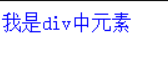
1.4.1 层叠性 :当元素之间的样式发生冲突时,按照浏览器的解析顺序,后续的样式会覆盖掉原有的样式.
<!DOCTYPE html>

<html lang="en">

<head>

    <meta charset="UTF-8">

    <title>Document</title>

    <style>

        .div1{

            color:red;

        }

        .div2{

            color:blue;

        }

    </style>

</head>

<body>

    <div class="div1 div2">

     我是div中元素

    </div>

</body>

</html>
层叠性
1.4.2 继承性:包含关系,子元素中的某些元素会继承父元素的样式
<!DOCTYPE html>

<html lang="en">

<head>

    <meta charset="UTF-8">

    <title>Document</title>

    <style>

     p{

            font-style: italic;

        }

        div{

            font:italic  16px/40px 微软雅黑 ;

            color:red;

        }

    </style>

</head>

<body>

    <div>

        我是另一个div中元素

        <p>我是div中的p标签我是红色</p>

    </div>

</body>

</html>
继承性

1.4.3 优先级
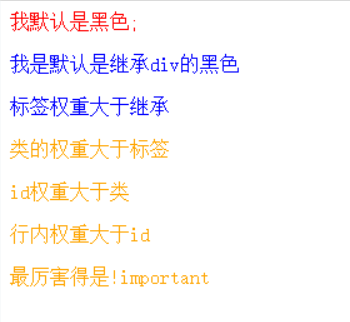
默认(继承)<标签<类<id<行内<!important
0 < 10<100<1000<1000+
<!DOCTYPE html>

<html lang="en">

<head>

    <meta charset="UTF-8">

    <title>Document</title>

    <style>

        #p2{

            color:green;

        }

        #p{

            color:pink;

        }

        .p{

            color:orange;

        }

       p{

              color:blue;

        }

        div{

             color: red;

        }

        .p2{

            color:orange !important;

        }

    </style>

</head>

<body>

    <div >

        我默认是黑色;

        <p>我是默认是继承div的黑色</p>

        <p>标签权重大于继承</p>

        <p class="p">类的权重大于标签</p>

        <p class="p" id="p">id权重大于类</p>

        <p class="p" id="p2" style="color:yellow">行内权重大于id</p>

    </div>

    <div class="father">

        <p class="p2">最厉害得是!important</p>

    </div>

</body>

</html>
优先级
权重的叠加
<!DOCTYPE html>

<html lang="en">

<head>

    <meta charset="UTF-8">

    <title>Document</title>

    <style>

        .father,.p2{

            color:red;

        }

        div,.p{

            color:orange;

        }

    </style>

</head>

<body>

    <div class="father">

        <p class="p2">红色表示连个类的叠加</p>

    </div>

</body>

</html>
权重的叠加

1.5 链接伪类
<!DOCTYPE html>

<html lang="en">

<head>

    <meta charset="UTF-8">

    <title>Document</title>

    <style type="text/css">

         a:link{

             color:red;

            text-decoration: none;

         }

         /*访问之后的状态*/

         a:visited{

             color:yellow;

         }

         /*鼠标放上的状态*/

         a:hover{

             color:orange;

         }

         /*激活状态*/

         a:active{

             color:pink;

         }

    </style>

</head>

<body>

    <div class="content">

         <a href="#">链接</a>

    </div>

</body>

</html>
链接伪类
<!DOCTYPE html>

<html lang="en">

<head>

    <meta charset="UTF-8">

    <title>Document</title>

    <style type="text/css">

        .nav{

            height: 60px;

            background-color: #aaa;

            text-align: center;

        }

        a:link{

            color:red;

            text-decoration: none;

        }

        /*访问之后的状态*/

        a:visited{

            color:yellow;

        }

        /*鼠标放上的状态*/

        a:hover{

            background-color: #eee;

            color: #F14400;

        }

        /*激活状态*/

        a:active{

            color:pink;

        }

        a{

            display: inline-block;

            width:100px;

            height: 60px;

        }

        a.public{

            font-weight: ;

            color: #F14400;

        }

    </style>

</head>

<body>

    <div class="nav">

        <a href="#"    class="public">天猫</a>

        <a href="#"    class="public">聚划算</a>

        <a href="#"    class="public">超市</a>

        <a href="#"    class="public">头条</a>

        <a href="#">阿里旅行</a>

        <a href="#">电器城</a>

        <a href="#">淘抢购</a>

        <a href="#">苏宁易购</a>

        <a href="#">智能生活</a>

    </div>

</body>

</html>
小练习

1.6 背景属性
/*背景颜色*/
background-color:red;
/*背景图片*/
background-image:url("");
/*背景平铺*/
background-repeat:repeat | no-repeat | repeat-x | repeat-y;
/*背景定位*/
background-position: left | right | center | top | bottom
/*背景滚动*/
Background -attachment scroll | fixed;
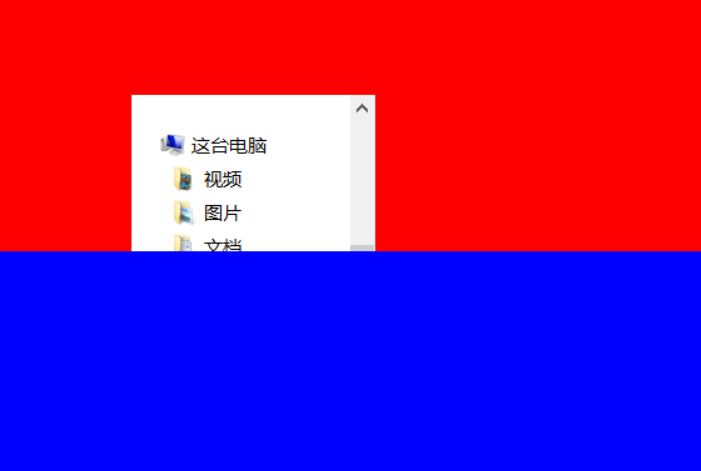
<!DOCTYPE html>

<html lang="en">

<head>

    <meta charset="UTF-8">

    <title>Document</title>

    <style type="text/css">

        .box{

            height:500px;

            /*背景颜色*/

            background-color:red;

            /*背景图片*/

            background-image:url("1.png");

            /*背景平铺*/

            background-repeat:no-repeat;

            /*背景定位*/

            background-position:center;

            /*背景滚动*/

            background-attachment: fixed;

        }

    </style>

</head>

<body>

    <div class="box">

    </div>

        <div Style="height:1000px;background-color:blue">

    </div>

</body>

</html>
背景颜色
1.6.2 背景属性的连写
background: red url("1.png") no-repeat center scroll;
1.6.3 练习
<!DOCTYPE html>

<html lang="en">

<head>

    <meta charset="UTF-8">

    <title>Document</title>

    <style type="text/css">

        input{

            width:200px;

            height: 20px;

            background: url("search.png") no-repeat right center;

        }

    </style>

</head>

<body>

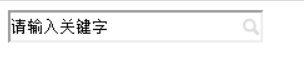
    <input type="text" value="请输入关键字">

</body>

</html>
练习1
<!DOCTYPE html>

<html lang="en">

<head>

    <meta charset="UTF-8">

    <title>Document</title>

    <style type="text/css">

         li{

             list-style: none;

             background: url("li.gif") no-repeat left center;

             text-indent: 1em;

         }

    </style>

</head>

<body>

    <div class="nav">

         <ul>

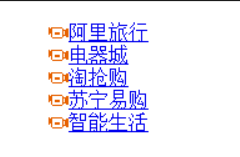
             <li><a href="#">阿里旅行</a></li>

             <li><a href="#">电器城</a></li>

             <li><a href="#">淘抢购</a></li>

             <li><a href="#">苏宁易购</a></li>

             <li><a href="#">智能生活</a></li>

         </ul>

    </div>

</body>

</html>
练习2
<!DOCTYPE html>

<html lang="en">

<head>

    <meta charset="UTF-8">

    <title>Document</title>

    <style type="text/css">

        a{

            display: inline-block;

            width: 67px;

            height: 32px;

            background: url("shoppingCar.png");

        }

        a:hover{

            background: url("shoppingCar.png") bottom;

        }

    </style>

</head>

<body>

    <div class="nav">

        <a href="#"></a>

    </div>

</body>

</html>
练习3


<!DOCTYPE html>

<html lang="en">

<head>

    <meta charset="UTF-8">

    <title>Document</title>

    <style type="text/css">

        a{

            display: inline-block;

            width: 120px;

            height: 58px;

            text-align: center;

            text-decoration: none;

            color:white;

            line-height: 50px;

        }

        .one{

            background: url("images/bg1.png");

        }

        .one:hover{

            background: url("images/bg5.png");

        }

        .two{

            background: url("images/bg2.png");

        }

        .three{

            background: url("images/bg3.png");

        }

        .four{

            background: url("images/bg4.png");

        }

    </style>

</head>

<body>

     <a href="#" class="one">五彩导航</a>

     <a href="#" class="two">五彩导航</a>

     <a href="#" class="three">五彩导航</a>

     <a href="#" class="four">五彩导航</a>

</body>

</html>
练习3

集腋成裘-03-css基础-02的更多相关文章
- CSS基础(02)
CSS 选择器 1.CSS3 选择器简介 在 CSS 中,选择器是一种模式,用于选择需要添加样式的元素. 语法: 下面中"CSS" 列指示该属性是在哪个 CSS 版本中定义的.(C ...
- css基础02
熟练快捷键!方便,要多练! css复合选择器 不会选孙子,有一个儿子和另一个儿子的孩子(也是孙子)同名了,但子选择器子选择儿子,同名的孙子不选.和后代选择器有一点不一样的. " ,&quo ...
- 086 01 Android 零基础入门 02 Java面向对象 01 Java面向对象基础 03 面向对象基础总结 01 面向对象基础(类和对象)总结
086 01 Android 零基础入门 02 Java面向对象 01 Java面向对象基础 03 面向对象基础总结 01 面向对象基础(类和对象)总结 本文知识点:面向对象基础(类和对象)总结 说明 ...
- 084 01 Android 零基础入门 02 Java面向对象 01 Java面向对象基础 02 构造方法介绍 03 构造方法-this关键字
084 01 Android 零基础入门 02 Java面向对象 01 Java面向对象基础 02 构造方法介绍 03 构造方法-this关键字 本文知识点:构造方法-this关键字 说明:因为时间紧 ...
- 022 01 Android 零基础入门 01 Java基础语法 03 Java运算符 02 算术运算符
022 01 Android 零基础入门 01 Java基础语法 03 Java运算符 02 算术运算符 本文知识点:Java中的算术运算符 算术运算符介绍 算术运算符代码示例 注意字符串连接问题和整 ...
- css基础--常用css属性02
上篇地址:css基础--常用css属性01 本文参考菜鸟教程和w3school 1 浮动和清除浮动 在上篇的第十一节--定位中说道: CSS 有三种基本的定位机制:普通流.浮动和绝对定位. 普通流和 ...
- 2020年12月-第02阶段-前端基础-CSS基础选择器
CSS选择器(重点) 理解 能说出选择器的作用 id选择器和类选择器的区别 1. CSS选择器作用(重点) 如上图所以,要把里面的小黄人分为2组,最快的方法怎办? 很多, 比如 一只眼睛的一组,剩下的 ...
- CSS 基础知识点 样式 选择器 伪类
CSS 基础知识点汇集 版权声明:这篇博客是别人写的,大神博客地址 : https://www.cnblogs.com/Mtime/p/5184685.html 1.CSS 简介 CSS 指层叠样式表 ...
- web开发:css基础
一.w3c架构分析 二.css三种引入 三.三种引入的优先级 四.基础选择器 五.长度单位与颜色 六.文件样式操作 七.display 一.w3c架构分析 <!DOCTYPE html> ...
- CSS基础知识筑基
01.CSS 简介 CSS 指层叠样式表 (Cascading Style Sheets),对HTML网页内容进行统一外观样式设计和管理,给网页进行各种装饰,让她变得美观,是HTML的化妆师.(Cas ...
随机推荐
- faster-rcnn自己的理解总结(包括它的前世今身R-CNN和fast R-CNN)
1.grandfather: R-CNN网络 结构如下: 工作流程: Input(an image) Proposals(~2K个,在使用CNN提取特征之前还要先resize) feature ...
- 武汉倍特威视系统有限公司 --- 安全帽识别|烟火识别|智慧工地|BVS智能视频分析
武汉倍特威视系统有限公司 --- 安全帽识别|烟火识别|智慧工地|BVS智能视频分析 http://www.betvsys.com/
- systemd实践: 依据情况自动重启服务【转】
1.最简单的自动重启范例 [Unit] Description=mytest [Service] Type=simple ExecStart=/root/mytest.sh Restart=alway ...
- git与eclipse集成之更新特性分支代码到个人特性分支
1.1. 更新特性分支代码到个人特性分支 在基于特性分支开发的过程中,存在多人向特性分支提交代码的情况,开发者需要关注特性分支代码与个人分支代码保持同步,否则可能导致提交代码冲突. 具体代码同步步骤: ...
- 转载:MySQL字段类型
原文:https://www.cnblogs.com/jennyyin/p/7895010.html 数值类型 类型 大小 范围(有符号) 范围(无符号) 用途 TINYINT 1 字节 (-128, ...
- MySQL跟踪SQL执行之开启慢查询日志
查询慢查询相关参数 show variables like '%quer%'; slow_query_log(是否记录慢查询) slow_query_log_file(慢日志文件路径) ...
- 用puttygen工具把私钥id_rsa转换成公钥id_rsa.ppk
1 前言 有时候需要ppk格式的公钥,可以用putty来处理 2 步骤 1. 产生密钥 可以参考Gitlab的SSH配置(linux和windows双版本) $ ssh-keygen -t rsa - ...
- jQuery实现鼠标点击div外的地方div隐藏消失的效果(转)
转:https://www.cnblogs.com/jsingleegg/p/3456152.html css部分: <style type="text/css">.p ...
- liunx 利用nginx 实现负载均衡
一般采用软件实现负载均衡的有Nginx.apache.nginx 近年来使用频繁,其官网上面显示可以承载5万并发访问量,太牛了. nginx 相比 apache优势明显:Nginx 服务程序比较稳定, ...
- 【转】nvidia-smi 命令解读
nvidia-smi是linux下用来查看GPU使用情况的命令.具体的参数信息详见 原文:http://blog.csdn.net/sallyxyl1993/article/details/62220 ...