
CentOS5/6/7系统下搭建安装Amabari大数据集群时出现SSLError: Failed to connect. Please check openssl library versions.错误的解决办法(图文详解)
不多说,直接上干货!
==========================

Creating target directory...

==========================

Command start time -- ::

Connection to cetc12 closed.

SSH command execution finished

host=cetc12, exitcode=

Command end time -- ::

==========================

Copying ambari sudo script...

==========================

Command start time -- ::

scp /var/lib/ambari-server/ambari-sudo.sh

host=cetc12, exitcode=

Command end time -- ::

==========================

Copying common functions script...

==========================

Command start time -- ::

scp /usr/lib/ambari-server/lib/ambari_commons

host=cetc12, exitcode=

Command end time -- ::

==========================

Copying create-python-wrap script...

==========================

Command start time -- ::

scp /var/lib/ambari-server/create-python-wrap.sh

host=cetc12, exitcode=

Command end time -- ::

==========================

Copying OS type check script...

==========================

Command start time -- ::

scp /usr/lib/ambari-server/lib/ambari_server/os_check_type.py

host=cetc12, exitcode=

Command end time -- ::

==========================

Running create-python-wrap script...

==========================

Command start time -- ::

Connection to cetc12 closed.

SSH command execution finished

host=cetc12, exitcode=

Command end time -- ::

==========================

Running OS type check...

==========================

Command start time -- ::

Cluster primary/cluster OS family is redhat7 and local/current OS family is redhat7

Connection to cetc12 closed.

SSH command execution finished

host=cetc12, exitcode=

Command end time -- ::

==========================

Checking 'sudo' package on remote host...

==========================

Command start time -- ::

Connection to cetc12 closed.

SSH command execution finished

host=cetc12, exitcode=

Command end time -- ::

==========================

Copying repo file to 'tmp' folder...

==========================

Command start time -- ::

scp /etc/yum.repos.d/ambari.repo

host=cetc12, exitcode=

Command end time -- ::

==========================

Moving file to repo dir...

==========================

Command start time -- ::

Connection to cetc12 closed.

SSH command execution finished

host=cetc12, exitcode=

Command end time -- ::

==========================

Changing permissions for ambari.repo...

==========================

Command start time -- ::

Connection to cetc12 closed.

SSH command execution finished

host=cetc12, exitcode=

Command end time -- ::

==========================

Copying setup script file...

==========================

Command start time -- ::

scp /usr/lib/ambari-server/lib/ambari_server/setupAgent.py

host=cetc12, exitcode=

Command end time -- ::

==========================

Running setup agent script...

==========================

Command start time -- ::

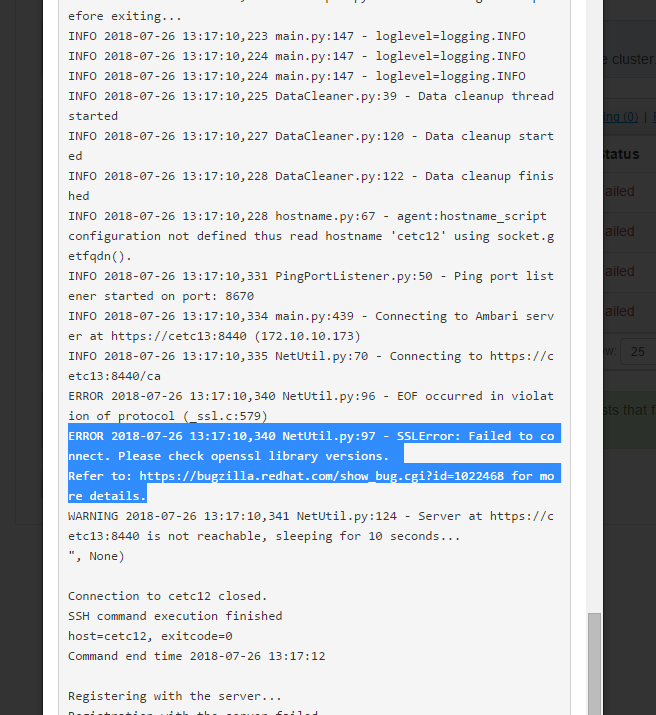
("INFO 2018-07-26 13:17:06,791 HeartbeatHandlers.py:116 - Stop event received

INFO -- ::, NetUtil.py: - Stop event received

INFO -- ::, ExitHelper.py: - Performing cleanup before exiting...

INFO -- ::, ExitHelper.py: - Cleanup finished, exiting with code:

INFO -- ::, main.py: - Agent died gracefully, exiting.

INFO -- ::, ExitHelper.py: - Performing cleanup before exiting...

INFO -- ::, main.py: - loglevel=logging.INFO

INFO -- ::, main.py: - loglevel=logging.INFO

INFO -- ::, main.py: - loglevel=logging.INFO

INFO -- ::, DataCleaner.py: - Data cleanup thread started

INFO -- ::, DataCleaner.py: - Data cleanup started

INFO -- ::, DataCleaner.py: - Data cleanup finished

INFO -- ::, hostname.py: - agent:hostname_script configuration not defined thus read hostname 'cetc12' using socket.getfqdn().

INFO -- ::, PingPortListener.py: - Ping port listener started on port:

INFO -- ::, main.py: - Connecting to Ambari server at https://cetc13:8440 (172.10.10.173)

INFO -- ::, NetUtil.py: - Connecting to https://cetc13:8440/ca

ERROR -- ::, NetUtil.py: - EOF occurred in violation of protocol (_ssl.c:)

ERROR -- ::, NetUtil.py: - SSLError: Failed to connect. Please check openssl library versions.

Refer to: https://bugzilla.redhat.com/show_bug.cgi?id=1022468 for more details.

WARNING -- ::, NetUtil.py: - Server at https://cetc13:8440 is not reachable, sleeping for 10 seconds...

", None)

("INFO 2018-07-26 13:17:06,791 HeartbeatHandlers.py:116 - Stop event received

INFO -- ::, NetUtil.py: - Stop event received

INFO -- ::, ExitHelper.py: - Performing cleanup before exiting...

INFO -- ::, ExitHelper.py: - Cleanup finished, exiting with code:

INFO -- ::, main.py: - Agent died gracefully, exiting.

INFO -- ::, ExitHelper.py: - Performing cleanup before exiting...

INFO -- ::, main.py: - loglevel=logging.INFO

INFO -- ::, main.py: - loglevel=logging.INFO

INFO -- ::, main.py: - loglevel=logging.INFO

INFO -- ::, DataCleaner.py: - Data cleanup thread started

INFO -- ::, DataCleaner.py: - Data cleanup started

INFO -- ::, DataCleaner.py: - Data cleanup finished

INFO -- ::, hostname.py: - agent:hostname_script configuration not defined thus read hostname 'cetc12' using socket.getfqdn().

INFO -- ::, PingPortListener.py: - Ping port listener started on port:

INFO -- ::, main.py: - Connecting to Ambari server at https://cetc13:8440 (172.10.10.173)

INFO -- ::, NetUtil.py: - Connecting to https://cetc13:8440/ca

ERROR -- ::, NetUtil.py: - EOF occurred in violation of protocol (_ssl.c:)

ERROR -- ::, NetUtil.py: - SSLError: Failed to connect. Please check openssl library versions.

Refer to: https://bugzilla.redhat.com/show_bug.cgi?id=1022468 for more details.

WARNING -- ::, NetUtil.py: - Server at https://cetc13:8440 is not reachable, sleeping for 10 seconds...

", None)

Connection to cetc12 closed.

SSH command execution finished

host=cetc12, exitcode=

Command end time -- ::

Registering with the server...

Registration with the server failed.
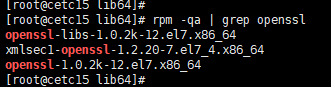
[root@cetc15 lib64]# rpm -qa | grep openssl

openssl-libs-1.0.2k-.el7.x86_64

xmlsec1-openssl-1.2.-.el7_4.x86_64

openssl-1.0.2k-.el7.x86_64
解决办法1:
地址:http://stackoverflow.com/questions/38423925/ambari-confirm-hosts-step-fails-registration-with-the-server-failed
说明:中文和英文操作系统版本问题,中文操作系统出错,英文则成功;
Hey,thank both of you.i got it.The character in China is UTF8,and Ambari is ascii.And Python 2.6 for UTF8 has a bug.
和
I think this is because I set a non-English language (i.e,. Trad. Chinese) as a default language when I installed CentOs 7. It would encounter a charset problem (UTF-8<->ascii) when confirming hosts. After changing the default language to English, This problem has been solved.
解决方法是将系统的默认语言改成英语。
解决办法2:
最有效的方式就是关闭 openssl 的检查
sed -i 's/verify=platform_default/verify=disable/' /etc/python/cert-verification.cfg

source /etc/python/cert-verification.cfg
解决办法3:
若还是不能注册ambari-agent,使用下面介绍的方式。
如果上面方式还不能注册,说明jdk版本不通过,使用默认oracle啊jdk,博主是(centos7.3,所以选择jdk1.8)
(1)先停掉:ambari-server stop;
(2)卸载掉所有节点agent:rpm -qa | grep ambari-agent 得到对应版本,使用rpm -e ambari-agent-XXX卸载;
(3)启动setup:ambari-server setup,配置你的东西,直到选择jdk如下图:

这里,选择3
然后,yum -y install ambari-agent
等下载安装完成,继续后续步骤。直到结束
(4)启动ambari:ambari-server start
(5)配置ambari即可正常注册ambari-agent
解决办法4:

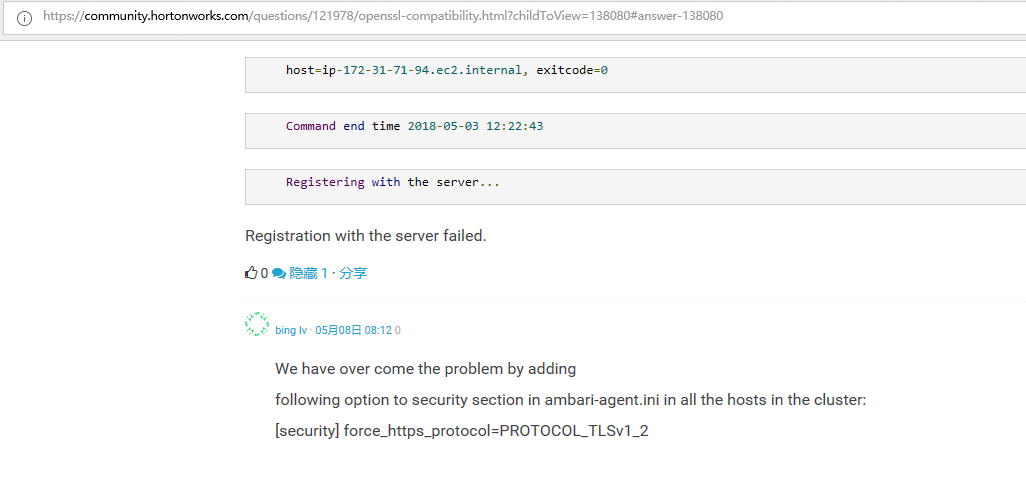
最终解决办法:
见
https://community.hortonworks.com/questions/121978/openssl-compatibility.html?childToView=138080#answer-138080
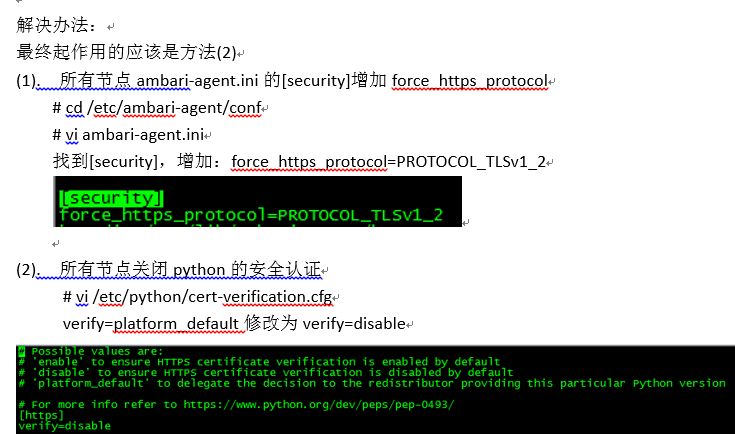
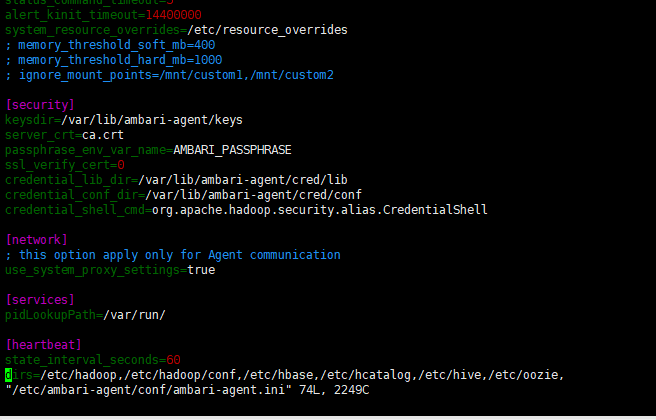
改为

同时,大家可以关注我的个人博客:
http://www.cnblogs.com/zlslch/ 和 http://www.cnblogs.com/lchzls/ http://www.cnblogs.com/sunnyDream/
详情请见:http://www.cnblogs.com/zlslch/p/7473861.html
人生苦短,我愿分享。本公众号将秉持活到老学到老学习无休止的交流分享开源精神,汇聚于互联网和个人学习工作的精华干货知识,一切来于互联网,反馈回互联网。
目前研究领域:大数据、机器学习、深度学习、人工智能、数据挖掘、数据分析。 语言涉及:Java、Scala、Python、Shell、Linux等 。同时还涉及平常所使用的手机、电脑和互联网上的使用技巧、问题和实用软件。 只要你一直关注和呆在群里,每天必须有收获
对应本平台的讨论和答疑QQ群:大数据和人工智能躺过的坑(总群)(161156071)



CentOS5/6/7系统下搭建安装Amabari大数据集群时出现SSLError: Failed to connect. Please check openssl library versions.错误的解决办法(图文详解)的更多相关文章
- ClouderManger搭建大数据集群时ERROR 2003 (HY000): Can't connect to MySQL server on 'ubuntucmbigdata1' (111)的问题解决(图文详解)
问题详情 相关问题的场景,是在我下面的这篇博客里 Cloudera Manager安装之利用parcels方式(在线或离线)安装3或4节点集群(包含最新稳定版本或指定版本的安装)(添加服务)(Ubun ...
- 全网最详细的如何在谷歌浏览器里正确下载并安装Postman【一款功能强大的网页调试与发送网页HTTP请求的Chrome插件】(图文详解)
不多说,直接上干货! 想必,玩过Java Web的你,肯定是对于http post和get等请求测试的过程记忆犹新吧. Postman的安装方法分好几种,主要分为两种安装模式介绍: (1)chrome ...
- cloudemanager安装时出现ProtocolError: <ProtocolError for 127.0.0.1/RPC2: 401 Unauthorized>问题解决方法(图文详解)
不多说,直接上干货! 问题详情 查看日志/var/log/cloudera-scm-agent/,得知 解决办法 $> ps -ef | grep supervisord $> kill ...
- Ambari2.6.2 HDP2.6.5 大数据集群搭建
Ambari 2.6.2 中 HDFS-2.7.3 YARN-2.7.3 HIVE-1.2.1 HBASE-1.1.2 ZOOKEEPER-3.4.6 SPARK-2.3.0 注:本文基于root用户 ...
- 关于在真实物理机器上用cloudermanger或ambari搭建大数据集群注意事项总结、经验和感悟心得(图文详解)
写在前面的话 (1) 最近一段时间,因担任我团队实验室的大数据环境集群真实物理机器工作,至此,本人秉持负责.认真和细心的态度,先分别在虚拟机上模拟搭建ambari(基于CentOS6.5版本)和clo ...
- cloudemanager安装时出现failed to receive heartbeat from agent问题解决方法(图文详解)
不多说,直接上干货! 安装cdh5到最后报如下错误: 安装失败,无法接受agent发出的检测信号. 确保主机名称正确 确保端口7182可在cloudera manager server上访问(检查防火 ...
- 基于JDBC的跨平台数据库管理工具DbVisualizer安装步骤(图文详解)(博主推荐)
首先,关于跨平台数据库管理工具DbVisualizer是什么?这个不多说,大家自行去看. 这个工具可以自定义连接其他没有驱动的数据库. 公司的项目牵扯到的数据库有mysql,sqlserver,o ...
- cloudemanager安装时出现8475 MainThread agent ERROR Heartbeating to 192.168.30.1:7182 failed问题解决方法(图文详解)
不多说,直接上干货! 问题详情 解决这个问题简单的,是因为有进程占用了.比如 # ps aux | grep super root ? Ss : : /opt/cm-/lib64/cmf/agen ...
- Ubuntu系统下搭建Python开发环境
之前演示了在Windows中安装Pycharm,很简单.下面介绍一下如何在Ubuntu中安装Pycharm 1.更新Python至3.5.1,执行以下命令: sudo add-apt-reposito ...
随机推荐
- 使用kbmmw 生成客户端delphi函数原型
前面我们讲了使用swagger 生成java,php 的客户端调用函数原型. 对于delphi,其实很遗憾,不能直接生成客户端函数原型代码. 不要紧,解铃还须系铃人,既然是kbmmw 自己生成的,我们 ...
- django中的modelform和modelfoemset
一. ModelForm ModelForm是根据Model来定制的Form 二. ModelForm的创建 from django import forms from app import mode ...
- redis操作(String,Hash,List,Set,其他操作)
一.String操作 String操作,redis中的String在在内存中按照一个name对应一个value来存储.如图: set(name,value,ex=None,px=None,nx=Fal ...
- bower学习总结
1. 安装软件:node-v6.10.3-x64.msi 和 Git-2.13.0-64-bit.exe 在安装git时,需要选择‘Run Git from the Windows Command P ...
- 手把手教你利用Python自动下载CL社区图片
需求描述: 最近发现CL社区上好多精华的帖子分享的图片非常棒,好想好想保存下来,但是一张一张地保存太费时间了,因此,造物者思想主义的我就想动手写个工具,实现只要输入帖子的链接,就能把所有的精华 ...
- 11、OpenCV实现图像的灰度变换
1.灰度变换的基本概念 灰度变换指对图像的单个像素进行操作,主要以对比度和阈值处理为目的.其变换形式如下: s=T(r) 其中,T是灰度变换函数:r是变换前的灰度:s是变换后的像素.图像灰度变换的有以 ...
- js操作bom和dom
Bom 概念 BOM : Browser Object Model 浏览器对象模型,描述与浏览器进行交互的方法和接 口, ECMAscript是javascript的核心,但如果要在web中使用jav ...
- EmguCV使用Stitcher类来拼接图像
using System; using System.Windows; using System.Collections.Generic; using System.ComponentModel; u ...
- “Xavier”安卓木马分析:可静默收集数据并远程代码执行
趋势科技研究发现了一款Android恶意木马——Xavier.在谷歌Play应用市场中,超过800款Android应用感染了该恶意木马,影响数百万Android用户.感染的应用范围覆盖图片编辑器,墙纸 ...
- 背水一战 Windows 10 (98) - 关联启动: 使用外部程序打开一个文件, 使用外部程序打开一个 Uri
[源码下载] 背水一战 Windows 10 (98) - 关联启动: 使用外部程序打开一个文件, 使用外部程序打开一个 Uri 作者:webabcd 介绍背水一战 Windows 10 之 关联启动 ...