
nginx记录post body/payload数据
1. 文档
在nginx中想利用$request_body命令获取post请求的body参数,并落日志,但是发现该变量值为空,查看官网中对$request_body的描述如下:
$request_body
request body
The variable’s value is made available in locations processed by the proxy_pass, fastcgi_pass, uwsgi_pass, and scgi_pass directives when the request body was read to a memory buffer.
意思是只有location中用到proxy_pass,fastcgi_pass,scgi_pass命令时,该变量才有值。
2.使用proxy_pass,fastcgi_pass, scgi_pass等命令获取$request_body值
试了下用proxy_pass,的确可以。配置如下:
log_format main_post '$remote_addr\t$remote_user\t[$time_local]\t"$request"\t$status\t$bytes_sent\t'

                '"$http_referer"\t"$http_user_agent"\t"$http_x_forwarded_for"\t"$request_body"';
worker_processes  ;        #nginx worker 数量

error_log logs/error.log;   #指定错误日志文件路径

events {

    worker_connections ;

}

http {

    log_format  dm  ' "$request_body" ';

    upstream bk_servers_2 {

        server 127.0.0.1:;

    }

    server {

        listen ;

        location /post/ {

            proxy_pass http://bk_servers_2/api/log/letv/env;

            access_log /home/shuhao/openresty-test/logs/post.log dm;

        }

        location /api/log/letv/env {

            return ;

        }

    }

}
使用curl命令模拟post请求
curl -i -d "arg1=1&arg2=2" "http://127.0.0.1:6699/post/"日志用打印出结果:
"arg1=1&arg2=2" 3.使用lua获取$request_body值
条件:使用openresty或者nginx编译了lua模块。
方法:
server中使用lua_need_request_body on; 或者在location lua代码块中使用 ngx.req.read_body()
注意:
1)lua代码块中必须有执行语句,否则lua不执行,无法获取request_body;
2)不要使用return 200;等命令,有return命令,lua代码不执行。
worker_processes  ;        #nginx worker 数量

error_log ~/openresty-test/logs/error.log debug;   #指定错误日志文件路径

events {

    worker_connections ;

}

http {

    log_format  dm  '"$request_body"';

    lua_need_request_body on;

    server {

        listen ;

        location /post/ {

            content_by_lua '

                ngx.say("-------")

                ngx.req.read_body()

            ';

            access_log ~/openresty-test/logs/post.log dm;

            #return ;

        }

    }

}
4. 自定义变量存放request body
方法:
1)在server 块中使用set $resp_body ""; 声明变量;
2)在location使用 ngx.var.resp_body = ngx.req.get_body_data() or "-" 为变量赋值
worker_processes  ;        #nginx worker 数量

error_log /home/shuhao/openresty-test/logs/error.log debug;   #指定错误日志文件路径

events {

    worker_connections ;

}

http {

    log_format  dm  ' "$request_body"  --  "$resp_body"';

    lua_need_request_body on;

    server {

        listen ;

        set $resp_body "";

        location /post/ {

            lua_need_request_body on;

            content_by_lua '

                local resp_body = ngx.req.get_body_data() or "-"

                ngx.var.resp_body = resp_body

            ';

            access_log /home/shuhao/openresty-test/logs/post.log dm;

            #return ;

        }

    }

}
效果:
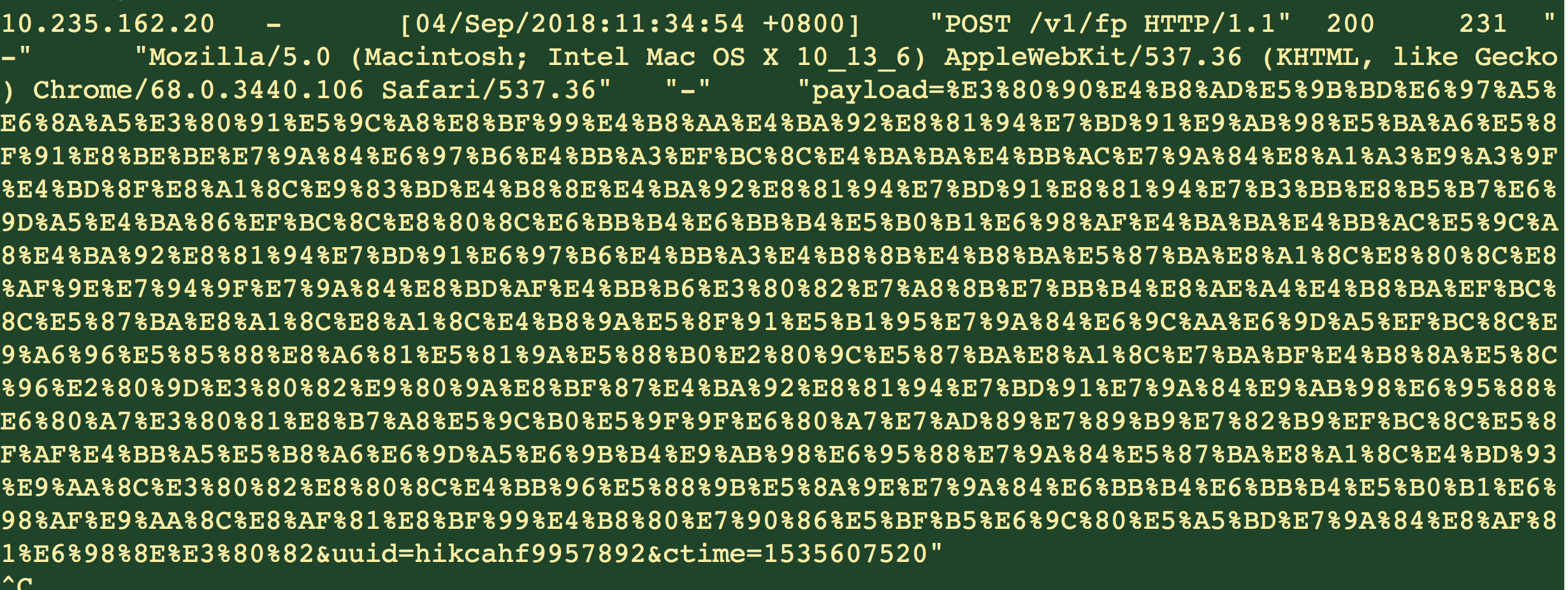
(完)
nginx记录post body/payload数据的更多相关文章
- nginx记录响应与POST请求日志
生产环境中的某些api出现故障,但是问题无法重现,但是又很想解决掉问题以及我们新项目上线,需要跟踪请求与响应的信息,可以预先找到一些bug,减少大面积的损失. 安装nginx与ngx_lua 响应日志 ...
- thinkphp5 数据库查询之paginate: 同时获取记录总数和分页数据
thinkphp5中要想同时获得查询记录的总数量以及分页的数据, 可以用paginate(), 真的非常方便! 表结构: CREATE TABLE `t_users` ( `id` int(11) u ...
- [日常] nginx记录post数据
1.使用log_format指令来更改日志格式,该指令只能放在http{}段 log_format 日志名 '日志内容'; server { access_log /var/log/nginx/d ...
- nginx记录post数据日志
1.vi nginx.conf 找到http {}中log_foramt ,定义post 日志格式 #log_format main '$remote_addr - $remote_user [$ti ...
- Flunetd 用于统一日志记录层的开源数据收集器
传统的日志查看方式 使用fluentd之后 一.介绍 Fluentd是一个开源的数据收集器,可以统一对数据收集和消费,以便更好地使用和理解数据. 几大特色: 使用JSON统一记录 简单灵活可插拔架构 ...
- Nginx记录-nginx 负载均衡5种配置方式(转载)
nginx 负载均衡5种配置方式 1.轮询(默认) 每个请求按时间顺序逐一分配到不同的后端服务器,如果后端服务器down掉,能自动剔除. 2.weight 指定轮询几率,weight和访问比率成 ...
- Nginx记录-Nginx基础(转载)
1.Nginx常用功能 1.Http代理,反向代理:作为web服务器最常用的功能之一,尤其是反向代理. Nginx在做反向代理时,提供性能稳定,并且能够提供配置灵活的转发功能.Nginx可以根据不同的 ...
- Nginx记录用户请求Header到access log
为了统计和其它用途,经常有人需要自定义Nginx日志,把http请求中的某个字段记录到日志中,刚好在看lua+nginx的文章,第一想到的是用lua赋值来做,但是想想有点小恶心,于是Google了一番 ...
- ViewPager使用记录1——展示固定数据
ViewPager是v4支持库中的一个控件,相信几乎所有接触Android开发的人都对它不陌生.之所以还要在这里翻旧账,是因为我在最近的项目中有多个需求用到了它,觉得自己对它的认识不够深刻.我计划从最 ...
随机推荐
- setDefaultKeyMode设置Activity的五种按键模式
setDefaultKeyMode (int mode) 用来设置一个Activity的默认的按键模式, mode一共有五种 DEFAULT_KEYS_DISABLE DEFAULT_KEYS_DIA ...
- 访问权限,public private protected
百度经验这篇文章很不错:https://jingyan.baidu.com/article/bad08e1e8e9a9b09c851219f.html
- ROI Pooling层详解
目标检测typical architecture 通常可以分为两个阶段: (1)region proposal:给定一张输入image找出objects可能存在的所有位置.这一阶段的输出应该是一系列o ...
- 隐马尔可夫模型HMM(一)
摘自 1.李航的<统计学习方法> 2.https://www.cnblogs.com/pinard/p/6945257.html 了解HMM模型 1.隐马尔可夫模型的定义 隐马尔可夫模型是 ...
- EF 复杂语句的使用
//EF多重排序 context.Serials .Where(s => ("," + s.VideoGenreIds + ",").Contains(& ...
- Debian Security Advisory(Debian安全报告) DSA-4415-1 passenger security update
Debian Security Advisory(Debian安全报告) DSA-4415-1 passenger security update Package : passenger CVE I ...
- Django的csrf中间件
csrf中间件 csrf 跨站请求伪造 补充两个装饰器: from django.views.decorators.csrf import csrf_exempt,csrf_protect ...
- Coursera, Machine Learning, Unsupervised Learning, K-means, Dimentionality Reduction
Clustering K-means: 基本思想是先随机选择要分类数目的点,然后找出距离这些点最近的training data 着色,距离哪个点近就算哪种类型,再对每种分类算出平均值,把中心点移动到 ...
- NFS网络共享文件系统
1.nfs服务端配置操作 1.1 创建所需的共享目录--源 mkdir /data/rw #rw代表同步的数据可读可写 1.2 对共享目录进行授权 chown -R nfsnobody.nfsno ...
- linux 查看文件夹大小
参考链接: http://www.cnblogs.com/iconfig/p/4863063.html