
How to build a NFS Service
NFS网络文件系统的服务的配置
1 Preparation
Three Linux virtual machines
one: to be NFS Service
the other two: NFS Clinet
2 Install And Setting
2.1 checking System version
Client:
cat /etc/redhat-release
uname -a
ifconfig
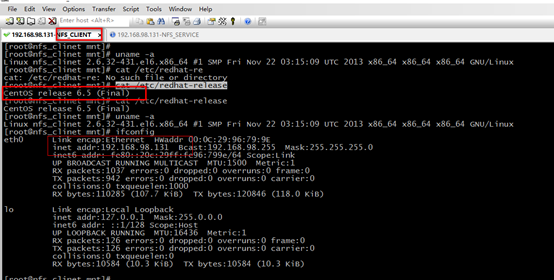
Service:
cat /etc/redhat-release
uname -a
ifconfig
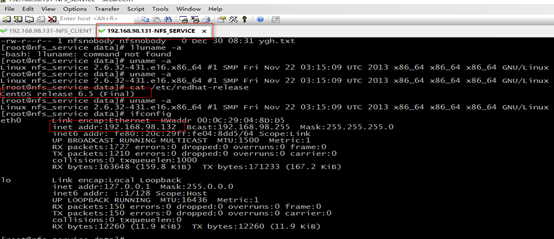
you are better make sure three Linux System is same.
2.2 Checking RPC and NFS whether has installed at Service
Service:
rpm -aq nfs-utils portmap rpcbind

If the PRC and NFS haven’t installed, you can user “ yum install nfs-utils rpcbind -y”
2.3 Start NFS and RPC Service at Service
switch to NFS Service
Firstly start RPC Service at service.
rpcinfo -p localhost: check RPC localhost port
“rpcinfo: can't contact portmapper: RPC: Remote system error - Connection refused”: show RPC Service does not start.
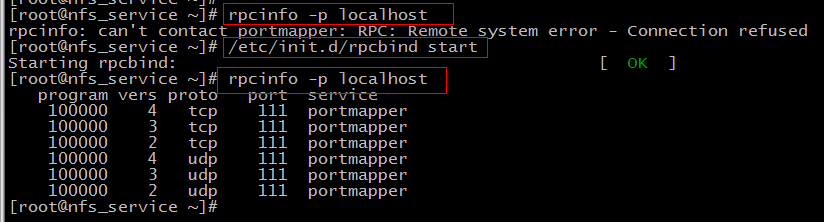
Secondly: start NFS Service
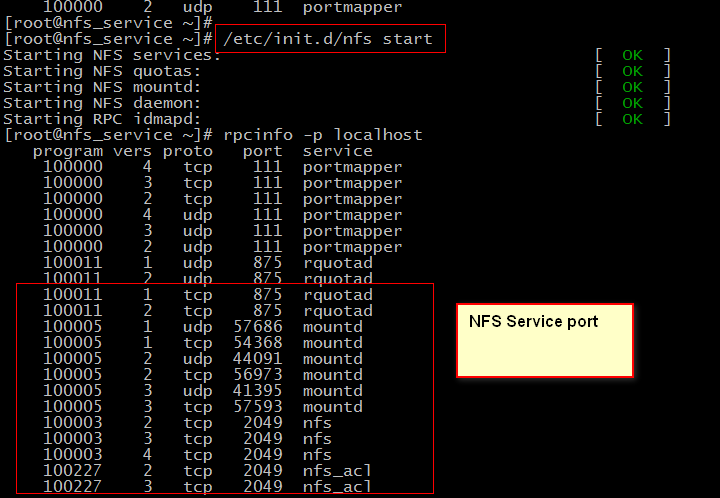
2.4 Setting NSF at Service
/etc/exports is setting of NFS, we need to set it by “VIM”.
The GateWay can be replaced by IP, it will make the /date used by only Client. So we always use gateway.
The authority includes:
ro: only read
wo:only write
sync:
use “,” as separator.
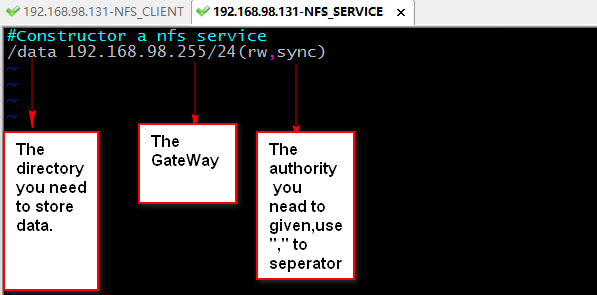
Then, you need to reload the nfs Service.

Then, you need to check the mount information for an NFS Server.

At this moment, The Service is OK.
2.5 Setting RPC in Client
switch to NFS Client.
Firstly: start RPC Service.

Check NFS information of NFS Server from Client, If show flowing it success.

If it don’t success ,you use ping SERVICE_IP or telnet SERVICE_IP 111(RPC port) to check where error occurs.
you are better make sure two client Linux System is same.
2.6 mount Service Data and update directory owner.
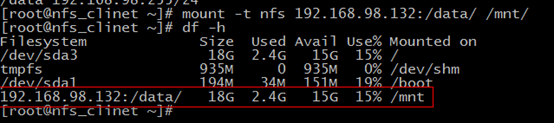
The you should update owner or group of /data at Service, or client will has authority errors.
If you set “w” authority, you need set “nfsnobody” to owner or group of /data and give writable authority.

“nfsnobody” is the default user of NFS.
you can see it’s UID in /var/lib/nfs/etab

If show red information, it is OK.
The another client operations is same as first one.
3 run and test
switch to Client.
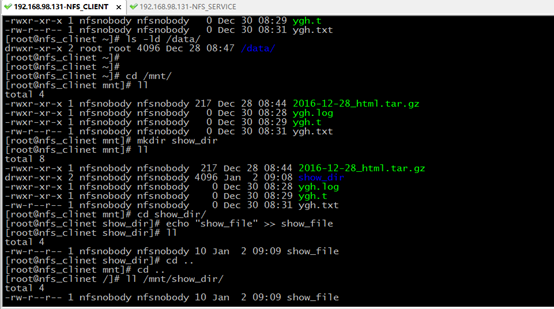
Then switch to Service
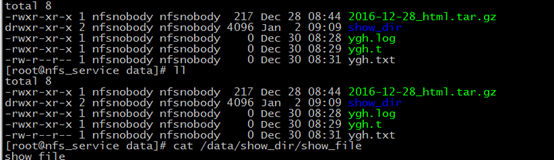
If the /date of Service is same as the /mnt of Client, indicates it success.
4 optimization
4.1 set start with System open
we add all NFS, RPC starting commands in /etc/rc.local file to manage easily.
at Service:
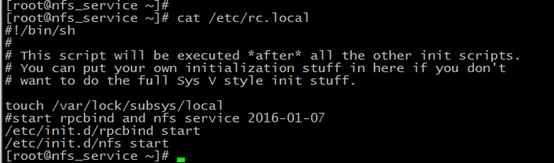
at Client: you better make sure two client is same.
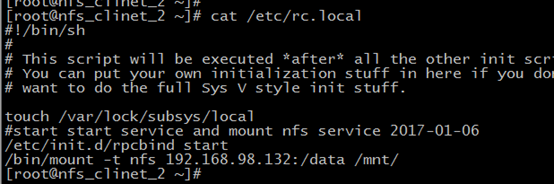
4.2 update /etc/exports
we want all clients can ADD, VIEW, UPDATE, and DELETE file. So we should use the same user to execute the client process. So we can use
all_squash: indicates all user will be set anonuid, if anonuid is not given, using default nfsnobody to be the client process executor.
anonuid: give executor UID
anongid: give executor GID

It will prompt the system safety.
4.3 use soft not hard
hard: request NFS service all time
soft: request NFS service intermittent
but, the two options belong to mount.
We use soft we reduce the coupling(耦合性) between NFS Service and NFS Client.
So we should use flowing command to mount NFS Service and add it at /etc/rc.local
/bin/mount -t nfs -o soft 192.168.98.132:/data /mnt/.
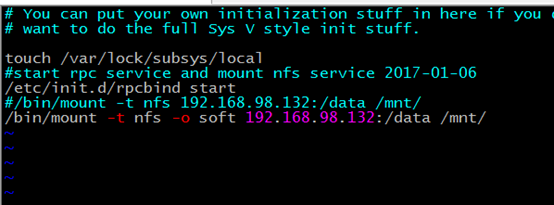
4.4 rsize, wsize
rsize: the max size of cache of reading file.
wsize: the max size of buffer of write file
test data:
#test read and write speed about rsize,wsize
the rsize=1024,wsize=1024
time sh read.sh
real 0m43.792s
user 0m11.669s
sys 0m21.960s
time sh write.sh
20000+0 records in
20000+0 records out
184320000 bytes (184 MB) copied, 64.963 s, 2.8 MB/s
real 1m5.058s
user 0m0.006s
sys 0m6.103s
[root@nfs_clinet_2 nfs_test]# grep mnt /proc/mounts
192.168.98.132:/data/ /mnt nfs4 rw,relatime,vers=4,rsize=1024,wsize=1024,namlen=255,soft,proto=tcp,port=0,timeo=600,retrans=2,sec=sys,clientaddr=192.168.98.134,minorversion=0,local_lock=none,addr=192.168.98.132 0 0
the rsize=262144,wsize=262144,
time sh read.sh
real 0m37.112s
user 0m4.690s
sys 0m25.867s
time sh write.sh
20000+0 records in
20000+0 records out
184320000 bytes (184 MB) copied, 6.63189 s, 27.8 MB/s
real 0m6.645s
user 0m0.002s
sys 0m1.366s
grep mnt /proc/mounts
192.168.98.132:/data/ /mnt nfs4 rw,relatime,vers=4,rsize=262144,wsize=262144,namlen=255,soft,proto=tcp,port=0,timeo=600,retrans=2,sec=sys,clientaddr=192.168.98.134,minorversion=0,local_lock=none,addr=192.168.98.132 0 0
obvious the rsize and wsize bigger, the speed is more quickly.
In Centos 6.5 default rsize and wrize is so good ,we don’t need to update it.
4.5 noatime, nodiratime
noatime: when you access a file, will not update its atime
nodiratime: when you access a file, will not update its atiem
If you hope you NFS Service read/write more quickly, you can add these two options.
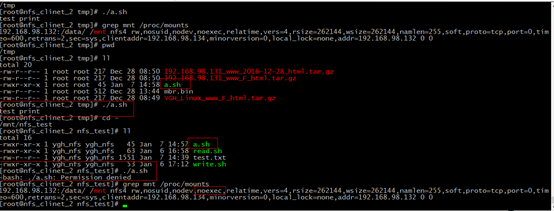
4.6 nosuid, noexec, nodev
nosuid: forbidden seting suid
noexec:forbidden executing scripts, including shell and scropts
nodev: Do not interpret character or block special devices on the file system.
The three is safe options, we can use these to prevent our system be invaded
The picture is show noexec option effect.
How to build a NFS Service的更多相关文章
- Build a Restful Service
最近项目中遇到的REST的问题很多,很多情况下受weblogic以及Jdeveloper版本的影响,无法直接从Jdeveloper中生成一个RESTful Service出来,所以基于流行的Sprin ...
- [转]How to Use Web API OData to Build an OData V4 Service without Entity Framework
本文转自:http://www.odata.org/blog/how-to-use-web-api-odata-to-build-an-odata-v4-service-without-entity- ...
- NFS文件系统存储服务部署
1 NFS介绍 1.1 什么是NFS? NFS是Network File System的缩写,中文名称是网络文件系统.它的主要功能是通过网络让不用的主机系统之间可以共享文件或者目录.NFS客户端通过挂 ...
- nfs服务的讲解
第4章 nfs存储服务的搭建 4.1 nfs服务的介绍 4.1.1 nfs的作用 nfs服务器是一种远程网络传输的共享文件系统 节省web服务器的本地存储空间 用户存储在web服务器上面的资源,会通过 ...
- 【集群实战】NFS网络文件共享服务
1. NFS介绍 1.1 什么是NFS? NFS是Network File System的缩写,中文意思是网络文件系统. 它的主要功能是通过网络(一般是局域网)让不同的主机系统之间可以共享文件或目录. ...
- Linux NFS 服务部署
系统环境:Oracle Linux 5.7 服务端:192.168.1.111 客户端:192.168.1.171 一.服务端配置 二.客户端配置 一.服务端配置 1.依次启动portmap和nfs服 ...
- Windows Service--Write a Better Windows Service
原文地址: http://visualstudiomagazine.com/Articles/2005/10/01/Write-a-Better-Windows-Service.aspx?Page=1 ...
- 2 NFS高可用解决方案之NFS的搭建
preface 我们紧接着上一篇博文的基础(drbd+heartbeat的正常工作,http://www.cnblogs.com/liaojiafa/p/6129499.html)来搭建NFS的服务. ...
- Linux 配置NFS,文件共享
配置: 1.设定共享主机服务器 ---(注意防火墙) 编辑ipA端的/etc/exports 文件 [root@dbrac2 ~]# cat /etc/exports /media 192 ...
随机推荐
- 理解jQuery对象$.html
前面的话 如果要比喻jQuery和原生javascript的关系,我个人认为是自动档和手动档汽车的区别.使用原生javascript,可以知道离合器以及档位的作用:而使用jQuery,则把离合器和手动 ...
- iOS多线程之9.自定义NSOperation
本文主要讲如何自定义NSOperation,以及自定义NSOperation的一些注意事项,以下载图片为例. 新建一个类,继承于NSOperation. CustomOperation.h 代码 ...
- iOS 小谈开发者中的个人、组织(公司、企业)账号
苹果对开发者主要分为3类:个人.组织(公司.企业).教育机构.即: 1.个人(Individual) 2.组织(Organizations) 组织类又分为2个小类: (1)公司(Company) (2 ...
- iOS系列 基础篇 06 标签和按钮 (Label & Button)
iOS系列 基础篇 06 标签和按钮 (Label & Button) 目录: 标签控件 按钮控件 小结 标签和按钮是两个常用的控件,下面咱们逐一学习. 1. 标签控件 使用Single Vi ...
- [Hadoop in Action] 第2章 初识Hadoop
Hadoop的结构组成 安装Hadoop及其3种工作模式:单机.伪分布和全分布 用于监控Hadoop安装的Web工具 1.Hadoop的构造模块 (1)NameNode(名字节点) ...
- 版本控制-Git服务器搭建和常用命令使用
Git是目前世界上最先进的分布式版本控制系统(没有之一).使用Svn的请参考<版本控制-svn服务器搭建和常用命令(centos 6.3)>,下面介绍Git的常用命令 常用命令 简单版 升 ...
- Spark——SparkContext简单分析
本篇文章就要根据源码分析SparkContext所做的一些事情,用过Spark的开发者都知道SparkContext是编写Spark程序用到的第一个类,足以说明SparkContext的重要性:这里先 ...
- WPF 自定义窗口关闭按钮
关闭图标设计主要涉及主要知识点: 1.Path,通过Path来画线.当然一般水平.竖直也是可以用Rectangle/Border之类的替代 一些简单的线条图标用Path来做,还是很方便的. 2.简单的 ...
- jenkins / ant / jmeter 持续集成接口自动化
1. 将 jmeter 脚本放在/var/lib/jenkins/workspace/Jmeter_auto/jmxpath路径下 2. 点击http://jk.facebank.net.cn/job ...
- angular学习笔记(二十八-附1)-$resource中的资源的方法
通过$resource获取到的资源,或者是通过$resource实例化的资源,资源本身就拥有了一些方法,$save,$delete,$remove,可以直接调用来保存该资源: 比如有一个$resour ...