
pandas数据结构之series操作
阅读之前假定你已经有了python内置的list和dict的基础.这里内容几乎是官方文档的翻译版本.
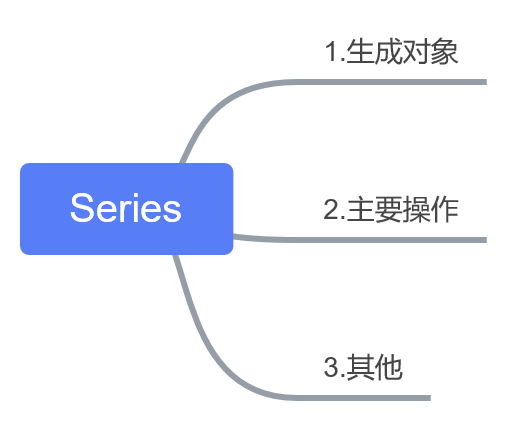
原来的文档是在一个地方,那边的代码看起来舒服些 https://www.yuque.com/u86460/dgt6mu/bx0m4g
>>> pd.Series(np.random.randn(5))

0    1.617186

1    0.326732

2   -0.230443

3   -0.137932

4    0.474872

dtype: float64

>>> pd.Series(np.random.randn(5),index=['a', 'b', 'c', 'd', 'e'])

a    0.048464

b    1.413755

c    0.036489

d    0.533946

e    0.286384

dtype: float64
>>> d = {'b' : 1, 'a' : 0, 'c' : 2}

>>> pd.Series(d)

b    1

a    0

c    2

dtype: int64
>>> pd.Series(d,index=['b', 'c', 'd', 'a'])

b    1.0

c    2.0

d    NaN

a    0.0

dtype: float64
>>> pd.Series(5,index=['a', 'b', 'c', 'd', 'e'])

a    5

b    5

c    5

d    5

e    5

dtype: int64

>>> pd.Series('a',index=['b', 'c', 'd', 'a'])

b    a

c    a

d    a

a    a

dtype: object
>>> se =pd.Series(np.random.randn(5),index=['a', 'b', 'c', 'd', 'e'])

>>> se[:3]  #slice

a    1.169659

b   -1.557760

c    1.199475

dtype: float64

>>> se[se >se.median()]  #filter

a    1.169659

c    1.199475

dtype: float64

>>> se[[4,3,1]]  #indexing

e   -1.113787

d    0.571881

b   -1.557760

dtype: float64
>>> se['a']=12 #indexing

>>> 'e' in se

True
>>> se+se

a    24.000000

b    -3.115519

c     2.398949

d     1.143761

e    -2.227573

dtype: float64

>>> se*4

a    48.000000

b    -6.231039

c     4.797899

d     2.287523

e    -4.455147

dtype: float64

>>> np.exp(se)

a    162754.791419

b         0.210607

c         3.318373

d         1.771596

e         0.328313

dtype: float64
>>> s=pd.Series(np.random.randn(5),name='something')

>>> s

0   -0.010572

1   -0.519850

2    0.649738

3   -0.443780

4    0.402685

Name: something, dtype: float64

>>> s2=s.rename('different')

>>> s2

0   -0.010572

1   -0.519850

2    0.649738

3   -0.443780

4    0.402685

Name: different, dtype: float64
import pandas as pdu

import numpy as npa

n

#basic tentet:data aligment/基本的原则:数据对齐m

#point:data types;indexing;axis labeling/alignment]/要点:数据类型,索引,轴标签和对齐

def series():

    #*generate

    #ndarray

    se=pd.Series(np.random.randn(5))

    se =pd.Series(np.random.randn(5),index=['a', 'b', 'c', 'd', 'e'])

    #dict

    d = {'b' : 1, 'a' : 0, 'c' : 2}

    se=pd.Series(d)

    se=pd.Series(d,index=['b', 'c', 'd', 'a'])

    #scalar

    se=pd.Series(5,index=['a', 'b', 'c', 'd', 'e'])

    #*operate

    #ndarrat-like

    se[:3]  #slice

    se[se >se.median()]  #filter

    se[[4,3,1]]  #indexing

    #dict-like

    se['a']=12 #indexing

    'e' in se

    #compute

    se+se

    se*2

    np.exp(se)
pandas数据结构之series操作的更多相关文章
- pandas 学习(1): pandas 数据结构之Series
1. Series Series 是一个类数组的数据结构,同时带有标签(lable)或者说索引(index). 1.1 下边生成一个最简单的Series对象,因为没有给Series指定索引,所以此时会 ...
- pandas数据结构:Series/DataFrame;python函数:range/arange
1. Series Series 是一个类数组的数据结构,同时带有标签(lable)或者说索引(index). 1.1 下边生成一个最简单的Series对象,因为没有给Series指定索引,所以此时会 ...
- pandas数据结构之DataFrame操作
这一次我的学习笔记就不直接用官方文档的形式来写了了,而是写成类似于“知识图谱”的形式,以供日后参考. 下面是所谓“知识图谱”,有什么用呢? 1.知道有什么操作(英文可以不看) 2.展示本篇笔记的结构 ...
- pandas数据结构之Series笔记
对Series的理解也源于对其相关的代码操作,本次仅贴一些代码来加深理解以及记忆 import pandas as pd import numpy as np s = pd.Series(np.ran ...
- pandas教程1:pandas数据结构入门
pandas是一个用于进行python科学计算的常用库,包含高级的数据结构和精巧的工具,使得在Python中处理数据非常快速和简单.pandas建造在NumPy之上,它使得以NumPy为中心的应用很容 ...
- pandas 数据结构的基本功能
操作Series和DataFrame中的数据的常用方法: 导入python库: import numpy as np import pandas as pd 测试的数据结构: Series: > ...
- 读书笔记一、pandas数据结构介绍
pandas数据结构介绍 主要两种数据结构:Series和DataFrame. Series Series是一种类似于一维数组的对象,由一组数据(各种NumPy数据类型)+数据标签(即索引)组 ...
- python数据分析学习(1)pandas一维工具Series讲解
目录 一:pandas数据结构介绍 python是数据分析的主要工具,它包含的数据结构和数据处理工具的设计让python在数据分析领域变得十分快捷.它以NumPy为基础,并对于需要类似 for循环 ...
- pandas | 使用pandas进行数据处理——Series篇
本文始发于个人公众号:TechFlow,原创不易,求个关注 上周我们关于Python中科学计算库Numpy的介绍就结束了,今天我们开始介绍一个新的常用的计算工具库,它就是大名鼎鼎的Pandas. Pa ...
随机推荐
- Cartographer安装
安装过程: 官方安装教程: https://google-cartographer-ros.readthedocs.io/en/latest/index.html # Install wstool a ...
- FileUrl
package com.rscode.credits.util; import java.io.BufferedReader; import java.io.File; import java.io. ...
- Win10激活密钥key(可激活所有版本)
Win10激活密钥key(可激活所有版本) Win10一年的免费升级服务已经到期,用户要使用Win10系统,就需要最新Win10密钥来激活Win10,一般激活Win10系统有两种方式,一个是使用Win ...
- MySQL 对分组后的同类数据进行拼接字符串
MySQL 对分组后的同类数据进行拼接字符串 写后台方法时遇到个问题,需要将表内同一订单号的操作记录流水进行简单拼接输出,不想取出来再操作,找了个mysql的方法直接操作 //group_concat ...
- SpringBoot框架中,使用过滤器进行加密解密操作(一)
一.基本说明 1.请求方式:POST请求.注解@PostMapping 2.入参格式:json串 3.出参格式:json串(整体加密) 4.使用Base64进行加密解密.具体的加密方式,可以根据需求自 ...
- Python学习笔记–Chapter 2
1.字符串中添加制表符,可使用字符组合\t 2.字符串中添加换行符,可使用字符组合\n 3.字符串\n\t可以换到下一行,并且在开头添加一个制表符. 4.删除末尾空白,使用方法rstrip() 5.删 ...
- 关于Mysql的主从
mysql 主从同步异常原因及恢复: 1,auto.cnf 配置问题 这个问题是在部署主从复制的时候,可能会遇到 [1]报错 Last_IO_Error: Fatal error: The sla ...
- 微信小程序wx.navigateTo页面不跳转
排查后发现: 若是在全局app.json中配置了tabBar,引用的链接与wx.navigateTo页面跳转url地址相同就无法实现跳转.
- LeetCode - Implement Magic Dictionary
Implement a magic directory with buildDict, and search methods. For the method buildDict, you'll be ...
- Iterator迭代器UML类图
ArrayList类中,实现了List接口的方法 List接口的方法 迭代器接口 ArrayList的内部类实现了这个[迭代器]接口