
springboot入门使用
一、什么是springboot,有什么用
springboot是一个开发框架,其出现的目的利用约定大于配置的思想来让开发者摆脱spring繁琐的配置,简化开发。其不是spring框架的替代品,是spring框架的另外一种使用形式。
二、springboot的快速使用
1.登录到spring官网 找到如下页面,然后选择自己想要的开发环境和版本,
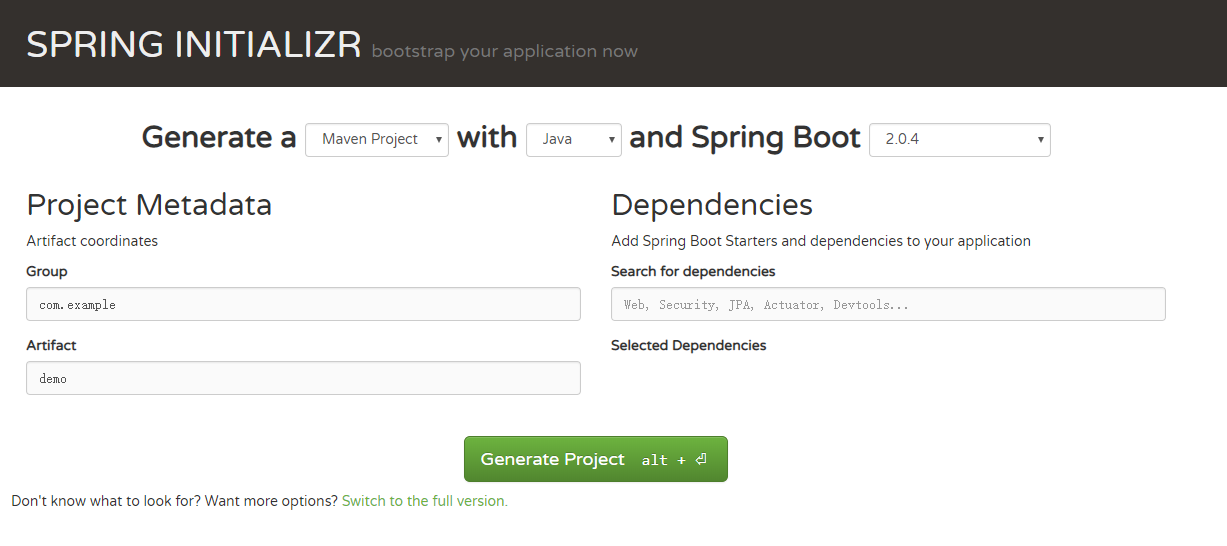
2.解压压缩包并导入到eclipse,就可以启动项目了,下面是程序的入口
package com.example.demo;

import org.springframework.boot.SpringApplication;

import org.springframework.boot.autoconfigure.SpringBootApplication;

@SpringBootApplication

public class DemoApplication {

    public static void main(String[] args) {

        SpringApplication.run(DemoApplication.class, args);

    }

}
三、springboot使用
1.配置文件properties的加载
#myconfig.properties配置文件

com.kyle.name=邓zm

com.kyle.age=27
/**

 * 自定义配置文件的加载,需要加上下面的注解,并导入相关的包

 * 如果是主配置文件application.properties加载,则只需要@Value就能获取数据

 */

@Component

@ConfigurationProperties

@PropertySource("classpath:myconfig.properties")

public class UserInfo {

    @Value("${com.kyle.name}")

    private String name;

    @Value("${com.kyle.age}")

    private int age;

    public String getName() {

        return name;

    }

    public void setName(String name) {

        this.name = name;

    }

    public int getAge() {

        return age;

    }

    public void setAge(int age) {

        this.age = age;

    }

}
2.springboot集成mybatis(只说和spring框架的差别)
        <!-- 引入jar包 -->

        <dependency>

          <groupId>mysql</groupId>

          <artifactId>mysql-connector-java</artifactId>

        </dependency>

        <dependency>

            <groupId>org.mybatis.spring.boot</groupId>

            <artifactId>mybatis-spring-boot-starter</artifactId>

            <version>1.3.2</version>

        </dependency>
#application.properties文件中引入配置文件和映射文件,

#没有配置文件也可以不引入

mybatis.config-locations=classpath:mybatis-config.xml

mybatis.mapper-locations=classpath:mapper/*.xml
3.springboot集成redis集群
<!--引入相关jar包-->

<dependency>

    <groupId>org.springframework.boot</groupId>

    <artifactId>spring-boot-starter-redis</artifactId>

</dependency>
#redis集群配置 redis.properties

spring.redis.cluster.nodes=111.230.239.152:7000,111.230.239.152:7001,111.230.239.152:7002,111.230.239.152:8000,111.230.239.152:8001,111.230.239.152:8002

spring.redis.password=12345

spring.redis.pool.max-active=8

spring.redis.pool.max-wait=-1

spring.redis.pool.max-idle=8

spring.redis.pool.min-idle=0

spring.redis.timeout=1000

spring.redis.commandTimeout=5000
@Component

@Configuration

@PropertySource("classpath:redis.properties")

public class RedisConfig {

    /**

     * 设置数据存入redis 的序列化方式

     *</br>redisTemplate序列化默认使用的jdkSerializeable,存储二进制字节码,导致key会出现乱码,所以自定义

     *序列化类

     */

    @Bean

    @SuppressWarnings({ "rawtypes", "unchecked" })

    public RedisTemplate<Object,Object> redisTemplate(RedisConnectionFactory redisConnectionFactory)throws UnknownHostException {

        RedisTemplate<Object,Object> redisTemplate = new RedisTemplate<>();

        redisTemplate.setConnectionFactory(redisConnectionFactory);

        Jackson2JsonRedisSerializer serializer =new Jackson2JsonRedisSerializer(Object.class);

        ObjectMapper objectMapper =new ObjectMapper();

        objectMapper.setVisibility(PropertyAccessor.ALL,JsonAutoDetect.Visibility.ANY);

        objectMapper.enableDefaultTyping(ObjectMapper.DefaultTyping.NON_FINAL);

        serializer.setObjectMapper(objectMapper);

        redisTemplate.setValueSerializer(serializer);

        redisTemplate.setKeySerializer(new StringRedisSerializer());

        redisTemplate.afterPropertiesSet();

        return redisTemplate;

    }

}
@Service

public class UserServiceImpl implements UserService {

    @Autowired

    private UserMapper userMapper;

    @Resource

    private RedisTemplate<String,Object> redisTemplate;

    @Override

    public User getUserInfoById(Long id) {

        User user = (User)redisTemplate.opsForValue().get("user:"+id);

        if(user == null ){

            user = userMapper.getUserInfoById(id);

            redisTemplate.opsForValue().set("user:"+id, user);

        }

        return user;

    }

}
4.springboot开启定时任务
@MapperScan("com.example.demo.dao")

@SpringBootApplication

@EnableScheduling //开启定时任务

public class DemoApplication {

    public static void main(String[] args) {

        SpringApplication.run(DemoApplication.class, args);

    }

}
@Component

public class SchedulerTask {

    private int count=0;

    @Scheduled(cron="*/1 * * * * ?")

    private void process(){

        System.out.println("this is scheduler task runing  "+(count++));

    }

}
5.springboot的事务
@MapperScan("com.example.demo.dao")

@SpringBootApplication

@EnableScheduling

@EnableTransactionManagement //事务管理

public class DemoApplication {

    public static void main(String[] args) {

        SpringApplication.run(DemoApplication.class, args);

    }

}
@Override

    @Transactional(readOnly=false,propagation=Propagation.REQUIRED)

    public void updateUser(User user) {

        User user1 = new User();

        user1.setUserId(1);

        user1.setName("yao1");

        User user2 = new User();

        user2.setUserId(2);

        user2.setName("Xiaoxiao1");

        userMapper.updateUser(user1);

        int i = 1/0;

        userMapper.updateUser(user2);

    }
springboot入门使用的更多相关文章
- SpringBoot入门教程(二)CentOS部署SpringBoot项目从0到1
在之前的博文<详解intellij idea搭建SpringBoot>介绍了idea搭建SpringBoot的详细过程, 并在<CentOS安装Tomcat>中介绍了Tomca ...
- SpringBoot入门基础
目录 SpringBoot入门 (一) HelloWorld. 2 一 什么是springboot 1 二 入门实例... 1 SpringBoot入门 (二) 属性文件读取... 16 一 自定义属 ...
- SpringBoot入门示例
SpringBoot入门Demo SpringBoot可以说是Spring的简化版.配置简单.使用方便.主要有以下几种特点: 创建独立的Spring应用程序 嵌入的Tomcat,无需部署WAR文件 简 ...
- Spring全家桶系列–[SpringBoot入门到跑路]
//本文作者:cuifuan Spring全家桶————[SpringBoot入门到跑路] 对于之前的Spring框架的使用,各种配置文件XML.properties一旦出错之后错误难寻,这也是为什么 ...
- springboot入门之一:环境搭建(续)
在上篇博客中从springboot的入门到运行一个springboot项目进行了简单讲述,详情请查看“springboot入门之一”.下面继续对springboot做讲述. 开发springboot测 ...
- 【Java】SpringBoot入门学习及基本使用
SpringBoot入门及基本使用 SpringBoot的介绍我就不多说了,核心的就是"约定大于配置",接下来直接上干货吧! 本文的实例: github-LPCloud,欢迎sta ...
- SpringBoot入门(三)——入口类解析
本文来自网易云社区 上一篇介绍了起步依赖,这篇我们先来看下SpringBoot项目是如何启动的. 入口类 再次观察工程的Maven配置文件,可以看到工程的默认打包方式是jar格式的. <pack ...
- SpringBoot入门(五)——自定义配置
本文来自网易云社区 大部分比萨店也提供某种形式的自动配置.你可以点荤比萨.素比萨.香辣意大利比萨,或者是自动配置比萨中的极品--至尊比萨.在下单时,你并没有指定具体的辅料,你所点的比萨种类决定了所用的 ...
- SpringBoot入门(四)——自动配置
本文来自网易云社区 SpringBoot之所以能够快速构建项目,得益于它的2个新特性,一个是起步依赖前面已经介绍过,另外一个则是自动配置.起步依赖用于降低项目依赖的复杂度,自动配置负责减少人工配置的工 ...
- SpringBoot入门(二)——起步依赖
本文来自网易云社区 在前一篇我们通过简单几步操作就生成了一个可以直接运行的Web程序,这是因为SpringBoot代替我们做了许多工作,概括来讲可以分为起步依赖和自动配置.这一篇先来看看起步依赖. 项 ...
随机推荐
- POJ 2352 树状数组
学习自:链接以及百度百科 以及:https://www.bilibili.com/video/av18735440?from=search&seid=363548948825132979 理解 ...
- MySQL 同一台服务器同步数据
声明:我配置出来的slave_io_running和slave_sql_running都是yes.但是数据并没有同步! 希望有遇到相同问题的朋友,能够告诉我一下解决方案? 首先,如何在同一个服务器安装 ...
- 用递归方法解决汉诺塔问题(Recursion Hanoi Tower Python)
汉诺塔问题源于印度的一个古老传说:梵天创造世界的时候做了三根金刚石柱子,在一根柱子上从下往上按照大小顺序摞着64片黄金圆盘.梵天命令婆罗门把圆盘按大小顺序重新摆放在另一根柱子上,并且规定小圆盘上不能放 ...
- Java7后try语句的优化
原始的写法 先来看一段老代码 OutputStream out = null; try { out = response.getOutputStream() } catch (IOException ...
- day4 linux安装python
linux 安装 python centos6 默认安装的是2.6,如果需要安装更高版本需要手动下载安装 下载源码包wget https://www.python.org/ftp/python/3.5 ...
- Jeesite 自定义api接口 404 访问不到页面
1.类上面要有路径 @RequestMapping(value = "${adminPath}/sys/good") adminPath 值可以在 jeesite.properti ...
- Android 错误提示: Can't create handler inside thread that has not called Looper.prepare()
Can't create handler inside thread that has not called Looper.prepare() 将 Handler handler = new Hand ...
- VLAN报文和非VLAN以太网报文的区别
VLAN(Virtual Local Area Network,虚拟局域网)协议,基于802.1Q协议标准. 以太网带VLAN帧结构,是在以太网报文中,位于数据帧中“发送源MAC地址”与“类别/长度域 ...
- 2019 校内赛 RPG的天赋分支(贪心)
Problem Description 很多游戏都有天赋树的概念,天赋树的不同分支具有不同的属性加成,那么合理选择分支就非常重要了.Luke最近沉迷一款RPG游戏,它的天赋树机制如下:角色具有n个可选 ...
- Typescript学习笔记(三)变量声明及作用域
ts的变量声明有var,let和const,这尼玛完全跟es6一样嘛.就稍微介绍一下. 大多数js开发者对于var很熟悉了,原生js里没有块级作用域,只有函数作用域和全局作用域,还存在var的变量提升 ...