
springboot入门使用
一、什么是springboot,有什么用
springboot是一个开发框架,其出现的目的利用约定大于配置的思想来让开发者摆脱spring繁琐的配置,简化开发。其不是spring框架的替代品,是spring框架的另外一种使用形式。
二、springboot的快速使用
1.登录到spring官网 找到如下页面,然后选择自己想要的开发环境和版本,
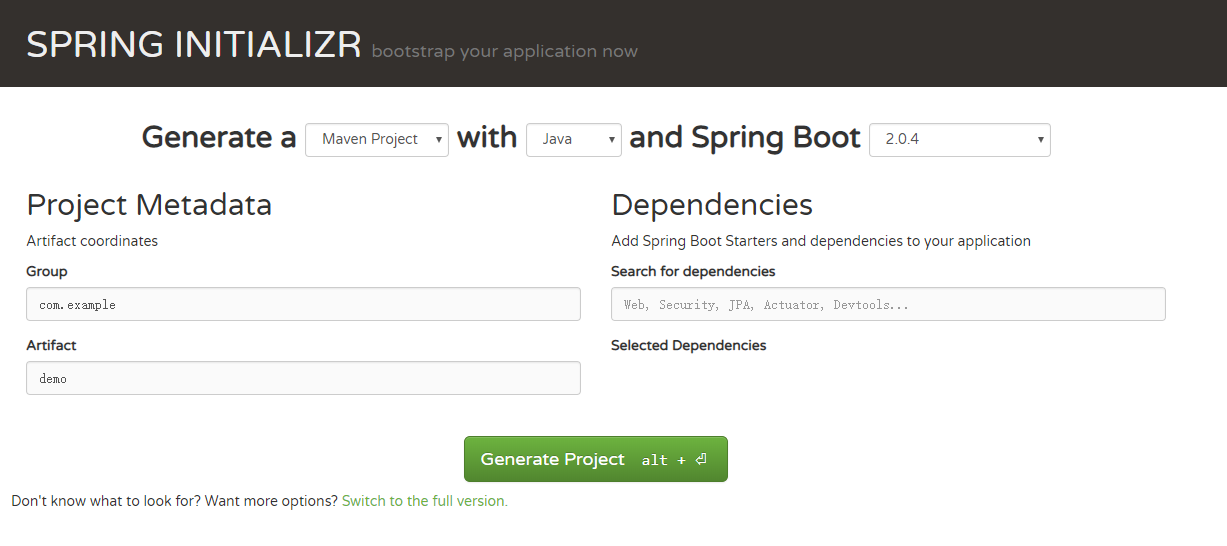
2.解压压缩包并导入到eclipse,就可以启动项目了,下面是程序的入口
package com.example.demo;

import org.springframework.boot.SpringApplication;

import org.springframework.boot.autoconfigure.SpringBootApplication;

@SpringBootApplication

public class DemoApplication {

    public static void main(String[] args) {

        SpringApplication.run(DemoApplication.class, args);

    }

}
三、springboot使用
1.配置文件properties的加载
#myconfig.properties配置文件

com.kyle.name=邓zm

com.kyle.age=27
/**

 * 自定义配置文件的加载,需要加上下面的注解,并导入相关的包

 * 如果是主配置文件application.properties加载,则只需要@Value就能获取数据

 */

@Component

@ConfigurationProperties

@PropertySource("classpath:myconfig.properties")

public class UserInfo {

    @Value("${com.kyle.name}")

    private String name;

    @Value("${com.kyle.age}")

    private int age;

    public String getName() {

        return name;

    }

    public void setName(String name) {

        this.name = name;

    }

    public int getAge() {

        return age;

    }

    public void setAge(int age) {

        this.age = age;

    }

}
2.springboot集成mybatis(只说和spring框架的差别)
        <!-- 引入jar包 -->

        <dependency>

          <groupId>mysql</groupId>

          <artifactId>mysql-connector-java</artifactId>

        </dependency>

        <dependency>

            <groupId>org.mybatis.spring.boot</groupId>

            <artifactId>mybatis-spring-boot-starter</artifactId>

            <version>1.3.2</version>

        </dependency>
#application.properties文件中引入配置文件和映射文件,

#没有配置文件也可以不引入

mybatis.config-locations=classpath:mybatis-config.xml

mybatis.mapper-locations=classpath:mapper/*.xml
3.springboot集成redis集群
<!--引入相关jar包-->

<dependency>

    <groupId>org.springframework.boot</groupId>

    <artifactId>spring-boot-starter-redis</artifactId>

</dependency>
#redis集群配置 redis.properties

spring.redis.cluster.nodes=111.230.239.152:7000,111.230.239.152:7001,111.230.239.152:7002,111.230.239.152:8000,111.230.239.152:8001,111.230.239.152:8002

spring.redis.password=12345

spring.redis.pool.max-active=8

spring.redis.pool.max-wait=-1

spring.redis.pool.max-idle=8

spring.redis.pool.min-idle=0

spring.redis.timeout=1000

spring.redis.commandTimeout=5000
@Component

@Configuration

@PropertySource("classpath:redis.properties")

public class RedisConfig {

    /**

     * 设置数据存入redis 的序列化方式

     *</br>redisTemplate序列化默认使用的jdkSerializeable,存储二进制字节码,导致key会出现乱码,所以自定义

     *序列化类

     */

    @Bean

    @SuppressWarnings({ "rawtypes", "unchecked" })

    public RedisTemplate<Object,Object> redisTemplate(RedisConnectionFactory redisConnectionFactory)throws UnknownHostException {

        RedisTemplate<Object,Object> redisTemplate = new RedisTemplate<>();

        redisTemplate.setConnectionFactory(redisConnectionFactory);

        Jackson2JsonRedisSerializer serializer =new Jackson2JsonRedisSerializer(Object.class);

        ObjectMapper objectMapper =new ObjectMapper();

        objectMapper.setVisibility(PropertyAccessor.ALL,JsonAutoDetect.Visibility.ANY);

        objectMapper.enableDefaultTyping(ObjectMapper.DefaultTyping.NON_FINAL);

        serializer.setObjectMapper(objectMapper);

        redisTemplate.setValueSerializer(serializer);

        redisTemplate.setKeySerializer(new StringRedisSerializer());

        redisTemplate.afterPropertiesSet();

        return redisTemplate;

    }

}
@Service

public class UserServiceImpl implements UserService {

    @Autowired

    private UserMapper userMapper;

    @Resource

    private RedisTemplate<String,Object> redisTemplate;

    @Override

    public User getUserInfoById(Long id) {

        User user = (User)redisTemplate.opsForValue().get("user:"+id);

        if(user == null ){

            user = userMapper.getUserInfoById(id);

            redisTemplate.opsForValue().set("user:"+id, user);

        }

        return user;

    }

}
4.springboot开启定时任务
@MapperScan("com.example.demo.dao")

@SpringBootApplication

@EnableScheduling //开启定时任务

public class DemoApplication {

    public static void main(String[] args) {

        SpringApplication.run(DemoApplication.class, args);

    }

}
@Component

public class SchedulerTask {

    private int count=0;

    @Scheduled(cron="*/1 * * * * ?")

    private void process(){

        System.out.println("this is scheduler task runing  "+(count++));

    }

}
5.springboot的事务
@MapperScan("com.example.demo.dao")

@SpringBootApplication

@EnableScheduling

@EnableTransactionManagement //事务管理

public class DemoApplication {

    public static void main(String[] args) {

        SpringApplication.run(DemoApplication.class, args);

    }

}
@Override

    @Transactional(readOnly=false,propagation=Propagation.REQUIRED)

    public void updateUser(User user) {

        User user1 = new User();

        user1.setUserId(1);

        user1.setName("yao1");

        User user2 = new User();

        user2.setUserId(2);

        user2.setName("Xiaoxiao1");

        userMapper.updateUser(user1);

        int i = 1/0;

        userMapper.updateUser(user2);

    }
springboot入门使用的更多相关文章
- SpringBoot入门教程(二)CentOS部署SpringBoot项目从0到1
在之前的博文<详解intellij idea搭建SpringBoot>介绍了idea搭建SpringBoot的详细过程, 并在<CentOS安装Tomcat>中介绍了Tomca ...
- SpringBoot入门基础
目录 SpringBoot入门 (一) HelloWorld. 2 一 什么是springboot 1 二 入门实例... 1 SpringBoot入门 (二) 属性文件读取... 16 一 自定义属 ...
- SpringBoot入门示例
SpringBoot入门Demo SpringBoot可以说是Spring的简化版.配置简单.使用方便.主要有以下几种特点: 创建独立的Spring应用程序 嵌入的Tomcat,无需部署WAR文件 简 ...
- Spring全家桶系列–[SpringBoot入门到跑路]
//本文作者:cuifuan Spring全家桶————[SpringBoot入门到跑路] 对于之前的Spring框架的使用,各种配置文件XML.properties一旦出错之后错误难寻,这也是为什么 ...
- springboot入门之一:环境搭建(续)
在上篇博客中从springboot的入门到运行一个springboot项目进行了简单讲述,详情请查看“springboot入门之一”.下面继续对springboot做讲述. 开发springboot测 ...
- 【Java】SpringBoot入门学习及基本使用
SpringBoot入门及基本使用 SpringBoot的介绍我就不多说了,核心的就是"约定大于配置",接下来直接上干货吧! 本文的实例: github-LPCloud,欢迎sta ...
- SpringBoot入门(三)——入口类解析
本文来自网易云社区 上一篇介绍了起步依赖,这篇我们先来看下SpringBoot项目是如何启动的. 入口类 再次观察工程的Maven配置文件,可以看到工程的默认打包方式是jar格式的. <pack ...
- SpringBoot入门(五)——自定义配置
本文来自网易云社区 大部分比萨店也提供某种形式的自动配置.你可以点荤比萨.素比萨.香辣意大利比萨,或者是自动配置比萨中的极品--至尊比萨.在下单时,你并没有指定具体的辅料,你所点的比萨种类决定了所用的 ...
- SpringBoot入门(四)——自动配置
本文来自网易云社区 SpringBoot之所以能够快速构建项目,得益于它的2个新特性,一个是起步依赖前面已经介绍过,另外一个则是自动配置.起步依赖用于降低项目依赖的复杂度,自动配置负责减少人工配置的工 ...
- SpringBoot入门(二)——起步依赖
本文来自网易云社区 在前一篇我们通过简单几步操作就生成了一个可以直接运行的Web程序,这是因为SpringBoot代替我们做了许多工作,概括来讲可以分为起步依赖和自动配置.这一篇先来看看起步依赖. 项 ...
随机推荐
- [NOIp2009] $Hankson$ 的趣味题
类型:数论 传送门:>Here< 题意:给出四个数$a_0,a_1,b_0,b_1$,求满足$gcd(x,a_0)=a_1,lcm(x,b_0)=b_1$的$x$的个数 解题思路 显然$a ...
- Python中操作ini配置文件
这篇博客我主要想总结一下python中的ini文件的使用,最近在写python操作mysql数据库,那么作为测试人员测试的环境包括(测试环境,UAT环境,生产环境)每次需要连接数据库的ip,端口,都会 ...
- 【XSY1294】sub 树链剖分
题目描述 给你一棵\(n\)个点的无根树,节点\(i\)有权值\(v_i\).现在有\(m\)次操作,操作有如下两种: \(1~x~y\):把\(v_x\)改成\(y\). \(2\):选择一个连通块 ...
- Hdoj 2191.悼念512汶川大地震遇难同胞——珍惜现在,感恩生活 题解
Problem Description 急!灾区的食物依然短缺! 为了挽救灾区同胞的生命,心系灾区同胞的你准备自己采购一些粮食支援灾区,现在假设你一共有资金n元,而市场有m种大米,每种大米都是袋装产品 ...
- 用c#查询各快递物流信息
前面介绍过<用快递100接口查询各快递物流信息>,里面用的是API接口,但有些快递不支持这种方式,本文介绍的HtmlAPI支持所有快递公司. 支持包括EMS.邮政.顺丰和申通在内的所有公司 ...
- Crash 的文明世界
题目描述 给一棵树,求以每个点为根时下列式子的值. 题解 当k=1时这就是一个经典的换根dp问题. 所以这道题还是要用换根dp解决. 部分分做法: 考虑转移时是这样的一个形式(图是抄的). 用二项式定 ...
- angular与vue的应用对比
因为各种笔试面试,最近都没时间做一些值得分享的东西,正好复习一下vue技术栈,与angular做一下对比. angular1就跟vue比略low了. 1.数据绑定 ng1 ng-bind,{{ sco ...
- HDU--4486 Task(贪心)
题目链接 4486 Task 按照时间从大到小排序 然后枚举所有的y值 用一个数组存储 符合要求就算上 #include<bits/stdc++.h> using namespace s ...
- dom4j解析xml时取消DTD验证
解决方式整合一下,就分两种: 1.用setFeature() SAXReader reader = new SAXReader();reader.setValidation(false); reade ...
- OpenLayers学习笔记(四)— QML显示html中openlayers地图的坐标
GitHub:八至 作者:狐狸家的鱼 本文链接:实现QML中显示html中地图的坐标 如何QML与HTML通信已经在这篇文章 QML与HTML通信之画图 详细讲述了 1.HTML var coord; ...