
一个字符带下滑线的EditText
效果样式:
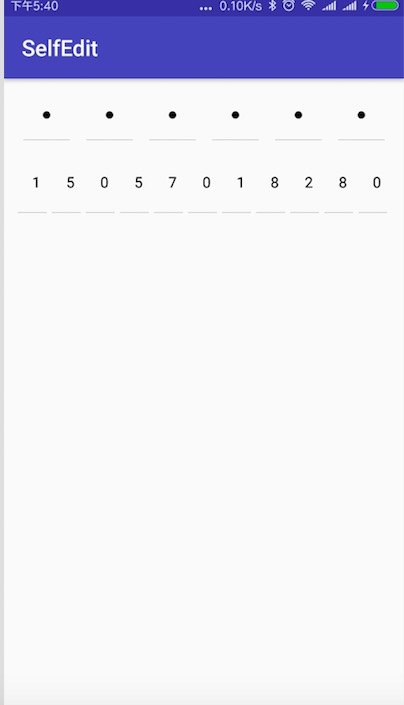
这个比较特别的editText是公司的一个新的需求,我也是在网上找了一下,然后看到了一篇博客然后修改成自己需要的样式。这种一般的思路就是在onDraw()方法绘制editText的特别的样式,如果输入里面的值是*这种特殊字符就只用直接绘制,如果需要输入进去的值则可以在onTextChanged方法中获取每一次更改editText值,在onDraw方法里一个个的绘制。
自定义的editText
package com.kkrs.selfedit;

import android.content.Context;

import android.content.res.TypedArray;

import android.graphics.Canvas;

import android.graphics.Color;

import android.graphics.Paint;

import android.graphics.RectF;

import android.text.InputFilter;

import android.text.TextUtils;

import android.util.AttributeSet;

import android.util.Log;

import android.widget.EditText;

import static android.graphics.Paint.ANTI_ALIAS_FLAG;

/**

 * Created by zd on 2018/11/27.

 */

public class InputView extends EditText {

    private Context mContext;

    /**

     * 第一个圆开始绘制的圆心坐标

     */

    private float startX;

    private float startY;

    private float cX;

    int psdType = 0;

    /**

     * 实心圆的半径

     */

    private int radius = 10;

    /**

     * view的高度

     */

    private int height;

    private int width;

    /**

     * 当前输入密码位数

     */

    private int textLength = 0;

    private int bottomLineLength;

    /**

     * 最大输入位数

     */

    private int maxCount = 6;

    /**

     * 圆的颜色   默认BLACK

     */

    private int circleColor = Color.BLACK;

    /**

     * 底部线的颜色   默认GRAY

     */

    private int bottomLineColor = Color.GRAY;

    /**

     * 分割线开始的坐标x

     */

    private int divideLineWStartX;

    /**

     * 分割线的宽度  默认2

     */

    private int divideLineWidth = 2;

    /**

     * 竖直分割线的颜色

     */

    private int divideLineColor = Color.GRAY;

    private int focusedColor = Color.BLUE;

    private RectF rectF = new RectF();

    private RectF focusedRecF = new RectF();

    private String texts = "";

    /**

     * 矩形边框的圆角

     */

    private int rectAngle = 0;

    /**

     * 圆的画笔

     */

    private Paint circlePaint;

    /**

     * 底部线的画笔

     */

    private Paint bottomLinePaint;

    /**

     * 需要对比的密码  一般为上次输入的

     */

    private String mComparePassword = null;

    /**

     * 当前输入的位置索引

     */

    private int position = 0;

    private onPasswordListener mListener;

    public InputView(Context context, AttributeSet attrs) {

        super(context, attrs);

        mContext = context;

        getAtt(attrs);

        initPaint();

        this.setBackgroundColor(Color.TRANSPARENT);

        this.setCursorVisible(false);

        this.setFilters(new InputFilter[]{new InputFilter.LengthFilter(maxCount)});

    }

    private void getAtt(AttributeSet attrs) {

        TypedArray typedArray = mContext.obtainStyledAttributes(attrs, R.styleable.PayPsdInputView);

        maxCount = typedArray.getInt(R.styleable.PayPsdInputView_maxCount, maxCount);

        circleColor = typedArray.getColor(R.styleable.PayPsdInputView_circleColor, circleColor);

        bottomLineColor = typedArray.getColor(R.styleable.PayPsdInputView_bottomLineColor, bottomLineColor);

        radius = typedArray.getDimensionPixelOffset(R.styleable.PayPsdInputView_radius, radius);

        divideLineWidth = typedArray.getDimensionPixelSize(R.styleable.PayPsdInputView_divideLineWidth, divideLineWidth);

        divideLineColor = typedArray.getColor(R.styleable.PayPsdInputView_divideLineColor, divideLineColor);

        psdType = typedArray.getInt(R.styleable.PayPsdInputView_psdType, psdType);

        rectAngle = typedArray.getDimensionPixelOffset(R.styleable.PayPsdInputView_rectAngle, rectAngle);

        focusedColor = typedArray.getColor(R.styleable.PayPsdInputView_focusedColor, focusedColor);

        typedArray.recycle();

    }

    /**

     * 初始化画笔

     */

    private void initPaint() {

        circlePaint = getPaint(5, Paint.Style.FILL, circleColor);

        bottomLinePaint = getPaint(2, Paint.Style.FILL, bottomLineColor);

    }

    /**

     * 设置画笔

     *

     * @param strokeWidth 画笔宽度

     * @param style       画笔风格

     * @param color       画笔颜色

     * @return

     */

    private Paint getPaint(int strokeWidth, Paint.Style style, int color) {

        Paint paint = new Paint(ANTI_ALIAS_FLAG);

        paint.setStrokeWidth(strokeWidth);

        paint.setStyle(style);

        paint.setColor(color);

        paint.setAntiAlias(true);

        paint.setTextSize(40);

        return paint;

    }

    @Override

    protected void onSizeChanged(int w, int h, int oldw, int oldh) {

        super.onSizeChanged(w, h, oldw, oldh);

        height = h;

        width = w;

        divideLineWStartX = w / maxCount;

        startX = w / maxCount / 2;

        startY = h / 2;

        bottomLineLength = w / (maxCount + 2);

        rectF.set(0, 0, width, height);

    }

    @Override

    protected void onDraw(Canvas canvas) {

        //不删除的画会默认绘制输入的文字

//       super.onDraw(canvas);

        drawBottomBorder(canvas);

        switch (psdType){

            case 0:

                char[] cc;

                cc=texts.toCharArray();

                for (int i = 0; i < cc.length; i++) {

                    Log.e("sys","cc="+cc[i]);

                    canvas.drawText(cc[i]+"",startX + i * 2 * startX,

                            startY,circlePaint);

                }

                break;

            case 1:

                drawPsdCircle(canvas);

                break;

        }

    }

    /**

     * 画密码实心圆

     *

     * @param canvas

     */

    private void drawPsdCircle(Canvas canvas) {

        for (int i = 0; i < textLength; i++) {

            canvas.drawCircle(startX + i * 2 * startX,

                    startY,

                    radius,

                    circlePaint);

        }

    }

    /**

     * 画底部显示的分割线

     *

     * @param canvas

     */

    private void drawBottomBorder(Canvas canvas) {

        for (int i = 0; i < maxCount; i++) {

            cX = startX + i * 2 * startX;

            canvas.drawLine(cX - bottomLineLength / 2,

                    height,

                    cX + bottomLineLength / 2,

                    height, bottomLinePaint);

        }

    }

    @Override

    protected void onTextChanged(CharSequence text, int start, int lengthBefore, int lengthAfter) {

        super.onTextChanged(text, start, lengthBefore, lengthAfter);

        this.position = start + lengthAfter;

        textLength = text.toString().length();

        texts = text.toString();

        Log.e("onTextChanged",text.toString());

        if (textLength == maxCount) {

            if (mListener != null) {

                if (TextUtils.isEmpty(mComparePassword)) {

                    mListener.inputFinished(getPasswordString());

                } else {

                    if (TextUtils.equals(mComparePassword, getPasswordString())) {

                        mListener.onEqual(getPasswordString());

                    } else {

                        mListener.onDifference(mComparePassword, getPasswordString());

                    }

                }

            }

        }

        invalidate();

    }

    @Override

    protected void onSelectionChanged(int selStart, int selEnd) {

        super.onSelectionChanged(selStart, selEnd);

        //保证光标始终在最后

        if (selStart == selEnd) {

            setSelection(getText().length());

        }

    }

    /**

     * 获取输入的密码

     *

     * @return

     */

    public String getPasswordString() {

        return getText().toString().trim();

    }

    public void setComparePassword(String comparePassword, onPasswordListener listener) {

        mComparePassword = comparePassword;

        mListener = listener;

    }

    public void setComparePassword(onPasswordListener listener) {

        mListener = listener;

    }

    public void setComparePassword(String psd) {

        mComparePassword = psd;

    }

    /**

     * 清空密码

     */

    public void cleanPsd() {

        setText("");

    }

    /**

     * 密码比较监听

     */

    public interface onPasswordListener {

        void onDifference(String oldPsd, String newPsd);

        void onEqual(String psd);

        void inputFinished(String inputPsd);

    }

}
在xml的用法:
<?xml version="1.0" encoding="utf-8"?>

<LinearLayout xmlns:android="http://schemas.android.com/apk/res/android"

    xmlns:app="http://schemas.android.com/apk/res-auto"

    xmlns:tools="http://schemas.android.com/tools"

    xmlns:psd="http://schemas.android.com/apk/res-auto"

    android:layout_width="match_parent"

    android:layout_height="match_parent"

    android:orientation="vertical"

    >

    <com.kkrs.selfedit.InputView

        android:id="@+id/pwd"

        android:layout_width="match_parent"

        android:layout_height="wrap_content"

        android:layout_margin="10dp"

        android:layout_marginTop="20dp"

        android:inputType="number"

        psd:maxCount="6"

        psd:psdType="pwd"/>

    <com.kkrs.selfedit.InputView

        android:id="@+id/phone"

        android:layout_width="match_parent"

        android:layout_height="wrap_content"

        android:layout_margin="10dp"

        android:layout_marginTop="20dp"

        android:inputType="number"

        psd:maxCount="11"

        psd:psdType="phone"/>

</LinearLayout>
github:https://github.com/tempest1/SelfEdit
一个字符带下滑线的EditText的更多相关文章
- sql 字符带下划线匹配问题
SQL 中 _下划线 作用是 匹配一个任意字符. 如果我们要去掉下划线的作用 单纯只用作一个字符则需要转义成 like '%\_%' escape '\' 字段 1.order_qrsc 2.o ...
- Android实现带下划线的EditText(BUG修正)
之前写了一个关于实现EditText显示下划线的例子,发现仍然存在一些问题,在此继续探索,原文链接:http://www.cnblogs.com/ayqy/p/3599414.html (零)另一个b ...
- delphi 仅带下划线的TEdit控件
在做录入框的时候,很希望有一个只带下划线的文本框,网上介绍的很多,有自己做组件的,须不知Delphi下只需要简单设置几个属性即可达到目的.
- ssh框架从页面传中文发生乱码时怎么解决,就是添加一个字符编码拦截器。用springframework自带的便可
ssh框架从页面传中文发生乱码时怎么解决,就是添加一个字符编码拦截器.用springframework自带的便可
- C++学习45 流成员函数put输出单个字符 cin输入流详解 get()函数读入一个字符
在程序中一般用cout和插入运算符“<<”实现输出,cout流在内存中有相应的缓冲区.有时用户还有特殊的输出要求,例如只输出一个字符.ostream类除了提供上面介绍过的用于格式控制的成员 ...
- utf-8的中文,一个字符占几个字节
https://blog.csdn.net/kindsuper_liu/article/details/80202150 英文字母和中文汉字在不同字符集编码下的字节数英文字母:·字节数 : 1;编码: ...
- utf-8的中文是一个字符占几个字节
utf-8的中文是一个字符占几个字节 英文字母和中文汉字在不同字符集编码下的字节数英文字母:·字节数 : 1;编码:GB2312 字节数 : 1;编码:GBK 字节数 : 1;编码:GB18030 字 ...
- Android带加减的edittext
看了网上这样自带加减的edittext写得好复杂,还有各种监听事件,我觉得没有必有.于是我自己写了一个. 我这个edittext仅仅限制整数,每次加减1. public class TestEditT ...
- php 去掉字符串的最后一个字符
原字符串1,2,3,4,5,6, 去掉最后一个字符",",最终结果为1,2,3,4,5,6 代码如下: $str = "1,2,3,4,5,6,"; $news ...
随机推荐
- 基于Unity的AR开发初探:发布AR应用到Android平台
本文接上一篇,介绍一下如何通过Unity发布第一个AR应用至Android平台,在Android手机上使用我们的第一个AR应用. 一.一些准备工作 1.1 准备Java JDK 这里选择的是JDK 1 ...
- Go:学习笔记兼吐槽(2)
Go:学习笔记兼吐槽(1) Go:学习笔记兼吐槽(2) Go:学习笔记兼吐槽(3) 基本数据类型和string之间的转换 (1) 基本类型转string 使用 fmt.Sprintf(“%参数”, 表 ...
- SpringBoot自动配置原理
前言 只有光头才能变强. 文本已收录至我的GitHub仓库,欢迎Star:https://github.com/ZhongFuCheng3y/3y 回顾前面Spring的文章(以学习的顺序排好): S ...
- 欢迎使用IdentityModel文档!- IdentityModel 中文文档(v1.0.0)
IdentityModel是基于声明的身份,OAuth 2.0和OpenID Connect的.NET标准帮助程序库. 它具有以下高级功能: 标准OAuth 2.0和OpenID Connect端点的 ...
- 16 , CSS 边框与边界
1.CSS 中边框的使用 2.CSS 中边界的使用 16.1 CSS 中边框的使用 属性名称 属性值 说明 border-color 十六进制 可依序设置上,右,下,左线颜色 英文名称 border- ...
- arcgis画矢量图
总图 首先建立目标文件夹和目标文件(shp文件) 现在H:\ex_gis\下新建test文件夹,起名为test,再此目录下建立一个线要素文件. 在这里选择要素类型.这里以线为例,点面类推即可. 设置坐 ...
- 【Matlab&Mathematica】对三维空间上的点进行椭圆拟合
问题是这样:比如有一个地心惯性系的轨道,然后从轨道上取了几个点,问能不能根据这几个点把轨道还原了? 当然,如果知道轨道这几个点的速度的情况下,根据轨道六根数也是能计算轨道的,不过真近点角是随时间变动的 ...
- 代码规范:idea上添加阿里巴巴Java开发插件
在一个项目中,不可缺少的是书写代码的规范,没有好的代码规范约束,大家各写各的,十分不利于代码的维护与修改. 首先来看看如何在idea上添加这个插件: 直接上图 点击右边的蓝色按钮就可以安装了, ...
- ORM(四)字段参数
null:如果null=True,则该字段在数据库中的值可以为NULL,默认null=False. blank:如果blank=True,前端form表单可以空,注意,这与NULL不同.NULL纯粹与 ...
- 一道编程题: 在1~n之间选择若干个数,使其和为m
这是一道很明显的动态规划的题目. 递推公式为 用sum(n, m)表示所有可能的1~n之间存在的和为m的组合 那么 sum(n,m) = sum(n-1, m) | sum(n-1, m-n) 直接上 ...