
java基础之-I/O流和File类解析
在日常的java开发中少不了文件的读取和 写入,这就涉及到文件的I/O操作,今天就来总结下文件的IO操作,顺便文件的IO操作也需要File了的帮助,所以一起总结了。
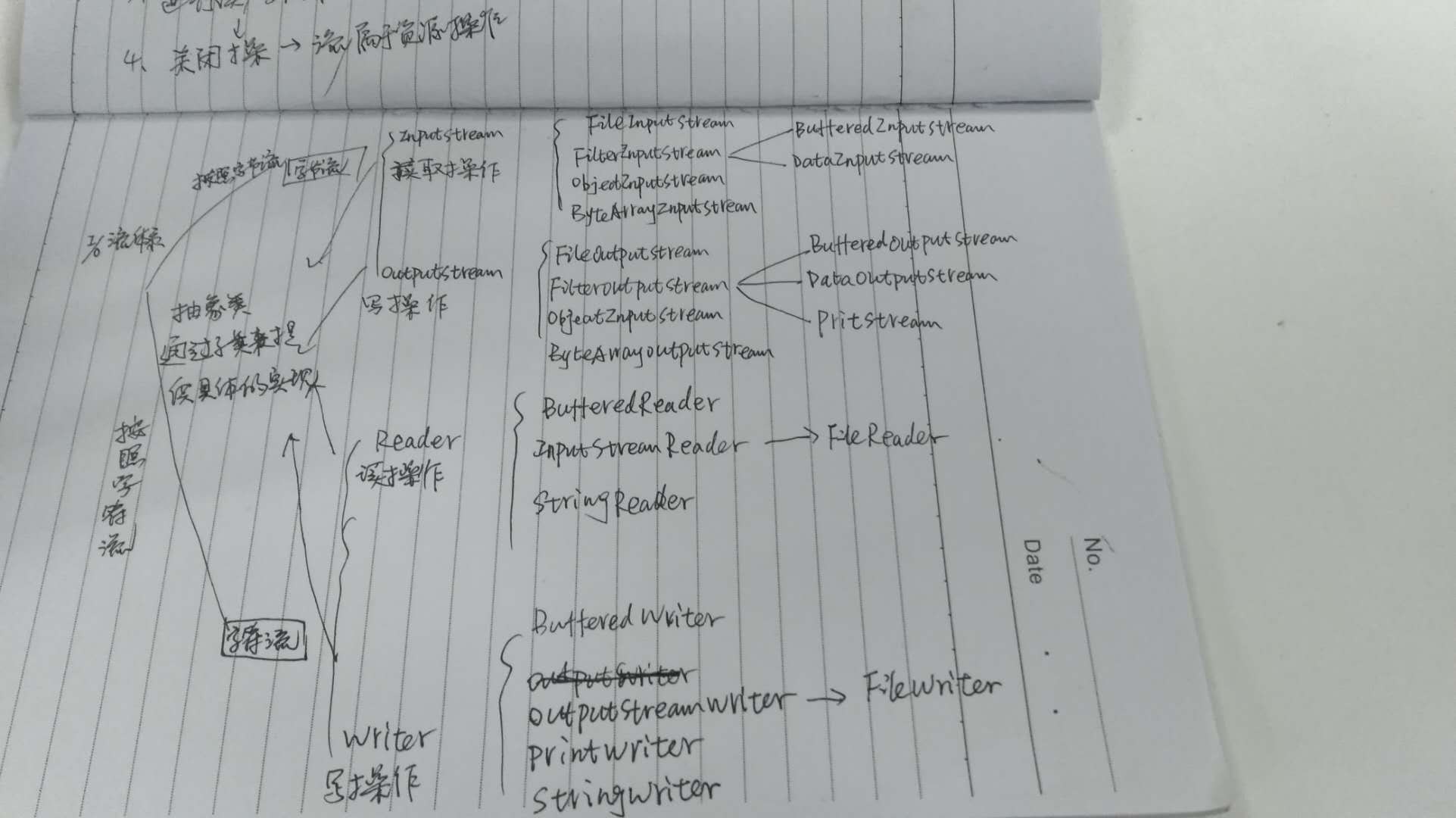
以下图片为我根据其他博客所总结的内容进行了相应的总结和IO流的类结构图,类结构图中还少了几个类
简单描述下:
IO分为字节和字符流2中方式,字节流以byte为单位,字符流以字符为单位,1个字节8byte 0·255,字节流的抽象类为inputstream和outputstream,他们无法实例化,所以需要
其子类来实现。字符流通常按2个字节来表示则为16byte,字符流的抽象类为reader和writer。
字符流通常是需要将文件读取到内存才能进行操作的,而字节流则是直接操作文件的。

还是通过具体的例子来说明吧。
@Test
public void testFileReader() throws IOException {
    File file = new File("D:/train/train.txt");
    FileInputStream fs = new FileInputStream(file);
    InputStreamReader reader = new InputStreamReader(fs,"utf8");
    BufferedReader bufferedReader = new BufferedReader(reader);
    System.out.println(bufferedReader.readLine());
// 关闭文件流
bufferedReader.flush();

bufferedReader.close();
reader.close();
fs.close();
}

@Test
public void testFileOut() throws IOException {
    File file = new File("D:/train/train.txt");
    FileOutputStream out = new FileOutputStream(file);
    String str = "hello world";
    out.write(str.getBytes("utf8"));
out.close();
}
上面的代码包含了文件的读取和文件的写入,包含字符集设置,读取操作其实可以包含了IO中绝大多数的操作了。需要注意的是不管是字节流,还是字符流他们的read()方法返回的结果都是int类型,需要将其转换成char类型。具体的源码可以根据类的结构树去查看。
一上为简单总结了IO流,下面是File类的总结:


File -> FileSystem -> WinNTFileSystem
操作文件其实通过操作系统的文件功能来实现的,不同的系统如windows和UNIX其实是不同的,新建的File通过getFileSystem()方法获取系统操作文件的权限,每个新建的文件都包含2个重要参数path和prefixLength
 /**

     * This abstract pathname's normalized pathname string. A normalized

     * pathname string uses the default name-separator character and does not

     * contain any duplicate or redundant separators.

     * 这个抽象路径的正常路径名称,"d:/program file/train"这种格式

     * @serial

     */

    private final String path;

 /**

     * The length of this abstract pathname's prefix, or zero if it has no

     * prefix. 抽象路径的前缀长度,不存在则为0

     */

    private final transient int prefixLength;
文件系统的操作其实很多都是通过这个前缀来创建文件的。
通过看源码可以发现,File类其实有点像接口,而WinNTFileSystem类则像实现接口。
看下File的构造函数,其中通过uri的构造函数没有贴出,有需要可以自己去查阅
/**

     * Creates a new <code>File</code> instance by converting the given

     * pathname string into an abstract pathname.  If the given string is

     * the empty string, then the result is the empty abstract pathname.

     *

     * @param   pathname  A pathname string

     * @throws  NullPointerException

     *          If the <code>pathname</code> argument is <code>null</code> 最通用给构造函数,通过文件路径来创建文件

     */

    public File(String pathname) {

        if (pathname == null) {

            throw new NullPointerException();

        }

        this.path = fs.normalize(pathname);

        this.prefixLength = fs.prefixLength(this.path);

    }

 /**

     * Creates a new <code>File</code> instance from a parent pathname string

     * and a child pathname string.

     *

     * <p> If <code>parent</code> is <code>null</code> then the new

     * <code>File</code> instance is created as if by invoking the

     * single-argument <code>File</code> constructor on the given

     * <code>child</code> pathname string.

     *

     * <p> Otherwise the <code>parent</code> pathname string is taken to denote

     * a directory, and the <code>child</code> pathname string is taken to

     * denote either a directory or a file.  If the <code>child</code> pathname

     * string is absolute then it is converted into a relative pathname in a

     * system-dependent way.  If <code>parent</code> is the empty string then

     * the new <code>File</code> instance is created by converting

     * <code>child</code> into an abstract pathname and resolving the result

     * against a system-dependent default directory.  Otherwise each pathname

     * string is converted into an abstract pathname and the child abstract

     * pathname is resolved against the parent.

     * 通过父路径和子路径来创建文件

     * @param   parent  The parent pathname string

     * @param   child   The child pathname string

     * @throws  NullPointerException

     *          If <code>child</code> is <code>null</code>

     */

    public File(String parent, String child) {

        if (child == null) {

            throw new NullPointerException();

        }

        if (parent != null) {

            if (parent.equals("")) {

                this.path = fs.resolve(fs.getDefaultParent(), -->"/"

                                       fs.normalize(child));

            } else {

                this.path = fs.resolve(fs.normalize(parent),

                                       fs.normalize(child));

            }

        } else {

            this.path = fs.normalize(child);

        }

        this.prefixLength = fs.prefixLength(this.path);

    }

 /** 通过父文件和子路径来创建文件

     * Creates a new <code>File</code> instance from a parent abstract

     * pathname and a child pathname string.

     *

     * <p> If <code>parent</code> is <code>null</code> then the new

     * <code>File</code> instance is created as if by invoking the

     * single-argument <code>File</code> constructor on the given

     * <code>child</code> pathname string.

     *

     * <p> Otherwise the <code>parent</code> abstract pathname is taken to

     * denote a directory, and the <code>child</code> pathname string is taken

     * to denote either a directory or a file.  If the <code>child</code>

     * pathname string is absolute then it is converted into a relative

     * pathname in a system-dependent way.  If <code>parent</code> is the empty

     * abstract pathname then the new <code>File</code> instance is created by

     * converting <code>child</code> into an abstract pathname and resolving

     * the result against a system-dependent default directory.  Otherwise each

     * pathname string is converted into an abstract pathname and the child

     * abstract pathname is resolved against the parent.

     *

     * @param   parent  The parent abstract pathname

     * @param   child   The child pathname string

     * @throws  NullPointerException

     *          If <code>child</code> is <code>null</code>

     */

    public File(File parent, String child) {

        if (child == null) {

            throw new NullPointerException();

        }

        if (parent != null) {

            if (parent.path.equals("")) {

                this.path = fs.resolve(fs.getDefaultParent(),

                                       fs.normalize(child));

            } else {

                this.path = fs.resolve(parent.path,   --> 将父文件转换成路径,然后和子路径拼接

                                       fs.normalize(child));

            }

        } else {

            this.path = fs.normalize(child);

        }

        this.prefixLength = fs.prefixLength(this.path);

    }
其他的一些方法如创建新文件,creatNewFile(),创建文件夹mkdir(),mkdirs()等方法,相信看下源码就能很清楚了。
java基础之-I/O流和File类解析的更多相关文章
- java基础9(IO流)-File类
File类 File:文件和目录路径名的抽象表示形式.即java中把文件或者目录都封装成File对象 代码练习1 import java.io.File; public class FileDemo1 ...
- 【Java基础】【19异常&IO(File类)】
19.01_异常(异常的概述和分类) A:异常的概述 异常就是Java程序在运行过程中出现的错误. B:异常的分类 通过API查看Throwable Error 服务器宕机,数据库崩溃等 Except ...
- IO流,File类的测试........课堂加总结
package liu0926; import java.io.File; import java.io.IOException; public class Text01 { public stati ...
- Java基础系列2:深入理解String类
Java基础系列2:深入理解String类 String是Java中最为常用的数据类型之一,也是面试中比较常被问到的基础知识点,本篇就聊聊Java中的String.主要包括如下的五个内容: Strin ...
- java基础——IO流之File类
1.File类的构造方法: File(String pathName):通过一个指定的字符串类型路径来创建一个文件对象 File (String parent,String child):通过指定 ...
- Java基础系列8——IO流超详细总结
该系列博文会告诉你如何从入门到进阶,一步步地学习Java基础知识,并上手进行实战,接着了解每个Java知识点背后的实现原理,更完整地了解整个Java技术体系,形成自己的知识框架. 在初学Java时,I ...
- Java基础之详谈IO流
Java基础知识.IO流详细讲解.你所要的IO这里都有
- Java笔记(二十七)……IO流中 File文件对象与Properties类
File类 用来将文件或目录封装成对象 方便对文件或目录信息进行处理 File对象可以作为参数传递给流进行操作 File类常用方法 创建 booleancreateNewFile():创建新文件,如果 ...
- -1-4 java io java流 常用流 分类 File类 文件 字节流 字符流 缓冲流 内存操作流 合并序列流
File类 •文件和目录路径名的抽象表示形式 构造方法 •public File(String pathname) •public File(String parent,Stringchild) ...
随机推荐
- 20171201 - macOS High Sierra 神级 bug
昨日亲测有效,macOS High Sierra 神级 bug,系统管理员 root 密码为空,输入就可以登录,具备最高权限. 让人不禁想象 Apple Software 怎么了,人才都流失了吗?
- 深入理解 call,apply 和 bind
在JavaScript 中,call.apply 和 bind 是 Function 对象自带的三个方法,这三个方法的主要作用是改变函数中的 this 指向,从而可以达到`接花移木`的效果.本文将对这 ...
- EL表达式 if 和 if else语句的写法
JavaScript的if else大家都不会陌生,但可能很多小伙伴并不知道在jsp文件里,el表达式的if else是怎么写的,下面安利给各位小伙伴 el表达式 if 代码示例 <c:if t ...
- 打开ubantu报错(invalid environment block. Press any key to continue)
今天向往常一样打开ubantu ,却无法正常打开,如下图 意思是无效的环境模块,随意按键继续,按任意键后如下图 折腾了许久问题也没有得到解决,后来在某篇博客中找到了答案 https://blog.cs ...
- Python后台开发Django(启动)
Django版本为:2.1.7 Python的web框架,MTV思想 MVC Model(模板文件,数据库操作) view(视图模板文件 )controller(业务处理) MTV Model(模 ...
- ASP.NET MVC权限控制思路
在系统开发的时候一个老生常谈的权限管理问题,翻阅了很多的网络资料,但是总感觉离实际使用还有一段距离,其实权限控制无非就几个“请求.页面按钮.字段显示”, 对于前端权限就需要配合JS了, 这里主要展示我 ...
- 关于 Docker 镜像的操作,看完这篇就够啦 !(下)
紧接着上篇<关于 Docker 镜像的操作,看完这篇就够啦 !(上)>,奉上下篇 !!! 镜像作为 Docker 三大核心概念中最重要的一个关键词,它有很多操作,是您想学习容器技术不得不掌 ...
- FragmentTabHostTopDemo【FragmentTabHost固定宽度且居中】
版权声明:本文为HaiyuKing原创文章,转载请注明出处! 前言 使用FragmentTabHost实现顶部选项卡(居中且宽度非全屏)展现. 备注:该Demo主要是演示FragmentTabHost ...
- service相关
本篇仍以问题为驱动 一.什么时Service? Service是Android程序中四大基础组件之一,它和Activity一样都是Context的子类,只不过它没有UI界面,是在后台运行的组件.Ser ...
- python学习第九讲,python中的数据类型,字符串的使用与介绍
目录 python学习第九讲,python中的数据类型,字符串的使用与介绍 一丶字符串 1.字符串的定义 2.字符串的常见操作 3.字符串操作 len count index操作 4.判断空白字符,判 ...