
R语言-探索两个变量
目的:
通过探索文件pseudo_facebook.tsv数据来学会两个变量的分析流程
知识点:
1.ggplot语法
2.如何做散点图
3.如何优化散点图
4.条件均值
5.变量的相关性
6.子集散点图
7.平滑化
简介:
如果在探索单一变量时,使用直方图来表示该值和整体的关系,那么在探索两个变量的时候,使用散点图会更适合来探索两个变量之间的关系
案例分析:
1.根据年龄和好友数作出散点图
#导入ggplot2绘图包
library(ggplot2)

setwd('D:/Udacity/数据分析进阶/R')
#加载数据文件

pf <- read.csv('pseudo_facebook.tsv',sep='\t')
#使用qplot语法作出散点图

qplot(x=age,y=friend_count,data=pf)
#使用ggplot语法作出散点图,此处使用ggplot作图语法上更清晰
ggplot(aes(x=age,y=friend_count),data=pf)+ geom_point()
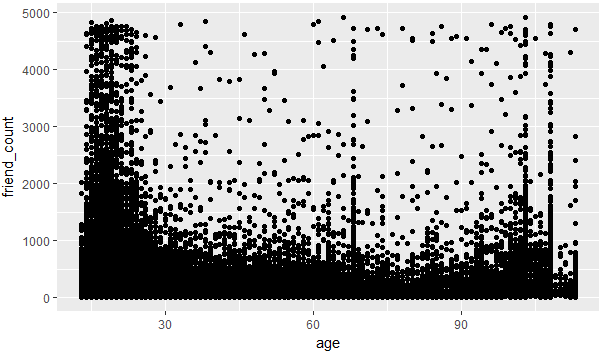
图 2-1
2.过渡绘制,因为图2-1有大部分的点都重叠,不太好区分哪个年龄和好友数的关系,所以使用alpha和geom_jitter来进行调整
#geom_jitter消除重合的点

#alpha=1/20表示20个值算1个点

#xlim(13,90)表示x轴的取值从13,90

ggplot(aes(x=age,y=friend_count),data=pf)+

  geom_jitter(alpha=1/20)+

  xlim(13,90)

图 2-2
3.coord_trans函数的用法,可以给坐标轴上应用函数,使其的可视化效果更好
#给y轴的好友数开根号,使其可视化效果更好

ggplot(aes(x=age,y=friend_count),data=pf)+

  geom_point(alpha=1/20)+

  xlim(13,90)+

  coord_trans(y="sqrt")

图2-3
4.条件均值,根据字段进行分组然后分组进行统计出新的DataFrame
#1.导入dplyr包

#2.使用group_by对年龄字段进行分组

#3.使用summarise统计出平均值和中位数

#4.再使用arrange进行排序

library('dplyr')

pf.fc_by_age <- pf %>%

  group_by(age) %>%

  summarise(friend_count_mean=mean(friend_count),

            friend_count_media = median(friend_count),

            n=n()) %>%

  arrange(age)
5.将该数据和原始数据进行迭加,根据图形,我们可以得出一个趋势,从13岁-26岁好友数在增加,从26开始慢慢的好友数开始下降
#1.通过限制x,y的值,做出年龄和好友数的散点图

#2.做出中位值的渐近线

#3.做出0.9的渐近线

#4.做出0.5的渐近线

#5.做出0.1的渐近线

ggplot(aes(x=age,y=friend_count),data=pf)+

  geom_point(alpha=1/10,

             position = position_jitter(h=0),

             color='orange')+

  coord_cartesian(xlim = c(13,90),ylim = c(0,1000))+

  geom_line(stat = 'summary',fun.y=mean)+

  geom_line(stat = 'summary',fun.y=quantile,fun.args=list(probs=.9),

            linetype=2,color='blue')+

  geom_line(stat='summary',fun.y=quantile,fun.args=list(probs=.5),

            color='green')+

  geom_line(stat = 'summary',fun.y=quantile,fun.args=list(probs=.1),

            color='blue',linetype=2)

图2-4
6.计算相关性
#使用cor.test函数来进行计算,在实际中可以对数据集进行划分
#pearson表示两个变量之间的关联强度的参数,越接近1关联性越强

with(pf,cor.test(age,friend_count,method = 'pearson'))
with(subset(pf,age<=70),cor.test(age,friend_count,method = 'pearson')
7.强相关参数,通过做出www_likes_received和likes_received的散点图来判断两个变量的关联程度,从图中看出两个值的关联性很大
#使用quantile来过限定一些极端值

#通过xlim和ylim实现过滤

#同时增加一条渐近线来查看整体的值

ggplot(aes(x=www_likes_received,y=likes_received),data=pf)+

  geom_point()+

  xlim(0,quantile(pf$www_likes_received,0.95))+

  ylim(0,quantile(pf$likes_received,0.95))+

  geom_smooth(method = 'lm',color='red')
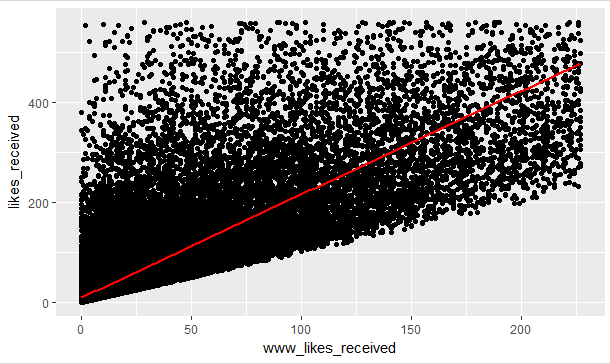
图2-5
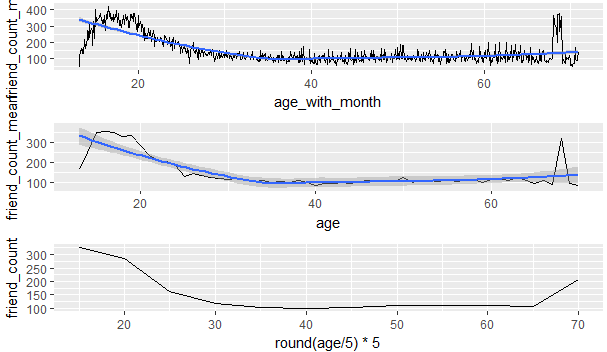
8.通过计算月平均年龄,平均年龄和年龄分布来做出三个有关年龄和好友数关系的折线图
从该图中我们可以发现p1的细节最多,p2展现的是每个年龄段不同的好友数量,p3展示的是年龄和好友数的大体趋势
#

library(gridExtra)

pf$age_with_month <- pf$age + (12-pf$dob_month)/12

pf.fc_by_age_months <- pf %>%

  group_by(age_with_months) %>%

  summarise(friend_count_mean = mean(friend_count),

            friend_count_median = median(friend_count),

            n=n()) %>%

  arrange(age_with_months)

p1 <- ggplot(aes(x=age_with_month,y=friend_count_mean),

       data=subset(pf.fc_by_age_months,age_with_month<71))+

  geom_line()+

  geom_smooth()

p2 <- ggplot(aes(x=age,y=friend_count_mean),

             data=subset(pf.fc_by_age,age<71))+

  geom_line()+

  geom_smooth()

p3 <- ggplot(aes(x=round(age/5)*5,y=friend_count),

             data=subset(pf,age<71))+

  geom_line(stat = 'summary',fun.y=mean)

grid.arrange(p1,p2,p3,ncol=1)
习题:钻石数据集分析
1.价格与x的关系
ggplot(aes(x=x,y=price),data=diamonds)+

  geom_point()

2.价格和x的相关性
with(diamonds,cor.test(price,x,method = 'pearson'))

with(diamonds,cor.test(price,y,method = 'pearson'))

with(diamonds,cor.test(price,z,method = 'pearson'))
3.价格和深度的关系
ggplot(aes(x=depth,y=price),data=diamonds)+

  geom_point()

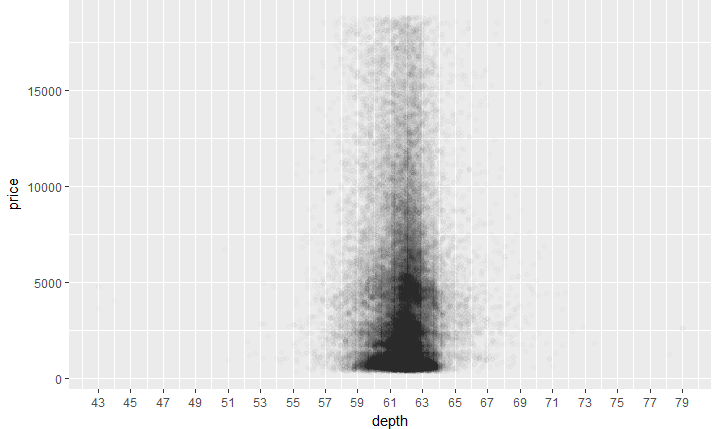
4.价格和深度图像的调整
ggplot(aes(x=depth,y=price),data=diamonds)+

  geom_point(alpha=1/100)+

  scale_x_continuous(breaks = seq(43,79,2))
5.价格和深度的相关性
with(diamonds,cor.test(price,depth,method = 'pearson'))
6.价格和克拉
ggplot(aes(x=carat,y=price),data=diamonds)+

  geom_point()+

  scale_x_continuous(limits = c(0,quantile(diamonds$carat,0.99)))

7.价格和体积
volume <- diamonds$x * diamonds$y * diamonds$z

ggplot(aes(x=volume,y=price),data=diamonds)+

  geom_point()

8.子集相关特性
diamonds$volume <- with(diamonds,x*y*z)

sub_data <- subset(diamonds,volume < 800 & volume >0)

cor.test(sub_data$volume,sub_data$price)
9.调整,价格与体积
ggplot(aes(x=price,y=volume),data=diamonds)+

  geom_point()+

  geom_smooth()

10.平均价格,净度
library(dplyr)

diamondsByClarity <- diamonds %>%

  group_by(clarity) %>%

  summarise(mean_price = mean(as.numeric(price)),

            median_price = median(as.numeric(price)),

            min_price = min(as.numeric(price)),

            max_price = max(as.numeric(price)),

            n= n()) %>%

  arrange(clarity)
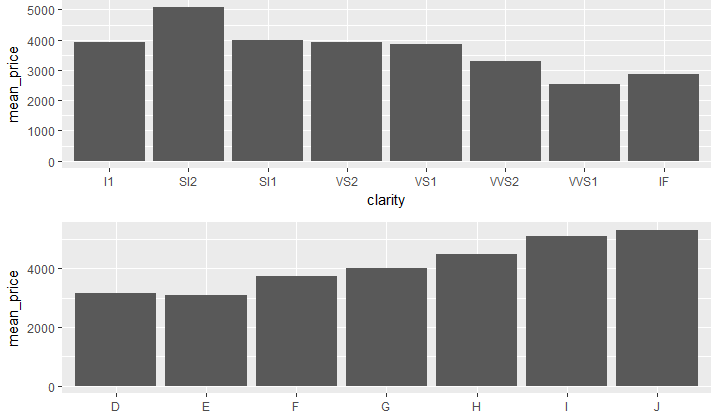
11.平均价格柱状图(探索每种净度和颜色的价格柱状图)
library(dplyr)

library(gridExtra)

diamonds_by_clarity <- group_by(diamonds, clarity)

diamonds_mp_by_clarity <- summarise(diamonds_by_clarity, mean_price = mean(price))

diamonds_by_color <- group_by(diamonds, color)

diamonds_mp_by_color <- summarise(diamonds_by_color, mean_price = mean(price))

p1 <- ggplot(aes(x=clarity,y=mean_price),data=diamonds_mp_by_clarity)+

  geom_bar(stat = "identity")

p2 <- ggplot(aes(x=color,y=mean_price),

             data=diamonds_mp_by_color)+

  geom_bar(stat = "identity")

grid.arrange(p1,p2,ncol=1)
R语言-探索两个变量的更多相关文章
- R语言-探索多个变量
目的: 通过探索文件pseudo_facebook.tsv数据来学会多个变量的分析流程 通过探索diamonds数据集来探索多个变量 通过酸奶数据集探索多变量数据 知识点: 散点图 dplyr汇总数据 ...
- R语言中两个数组(或向量)的外积怎样计算
所谓数组(或向量)a和b的外积,指的是a的每个元素和b的每个元素搭配在一起相乘得到的新元素.当然运算规则也可自己定义.外积运算符为 %o%(注意:百分号中间的字母是小写的字母o).比如: > a ...
- c语言交换两个变量的值
有两个变量a 和b,想要交换它们的值 int a,b; 能不能这样操作呢? b=a; a=b; 不能啊,这样操作的意思是把a的值放到b中,然后b中的值已经被覆盖掉了,已经不是b原来的那个值了,所以是没 ...
- R语言基本操作函数(1)变量的基本操作
1.变量变换 as.array(x),as.data.frame(x),as.numeric(x),as.logical(x),as.complex(x),as.character(x) ...
- R语言里面的循环变量
for (i in 1:10) { print("Hello world") } 以上这条命令执行完之后,变量i会被保存下来!并且,i的值将是10. 程序中有多处循环的时候要非常注 ...
- R语言实现两文件对应行列字符替换(解决正负链统一的问题)
假设存在文件file1.xlsx,其内容如下: 存在文件file2.xlsx,其内容如下: 现在我想从第七列开始,将file2所有的字符替换成file1一样的,即第七.八.九.十列不需要改变,因为fi ...
- 【R语言入门】R语言中的变量与基本数据类型
说明 在前一篇中,我们介绍了 R 语言和 R Studio 的安装,并简单的介绍了一个示例,接下来让我们由浅入深的学习 R 语言的相关知识. 本篇将主要介绍 R 语言的基本操作.变量和几种基本数据类型 ...
- R语言快速入门
R语言是针对统计分析和数据科学的功能全面的开源语言,R的官方网址:http://www.r-project.org/ 在Windows环境下安装R是很方便的 R语言的两种运行模式:交互模式和批处理模 ...
- R语言
什么是R语言编程? R语言是一种用于统计分析和为此目的创建图形的编程语言.不是数据类型,它具有用于计算的数据对象.它用于数据挖掘,回归分析,概率估计等领域,使用其中可用的许多软件包. R语言中的不同数 ...
随机推荐
- python制作wifi破解(跑字典(单线程))
很鸡巴简单,接上一篇文章 import pywifi import sys import time from pywifi import const def test_wifi_connect(pas ...
- JavaWeb(二)cookie与session的应用
前言 前面讲了一堆虚的东西,所以这篇我们来介绍一下cookie和session的应用. 一.使用cookie记住用户名 1.1.思路介绍 1.2.实现代码 1)LoginServlet package ...
- 最长上升子序列(LIS经典变型) dp学习~5
题目连接:http://acm.hdu.edu.cn/showproblem.php?pid=1069 Monkey and Banana Time Limit: 2000/1000 MS (Java ...
- Coins、Tokens、山寨币:区别在哪里
[译] Coins, Tokens & Altcoins: What's the Difference? coin:指"正宗的"数字货币,比如比特币 tokens:比如用 ...
- chorme浏览器的Access-Control-Allow-Origin拦截限制
今天在公司调试一个项目,这个项目的前后端是分离开的,也就是说前后端是在两个站点上的.我负责的前端页面在请求后端数据的时候数据可以拿到,但是chrome安全级别高,自动拦截跨域和站点的数据请求及交互,出 ...
- [学习OpenCV攻略][008][Canny边缘检测]
cvGetSize(输入图片) 得到输入图片的大小 cvCanny(输入图片,输出图片,lowThresh,highThresh,aperture) 把输入图片按设定光圈值进行Canny边缘检测,然后 ...
- Java排序算法分析与实现:快排、冒泡排序、选择排序、插入排序、归并排序(二)
一.概述: 上篇博客介绍了常见简单算法:冒泡排序.选择排序和插入排序.本文介绍高级排序算法:快速排序和归并排序.在开始介绍算法之前,首先介绍高级算法所需要的基础知识:划分.递归,并顺带介绍二分查找算法 ...
- nodejs学习笔记 —— 异步编程解决方案
在js或者node编程中,由于异步的频繁和广度使用,使得回调和嵌套的深度导致编程的体验遇到一些挑战,如果写出优雅和好看的代码,本文主要针对异步编程的主流方案做一些总结 1.事件发布/订阅模式 事件监听 ...
- Use LiveCD to acquire images from a VM
Forensic examiners usually acquire images from suspect's PC or Laptop. What if the target computer i ...
- Linux 安装及配置 Nginx + ftp 服务器
Nginx 安装及配置 一.Nginx 简介: Nginx("engine x") 是一款是由俄罗斯的程序设计师 Igor Sysoev 所开发高性能的 Web和 反向代理服务器, ...