
ASP.NET Core Middleware 抽丝剥茧
一. 宏观概念
ASP.NET Core Middleware是在应用程序处理管道pipeline中用于处理请求和操作响应的组件。
每个组件是pipeline 中的一环。
自行决定是否将请求传递给下一个组件
在处理管道的下个组件执行之前和之后执行业务逻辑
二. 特性和行为
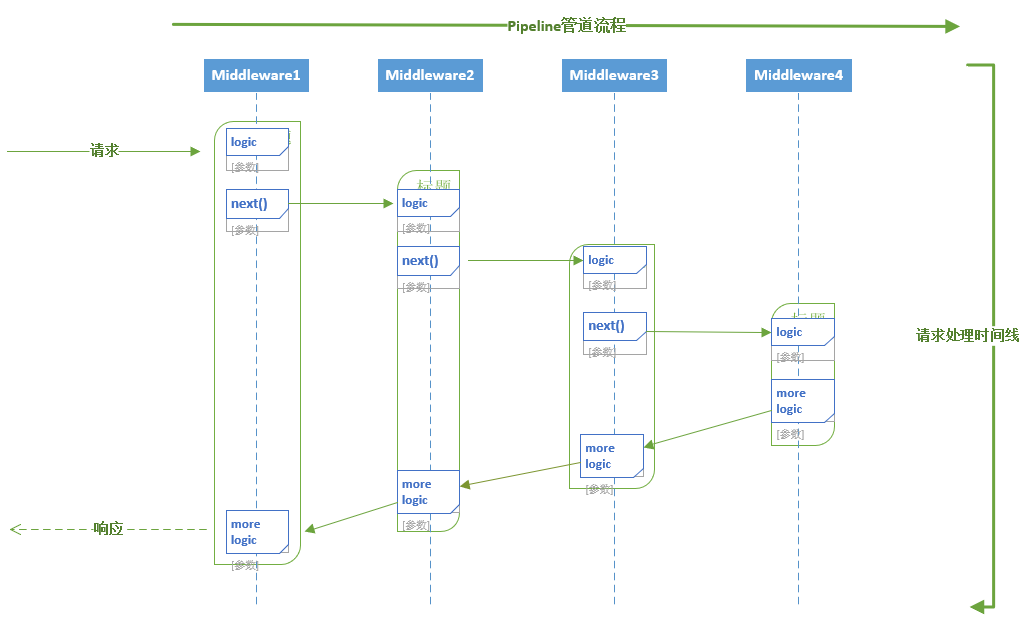
从上图可以看出,请求自进入处理管道,经历了四个中间件,每个中间件都包含后续紧邻中间件 执行委托(next)的引用,同时每个中间件在交棒之前和交棒之后可以自行决定参与一些Http请求和响应的逻辑处理。
每个中间件还可以决定不将请求转发给下一个委托,这称为请求管道的短路。
短路是有必要的,某些特殊中间件比如 StaticFileMiddleware 可以在完成功能之后,避免请求被转发到其他动态处理过程 。
三. 标准Middleware 使用方式
using System.Threading.Tasks;
using Alyio.AspNetCore.ApiMessages;
using Gridsum.WebDissector.Common;
using Microsoft.AspNetCore.Http;

namespace Gridsum.WebDissector
{
    sealed class AuthorizationMiddleware
    {
        private readonly RequestDelegate _next;      // 下一个中间件执行委托的引用

        public AuthorizationMiddleware(RequestDelegate next)
        {
            _next = next;
        }

        public Task Invoke(HttpContext context)      // 贯穿始终的HttpContext对象
        {
            if (context.Request.Path.Value.StartsWith("/api/"))
            {
                return _next(context);
            }
            if (context.User.Identity.IsAuthenticated && context.User().DisallowBrowseWebsite)
            {
                throw new ForbiddenMessage("You are not allow to browse the website.");
            }
            return _next(context);
        }
    }
}

 public static IApplicationBuilder UserAuthorization(this IApplicationBuilder app)
 {
      return app.UseMiddleware<AuthorizationMiddleware>();
 }
 // 启用该中间件,也就是注册该中间件
 app.UserAuthorization();
四. 观察标准中间件的定义方式,带着几个问题探究源码实现
① 中间件传参是怎样完成的: app.UseMiddleware<Authorization>(AuthOption); 我们传参的时候,为什么能自动注入中间件构造函数非第1个参数?
② 编写中间件的时候,为什么必须要定义特定的 Invoke/InvokeAsync 函数?
③ 设定中间件的顺序很重要,中间件的嵌套顺序是怎么确定的 ?
思考标准中间件的行为:
- 输入下一个中间件的执行委托Next;
- 定义当前中间件的执行委托Invoke/InvokeAsync;
每个中间件完成了 Func<RequestDelegate,RequestDelegate>这样的行为;
通过参数next与下一个中间件的执行委托Invoke/InvokeAsync 建立"链式"关系。
public delegate Task RequestDelegate(HttpContext context);
//-----------------节选自 Microsoft.AspNetCore.Builder.UseMiddlewareExtensions------------------
        /// <summary>
        /// Adds a middleware type to the application's request pipeline.
        /// </summary>
        /// <typeparam name="TMiddleware">The middleware type.</typeparam>
        /// <param name="app">The <see cref="IApplicationBuilder"/> instance.</param>
        /// <param name="args">The arguments to pass to the middleware type instance's constructor.</param>
        /// <returns>The <see cref="IApplicationBuilder"/> instance.</returns>
        public static IApplicationBuilder UseMiddleware<TMiddleware>(this IApplicationBuilder app, params object[] args)
        {
            return app.UseMiddleware(typeof(TMiddleware), args);
        }
        /// <summary>
        /// Adds a middleware type to the application's request pipeline.
        /// </summary>
        /// <param name="app">The <see cref="IApplicationBuilder"/> instance.</param>
        /// <param name="middleware">The middleware type.</param>
        /// <param name="args">The arguments to pass to the middleware type instance's constructor.</param>
        /// <returns>The <see cref="IApplicationBuilder"/> instance.</returns>
        public static IApplicationBuilder UseMiddleware(this IApplicationBuilder app, Type middleware, params object[] args)
        {
            if (typeof(IMiddleware).GetTypeInfo().IsAssignableFrom(middleware.GetTypeInfo()))
            {
                // IMiddleware doesn't support passing args directly since it's
                // activated from the container
                )
                {
                    throw new NotSupportedException(Resources.FormatException_UseMiddlewareExplicitArgumentsNotSupported(typeof(IMiddleware)));
                }

                return UseMiddlewareInterface(app, middleware);
            }

            var applicationServices = app.ApplicationServices;
            return app.Use(next =>
            {
                var methods = middleware.GetMethods(BindingFlags.Instance | BindingFlags.Public);                // 执行委托名称被限制为Invoke/InvokeAsync
                var invokeMethods = methods.Where(m =>
                    string.Equals(m.Name, InvokeMethodName, StringComparison.Ordinal)
                    || string.Equals(m.Name, InvokeAsyncMethodName, StringComparison.Ordinal)
                    ).ToArray();

                )
                {
                    throw new InvalidOperationException(Resources.FormatException_UseMiddleMutlipleInvokes(InvokeMethodName, InvokeAsyncMethodName));
                }

                )
                {
                    throw new InvalidOperationException(Resources.FormatException_UseMiddlewareNoInvokeMethod(InvokeMethodName, InvokeAsyncMethodName, middleware));
                }

                ];
                if (!typeof(Task).IsAssignableFrom(methodInfo.ReturnType))
                {
                    throw new InvalidOperationException(Resources.FormatException_UseMiddlewareNonTaskReturnType(InvokeMethodName, InvokeAsyncMethodName, nameof(Task)));
                }

                var parameters = methodInfo.GetParameters();
                 || parameters[].ParameterType != typeof(HttpContext))
                {
                    throw new InvalidOperationException(Resources.FormatException_UseMiddlewareNoParameters(InvokeMethodName, InvokeAsyncMethodName, nameof(HttpContext)));
                }

                ];
                ctorArgs[] = next;
                Array.Copy(args, , ctorArgs, , args.Length);                //  通过反射形成中间件实例的时候,构造函数第一个参数被指定为 下一个中间件的执行委托                var instance = ActivatorUtilities.CreateInstance(app.ApplicationServices, middleware, ctorArgs);
                )
                {
                    return (RequestDelegate)methodInfo.CreateDelegate(typeof(RequestDelegate), instance);
                }
                               // 当前执行委托除了可指定HttpContext参数以外, 还可以注入更多的依赖参数
                var factory = Compile<object>(methodInfo, parameters);

                return context =>
                {
                    var serviceProvider = context.RequestServices ?? applicationServices;
                    if (serviceProvider == null)
                    {
                        throw new InvalidOperationException(Resources.FormatException_UseMiddlewareIServiceProviderNotAvailable(nameof(IServiceProvider)));
                    }

                    return factory(instance, context, serviceProvider);
                };
            });
        }

//-------------------节选自 Microsoft.AspNetCore.Builder.Internal.ApplicationBuilder-------------------
private readonly IList<Func<RequestDelegate, RequestDelegate>> _components = new List<Func<RequestDelegate, RequestDelegate>>();

publicIApplicationBuilder Use(Func<RequestDelegate,RequestDelegate> middleware)
{
    this._components.Add(middleware);
    return this;
}

public RequestDelegate Build()
{
     RequestDelegate app = context =>
     {
         context.Response.StatusCode = ;
         return Task.CompletedTask;
     };

     foreach (var component in _components.Reverse())
    {
        app = component(app);
    }

   return app;}
通过以上代码我们可以看出:
- 注册中间件的过程实际上,是给一个 Type为List<Func<RequestDelegate, RequestDelegate>> 的容器依次添加元素的过程;
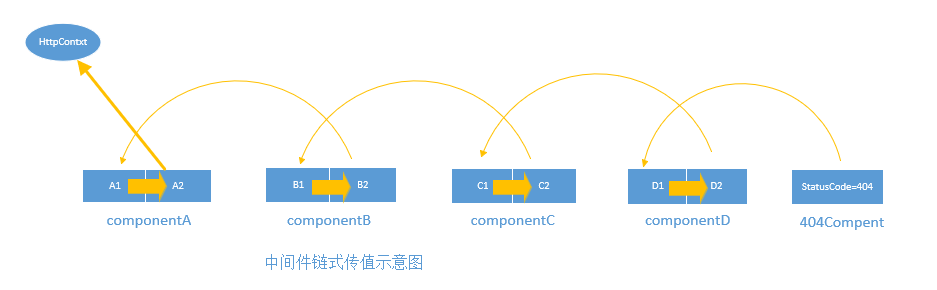
- 容器中每个元素对应每个中间件的行为委托Func<RequestDelegate, RequestDelegate>, 这个行为委托包含2个关键行为:输入下一个中间件的执行委托next:RequestDelegate, 完成当前中间件的Invoke函数: RequestDelegate;
通过build方法完成前后中间件的链式传值关系
分析源码:回答上面的问题:
① 使用反射构造中间件的时候,第一个参数Array[0] 是下一个中间件的执行委托
② 当前中间件执行委托 函数名称被限制为: Invoke/InvokeAsync, 函数支持传入除HttpContext之外的参数
③ 按照代码顺序添加进入 _components容器, 通过后一个中间件的执行委托 ------> 前一个中间件的输入执行委托建立链式关系。
附:非标准中间件的用法
短路中间件、 分叉中间件、条件中间件
整个处理管道的形成,存在一些管道分叉或者临时插入中间件的行为,一些重要方法可供使用
Use方法是一个注册中间件的简便写法
Run方法是一个约定,一些中间件使用Run方法来完成管道的结尾
Map扩展方法:请求满足指定路径,将会执行分叉管道,强调满足 path
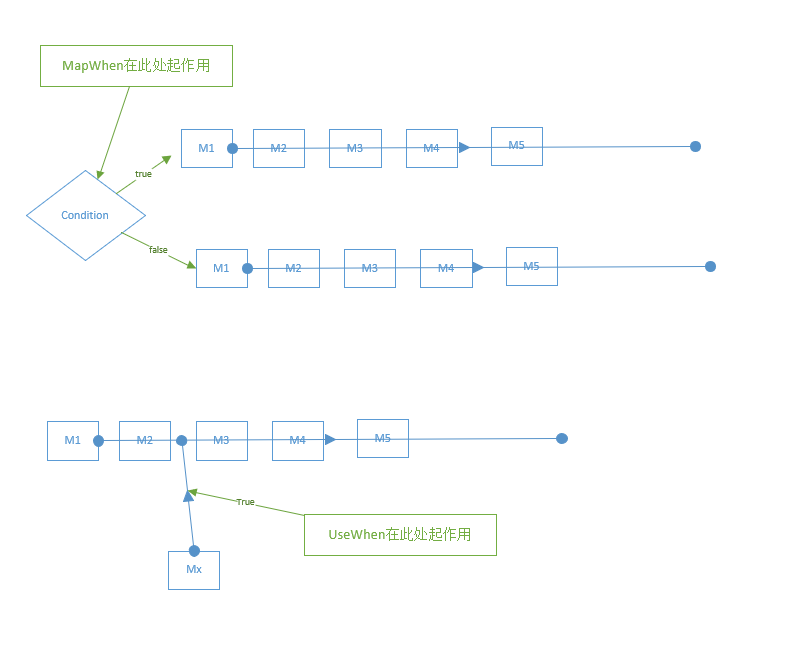
MapWhen方法:HttpContext满足条件,将会执行分叉管道:
UseWhen方法:HttpContext满足条件 则插入中间件
感谢您的认真阅读,如有问题请大胆斧正,如果您觉得本文对你有用,不妨右下角点个 或加关注。
或加关注。
本文版权归作者所有,欢迎转载,但未经作者同意必须保留此段声明,且在文章页面明显位置注明本文的作者及原文链接,否则保留追究法律责任的权利。
ASP.NET Core Middleware 抽丝剥茧的更多相关文章
- ASP.NET Core Middleware (转载)
What is Middleware? Put simply, you use middleware components to compose the functionality of your A ...
- Prerender Application Level Middleware - ASP.NET Core Middleware
In the previous post Use Prerender to improve AngularJS SEO, I have explained different solutions at ...
- [ASP.NET Core] Middleware
前言 本篇文章介绍ASP.NET Core里,用来处理HTTP封包的Middleware,为自己留个纪录也希望能帮助到有需要的开发人员. ASP.NET Core官网 结构 在ASP.NET Core ...
- ASP.NET Core Middleware管道介绍
public void Configure(IApplicationBuilder app, IHostingEnvironment env) { app.Use(async (context, ne ...
- 翻译 - ASP.NET Core 基本知识 - 中间件(Middleware)
翻译自 https://docs.microsoft.com/en-us/aspnet/core/fundamentals/middleware/?view=aspnetcore-5.0 中间件是集成 ...
- [转]Publishing and Running ASP.NET Core Applications with IIS
本文转自:https://weblog.west-wind.com/posts/2016/Jun/06/Publishing-and-Running-ASPNET-Core-Applications- ...
- 如何一秒钟从头构建一个 ASP.NET Core 中间件
前言 其实地上本没有路,走的人多了,也便成了路. -- 鲁迅 就像上面鲁迅说的那样,其实在我们开发中间件的过程中,微软并没有制定一些策略或者文档来约束你如何编写一个中间件程序, 但是其中却存在者一些最 ...
- 极简版ASP.NET Core学习路径及教程
绝承认这是一个七天速成教程,即使有这个效果,我也不愿意接受这个名字.嗯. 这个路径分为两块: 实践入门 理论延伸 有了ASP.NET以及C#的知识以及项目经验,我们几乎可以不再需要了解任何新的知识就开 ...
- asp.net core中写入自定义中间件
首先要明确什么是中间件?微软官方解释:https://docs.microsoft.com/zh-cn/aspnet/core/fundamentals/middleware/?tabs=aspnet ...
随机推荐
- 一步一步理解 python web 框架,才不会从入门到放弃
要想清楚地理解 python web 框架,首先要清楚浏览器访问服务器的过程. 用户通过浏览器浏览网站的过程: 用户浏览器(socket客户端) 3. 客户端往服务端发消息 6. 客户端接收消息 7. ...
- MySQL使用细节
************************************************************************ MySQL使用细节,包括部分常用函数以及注意如何提高数 ...
- BinaryOperator<T>接口的用法示例+BiFunction
转自http://www.tpyyes.com/a/java/2017/1015/285.html 转自https://blog.csdn.net/u014331288/article/details ...
- 【Floyd】BZOJ1491: [NOI2007]社交网络
Description Solution n<=100自然联想Floyd 设两个数组d[n][n]存最短距离,t[n][n]存最短路径条数 更新d的时候顺便更新t,乘法原理 if(d[i][ ...
- BZOJ_3048_[Usaco2013 Jan]Cow Lineup _双指针
BZOJ_3048_[Usaco2013 Jan]Cow Lineup _双指针 Description Farmer John's N cows (1 <= N <= 100,000) ...
- php与html实现交互的基本操作
今天我们来实现php与html页面注册和登录的效果.中国有句古话叫: 第一步:我们来了解一些php的基本格式. <?php php代码 ?> 第二步:了解php与js的一些基本区别 我们在 ...
- 招商信诺生产jvm 配置和自己的eclipse jdk配置
command=/usr/bin/java -jar -Xms512m -Xmx512m -Xss256K -XX:PermSize=256m -XX:MaxPermSize=512m -XX:+Us ...
- 你不可不知的iOS与Android差异点!
1.运行机制的区别 Android:沙盒运行机制,采用真后台运行,将所有的应用都保存在RAM中,按home键,程序被挂在了后台,实际未退出,因程序在后台运行,所以可以收到推送消息,导致内存越用越低,越 ...
- Android进阶加密-第1章-Android系统架构-读书笔记
第 1 章 Android 系统架构 1.1 Android 系统架构 Android 系统架构分为五层,从上到下依次是应用层.应用框架层.系统运行库层.硬件抽象层和 Linux 内核层. 应用层(S ...
- Linux - 修改系统的max open files、max user processes (附ulimit的使用方法)
目录 1 问题说明 2 修改max open files 3 修改max user processes 4 附录: ulimit命令说明 1 问题说明 Linux 系统默认的max open file ...