
【前端】Vue2全家桶案例《看漫画》之四、漫画页
转载请注明出处:http://www.cnblogs.com/shamoyuu/p/vue_vux_app_4.html
项目github地址:https://github.com/shamoyuu/vue-vux-iconan
上一章我们引入了vuex,这一章我们就来用一下。
我们底部的导航在进入漫画页的时候会隐藏,退出来之后会重新显示,所以我们给它加一个参数来控制。
首先在store.js文件里加一个变量ifShowNavBar: true,然后在App.vue里引入,并给app-footer添加v-show="ifShowNavBar"。
这样以后我们在其他页面控制vuex的ifShowNavBar变量的时候,就会自动处理UI了。
然后我们新建一个组件,只用来控制这个变量,在组件初始化之前设置为false,在组件销毁后设置为true,这样以后不想展示底部导航条的页面引入这个组件就好了。
新建一个文件components/common/HideNavBar.vue
<template>

    <div></div>

</template>

<script>

export default {

    name: "HideNavBar",

    beforeMount() {

        //创建之前

        this.$store.commit("hideNavBar");

    },

    destroyed() {

        //销毁完成

        this.$store.commit("showNavBar");

    }

};

</script>

<style scoped>

div {

    display: none;

}

</style>
有些人习惯把这样的功能做成指令,但是vuex只推荐在组件中调用,所以。
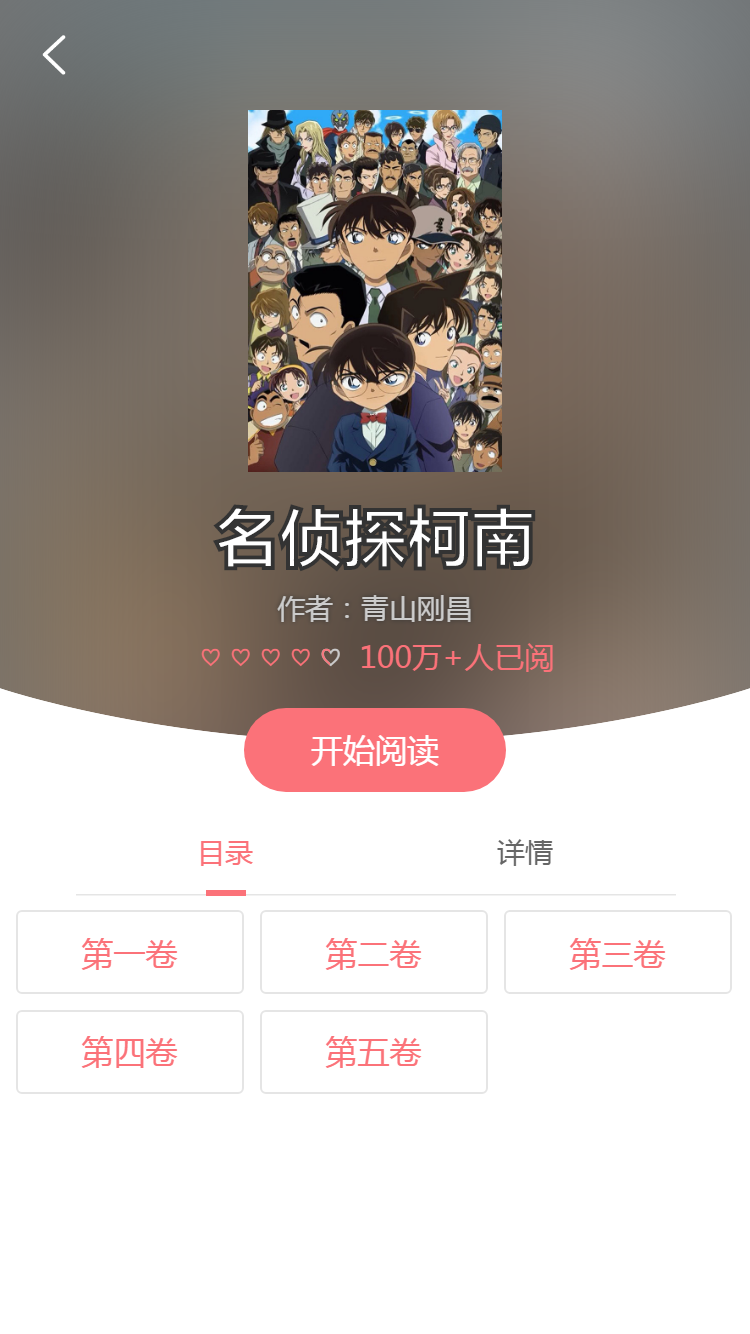
然后我们开始开发漫画页吧,新建components/Opus.vue文件
<template>

    <div class="opus-view">

        <hide-nav-bar></hide-nav-bar>

        <header-bar></header-bar>

        <div class="opus-body">

            <img :src="opus.cover" class="opus-body-content-bcg-img">

            <div class="opus-body-content">

                <img :src="opus.cover" class="opus-body-content-img">

                <div class="opus-body-content-txt">

                    <h1 class="opus-name">{{opus.name}}</h1>

                    <div class="opus-author">作者:{{opus.author}}</div>

                    <div>

                        <rater v-model="opus.score" star="♡" active-color="#fb7279" :font-size="15" :margin="0" disabled></rater>

                        <span class="opus-popularity">{{opus.popularity}}人已阅</span>

                    </div>

                </div>

            </div>

            <div class="opus-body-jaw">

                <button @click="read" class="read-btn" type="button">开始阅读</button>

            </div>

        </div>

        <div class="button-tab-area">

            <tab custom-bar-width="20px">

                <tab-item selected @on-item-click="onItemClick">目录</tab-item>

                <tab-item @on-item-click="onItemClick">详情</tab-item>

            </tab>

        </div>

        <div class="chapter-area" v-show="tabIndex == 0">

            <div class="chapter" v-for="item in chapters" :key="item.id">{{item.name}}</div>

        </div>

        <div class="summary-area" v-show="tabIndex == 1">

            {{opus.summary}}

        </div>

    </div>

</template>

<script>

import { Tab, TabItem, Flexbox, FlexboxItem, Rater } from "vux";

import HideNavBar from "@/components/common/HideNavBar";

import HeaderBar from "@/components/common/HeaderBar";

console.info(this.$score);

export default {

    data() {

        return {

            opus: {

                name: "名侦探柯南",

                summary:

                    "高中生侦探工藤新一,被称为“日本警察的救世主”、“平成年代的福尔摩斯”。一次在与青梅竹马的女友毛利兰...",

                author: "青山刚昌",

                type: 0,

                cover: "http://iconan.bj.bcebos.com/1%2Fcover.jpg",

                popularity: "100万+",

                score: 4.5

            },

            chapters: [

                {

                    id: 1,

                    name: "第一卷"

                },

                {

                    id: 2,

                    name: "第二卷"

                },

                {

                    id: 3,

                    name: "第三卷"

                },

                {

                    id: 4,

                    name: "第四卷"

                },

                {

                    id: 5,

                    name: "第五卷"

                }

            ],

            tabIndex: 0

        };

    },

    methods: {

        read: function() {

            console.info("开始阅读");

        },

        onItemClick: function(index) {

            this.tabIndex = index;

        }

    },

    mounted: function() {},

    components: {

        Tab,

        TabItem,

        HideNavBar,

        HeaderBar,

        Flexbox,

        FlexboxItem,

        Rater

    }

};

</script>

<style scoped lang="less">

.opus-view {

    position: relative;

}

.opus-body {

    position: relative;

    width: 100%;

    height: 107.6vw;

    background: #717171;

}

.opus-body-content {

    position: relative;

    padding-top: 14.7vw;

    text-align: center;

}

.opus-body-content-bcg-img {

    position: absolute;

    width: 100%;

    vertical-align: middle;

    filter: blur(50px);

}

.opus-body-content-img {

    width: 34vw;

}

.opus-name {

    font-size: 8.53vw;

    color: #fff;

    -webkit-text-stroke: 2px #333;

}

.opus-author {

    font-size: 3.73vw;

    color: #ccc;

    text-shadow: 0px 0px 3px #333;

}

.opus-body-jaw {

    position: absolute;

    bottom: 0;

    width: 100%;

    height: 16vw;

    background: url("../assets/images/opus-main-top.png") 0 0 no-repeat;

    background-size: 100%;

    text-align: center;

}

.read-btn {

    padding: 2.8vw 9vw;

    margin-top: 10px;

    border-radius: 100px;

    background: #fb7279;

    font-size: 4.27vw;

    color: #fff;

}

.button-tab-area {

    position: relative;

    padding: 0 10vw;

    background: #fff;

}

.chapter-area {

    position: relative;

    justify-content: space-between;

    flex-flow: row wrap;

    background: #fff;

}

.chapter {

    display: inline-block;

    width: 27vw;

    padding: 2vw 1.5vw;

    margin: 2vw 0 0 2vw;

    border: 1px solid #e5e5e5;

    border-radius: 3px;

    text-align: center;

    color: #fb7279;

}

.summary-area {

    position: relative;

    padding: 4vw;

    background: #fff;

}

.opus-popularity {

    font-size: 15px;

    color: #fb7279;

}

</style>
这里面还引入了一个公共的头部,用来返回的,新建components/common/HeaderBar.vue文件
<template>

    <div class="header">

        <button type="button" class="back-btn" @click="back"></button>

    </div>

</template>

<script>

export default {

    name: "HeaderBar",

    data() {

        return {};

    },

    methods: {

        back() {

            this.$router.back();

        }

    }

};

</script>

<style scoped>

.header {

    position: absolute;

    top: 0;

    left: 0;

    padding: 12px;

    width: 100%;

    z-index: 1;

}

.back-btn {

    display: inline-block;

    position: relative;

    width: 30px;

    height: 30px;

    background: url("../../assets/images/return.png") 0 0 no-repeat;

    background-size: 30px;

}

</style>
【前端】Vue2全家桶案例《看漫画》之四、漫画页的更多相关文章
- 【前端】Vue2全家桶案例《看漫画》之一、添加四个导航页
转载请注明出处:http://www.cnblogs.com/shamoyuu/p/vue_vux_app_1.html 项目github地址:https://github.com/shamoyuu/ ...
- 【前端】Vue2全家桶案例《看漫画》之番外篇、express上传漫画(可选)
转载请注明出处:http://www.cnblogs.com/shamoyuu/p/vue_vux_app_extra_1.html 项目github地址:https://github.com/sha ...
- 【前端】Vue2全家桶案例《看漫画》之六、图片阅读页
转载请注明出处:http://www.cnblogs.com/shamoyuu/p/vue_vux_app_6.html 项目github地址:https://github.com/shamoyuu/ ...
- 【前端】Vue2全家桶案例《看漫画》之二、完成首页基本样式
转载请注明出处:http://www.cnblogs.com/shamoyuu/p/vue_vux_app_2.html 项目github地址:https://github.com/shamoyuu/ ...
- 【前端】Vue2全家桶案例《看漫画》之七、webpack插件开发——自动替换服务器API-URL
转载请注明出处:http://www.cnblogs.com/shamoyuu/p/vue_vux_app_7.html 项目github地址:https://github.com/shamoyuu/ ...
- 【前端】Vue2全家桶案例《看漫画》之五、引入axios
转载请注明出处:http://www.cnblogs.com/shamoyuu/p/vue_vux_app_5.html 项目github地址:https://github.com/shamoyuu/ ...
- 【前端】Vue2全家桶案例《看漫画》之三、引入vuex
转载请注明出处:http://www.cnblogs.com/shamoyuu/p/vue_vux_app_3.html 项目github地址:https://github.com/shamoyuu/ ...
- Vue2全家桶+Element搭建的PC端在线音乐网站
目录 1,前言 2,已有功能 3,使用 4,目录结构 5,页面效果 登录页 首页 排行榜 歌单列表 歌单详情 歌手列表 歌手详情 MV列表 MV详情 搜索页 播放器 1,前言 项目基于Vue2全家桶及 ...
- Vue2全家桶之一:vue-cli(vue脚手架)超详细教程
本文转载于:https://www.jianshu.com/p/32beaca25c0d 都说Vue2简单上手容易,的确,看了官方文档确实觉得上手很快,除了ES6语法和webpack的配置让你感到 ...
随机推荐
- Matlab实用技巧
1 Matlab Cell 编程模式 在一个长长的脚本m文件中,可能需要对其中的一段反复修改,查看执行效果,这时,cell模式就非常有用了.cell模式相当于将其中的代码拷贝到命令窗口中运行.两个% ...
- cache.config文件配置模板
# # cache.config # # The purpose of this file is to alter caching parameters of # specific objects o ...
- oralce plsql案例练习
以下plsql程序用的scott用户的dept,emp表. 案例1 --查询80,81,82,87年员工入职人数 set serveroutput on declare cursor cemp is ...
- ferror,clearerr和EOF含义
1.我们并不是实时操纵文件,也不是实时生效,它依赖于缓冲区.非缓冲模式编程与常规区别,就是实时与不实时的区别. 2.//fgetc fputc, fgets fputs, fgetwc fputwc, ...
- Linux面试题(2)
一.Linux操作系统知识 1.常见的Linux发行版本都有什么?你最擅长哪一个?它的官网网站是什么?说明你擅长哪一块? Centos,Ubunto,fedora,openSUSE,Debian等,擅 ...
- vc++调用web服务传输文件
bool webService::UploadFile(LPWSTR appKey, LPWSTR fileName, const int len, unsigned char * buff) { t ...
- wxPython实现在浏览器中打开链接
需要用到webbrowser模块 代码超简单: import webbrowserwebbrowser.open('http://www.wangxing.com') webbrowser.open( ...
- Jquery之isPlainObject源码分析
今天对Jquery中 isPlainObject 源码分析. 1. isPlainObject 方法的作用: 用来判断传入参数,是否是对象. 2. 源码分析:isPlainObject: funct ...
- 【linux之文件查看,操作】
一.shell如何处理命令 1.shell会根据在命令中出现的空格字符,将命令划分为多个部分 2.判断第一个字段是内部命令还是外部命令 内部命令:内置于shell的命令(shell builtin) ...
- 洛谷 [P1198] 最大数
首先这是一道线段树裸题,但是线段树长度不确定,那么我们可以在建树的时候,将每一个节点初始化为-INF,每次往队尾加一个元素即一次单节点更新,注意本题的数据范围,其实并不用开 long long,具体请 ...