
Spark RDDs vs DataFrames vs SparkSQL
简介
Spark的 RDD、DataFrame 和 SparkSQL的性能比较。
2方面的比较
单条记录的随机查找
aggregation聚合并且sorting后输出
使用以下Spark的三种方式来解决上面的2个问题,对比性能。
Using RDD’s
Using DataFrames
Using SparkSQL
数据源
在HDFS中3个文件中存储的9百万不同记录
- 每条记录11个字段
总大小 1.4 GB
实验环境
HDP 2.4
Hadoop version 2.7
Spark 1.6
HDP Sandbox
测试结果
原始的RDD 比 DataFrames 和 SparkSQL性能要好
DataFrames 和 SparkSQL 性能差不多
使用DataFrames 和 SparkSQL 比 RDD 操作更直观
Jobs都是独立运行,没有其他job的干扰
2个操作
Random lookup against 1 order ID from 9 Million unique order ID's
GROUP all the different products with their total COUNTS and SORT DESCENDING by product name
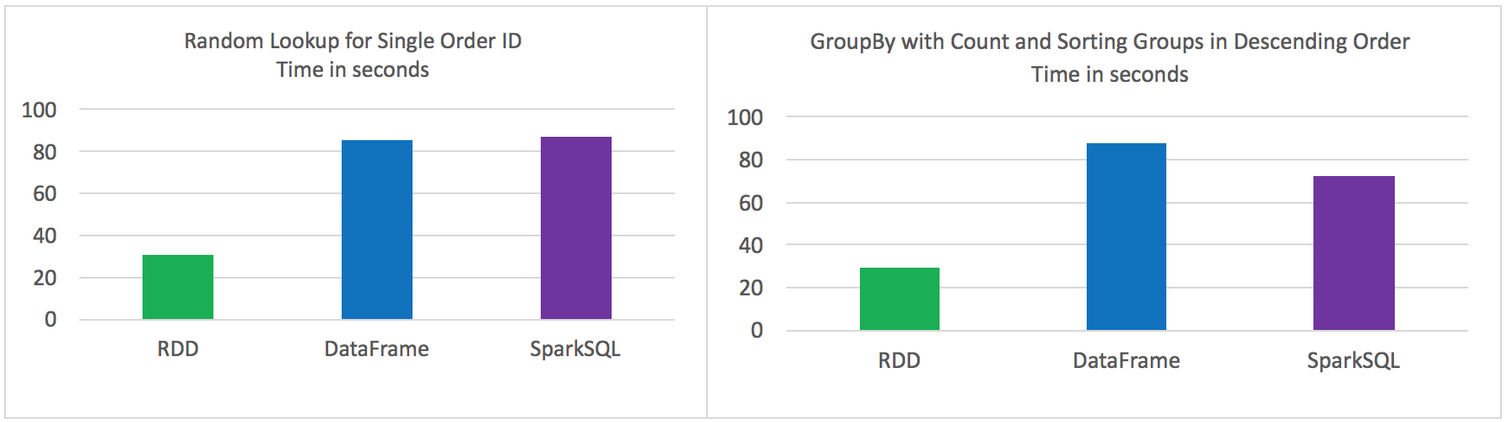
代码
RDD Random Lookup
#!/usr/bin/env python

from time import time

from pyspark import SparkConf, SparkContext

conf = (SparkConf()

  .setAppName("rdd_random_lookup")

  .set("spark.executor.instances", "")

  .set("spark.executor.cores", 2)

  .set("spark.dynamicAllocation.enabled", "false")

  .set("spark.shuffle.service.enabled", "false")

  .set("spark.executor.memory", "500MB"))

sc = SparkContext(conf = conf)

t0 = time()

path = "/data/customer_orders*"

lines = sc.textFile(path)

## filter where the order_id, the second field, is equal to 96922894

print lines.map(lambda line: line.split('|')).filter(lambda line: int(line[1]) == 96922894).collect()

tt = str(time() - t0)

print "RDD lookup performed in " + tt + " seconds"
DataFrame Random Lookup
#!/usr/bin/env python

from time import time

from pyspark.sql import *

from pyspark import SparkConf, SparkContext

conf = (SparkConf()

  .setAppName("data_frame_random_lookup")

  .set("spark.executor.instances", "")

  .set("spark.executor.cores", 2)

  .set("spark.dynamicAllocation.enabled", "false")

  .set("spark.shuffle.service.enabled", "false")

  .set("spark.executor.memory", "500MB"))

sc = SparkContext(conf = conf)

sqlContext = SQLContext(sc)

t0 = time()

path = "/data/customer_orders*"

lines = sc.textFile(path)

## create data frame

orders_df = sqlContext.createDataFrame( \

lines.map(lambda l: l.split("|")) \

.map(lambda p: Row(cust_id=int(p[0]), order_id=int(p[1]), email_hash=p[2], ssn_hash=p[3], product_id=int(p[4]), product_desc=p[5], \

country=p[6], state=p[7], shipping_carrier=p[8], shipping_type=p[9], shipping_class=p[10]  ) ) )

## filter where the order_id, the second field, is equal to 96922894

orders_df.where(orders_df['order_id'] == 96922894).show()

tt = str(time() - t0)

print "DataFrame performed in " + tt + " seconds"
SparkSQL Random Lookup
#!/usr/bin/env python

from time import time

from pyspark.sql import *

from pyspark import SparkConf, SparkContext

conf = (SparkConf()

  .setAppName("spark_sql_random_lookup")

  .set("spark.executor.instances", "")

  .set("spark.executor.cores", 2)

  .set("spark.dynamicAllocation.enabled", "false")

  .set("spark.shuffle.service.enabled", "false")

  .set("spark.executor.memory", "500MB"))

sc = SparkContext(conf = conf)

sqlContext = SQLContext(sc)

t0 = time()

path = "/data/customer_orders*"

lines = sc.textFile(path)

## create data frame

orders_df = sqlContext.createDataFrame( \

lines.map(lambda l: l.split("|")) \

.map(lambda p: Row(cust_id=int(p[0]), order_id=int(p[1]), email_hash=p[2], ssn_hash=p[3], product_id=int(p[4]), product_desc=p[5], \

country=p[6], state=p[7], shipping_carrier=p[8], shipping_type=p[9], shipping_class=p[10]  ) ) )

## register data frame as a temporary table

orders_df.registerTempTable("orders")

## filter where the customer_id, the first field, is equal to 96922894

print sqlContext.sql("SELECT * FROM orders where order_id = 96922894").collect()

tt = str(time() - t0)

print "SparkSQL performed in " + tt + " seconds"
RDD with GroupBy, Count, and Sort Descending
#!/usr/bin/env python

from time import time

from pyspark import SparkConf, SparkContext

conf = (SparkConf()

  .setAppName("rdd_aggregation_and_sort")

  .set("spark.executor.instances", "")

  .set("spark.executor.cores", 2)

  .set("spark.dynamicAllocation.enabled", "false")

  .set("spark.shuffle.service.enabled", "false")

  .set("spark.executor.memory", "500MB"))

sc = SparkContext(conf = conf)

t0 = time()

path = "/data/customer_orders*"

lines = sc.textFile(path)

counts = lines.map(lambda line: line.split('|')) \

.map(lambda x: (x[5], 1)) \

.reduceByKey(lambda a, b: a + b) \

.map(lambda x:(x[1],x[0])) \

.sortByKey(ascending=False)

for x in counts.collect():

  print x[1] + '\t' + str(x[0])

tt = str(time() - t0)

print "RDD GroupBy performed in " + tt + " seconds"
DataFrame with GroupBy, Count, and Sort Descending
#!/usr/bin/env python

from time import time

from pyspark.sql import *

from pyspark import SparkConf, SparkContext

conf = (SparkConf()

  .setAppName("data_frame_aggregation_and_sort")

  .set("spark.executor.instances", "")

  .set("spark.executor.cores", 2)

  .set("spark.dynamicAllocation.enabled", "false")

  .set("spark.shuffle.service.enabled", "false")

  .set("spark.executor.memory", "500MB"))

sc = SparkContext(conf = conf)

sqlContext = SQLContext(sc)

t0 = time()

path = "/data/customer_orders*"

lines = sc.textFile(path)

## create data frame

orders_df = sqlContext.createDataFrame( \

lines.map(lambda l: l.split("|")) \

.map(lambda p: Row(cust_id=int(p[0]), order_id=int(p[1]), email_hash=p[2], ssn_hash=p[3], product_id=int(p[4]), product_desc=p[5], \

country=p[6], state=p[7], shipping_carrier=p[8], shipping_type=p[9], shipping_class=p[10]  ) ) )

results = orders_df.groupBy(orders_df['product_desc']).count().sort("count",ascending=False)

for x in results.collect():

  print x

tt = str(time() - t0)

print "DataFrame performed in " + tt + " seconds"
SparkSQL with GroupBy, Count, and Sort Descending
#!/usr/bin/env python

from time import time

from pyspark.sql import *

from pyspark import SparkConf, SparkContext

conf = (SparkConf()

  .setAppName("spark_sql_aggregation_and_sort")

  .set("spark.executor.instances", "")

  .set("spark.executor.cores", 2)

  .set("spark.dynamicAllocation.enabled", "false")

  .set("spark.shuffle.service.enabled", "false")

  .set("spark.executor.memory", "500MB"))

sc = SparkContext(conf = conf)

sqlContext = SQLContext(sc)

t0 = time()

path = "/data/customer_orders*"

lines = sc.textFile(path)

## create data frame

orders_df = sqlContext.createDataFrame(lines.map(lambda l: l.split("|")) \

.map(lambda r: Row(product=r[5])))

## register data frame as a temporary table

orders_df.registerTempTable("orders")

results = sqlContext.sql("SELECT product, count(*) AS total_count FROM orders GROUP BY product ORDER BY total_count DESC")

for x in results.collect():

  print x

tt = str(time() - t0)

print "SparkSQL performed in " + tt + " seconds"
原文:https://community.hortonworks.com/articles/42027/rdd-vs-dataframe-vs-sparksql.html
Spark RDDs vs DataFrames vs SparkSQL的更多相关文章
- Spark 官方文档(5)——Spark SQL,DataFrames和Datasets 指南
Spark版本:1.6.2 概览 Spark SQL用于处理结构化数据,与Spark RDD API不同,它提供更多关于数据结构信息和计算任务运行信息的接口,Spark SQL内部使用这些额外的信息完 ...
- Effective Spark RDDs with Alluxio【转】
转自:http://kaimingwan.com/post/alluxio/effective-spark-rdds-with-alluxio 1. 介绍 2. 引言 3. Alluxio and S ...
- Spark(十二)SparkSQL简单使用
一.SparkSQL的进化之路 1.0以前: Shark 1.1.x开始:SparkSQL(只是测试性的) SQL 1.3.x: SparkSQL(正式版本)+Datafram ...
- Spark入门实战系列--6.SparkSQL(上)--SparkSQL简介
[注]该系列文章以及使用到安装包/测试数据 可以在<倾情大奉送--Spark入门实战系列>获取 .SparkSQL的发展历程 1.1 Hive and Shark SparkSQL的前身是 ...
- Spark入门实战系列--6.SparkSQL(中)--深入了解SparkSQL运行计划及调优
[注]该系列文章以及使用到安装包/测试数据 可以在<倾情大奉送--Spark入门实战系列>获取 1.1 运行环境说明 1.1.1 硬软件环境 线程,主频2.2G,10G内存 l 虚拟软 ...
- Spark入门实战系列--6.SparkSQL(下)--Spark实战应用
[注]该系列文章以及使用到安装包/测试数据 可以在<倾情大奉送--Spark入门实战系列>获取 .运行环境说明 1.1 硬软件环境 线程,主频2.2G,10G内存 l 虚拟软件:VMwa ...
- 一个spark SQL和DataFrames的故事
package com.lin.spark import org.apache.spark.sql.{Row, SparkSession} import org.apache.spark.sql.ty ...
- Apache Spark 2.2.0 中文文档 - Spark SQL, DataFrames and Datasets Guide | ApacheCN
Spark SQL, DataFrames and Datasets Guide Overview SQL Datasets and DataFrames 开始入门 起始点: SparkSession ...
- Spark记录-SparkSql官方文档中文翻译(部分转载)
1 概述(Overview) Spark SQL是Spark的一个组件,用于结构化数据的计算.Spark SQL提供了一个称为DataFrames的编程抽象,DataFrames可以充当分布式SQL查 ...
随机推荐
- 前端touch事件方向的判断
移动端touch事件判断滑屏手势的方向 方法一 当开始一个touchstart事件的时候,获取此刻手指的横坐标startX和纵坐标startY: 当触发touchmove事件时,在获取此时手指的横坐标 ...
- MAVEN打包报错:com.sun.net.ssl.internal.ssl;sun.misc.BASE64Decoder;程序包 javax.crypto不存在处理办法
以下是pom.xml里面的完整配置,重点是红色的部分,原因是引用的jar是jre下边的,而打包环境用的是jdk下边的jar,所以引用下就OK了.<build> <plugins> ...
- JavaScript(第二十四天)【事件对象】
JavaScript事件的一个重要方面是它们拥有一些相对一致的特点,可以给你的开发提供更多的强大功能.最方便和强大的就是事件对象,他们可以帮你处理鼠标事件和键盘敲击方面的情况,此外还可以修改一般事件的 ...
- 用Python登录好友QQ空间点赞
记得之前跟我女票说过,说要帮她空间点赞,点到999就不点了.刚开始还能天天记得,但是后来事情一多,就难免会忘记,前两天点赞的时候忽然觉得这样好枯燥啊,正好也在学Python,就在想能不能有什么方法能自 ...
- 第十四,十五周PTA作业
1.第十四周part1 7-3 #include<stdio.h> int main() { int n; scanf("%d",&n); int a[n]; ...
- 2017-2018-1 1623 bug终结者 冲刺007
bug终结者 冲刺007 by 20162302 杨京典 今日任务:排行榜界面 排行榜界面,选项界面 简要说明 排行榜界面用于展示用户通关是所使用的步数和时间,选项界面可以调整背景音乐的开关.选择砖块 ...
- 201621123057 《Java程序设计》第6周学习总结
1. 本周学习总结 1.1 面向对象学习暂告一段落,请使用思维导图,以封装.继承.多态为核心概念画一张思维导图或相关笔记,对面向对象思想进行一个总结. 注1:关键词与内容不求多,但概念之间的联系要清晰 ...
- 201621123068 Week02-Java基本语法与类库
1. 本周学习总结 1.1 当浮点数和整数放到一起运算时,java一般会将整数转化为浮点数然后进行浮点数计算,但是这样得出的结果通常与数学运算有一定误差,浮点数精确计算需要使用BigDecimal类 ...
- XML使用练习
#!/usr/bin/env python # -*- coding:utf-8 -*- import requests from xml.etree import ElementTree as ET ...
- Hibernate实体类注解解释
Hibernate注解1.@Entity(name="EntityName")必须,name为可选,对应数据库中一的个表2.@Table(name="",cat ...