
Recording and playing back data
Recording and playing back data
This tutorial will teach you how to record data from a running ROS system into a .bag file, and then to play back the data to produce similar behavior in a running system.
rostopic list -v

//This should yield the following output:

Published topics:

 * /turtle1/color_sensor [turtlesim/Color] 1 publisher

 * /turtle1/cmd_vel [geometry_msgs/Twist] 1 publisher

 * /rosout [rosgraph_msgs/Log] 2 publishers

 * /rosout_agg [rosgraph_msgs/Log] 1 publisher

 * /turtle1/pose [turtlesim/Pose] 1 publisher

Subscribed topics:

 * /turtle1/cmd_vel [geometry_msgs/Twist] 1 subscriber

 * /rosout [rosgraph_msgs/Log] 1 subscriber
只有topic list中列出的类型的msg才可以被record到data log file。
The list of published topics are the only message types that could potentially be recorded in the data log file, as only published messages are recorded.
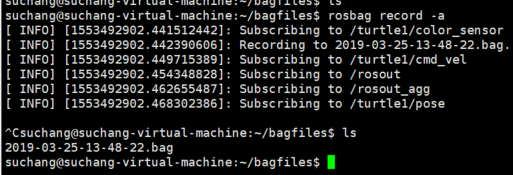
rosbag用法如下:
suchang@suchang-virtual-machine:~/bagfiles$ rosbag

Usage: rosbag <subcommand> [options] [args]

A bag is a file format in ROS for storing ROS message data. The rosbag command can record, replay and manipulate bags.

Available subcommands:

   check  	Determine whether a bag is playable in the current system, or if it can be migrated.

   compress  	Compress one or more bag files.

   decompress  	Decompress one or more bag files.

   decrypt  	Decrypt one or more bag files.

   encrypt  	Encrypt one or more bag files.

   filter  	Filter the contents of the bag.

   fix  	Repair the messages in a bag file so that it can be played in the current system.

   help

   info  	Summarize the contents of one or more bag files.

   play  	Play back the contents of one or more bag files in a time-synchronized fashion.

   record  	Record a bag file with the contents of specified topics.

   reindex  	Reindexes one or more bag files.

For additional information, see http://wiki.ros.org/rosbag
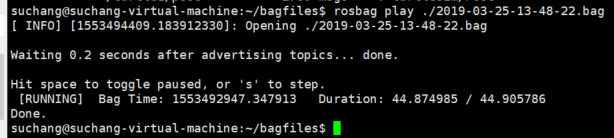
在真的发送bag file中记录的msg之前会等待0.2s,以防止前几个msg丢失.
In its default mode rosbag play will wait for a certain period (.2 seconds) after advertising each message before it actually begins publishing the contents of the bag file. Waiting for some duration allows any subscriber of a message to be alerted that the message has been advertised and that messages may follow. If rosbag play publishes messages immediately upon advertising, subscribers may not receive the first several published messages. The waiting period can be specified with the -d option.
rosbag play可以不从bag file的开始播放,可以用-s 指定从距离文件初始记录时间xx秒开始.
rosbag play -r 2 ./2019-03-25-13-48-22.bag
-r 参数指定播放倍速.
在一个复杂系统里,可能有成百上千个topic,我们不可能记录所有topic上的msg.
// -O means output.生成一个subset.bag文件.  只记录/turtle1/cmd_vel /turtle1/pose这两个topic上的msg.

rosbag record -O subset /turtle1/cmd_vel /turtle1/pose
rosbag record/play的局限
rosbag很难精确地复制一个running systerm中的行为,因为rosrecord记录的msg的时间很难做到足够精确,比方说系统1s的时候发了msg1,2s的时候发了msg2,rosbag记录到的时候可能已经是1.01s和2.02s,这样的话就差出了0.01s,在play back的时候可能就会产生微小误差.
In the previous section you may have noted that the turtle's path may not have exactly mapped to the original keyboard input - the rough shape should have been the same, but the turtle may not have exactly tracked the same path. The reason for this is that the path tracked by turtlesim is very sensitive to small changes in timing in the system, and rosbag is limited in its ability to exactly duplicate the behavior of a running system in terms of when messages are recorded and processed by rosrecord, and when messages are produced and processed when using rosplay. For nodes like turtlesim, where minor timing changes in when command messages are processed can subtly alter behavior, the user should not expect perfectly mimicked behavior.
Recording and playing back data的更多相关文章
- Learning ROS: Recording and playing back data
本文主要部分来源于ROS官网的Tutorials. Description: This tutorial will teach you how to record data from a runnin ...
- 论文笔记之:Playing for Data: Ground Truth from Computer Games
Playing for Data: Ground Truth from Computer Games ECCV 2016 Project Page:http://download.visinf.tu- ...
- ROS教程
Learning ROS 学习ROS Depending on your learning style and preferences, you can take two approaches to ...
- 一篇对iOS音频比较完善的文章
转自:http://www.cnblogs.com/iOS-mt/p/4268532.html 感谢作者:梦想通 前言 从事音乐相关的app开发也已经有一段时日了,在这过程中app的播放器几经修改我也 ...
- IOS 音频播放
iOS音频播放 (一):概述 前言 从事音乐相关的app开发也已经有一段时日了,在这过程中app的播放器几经修改我也因此对于iOS下的音频播放实现有了一定的研究.写这个系列的博客目的一方面希望能够抛砖 ...
- iOS苹果官方Demo合集
Mirror of Apple’s iOS samples This repository mirrors Apple’s iOS samples. Name Topic Framework Desc ...
- android录音功能的实现
这个录音实现是我在Bus上看到并下载的,他那个源码不完整,再次把我整理完整的代码贴出,源码地址在这:http://download.csdn.net/detail/chaozhung/5618649 ...
- 通过WinAPI播放PCM声音
在Windows平台上,播放PCM声音使用的API通常有如下两种. waveOut and waveIn:传统的音频MMEAPI,也是使用的最多的 xAudio2:C++/COM API,主要针对游戏 ...
- 小程序-demo:小程序示例-page/api
ylbtech-小程序-demo:小程序示例-page/api 以下将演示小程序接口能力,具体属性参数详见小程序开发文档. 1. page/component返回顶部 1. a) .js Page({ ...
随机推荐
- [SDOI2011]染色 BZOJ2243 树链剖分+线段树
分析: 区间合并,lcol是左端点的颜色编号,rcol是右端点的颜色编号,那么我们向上合并的时候,如果左儿子的rcol等于右儿子的lcol那么区间的sum--. 另外,如果重链顶的颜色等于重链顶的父节 ...
- Windows Ubuntu Bash申请免费通配符证书(Let's Encrypt)并绑定IIS
什么是 Let’s Encrypt? 部署 HTTPS 网站的时候需要证书,证书由 CA 机构签发,大部分传统 CA 机构签发证书是需要收费的,这不利于推动 HTTPS 协议的使用. Let’s En ...
- C++ bitset用法
概念: bitset是用来存储位的(其中的元素只有两种形式) 这个类通常用来模拟一个布尔数组,但对空间分配上进行了优化:通常,每个元素只占用一个bit ,而通常char类型是它的八倍 每个位置上的位都 ...
- Hadoop2.41的HA的配置与启动
我配置HA机制创建了7台虚拟机 1.修改Linux主机名2.修改IP3.修改主机名和IP的映射关系 ######注意######如果你们公司是租用的服务器或是使用的云主机(如华为云主机.阿里云主机等) ...
- Word2Vec总结
摘要: 1.算法概述 2.算法要点与推导 3.算法特性及优缺点 4.注意事项 5.实现和具体例子 6.适用场合 内容: 1.算法概述 Word2Vec是一个可以将语言中的字词转换为向量表达(Vecto ...
- 从0到1:使用Caliburn.Micro(WPF和MVVM)开发简单的计算器
从0到1:使用Caliburn.Micro(WPF和MVVM)开发简单的计算器 之前时间一直在使用Caliburn.Micro这种应用了MVVM模式的WPF框架做开发,是时候总结一下了. Calibu ...
- 【译】在C#中实现单例模式
目录 介绍 第一个版本 --不是线程安全的 第二个版本 -- 简单的线程安全 第三个版本 - 使用双重检查锁定尝试线程安全 第四个版本 - 不太懒,不使用锁且线程安全 第五版 - 完全懒惰的实例化 第 ...
- Android之Fragment详解
文章大纲 一. 什么是Fragment二. Fragment生命周期三. Fragment简单实例四.Fragment实战五.项目源码下载六.参考文章 一. 什么是Fragment Fragmen ...
- linux屏幕扩展、扩展屏幕的校准
#xrandr命令为屏幕扩展 #xinput命令为输入设备 #设置DSI-1为HDMI-1的右扩展 xrandr --output DSI- --right-of HDMI- --auto #DSI- ...
- windows 结束端口占用
1. cmd 调出命令行窗口 2. netstat -ano 查看端口被占用情况 3.命令:tasklist | findstr "9480" 发现被httpd.exe 占用 ...