
Spring MVC(一)五大核心组件和配置
一,五大核心组件
1.DispatcherServlet 请求入口
2.HandlerMapping 请求派发,负责请求和控制器建立一一对应的关系
3.Controller 处理器
4.ModelAndView 封装模型信息和视图信息
5.ViewResolver 视图处理器,定位页面
二,Spring MVC的编写步骤(访问WEB-INF下的.jsp)
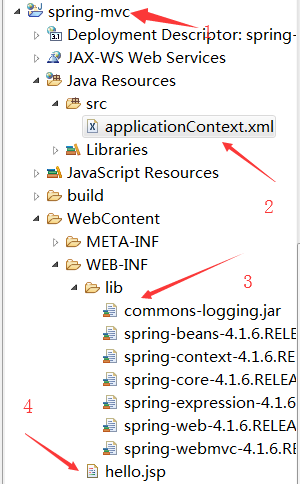
1.建立项目,导入jar包(ioc mvc)并且拷贝Spring容器中对应的配置文件到src下,并且在WEB-INF下创建一个hello.jsp
2.在web.xml中配置DispatcherServlet并通过初始化参数contextConfigLocation指定Spring容器对应的配置文件
3.在Spring配置文件中配置HandlerMapping的实现类SimpleUrlHandlerMapping
4.写一个控制器类实现Controller接口,控制器方法中返回ModelAndView,在Spring容器中配置控制器
5.配置ViewResolver的实现类internalResourceViewResolver
如图:
配置DispatcherServlet
 <?xml version="1.0" encoding="UTF-8"?>

 <web-app xmlns:xsi="http://www.w3.org/2001/XMLSchema-instance" xmlns="http://xmlns.jcp.org/xml/ns/javaee" xsi:schemaLocation="http://xmlns.jcp.org/xml/ns/javaee http://xmlns.jcp.org/xml/ns/javaee/web-app_3_1.xsd" version="3.1">

   <display-name>spring-mvc</display-name>

   <welcome-file-list>

     <welcome-file>index.html</welcome-file>

     <welcome-file>index.htm</welcome-file>

     <welcome-file>index.jsp</welcome-file>

     <welcome-file>default.html</welcome-file>

     <welcome-file>default.htm</welcome-file>

     <welcome-file>default.jsp</welcome-file>

   </welcome-file-list>

   <!-- 配置请求入口 -->

   <servlet>

       <servlet-name>SpringMVC</servlet-name>

       <servlet-class>org.springframework.web.servlet.DispatcherServlet</servlet-class>

       <!-- 配置初始化参数 -->

       <init-param>

           <param-name>contextConfigLocation</param-name>

           <param-value>classpath:applicationContext.xml</param-value>

       </init-param>

   </servlet>

   <servlet-mapping>

       <servlet-name>SpringMVC</servlet-name>

       <url-pattern>*.do</url-pattern>

   </servlet-mapping>

 </web-app>
配置HandlerMapping
 <?xml version="1.0" encoding="UTF-8"?>

 <beans xmlns="http://www.springframework.org/schema/beans"

     xmlns:xsi="http://www.w3.org/2001/XMLSchema-instance"

     xmlns:context="http://www.springframework.org/schema/context"

     xmlns:jdbc="http://www.springframework.org/schema/jdbc"

     xmlns:jee="http://www.springframework.org/schema/jee"

     xmlns:tx="http://www.springframework.org/schema/tx"

     xmlns:aop="http://www.springframework.org/schema/aop"

     xmlns:mvc="http://www.springframework.org/schema/mvc"

     xmlns:util="http://www.springframework.org/schema/util"

     xmlns:jpa="http://www.springframework.org/schema/data/jpa"

     xsi:schemaLocation="

         http://www.springframework.org/schema/beans http://www.springframework.org/schema/beans/spring-beans-4.1.xsd

         http://www.springframework.org/schema/context http://www.springframework.org/schema/context/spring-context-4.1.xsd

         http://www.springframework.org/schema/jdbc http://www.springframework.org/schema/jdbc/spring-jdbc-4.1.xsd

         http://www.springframework.org/schema/jee http://www.springframework.org/schema/jee/spring-jee-4.1.xsd

         http://www.springframework.org/schema/tx http://www.springframework.org/schema/tx/spring-tx-4.1.xsd

         http://www.springframework.org/schema/data/jpa http://www.springframework.org/schema/data/jpa/spring-jpa-1.3.xsd

         http://www.springframework.org/schema/aop http://www.springframework.org/schema/aop/spring-aop-4.1.xsd

         http://www.springframework.org/schema/mvc http://www.springframework.org/schema/mvc/spring-mvc-4.1.xsd

         http://www.springframework.org/schema/util http://www.springframework.org/schema/util/spring-util-4.1.xsd">

     <!-- 配置请求分发器,让请求和控制器之间建立一一对应关系 -->

     <bean id="handlerMapping" class="org.springframework.web.servlet.handler.SimpleUrlHandlerMapping">

         <property name="mappings">

             <props>

                 <prop key="/toHello.do">helloController</prop>

             </props>

         </property>

     </bean>

     <!-- 配置控制器 -->

     <bean id="helloController" class="com.xcz.controller.ToHelloController"></bean>

 </beans>
配置ViewResolver
 <?xml version="1.0" encoding="UTF-8"?>

 <beans xmlns="http://www.springframework.org/schema/beans"

     xmlns:xsi="http://www.w3.org/2001/XMLSchema-instance"

     xmlns:context="http://www.springframework.org/schema/context"

     xmlns:jdbc="http://www.springframework.org/schema/jdbc"

     xmlns:jee="http://www.springframework.org/schema/jee"

     xmlns:tx="http://www.springframework.org/schema/tx"

     xmlns:aop="http://www.springframework.org/schema/aop"

     xmlns:mvc="http://www.springframework.org/schema/mvc"

     xmlns:util="http://www.springframework.org/schema/util"

     xmlns:jpa="http://www.springframework.org/schema/data/jpa"

     xsi:schemaLocation="

         http://www.springframework.org/schema/beans http://www.springframework.org/schema/beans/spring-beans-4.1.xsd

         http://www.springframework.org/schema/context http://www.springframework.org/schema/context/spring-context-4.1.xsd

         http://www.springframework.org/schema/jdbc http://www.springframework.org/schema/jdbc/spring-jdbc-4.1.xsd

         http://www.springframework.org/schema/jee http://www.springframework.org/schema/jee/spring-jee-4.1.xsd

         http://www.springframework.org/schema/tx http://www.springframework.org/schema/tx/spring-tx-4.1.xsd

         http://www.springframework.org/schema/data/jpa http://www.springframework.org/schema/data/jpa/spring-jpa-1.3.xsd

         http://www.springframework.org/schema/aop http://www.springframework.org/schema/aop/spring-aop-4.1.xsd

         http://www.springframework.org/schema/mvc http://www.springframework.org/schema/mvc/spring-mvc-4.1.xsd

         http://www.springframework.org/schema/util http://www.springframework.org/schema/util/spring-util-4.1.xsd">

     <!-- 配置视图处理器 -->

     <bean class="org.springframework.web.servlet.view.InternalResourceViewResolver">

         <property name="prefix" value="/WEB-INF/"></property>

         <property name="suffix" value=".jsp"></property>

     </bean>

 </beans>
最终配置结果
 <?xml version="1.0" encoding="UTF-8"?>

 <beans xmlns="http://www.springframework.org/schema/beans"

     xmlns:xsi="http://www.w3.org/2001/XMLSchema-instance"

     xmlns:context="http://www.springframework.org/schema/context"

     xmlns:jdbc="http://www.springframework.org/schema/jdbc"

     xmlns:jee="http://www.springframework.org/schema/jee"

     xmlns:tx="http://www.springframework.org/schema/tx"

     xmlns:aop="http://www.springframework.org/schema/aop"

     xmlns:mvc="http://www.springframework.org/schema/mvc"

     xmlns:util="http://www.springframework.org/schema/util"

     xmlns:jpa="http://www.springframework.org/schema/data/jpa"

     xsi:schemaLocation="

         http://www.springframework.org/schema/beans http://www.springframework.org/schema/beans/spring-beans-4.1.xsd

         http://www.springframework.org/schema/context http://www.springframework.org/schema/context/spring-context-4.1.xsd

         http://www.springframework.org/schema/jdbc http://www.springframework.org/schema/jdbc/spring-jdbc-4.1.xsd

         http://www.springframework.org/schema/jee http://www.springframework.org/schema/jee/spring-jee-4.1.xsd

         http://www.springframework.org/schema/tx http://www.springframework.org/schema/tx/spring-tx-4.1.xsd

         http://www.springframework.org/schema/data/jpa http://www.springframework.org/schema/data/jpa/spring-jpa-1.3.xsd

         http://www.springframework.org/schema/aop http://www.springframework.org/schema/aop/spring-aop-4.1.xsd

         http://www.springframework.org/schema/mvc http://www.springframework.org/schema/mvc/spring-mvc-4.1.xsd

         http://www.springframework.org/schema/util http://www.springframework.org/schema/util/spring-util-4.1.xsd">

     <!-- 配置请求分发器,让请求和控制器之间建立一一对应关系 -->

     <bean id="handlerMapping" class="org.springframework.web.servlet.handler.SimpleUrlHandlerMapping">

         <property name="mappings">

             <props>

                 <prop key="/toHello.do">helloController</prop>

             </props>

         </property>

     </bean>

     <!-- 配置控制器 -->

     <bean id="helloController" class="com.xcz.controller.ToHelloController"></bean>

     <!-- 配置视图处理器 -->

     <bean class="org.springframework.web.servlet.view.InternalResourceViewResolver">

         <property name="prefix" value="/WEB-INF/"></property>

         <property name="suffix" value=".jsp"></property>

     </bean>

 </beans>
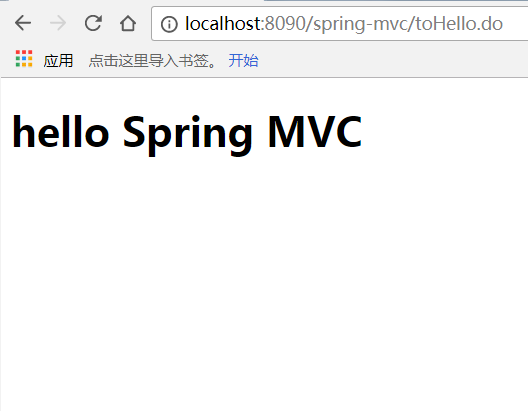
最后开启服务,在浏览器上输入localhost:端口号/项目名/toHello.do,看到如下界面,说明配置成功
Spring MVC(一)五大核心组件和配置的更多相关文章
- 转载 Spring、Spring MVC、MyBatis整合文件配置详解
Spring.Spring MVC.MyBatis整合文件配置详解 使用SSM框架做了几个小项目了,感觉还不错是时候总结一下了.先总结一下SSM整合的文件配置.其实具体的用法最好还是看官方文档. ...
- Spring MVC、MyBatis整合文件配置详解
Spring:http://spring.io/docs MyBatis:http://mybatis.github.io/mybatis-3/ Building a RESTful Web Serv ...
- spring MVC处理请求过程及配置详解
本文主要梳理下Spring MVC处理http请求的过程,以及配置servlet及业务application需要的常用标签,及其包含的意义. spring MVC处理请求过程 首先看一个整体图 简单说 ...
- Scrapy 框架 安装 五大核心组件 settings 配置 管道存储
scrapy 框架的使用 博客: https://www.cnblogs.com/bobo-zhang/p/10561617.html 安装: pip install wheel 下载 Twisted ...
- Spring MVC 5 + Thymeleaf 基于Java配置和注解配置
Spring MVC 5 + Thymeleaf 注解配置 Spring的配置方式一般为两种:XML配置和注解配置 Spring从3.0开始以后,推荐使用注解配置,这两种配置的优缺点说的人很多,我就不 ...
- spring mvc静态资源访问的配置
如果我们使用spring mvc来做web访问请求的控制转发,那么默认所有访问都将被DispatcherServlet独裁统治.比如我现在想访问的欢迎页index.html根本无需任何业务逻辑处理,仅 ...
- spring启动,spring mvc ,要不要xml配置,基于注解配置
老项目是09-11年搞的,用的是spring+struts2,没有用注解,全xml配置.web.xml中也配置了一大堆. 现在启动新项目,在项目中用spring+springmvc ,主要用注解,也用 ...
- Spring + Spring MVC+Hibernate框架整合详细配置
来源于:http://www.jianshu.com/p/8e2f92d0838c 具体配置参数: Spring: spring-framework-4.2.2Hibernate: hibernate ...
- Spring、Spring MVC、MyBatis整合文件配置详解
原文 http://www.cnblogs.com/wxisme/p/4924561.html 主题 MVC模式MyBatisSpring MVC 使用SSM框架做了几个小项目了,感觉还不错是时候总 ...
随机推荐
- 用Python学分析 - 散点图
# 运用散点图对数据分布得到直观的认识 import numpy as np import matplotlib.pyplot as plt # 设计 x, y 轴 n = 10000 x = np. ...
- 每日分享!JavaScript的鼠标事件(11个事件)
鼠标的11个事件 具体的事件解释如下: click:按下鼠标(通常是按下主按钮)时触发. dblclick:在同一个元素上双击鼠标时触发. mousedown:按下鼠标键时触发. mouseup:释放 ...
- java数据结构和算法01(数组的简单使用)
一直都对这一块没有什么想法,加上不怎么理解,只是懂个大概:最近突然感觉对数据结构和算法这块有点儿兴趣,决定还是尽量详细的看看这些结构和算法: 话说什么事数据结构和算法呢?现在我也说不上来,等我学的差不 ...
- WebGL three.js学习笔记 创建three.js代码的基本框架
WebGL学习----Three.js学习笔记(1) webgl介绍 WebGL是一种3D绘图协议,它把JavaScript和OpenGL ES 2.0结合在一起,通过增加OpenGL ES 2.0的 ...
- okio:定义简短高效
欢迎关注公众号,第一时间获取最新文章: 本篇目录 一.前言 okio是大名鼎鼎的square公司开发出来的,其是okhttp的底层io操作库,既然已经有java原生的io库为什么还要自己费尽开发一套呢 ...
- NET微信公众号开发环境搭建(一)-了解微信由来
公众号的应用,开发及调试环境搭建 花生壳要注册 需要二十多块钱 ,还要实名认证,估计要一两天才能审核通过 主要就是在 windows搭建测试环境 1.微信的应用场景 360百科微信简介 ht ...
- 常用的Java Keytool Keystore命令
Java keytool是密钥和证书管理工具.它使用户能够管理自己的公钥/私钥对及相关证书,用于(通过数字签名)自我认证(用户向别的用户/服务认证自己)或数据完整性以及认证服务.它还允许用户储存他们的 ...
- Android之PhotoView使用
文章大纲 一.什么是PhotoView二.代码实战三.项目源码下载 一.什么是PhotoView 一款 ImageView 展示框架,支持缩放,响应手势,位于图片排行榜的第五位,PhotoView ...
- 软件工程通用软件体系结构主机终端模式、B/S 、C/S 结构和多层分布式结构
软件系统的体系结构经历了主机终端模式.客户机/服务器(C/S)模式.浏览器/服务器(B/S)和多层分布式结构. 主机/终端结构: 早期计算机系统多是单机系统,多个用户是通过联网终端来访问的,没有网络的 ...
- maven pom 引入本地jar包
maven pom 引入本地jar包 在pom.xml同级目录下新建lib文件夹,并放入本地jar包. 配置Jar包的dependency,包括groupId,artifactId,version三个 ...