
button JS篇ant Design of react之二
最近更新有点慢,更新慢的原因最近在看
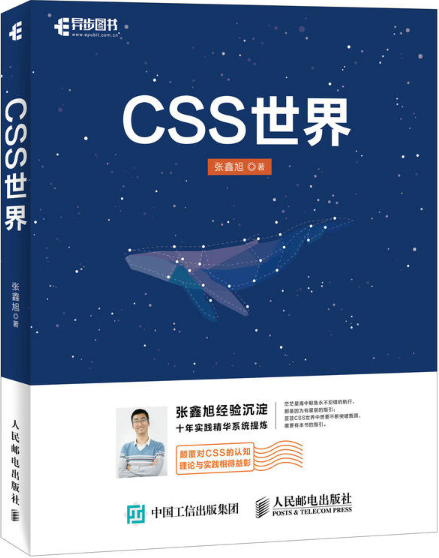
- 《css世界》这本书,感觉很不错
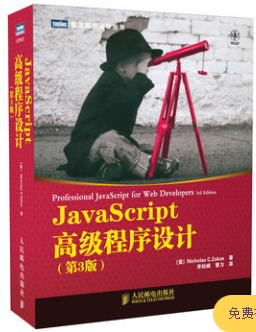
- 《JavaScript高级程序设计》 这本书已经看了很多遍了,主要是复习前端的基础知识,基础知识经常会过一段时间记忆就会慢慢模糊,特别是现在用vue、react、angularjs已经很少用原生js了,对dom的原生api方法已经忘记很多了。
- 《梦的解析》--弗洛伊德,看这本书主要是自己的兴趣爱好,里面的内容有点难度,想通过心理学改变自己,做更好更真实的自己。

题外话说完了,这篇主要是针对上一篇对ant of react的代码解析只是加了注释反应很难懂,没有那么时间去一个一个仔细看。后面ant发布了新版本在button组件上对动画效果做了一些处理,大概的逻辑结构没变。这篇就用思维导图来展示下ant of react button组件js代码的逻辑结构,画的不好敬请谅解。
结构主线
按钮的代码逻辑结构的主线其实就是围绕按钮对外开放的功能实现的,所有我想来看看ant desgin of ract 按钮组件对外开放的功能导图:
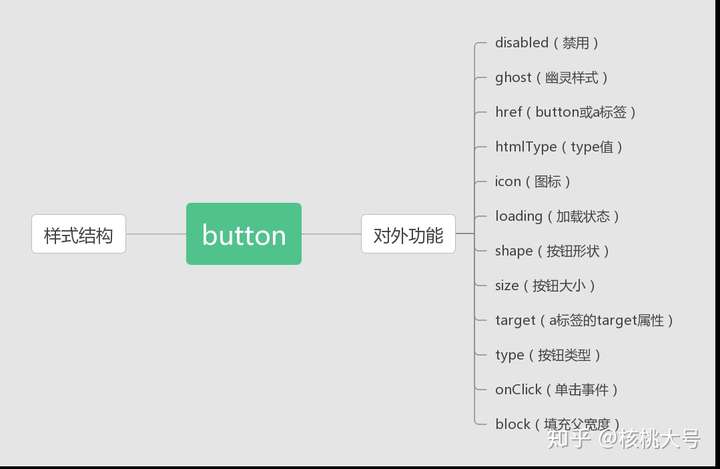
disabled 按钮失效状态
ghost 幽灵属性
href 点击跳转的地址,指定此属性 button 的行为和 a 链接一致
htmlType 设置 button 原生的 type 值,可选值请参考 HTML 标准
icon 设置按钮的图标类型
loading 设置按钮载入状态
shape 设置按钮形状
size 设置按钮大小
target 相当于 a 链接的 target 属性,href 存在时生效
type 设置按钮类型,可选值为 primary dashed danger(版本 2.7 中增加) 或者不设
onClick 点击按钮时的回调
block 将按钮宽度调整为其父宽度的选项
其中导致组件html结构不一样的是href功能,所以先看href的实现
   /**

   * 组件内容

   */

  render() {

    const {

      type, shape, size, className, children, icon, prefixCls, ghost, loading: _loadingProp, block, ...rest

    } = this.props;

    const { loading, hasTwoCNChar } = this.state;

    // large => lg

    // small => sm

    let sizeCls = '';

    switch (size) {

      case 'large':

        sizeCls = 'lg';

        break;

      case 'small':

        sizeCls = 'sm';

      default:

        break;

    }

    const now = new Date();

    const isChristmas = now.getMonth() === 11 && now.getDate() === 25;

    /**

     * 拼接className

     */

    const classes = classNames(prefixCls, className, {

      [`${prefixCls}-${type}`]: type,//对应type功能

      [`${prefixCls}-${shape}`]: shape,//对应shape功能

      [`${prefixCls}-${sizeCls}`]: sizeCls,//对应size功能

      [`${prefixCls}-icon-only`]: !children && icon,//对应icon功能

      [`${prefixCls}-loading`]: loading,//对应loading功能

      [`${prefixCls}-background-ghost`]: ghost,//对应ghost功能

      [`${prefixCls}-two-chinese-chars`]: hasTwoCNChar,

      [`${prefixCls}-block`]: block,//对应block功能

      christmas: isChristmas,

    });

    /**

       * 设置图标

       */

    const iconType = loading ? 'loading' : icon;

    const iconNode = iconType ? <Icon type={iconType} /> : null;

    const kids = (children || children === 0)

      ? React.Children.map(children, child => insertSpace(child, this.isNeedInserted())) : null;

    const title = isChristmas ? 'Ho Ho Ho!' : rest.title;

    /**

        * 判断是a标签还是button标签,对应href功能

        */

    if ('href' in rest) {

      return (

        <a

          {...rest}

          className={classes}

          onClick={this.handleClick}

          title={title}

        >

          {iconNode}{kids}

        </a>

      );

    } else {

      // React does not recognize the `htmlType` prop on a DOM element. Here we pick it out of `rest`.

      const { htmlType, ...otherProps } = rest;

      return (

        <Wave>

          <button

            {...otherProps}

            type={htmlType || 'button'}

            className={classes}

            onClick={this.handleClick}

            title={title}

          >

            {iconNode}{kids}

          </button>

        </Wave>

      );

    }

  }
上面的那些功能配置属性是通过父组件通过props传递进来的,那组件代码中要有接收参数已经检验参数类型的处理块:
/**

 * 类型别名,这个类型的只能是对应的值

 */

export type ButtonType = 'default' | 'primary' | 'ghost' | 'dashed' | 'danger';

export type ButtonShape = 'circle' | 'circle-outline';

export type ButtonSize = 'small' | 'default' | 'large';

export type ButtonHTMLType = 'submit' | 'button' | 'reset';

/**

 * 声明一个接口BaseButtonProps

 */

export interface BaseButtonProps {

  type?: ButtonType;

  icon?: string;

  shape?: ButtonShape;

  size?: ButtonSize;

  loading?: boolean | { delay?: number };

  prefixCls?: string;

  className?: string;

  ghost?: boolean;

  block?: boolean;

  children?: React.ReactNode;

}

/**

 * a标签的参数组合

 */

export type AnchorButtonProps = {

  href: string;

  target?: string;

  onClick?: React.MouseEventHandler<HTMLAnchorElement>;

} & BaseButtonProps & React.AnchorHTMLAttributes<HTMLAnchorElement>;

/**

 * button标签的参数组合

 */

export type NativeButtonProps = {

  htmlType?: ButtonHTMLType;

  onClick?: React.MouseEventHandler<HTMLButtonElement>;

} & BaseButtonProps & React.ButtonHTMLAttributes<HTMLButtonElement>;

/**

 * 类型别名

 */

export type ButtonProps = AnchorButtonProps | NativeButtonProps;

/**

 * button class声明

 */

export default class Button extends React.Component<ButtonProps, any> {

  static Group: typeof Group;

  static __ANT_BUTTON = true;

  /**

   * 设置props默认值

   */

  static defaultProps = {

    prefixCls: 'ant-btn',

    loading: false,

    ghost: false,

    block: false,

  };

  /**

    * props类型校验

    */

  static propTypes = {

    type: PropTypes.string,

    shape: PropTypes.oneOf(['circle', 'circle-outline']),

    size: PropTypes.oneOf(['large', 'default', 'small']),

    htmlType: PropTypes.oneOf(['submit', 'button', 'reset']),

    onClick: PropTypes.func,

    loading: PropTypes.oneOfType([PropTypes.bool, PropTypes.object]),

    className: PropTypes.string,

    icon: PropTypes.string,

    block: PropTypes.bool,

  };
这段代码大概意思是在typescript中声明接口和自定义类型来校验参数对象里面的键值对的数据类型,defaultProps设置参数的某些默认值,propTypes在react中通过prop-types来校验参数的数据量类型和值。
剩下就是单击事件和组件声明周期的一些处理事件
- 组件的构造函数 声明state的值
  /**

   * 构造函数

   */

  constructor(props: ButtonProps) {

    super(props);

    this.state = {

      loading: props.loading,

      hasTwoCNChar: false,

    };

  }
- 单击事件,如果是加载状态不触发单击事件
  /**

    * 单击事件

    */

  handleClick: React.MouseEventHandler<HTMLButtonElement | HTMLAnchorElement> = e => {

    const { loading } = this.state;

    const { onClick } = this.props;

    if (!!loading) {

      return;

    }

    if (onClick) {

      (onClick as React.MouseEventHandler<HTMLButtonElement | HTMLAnchorElement>)(e);

    }

  }
- 组件的生命周期处理
 /**

     * 组件渲染之后调用,只调用一次。

     */

  componentDidMount() {

    this.fixTwoCNChar();

  }

  /**

    * props改变时调用触发,nextProps.loading赋值到setState的loading

    * @param nextProps

    */

  componentWillReceiveProps(nextProps: ButtonProps) {

    const currentLoading = this.props.loading;

    const loading = nextProps.loading;

    if (currentLoading) {

      clearTimeout(this.delayTimeout);

    }

    if (typeof loading !== 'boolean' && loading && loading.delay) {

      this.delayTimeout = window.setTimeout(() => this.setState({ loading }), loading.delay);

    } else {

      this.setState({ loading });

    }

  }

  /**

    * 组件更新完成后调用

    */

  componentDidUpdate() {

    this.fixTwoCNChar();

  }

  /**

   * 组件将要卸载时调用,清除定时器

   */

  componentWillUnmount() {

    if (this.delayTimeout) {

      clearTimeout(this.delayTimeout);

    }

  }

  /**

    * 判断botton的内容是否有两个中文字

    */

  fixTwoCNChar() {

    // Fix for HOC usage like <FormatMessage />

    const node = (findDOMNode(this) as HTMLElement);

    const buttonText = node.textContent || node.innerText;

    if (this.isNeedInserted() && isTwoCNChar(buttonText)) {

      if (!this.state.hasTwoCNChar) {

        this.setState({

          hasTwoCNChar: true,

        });

      }

    } else if (this.state.hasTwoCNChar) {

      this.setState({

        hasTwoCNChar: false,

      });

    }

  }

  /**

 * 判断是否是字符串类型

 */

function isString(str: any) {

  return typeof str === 'string';

}

/**

 * 多个中文间插入空格

 * @param {Object} child 组件的子内容

 * @param {Boolean} needInserted 是否插入空格

 * @returns {ReactElement}

 */

// Insert one space between two chinese characters automatically.

function insertSpace(child: React.ReactChild, needInserted: boolean) {

  // Check the child if is undefined or null.

  if (child == null) {

    return;

  }

  const SPACE = needInserted ? ' ' : '';

  // strictNullChecks oops.

  if (typeof child !== 'string' && typeof child !== 'number' &&

    isString(child.type) && isTwoCNChar(child.props.children)) {

    return React.cloneElement(child, {},

      child.props.children.split('').join(SPACE));

  }

  if (typeof child === 'string') {

    if (isTwoCNChar(child)) {

      child = child.split('').join(SPACE);

    }

    return <span>{child}</span>;

  }

  return child;

}
button JS篇ant Design of react之二的更多相关文章
- button JS篇ant Design of react
这篇看ant Desgin of react的button按钮的js代码,js代码部分是typescript+react写的. button组件里面引用了哪些组件: import * as React ...
- ElementUI(vue UI库)、iView(vue UI库)、ant design(react UI库)中组件的区别
ElementUI(vue UI库).iView(vue UI库).ant design(react UI库)中组件的区别: 事项 ElementUI iView ant design 全局加载进度条 ...
- 同时使用 Ant Design of React 中 Mention 和 Form
使用场景,在一个列表中,点击每一行会弹出一个表单,通过修改表单数据并提交来修改这一行的数据,其中某个数据的填写需要通过Mention实现动态提示及自动补全的功能. 具体效果为: 遇到的问题: 1.希望 ...
- Ant Design of React 框架使用总结1
一. 为什么要用UI 框架 统一了样式交互动画 . Ui框架会对样式,交互动画进行统一,保证了系统风格完整统一,不像拼凑起来的. 兼容性 ,不是去兼容IE 6 7 8那些低版本浏览器,而是对主流的标 ...
- ant design pro (十二)advanced UI 测试
一.概述 原文地址:https://pro.ant.design/docs/ui-test-cn UI 测试是项目研发流程中的重要一环,有效的测试用例可以梳理业务需求,保证研发的质量和进度,让工程师可 ...
- 和我一起,重零开始学习Ant Design Pro开发解决方案(二)部署示例项目
- 十九、React UI框架Antd(Ant Design)的使用——及react Antd的使用 button组件 Icon组件 Layout组件 DatePicker日期组件
一.Antd(Ant Design)的使用:引入全部Css样式 1.1 antd官网: https://ant.design/docs/react/introduce-cn 1.2 React中使用A ...
- React + Ant Design网页,配置
第一个React + Ant Design网页(一.配置+编写主页) 引用博主的另外一篇VUE2.0+ElementUI教程, 请移步: https://blog.csdn.net/u0129070 ...
- Vue.js高效前端开发 • 【Ant Design of Vue框架基础】
全部章节 >>>> 文章目录 一.Ant Design of Vue框架 1.Ant Design介绍 2.Ant Design of Vue安装 3.Ant Design o ...
随机推荐
- 在java中怎样实现多线程?线程的4种状态
一.在java中怎样实现多线程? extends Thread implement Runnable 方法一:继承 Thread 类,覆盖方法 run(),我们在创建的 Thread 类的子类中重写 ...
- 记一发idea resources下rename的坑
resources rename文件 '.'不表示下级目录 只是作为一个字符 第一个com.uniubi.dao 是一层层创的.第二个是直接用idea 创的如下图. maven 打包后如下所示. ps ...
- Spring Bean 生命周期测试
本文代码GitHub地址 Bean的生命周期是开始创建到销毁的过程.需要实现相关的类BeanNameAware ,DisposableBean, InitializingBean ,并注册Inst ...
- mysql之数据库添加索引优化查询效率
项目中如果表中的数据过多的话,会影响查询的效率,那么我们需要想办法优化查询,通常添加索引就是我们的选择之一: 1.添加PRIMARY KEY(主键索引) mysql>ALTER TABLE `t ...
- 使用ASP.NET Core开发GraphQL服务器 -- 预备知识(下)
上一篇文章:https://www.cnblogs.com/cgzl/p/9734083.html 处理数据 嵌套字段 看例子: 我想查看viewer下的repositories.注意里面的edges ...
- Linux篇---ftp服务器的搭建
一.前述 企业中linux搭建ftp服务器还是很实用的,所以本文针对centoos7和centoos6搭建服务器教程做个总结. 二.具体 1.显示如下图则表示已安装 vsftp软件.如果未显示则需要安 ...
- Android 性能测试优质实践汇总
这两天把testerhome上的关于Android 性能测试的精品文章看了一遍,很有收获,学习到了Android 性能测试该关注的一些细节.我所说的“精品”是指对我自己有启发的文章,可以被自己运用起来 ...
- springboot~@Query到DTO对象
我们有时在进行开发过程中,使用jpa的@Query注解去选择多张表然后返回一个DTO对象,这个时候我们需要特殊处理一下,因为默认情况下,你的jpa代码是不认DTO对象的. 参考文章:https://s ...
- docker~docker-compose的使用
回到目录 docker-compose是用来在Docker中定义和运行复杂应用的工具,比如在一个yum文件里定义多个容器,只用一行命令就可以让一切就绪并运行. 使用docker compose我们可以 ...
- group by搭配 order by解决排序问题
问题 Ftravel_id Facct_no Froute_code Fmodify_time 41010020180725102219102000010452 1359c027b0a15266418 ...