
jQuery手机端点击弹出分享按钮代码
一、HTML代码如下:
<span onClick="toshare()" style="border:dotted 1px #ddd;display:block;width:100px;text-align:center;margin:20px auto 0 auto;cursor:pointer;height:60px;line-height:60px;">点击分享到</span>

<div class="am-share">

  <h3 class="am-share-title">分享到</h3>

  <ul class="am-share-sns">

    <li><a href="#"> <i class="share-icon-weibo"></i> <span>新浪微博</span> </a> </li>

    <li><a href="#"> <i class="share-icon-weibo"></i> <span>新浪微博</span> </a> </li>

    <li><a href="#"> <i class="share-icon-weibo"></i> <span>新浪微博</span> </a> </li>

    <li><a href="#"> <i class="share-icon-weibo"></i> <span>新浪微博</span> </a> </li>

  </ul>

  <div class="am-share-footer"><button class="share_btn">取消</button></div>

</div>
二、CSS代码如下:
<style type="text/css">

* { padding:; margin:; }

.am-share { font-size: 14px; border-radius:; bottom:; left:; position: fixed; text-align: center; -webkit-transform: translateY(100%); -ms-transform: translateY(100%); transform: translateY(100%); -webkit-transition: -webkit-transform 300ms; transition: transform 300ms ; width: 100%; z-index:; }

.am-modal-active { transform: translateY(0px);  -webkit-transform: translateY(0); -ms-transform: translateY(0); transform: translateY(0) }

.am-modal-out { z-index:; -webkit-transform: translateY(100%); -ms-transform: translateY(100%); transform: translateY(100%) }

.am-share-title { background-color: #f8f8f8; border-bottom: 1px solid #fff; border-top-left-radius: 2px; border-top-right-radius: 2px; color: #555; font-weight:; margin: 0 10px; padding: 10px 0 0; text-align: center; }

.am-share-title::after { border-bottom: 1px solid #dfdfdf; content: ""; display: block; height:; margin-top: 10px; width: 100%; }

.am-share-footer { margin: 10px; }

.am-share-footer .share_btn { color: #555;  display: block; width: 100%; background-color: #e6e6e6; border: 1px solid #e6e6e6; border-radius:; cursor: pointer;  font-size: 16px; font-weight:; line-height: 1.2; padding: 0.625em 0; text-align: center; transition: background-color 300ms ease-out 0s, border-color 300ms ease-out 0s; vertical-align: middle; white-space: nowrap;font-family:"微软雅黑";  }

.am-share-sns { background-color: #f8f8f8; border-radius: 0 0 2px 2px; margin: 0 10px; padding-top: 15px; height:auto; zoom:; overflow:auto; }

.am-share-sns li { margin-bottom: 15px; display: block; float: left; height: auto;  width: 25%; }

.am-share-sns a { color: #555; display: block; text-decoration:none; }

.am-share-sns span { display: block; }

.am-share-sns li i { background-position: center 50%; background-repeat: no-repeat; background-size: 36px 36px; background-color: #ccc; color: #fff; display: inline-block; font-size: 18px; height: 36px; line-height: 36px; margin-bottom: 5px; width: 36px; }

.am-share-sns .share-icon-weibo { background-image: url(); }

.sharebg { background-color: rgba(0, 0, 0, 0.6); bottom:; height: 100%; left:; opacity:; position: fixed; right:; top:; width: 100%; z-index:; display:none; }

.sharebg-active { opacity:; display:block; }

</style>
三、jQuery代码如下:
<script type="text/javascript">

    function toshare(){

        $(".am-share").addClass("am-modal-active");

        if($(".sharebg").length>0){

            $(".sharebg").addClass("sharebg-active");

        }else{

            $("body").append('<div class="sharebg"></div>');

            $(".sharebg").addClass("sharebg-active");

        }

        $(".sharebg-active,.share_btn").click(function(){

            $(".am-share").removeClass("am-modal-active");

            setTimeout(function(){

                $(".sharebg-active").removeClass("sharebg-active");

                $(".sharebg").remove();

            },300);

        })

    }

</script>
四、效果图如下:
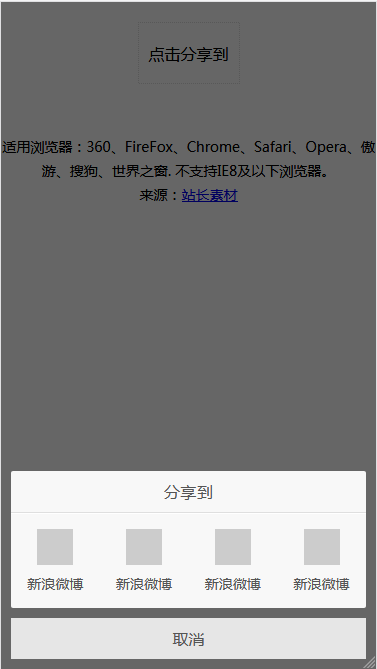
本文摘自站长素材:http://sc.chinaz.com/jiaoben/150907458420.htm
jQuery手机端点击弹出分享按钮代码的更多相关文章
- 基于jQuery鼠标点击弹出登陆框效果
基于jQuery鼠标点击弹出登陆框效果.这是一款扁平样式风格的jQuery弹出层登陆框特效.效果图如下: 在线预览 源码下载 实现的代码. html代码: <input type=" ...
- jQuery之点击弹出图标环形菜单
<head> <meta http-equiv="Content-Type" content="text/html; charset=utf-8&quo ...
- CSS3 页面中展示邮箱列表点击弹出发送邮件界面
CSS3 页面中展示邮箱列表点击弹出发送邮件界面 代码: <!DOCTYPE html> <html> <head> <meta charset=" ...
- JS框架_(JQuery.js)Tooltip弹出式按钮插件
百度云盘 传送门 密码:7eh5 弹出式按钮效果 <!DOCTYPE html> <html > <head> <meta charset="UTF ...
- jQuery实现打开网页自动弹出遮罩层或点击弹出遮罩层功能示例
本文实例讲述了jQuery实现打开网页自动弹出遮罩层或点击弹出遮罩层功能.分享给大家供大家参考,具体如下: 弹出层:两种方式 一是打开网页就自动弹出层二是点击弹出 <!DOCTYPE html ...
- 点击弹出 +1放大效果 -- jQuery插件
20140110更新: <!doctype html> <html> <head> <meta charset="UTF-8"> & ...
- jquery层居中,点击小图查看大图,弹出层居中代码,顶部层固定不动,滚动条滚动情况
jquery层居中,点击小图查看大图,弹出层居中代码 http://www.cnblogs.com/simpledev/p/3566280.html 见第一版,发现一个情况,如果页面内容多出一屏的情况 ...
- jQuery点击弹出层,弹出模态框,点击模态框消失
1 2 3 4 5 6 7 8 9 10 11 12 13 14 15 16 17 18 19 20 21 22 23 24 25 26 27 28 29 30 31 32 33 34 35 36 3 ...
- jQuery第二课 点击弹出一个提示框
选择器允许您对元素组或单个元素进行操作. jQuery 选择器 在前面的章节中,我们展示了一些有关如何选取 HTML 元素的实例. 关键点是学习 jQuery 选择器是如何准确地选取您希望应用效果的元 ...
随机推荐
- asp.net core导出导入excel
使用NPOI导入导出excel,已经封装好Action可以直接调用 导出 效果图 使用方法 定义导出实体 class Student { public int Id { get; set; } pub ...
- 网卡也能虚拟化?网卡虚拟化技术 macvlan 详解
本文首发于我的公众号 Linux云计算网络(id: cloud_dev),专注于干货分享,号内有 10T 书籍和视频资源,后台回复「1024」即可领取,欢迎大家关注,二维码文末可以扫. 01 macv ...
- Javascript高级编程学习笔记(91)—— Canvas(8) 阴影
阴影 2D上下文将会根据以下属性为形状或路径绘制阴影 shadowColor: 用于设置阴影颜色,默认为黑色 shadowOffsetX: 形状或路径X方向的阴影偏移量,默认为0 shadowOffs ...
- 轻量级数据库Sqlite的使用
SqLite是什么? SQLite是一个进程内的库,实现了自给自足的.无服务器的.零配置的.事务性的 SQL 数据库引擎.它是一个零配置的数据库,这意味着与其他数据库一样,您不需要在系统中配置. 就像 ...
- Elasticsearch倒排索引结构
一切设计都是为了提高搜索的性能 倒排索引(Inverted Index)也叫反向索引,有反向索引必有正向索引.通俗地来讲,正向索引是通过key找value,反向索引则是通过value找key. 先来回 ...
- .NET Core微服务之基于IdentityServer建立授权与验证服务
Tip: 此篇已加入.NET Core微服务基础系列文章索引 一.IdentityServer的预备知识 要学习IdentityServer,事先得了解一下基于Token的验证体系,这是一个庞大的主题 ...
- 获得当前EIP的值
VS2017 内联汇编 __asm { call NEXT NEXT: pop eax }
- python的小技巧 让你的代码更美观
持续更新.. 1,活用lambda表达式 匿名函数 lambda 可以提供很多便利.下面是举例. dic = {1:lambda a,b : a+b} 2,代码一行化. 当逻辑语句后只有一行代码的时候 ...
- DS控件库 DS标签的另类用法之折叠展开
某些场合下,可以通过动态设置DS标签的文本内容来输出不同的显示效果,以下是示例. 示例中的素材 示例资源文本 String1="<linkimg=E1><b>&l ...
- 在ASP.NET Core中构建路由的5种方法
原文链接 :https://stormpath.com/blog/routing-in-asp-net-core 在ASP.NET Core中构建路由的5种方法 原文链接 :https://storm ...