
jQuery手机端点击弹出分享按钮代码
一、HTML代码如下:
<span onClick="toshare()" style="border:dotted 1px #ddd;display:block;width:100px;text-align:center;margin:20px auto 0 auto;cursor:pointer;height:60px;line-height:60px;">点击分享到</span>

<div class="am-share">

  <h3 class="am-share-title">分享到</h3>

  <ul class="am-share-sns">

    <li><a href="#"> <i class="share-icon-weibo"></i> <span>新浪微博</span> </a> </li>

    <li><a href="#"> <i class="share-icon-weibo"></i> <span>新浪微博</span> </a> </li>

    <li><a href="#"> <i class="share-icon-weibo"></i> <span>新浪微博</span> </a> </li>

    <li><a href="#"> <i class="share-icon-weibo"></i> <span>新浪微博</span> </a> </li>

  </ul>

  <div class="am-share-footer"><button class="share_btn">取消</button></div>

</div>
二、CSS代码如下:
<style type="text/css">

* { padding:; margin:; }

.am-share { font-size: 14px; border-radius:; bottom:; left:; position: fixed; text-align: center; -webkit-transform: translateY(100%); -ms-transform: translateY(100%); transform: translateY(100%); -webkit-transition: -webkit-transform 300ms; transition: transform 300ms ; width: 100%; z-index:; }

.am-modal-active { transform: translateY(0px);  -webkit-transform: translateY(0); -ms-transform: translateY(0); transform: translateY(0) }

.am-modal-out { z-index:; -webkit-transform: translateY(100%); -ms-transform: translateY(100%); transform: translateY(100%) }

.am-share-title { background-color: #f8f8f8; border-bottom: 1px solid #fff; border-top-left-radius: 2px; border-top-right-radius: 2px; color: #555; font-weight:; margin: 0 10px; padding: 10px 0 0; text-align: center; }

.am-share-title::after { border-bottom: 1px solid #dfdfdf; content: ""; display: block; height:; margin-top: 10px; width: 100%; }

.am-share-footer { margin: 10px; }

.am-share-footer .share_btn { color: #555;  display: block; width: 100%; background-color: #e6e6e6; border: 1px solid #e6e6e6; border-radius:; cursor: pointer;  font-size: 16px; font-weight:; line-height: 1.2; padding: 0.625em 0; text-align: center; transition: background-color 300ms ease-out 0s, border-color 300ms ease-out 0s; vertical-align: middle; white-space: nowrap;font-family:"微软雅黑";  }

.am-share-sns { background-color: #f8f8f8; border-radius: 0 0 2px 2px; margin: 0 10px; padding-top: 15px; height:auto; zoom:; overflow:auto; }

.am-share-sns li { margin-bottom: 15px; display: block; float: left; height: auto;  width: 25%; }

.am-share-sns a { color: #555; display: block; text-decoration:none; }

.am-share-sns span { display: block; }

.am-share-sns li i { background-position: center 50%; background-repeat: no-repeat; background-size: 36px 36px; background-color: #ccc; color: #fff; display: inline-block; font-size: 18px; height: 36px; line-height: 36px; margin-bottom: 5px; width: 36px; }

.am-share-sns .share-icon-weibo { background-image: url(); }

.sharebg { background-color: rgba(0, 0, 0, 0.6); bottom:; height: 100%; left:; opacity:; position: fixed; right:; top:; width: 100%; z-index:; display:none; }

.sharebg-active { opacity:; display:block; }

</style>
三、jQuery代码如下:
<script type="text/javascript">

    function toshare(){

        $(".am-share").addClass("am-modal-active");

        if($(".sharebg").length>0){

            $(".sharebg").addClass("sharebg-active");

        }else{

            $("body").append('<div class="sharebg"></div>');

            $(".sharebg").addClass("sharebg-active");

        }

        $(".sharebg-active,.share_btn").click(function(){

            $(".am-share").removeClass("am-modal-active");

            setTimeout(function(){

                $(".sharebg-active").removeClass("sharebg-active");

                $(".sharebg").remove();

            },300);

        })

    }

</script>
四、效果图如下:
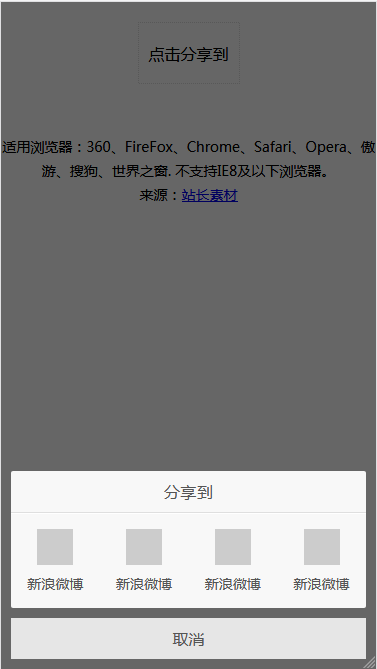
本文摘自站长素材:http://sc.chinaz.com/jiaoben/150907458420.htm
jQuery手机端点击弹出分享按钮代码的更多相关文章
- 基于jQuery鼠标点击弹出登陆框效果
基于jQuery鼠标点击弹出登陆框效果.这是一款扁平样式风格的jQuery弹出层登陆框特效.效果图如下: 在线预览 源码下载 实现的代码. html代码: <input type=" ...
- jQuery之点击弹出图标环形菜单
<head> <meta http-equiv="Content-Type" content="text/html; charset=utf-8&quo ...
- CSS3 页面中展示邮箱列表点击弹出发送邮件界面
CSS3 页面中展示邮箱列表点击弹出发送邮件界面 代码: <!DOCTYPE html> <html> <head> <meta charset=" ...
- JS框架_(JQuery.js)Tooltip弹出式按钮插件
百度云盘 传送门 密码:7eh5 弹出式按钮效果 <!DOCTYPE html> <html > <head> <meta charset="UTF ...
- jQuery实现打开网页自动弹出遮罩层或点击弹出遮罩层功能示例
本文实例讲述了jQuery实现打开网页自动弹出遮罩层或点击弹出遮罩层功能.分享给大家供大家参考,具体如下: 弹出层:两种方式 一是打开网页就自动弹出层二是点击弹出 <!DOCTYPE html ...
- 点击弹出 +1放大效果 -- jQuery插件
20140110更新: <!doctype html> <html> <head> <meta charset="UTF-8"> & ...
- jquery层居中,点击小图查看大图,弹出层居中代码,顶部层固定不动,滚动条滚动情况
jquery层居中,点击小图查看大图,弹出层居中代码 http://www.cnblogs.com/simpledev/p/3566280.html 见第一版,发现一个情况,如果页面内容多出一屏的情况 ...
- jQuery点击弹出层,弹出模态框,点击模态框消失
1 2 3 4 5 6 7 8 9 10 11 12 13 14 15 16 17 18 19 20 21 22 23 24 25 26 27 28 29 30 31 32 33 34 35 36 3 ...
- jQuery第二课 点击弹出一个提示框
选择器允许您对元素组或单个元素进行操作. jQuery 选择器 在前面的章节中,我们展示了一些有关如何选取 HTML 元素的实例. 关键点是学习 jQuery 选择器是如何准确地选取您希望应用效果的元 ...
随机推荐
- 如何解决Mac无法读取外置硬盘问题?
在mac中插入一款硬盘设备后发现硬盘无法显示在mac中,导致mac无法读取设备,遇到这种问题时需要如何解决? 首先,硬盘不能正常在mac上显示可能是硬盘出现了错误无法使用,也可能是硬盘的文件系统格式不 ...
- 强化学习(八)价值函数的近似表示与Deep Q-Learning
在强化学习系列的前七篇里,我们主要讨论的都是规模比较小的强化学习问题求解算法.今天开始我们步入深度强化学习.这一篇关注于价值函数的近似表示和Deep Q-Learning算法. Deep Q-Lear ...
- LeetCode 上最难的链表算法题,没有之一!
题目来源于 LeetCode 第 23 号问题:合并 K 个排序链表. 该题在 LeetCode 官网上有关于链表的问题中标注为最难的一道题目:难度为 Hard ,通过率在链表 Hard 级别目前最低 ...
- jQuery里面的DOM操作(查找,创建,添加,删除节点)
一:创建元素节点(添加) 创建元素节点并且把节点作为元素的子节点添加到DOM树上 append(): 在元素下添加元素 用法:$("id").append("定义的节点& ...
- 详解RPC远程调用和消息队列MQ的区别
PC(Remote Procedure Call)远程过程调用,主要解决远程通信间的问题,不需要了解底层网络的通信机制. RPC框架 知名度较高的有Thrift(FB的).dubbo(阿里的). RP ...
- keepalived介绍
keepalived介绍 Keepalived是一个基于VRRP协议来实现的服务高可用方案,可以利用其来避免IP单点故障,类似的工具还有heartbeat.corosync.pacemaker.但是它 ...
- nginx系列8:反向代理和负载均衡原理
反向代理是nginx的一个非常重要的功能. 反向代理 nginx支持四层反向代理和七层反向代理,如下图. 负载均衡 负载均衡是实现服务高性能和高可用的重要手段,而nginx是实现负载均衡的重要工具.
- Jinja2用法总结
Jinja2用法总结 一:渲染模版 要渲染一个模板,通过render_template方法即可. @app.route('/about/') def about(): # return rende ...
- Android为TV端助力 使用shared注意事项
不要存放大的key和value!我就不重复三遍了,会引起界面卡.频繁GC.占用内存等等,好自为之! 毫不相关的配置项就不要丢在一起了!文件越大读取越慢,不知不觉就被猪队友给坑了:蓝后,放进defalu ...
- android常犯错误记录(三)
java.lang.IndexOutOfBoundsException: Inconsistency detected. Invalid view holder adapter positionVie ...