
【原】无脑操作:TypeScript环境搭建
概述:本文描述TypeScript环境搭建,以及基于VSCode的自动编译设置和调试设置。网络上很多相应文章的方式过时了或者无法试验成功。
-------------------------------------------------------------------------------------------------------------------------
TypeScript简介:由微软开发的开源免费的编程语言,是JavaScript语言的一个超集,本质上为JavaScript语言添加了可选的静态类型和基于类的面向对象编程概念。
TypeScript的作者是大名鼎鼎的Anders Hejlsberg,没错,就是Delphi和C#之父。


-------------------------------------------------------------------------------------------------------------------------
1、TypeScript环境搭建:
① 操作系统:Windows 7 64位旗舰版
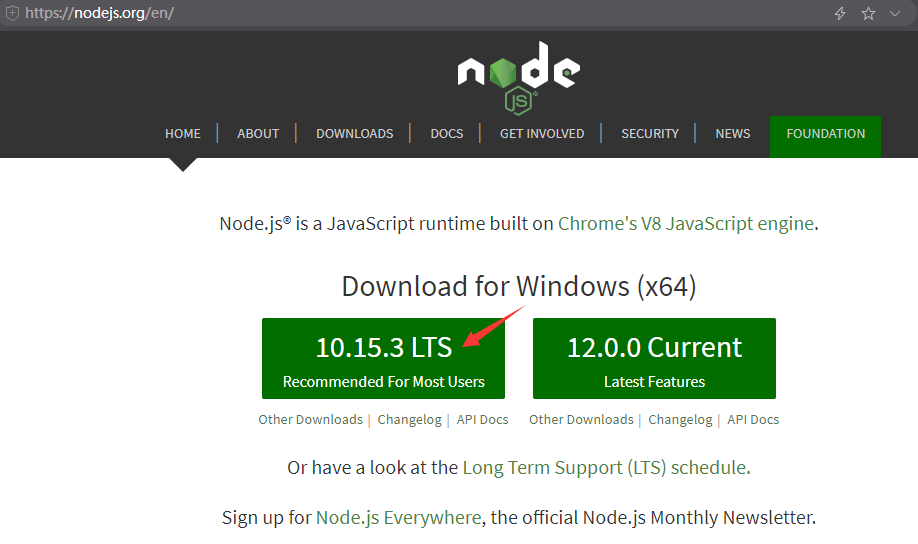
② 从Node.JS官网(https://nodejs.org/en/)下载当前稳定版本的Node.js(截至2019年04月27日,node-v10.15.3-x64.msi)
下载完毕,点击安装,选择好安装路径,一路回车安装即可。
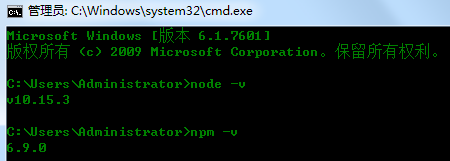
③ 当前版本的Node.js默认就带有npm工具。所以,安装完毕后,在命令行窗口中分别输入node -v 和 npm -v,查看版本信息,验证是否安装成功。
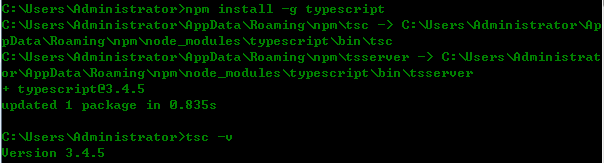
④ 使用npm安装TypeScript,在命令行窗口中输入 npm install -g typescript,全局安装TypeScript。安装完成后,可以输入 tsc -v,查看TypeScript编译器的版本信息。
⑤ 新建一个demo.ts文件
function say(msg) {

    return "Hello, " + msg;

}

let str = "TypeScript";

console.log(say(str));
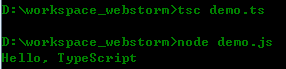
在命令行窗口中,使用tsc指令(输入: tsc demo.ts)编译为对应的JavaScript文件demo.js,打开该文件
function say(msg) {

    return "Hello, " + msg;

}

var str = "TypeScript";

console.log(say(str));
可以使用Node.js对生成的JavaScript文件进行执行
-------------------------------------------------------------------------------------------------------------------------
2、使用VSCode搭建开发环境
① 从VSCode官网(https://code.visualstudio.com)下载当前稳定版本(截至2019年04月27日,VSCodeUserSetup-x64-1.33.1.exe)
② 喜欢中文的朋友可以安装VSCode的中文插件
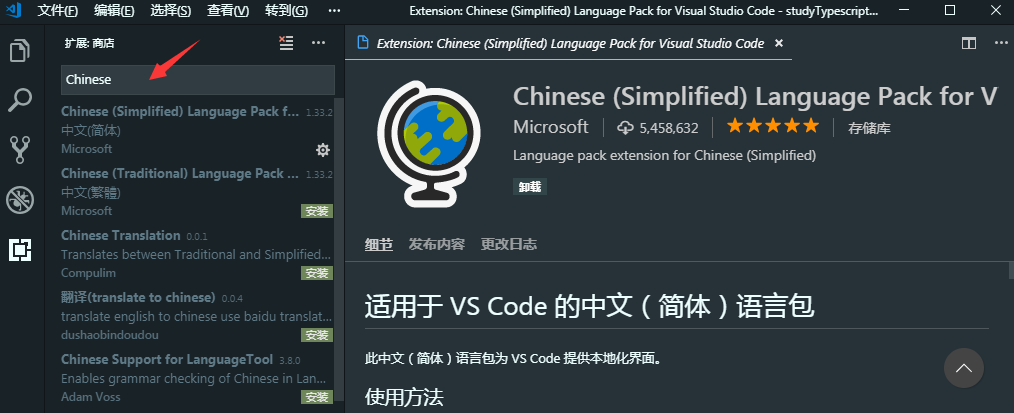
③ 创建目录demo,使用VSCode选择该目录,点击"终端"----->新建终端(快捷键:ctrl + shift + `),输入 tsc --init,创建出tsconfig.json文件。

④ tsconfig.json是TypeScript的配置文件,我们放开sourceMap 和 outDir的设置。其中,sourceMap是为了后续调试使用,outDir指定了自动编译时生成出JavaScript文件的位置。
{

  "compilerOptions": {

    /* Basic Options */

    "target": "es5",                          /* Specify ECMAScript target version: 'ES3' (default), 'ES5', 'ES2015', 'ES2016', 'ES2017', 'ES2018', 'ES2019' or 'ESNEXT'. */

    "module": "commonjs",                     /* Specify module code generation: 'none', 'commonjs', 'amd', 'system', 'umd', 'es2015', or 'ESNext'. */

    // "lib": [],                             /* Specify library files to be included in the compilation. */

    // "allowJs": true,                       /* Allow javascript files to be compiled. */

    // "checkJs": true,                       /* Report errors in .js files. */

    // "jsx": "preserve",                     /* Specify JSX code generation: 'preserve', 'react-native', or 'react'. */

    // "declaration": true,                   /* Generates corresponding '.d.ts' file. */

    // "declarationMap": true,                /* Generates a sourcemap for each corresponding '.d.ts' file. */

    "sourceMap": true,                     /* Generates corresponding '.map' file. */

    // "outFile": "./",                       /* Concatenate and emit output to single file. */

    "outDir": "./js",                        /* Redirect output structure to the directory. */

    // "rootDir": "./",                       /* Specify the root directory of input files. Use to control the output directory structure with --outDir. */

    // "composite": true,                     /* Enable project compilation */

    // "incremental": true,                   /* Enable incremental compilation */

    // "tsBuildInfoFile": "./",               /* Specify file to store incremental compilation information */

    // "removeComments": true,                /* Do not emit comments to output. */

    // "noEmit": true,                        /* Do not emit outputs. */

    // "importHelpers": true,                 /* Import emit helpers from 'tslib'. */

    // "downlevelIteration": true,            /* Provide full support for iterables in 'for-of', spread, and destructuring when targeting 'ES5' or 'ES3'. */

    // "isolatedModules": true,               /* Transpile each file as a separate module (similar to 'ts.transpileModule'). */

    /* Strict Type-Checking Options */

    "strict": true,                           /* Enable all strict type-checking options. */

    // "noImplicitAny": true,                 /* Raise error on expressions and declarations with an implied 'any' type. */

    // "strictNullChecks": true,              /* Enable strict null checks. */

    // "strictFunctionTypes": true,           /* Enable strict checking of function types. */

    // "strictBindCallApply": true,           /* Enable strict 'bind', 'call', and 'apply' methods on functions. */

    // "strictPropertyInitialization": true,  /* Enable strict checking of property initialization in classes. */

    // "noImplicitThis": true,                /* Raise error on 'this' expressions with an implied 'any' type. */

    // "alwaysStrict": true,                  /* Parse in strict mode and emit "use strict" for each source file. */

    /* Additional Checks */

    // "noUnusedLocals": true,                /* Report errors on unused locals. */

    // "noUnusedParameters": true,            /* Report errors on unused parameters. */

    // "noImplicitReturns": true,             /* Report error when not all code paths in function return a value. */

    // "noFallthroughCasesInSwitch": true,    /* Report errors for fallthrough cases in switch statement. */

    /* Module Resolution Options */

    // "moduleResolution": "node",            /* Specify module resolution strategy: 'node' (Node.js) or 'classic' (TypeScript pre-1.6). */

    // "baseUrl": "./",                       /* Base directory to resolve non-absolute module names. */

    // "paths": {},                           /* A series of entries which re-map imports to lookup locations relative to the 'baseUrl'. */

    // "rootDirs": [],                        /* List of root folders whose combined content represents the structure of the project at runtime. */

    // "typeRoots": [],                       /* List of folders to include type definitions from. */

    // "types": [],                           /* Type declaration files to be included in compilation. */

    // "allowSyntheticDefaultImports": true,  /* Allow default imports from modules with no default export. This does not affect code emit, just typechecking. */

    "esModuleInterop": true                   /* Enables emit interoperability between CommonJS and ES Modules via creation of namespace objects for all imports. Implies 'allowSyntheticDefaultImports'. */

    // "preserveSymlinks": true,              /* Do not resolve the real path of symlinks. */

    /* Source Map Options */

    // "sourceRoot": "",                      /* Specify the location where debugger should locate TypeScript files instead of source locations. */

    // "mapRoot": "",                         /* Specify the location where debugger should locate map files instead of generated locations. */

    // "inlineSourceMap": true,               /* Emit a single file with source maps instead of having a separate file. */

    // "inlineSources": true,                 /* Emit the source alongside the sourcemaps within a single file; requires '--inlineSourceMap' or '--sourceMap' to be set. */

    /* Experimental Options */

    // "experimentalDecorators": true,        /* Enables experimental support for ES7 decorators. */

    // "emitDecoratorMetadata": true,         /* Enables experimental support for emitting type metadata for decorators. */

  }

}
⑤ 编写TypeScript文件sample.ts
// 定义类

class Person {

    // 成员变量

    name: string;

    age: number;

    // 构造函数

    constructor(name: string, age: number) {

        this.name = name;

        this.age = age;

    }

    // 成员方法

    say(): void {

        console.log('姓名:' + this.name + ',年龄:' + this.age);

    }

}

// 实例化

let person = new Person('temptation', 18);

person.say();
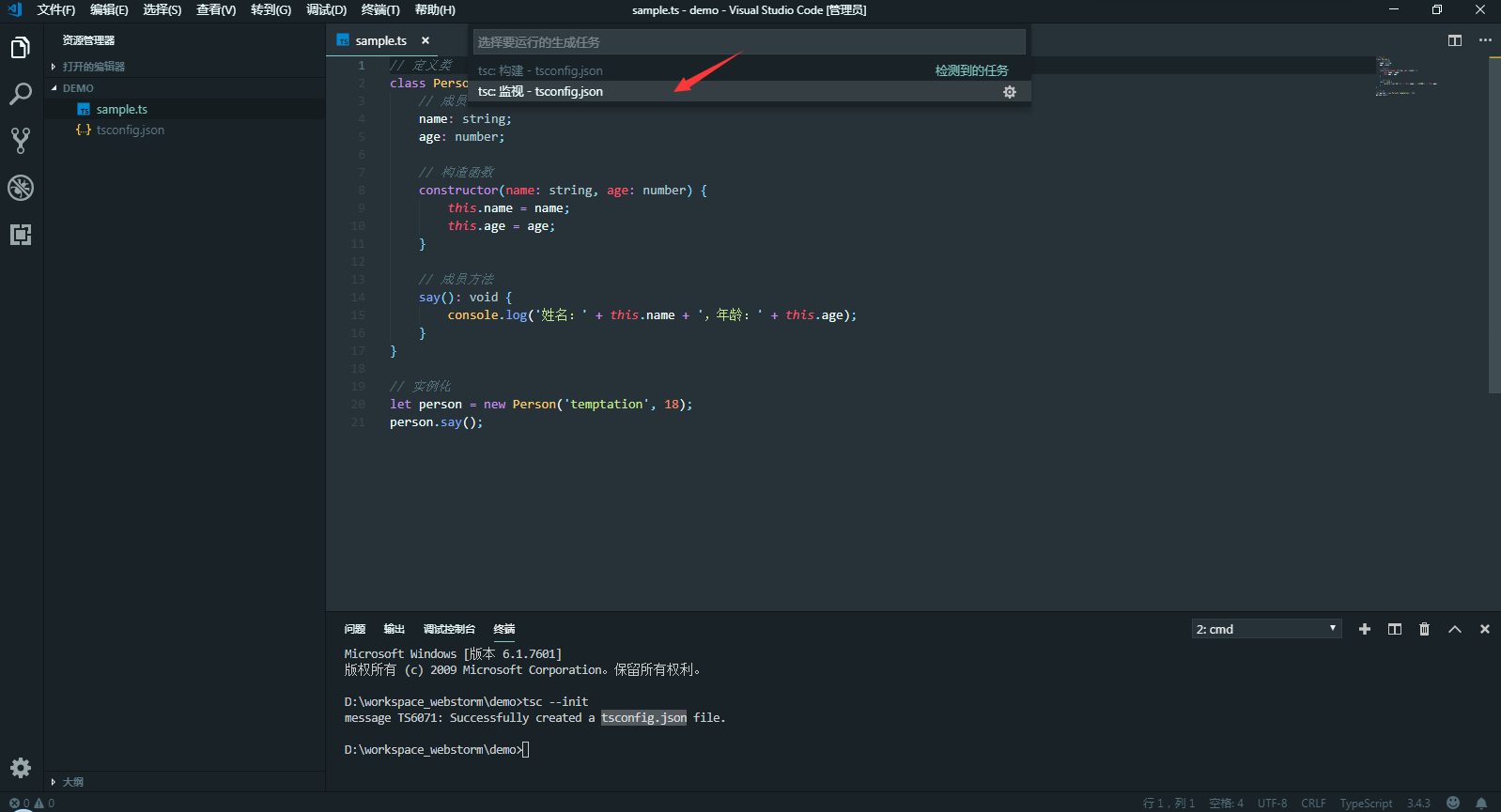
⑥ 点击"终端"----->运行生成任务(快捷键:ctrl + shift + B),选择tsc:监视 - tsconfig.json,一会儿就会生成js目录以及对应ts文件的js文件
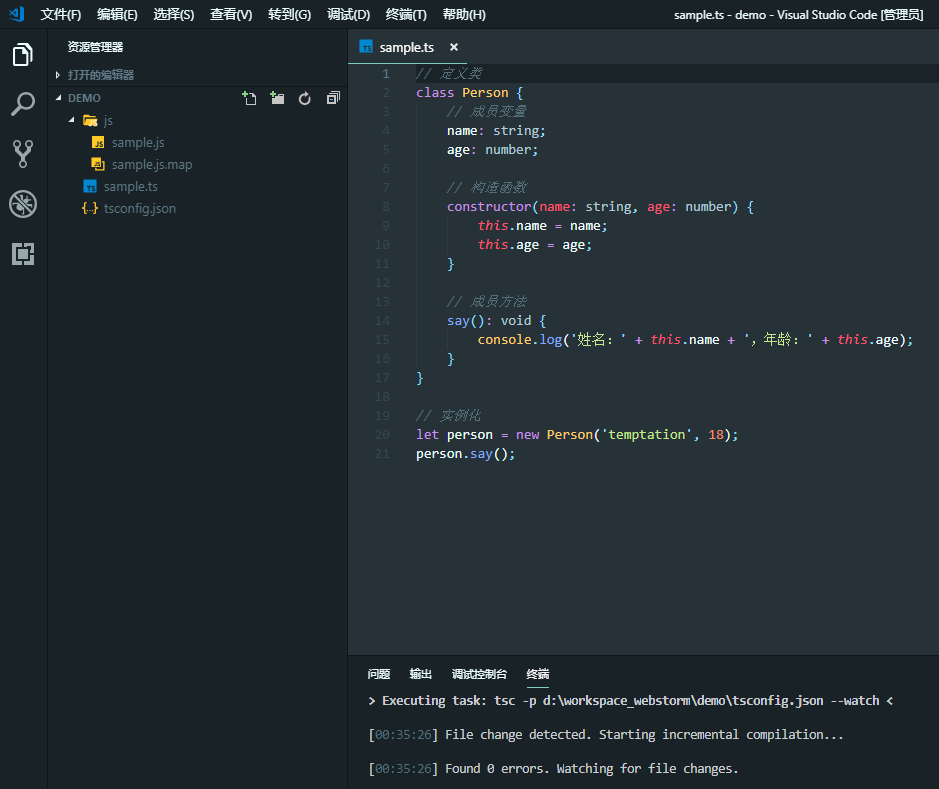
生成的JavaScript文件内容如下:
"use strict";

// 定义类

var Person = /** @class */ (function () {

    // 构造函数

    function Person(name, age) {

        this.name = name;

        this.age = age;

    }

    // 成员方法

    Person.prototype.say = function () {

        console.log('姓名:' + this.name + ',年龄:' + this.age);

    };

    return Person;

}());

// 实例化

var person = new Person('temptation', 18);

person.say();

//# sourceMappingURL=sample.js.map
⑦ 调试TypeScript文件。在需要中断的位置,使用F9设置断点。再点击F5启动调试即可。F10单步调试。F11单步走入。

⑧ HTML文件不能直接使用TypeScript,需要使用TypeScript自动编译生成的JavaScript文件。
可以在VSCode中安装open in browser这个插件,运行时,在HTML文件中右键找到Open In Default/Other Browser,打开相应的浏览器。在浏览器的控制台看到执行结果
<!DOCTYPE html>

<html lang="en">

<head>

    <meta charset="UTF-8">

    <meta name="viewport" content="width=device-width, initial-scale=1.0">

    <meta http-equiv="X-UA-Compatible" content="ie=edge">

    <title>TypeScript使用示例</title>

</head>

<body>

    <script src="js/sample.js"></script>

</body>

</html>
【原】无脑操作:TypeScript环境搭建的更多相关文章
- 【原】无脑操作:IDEA + maven + Shiro + SpringBoot + JPA + Thymeleaf实现基础认证权限
开发环境搭建参见<[原]无脑操作:IDEA + maven + SpringBoot + JPA + Thymeleaf实现CRUD及分页> 需求: ① 除了登录页面,在地址栏直接访问其他 ...
- 【原】无脑操作:EasyUI Tree实现左键只选择叶子节点、右键浮动菜单实现增删改
Easyui中的Tree组件使用频率颇高,经常遇到的需求如下: 1.在树形结构上,只有叶子节点才能被选中,其他节点不能被选中: 2.在叶子节点上右键出现浮动菜单实现新增.删除.修改操作: 3.在非叶子 ...
- 【原】无脑操作:express + MySQL 实现CRUD
基于node.js的web开发框架express简单方便,很多项目中都在使用.这里结合MySQL数据库,实现最简单的CRUD操作. 开发环境: IDE:WebStorm DB:MySQL ------ ...
- 【原】无脑操作:IDEA + maven + Shiro + SpringBoot + JPA + Thymeleaf实现基础授权权限
上一篇<[原]无脑操作:IDEA + maven + Shiro + SpringBoot + JPA + Thymeleaf实现基础认证权限>介绍了实现Shiro的基础认证.本篇谈谈实现 ...
- 【原】无脑操作:Eclipse + Maven + jFinal + MariaDB 环境搭建
一.开发环境 1.windows 7 企业版 2.Eclipse IDE for Enterprise Java Developers Version: 2019-03 (4.11.0) 3.JDK ...
- 【原】无脑操作:eclipse + maven搭建SSM框架
网上看到一些Spring + Spring MVC + MyBatis框架的搭建教程,不是很详细或是时间久远了,自己动手整一个简单无脑的! 0.系统环境 1)Windows 10 企业版 2)JDK ...
- 【原】无脑操作:ElasticSearch学习笔记(01)
开篇来自于经典的“保安的哲学三问”(你是谁,在哪儿,要干嘛) 问题一.ElasticSearch是什么?有什么用处? 答:截至2018年12月28日,从ElasticSearch官网(https:// ...
- TypeScript环境搭建
环境搭建 本篇将简单介绍一下TypeScript,并记录开发环境的搭建.使用Visual Studio Code进行一个简单的Demo开发过程. 第一部分.简介 TypeScript是一种由微软开发的 ...
- 【原】无脑操作:Centos 7.6 + MariaDB + Rsyslog + LogAnalyzer环境搭建
背景: 网络安全法第三章第二十一条明确规定"采取监测.记录网络运行状态.网络安全事件的技术措施,并按照规定留存相关的网络日志不少于六个月". 为了满足合规性的要求,应当建设相应的日 ...
随机推荐
- SpringMVC中的拦截器
1. 自定义拦截器 实现HandlerInterceptor接口 拦截器一: package cn.rodge.ssm.interceptor;import javax.servlet.http.Ht ...
- flock SUSE/RHEL
Util-linux-2.26 Util-linux 软件包其它实用程序.包括处理文件系统.控制台.分区以及消息等工具. 大概编译时间:1.3 SBU 需要磁盘空间:137 MB 6.65.1. FH ...
- SVN 使用方法
svn co http://路径(目录或文件的全路径) [本地目录全路径] --username 用户名 --password 密码svn co svn://路径(目录或文件的全路径) [本地目录全路 ...
- BigDecimal.setScale 处理java小数点
BigDecimal.setScale()方法用于格式化小数点setScale(1)表示保留一位小数,默认用四舍五入方式 setScale(1,BigDecimal.ROUND_DOWN)直接删除多余 ...
- MySQL事务原理&实战【官方精译】
事务隔离级别 事务隔离是数据库处理的基础之一.隔离是I中的首字母 ACID ; 隔离级别是在多个事务同时进行更改和执行查询时,对结果的性能和可靠性,一致性和可重复性之间的平衡进行微调的设置. Inno ...
- React Native在特赞的应用与实践
基于React技术栈构建开发前端项目,并使用React Native开发特赞移动APP 目前正在使用Node.js开发和维护特赞服务网关,希望Node.js能够在更轻量级的微服务架构中发挥重要作用 课 ...
- spring boot sso
https://hellokoding.com/hello-single-sign-on-sso-with-json-web-token-jwt-spring-boot/ https://github ...
- 软件配置管理及SVN的使用
一.配置管理 1. 管理整个软件生命周期中的配置项 配置项:软件生命周期中产出的各种输出成果,如需求文档.设计文档.代码.测试相关文档 2.管理配置项的变化(核心) 3.使用配置管理 ...
- 你不知道的JavaScript--Item25 创建对象(类)的8种方法总结
1. 使用Object构造函数来创建一个对象 下面代码创建了一个person对象,并用两种方式打印出了Name的属性值. var person = new Object(); person.name= ...
- windows7 dos修改mysql root密码
第一步:打开mysql 安装路径 选择bin文件 同时按下Shift+鼠标右键 点击"在此处打开命令" 第二步:输入mysql -u root -p 按回车键会提示输入密码 ...