
istio收集Metrics和日志信息
1.切换到istio根目录
cd /data/istio/istio-0.7.1
2.安装prometheus
kubectl apply -f install/kubernetes/addons/prometheus.yaml

3.创建收集数据的模板
# Configuration for metric instances

apiVersion: "config.istio.io/v1alpha2"

kind: metric

metadata:

  name: doublerequestcount

  namespace: istio-system

spec:

  value: "2" # count each request twice

  dimensions:

    source: source.service | "unknown"

    destination: destination.service | "unknown"

    message: '"twice the fun!"'

  monitored_resource_type: '"UNSPECIFIED"'

---

# Configuration for a Prometheus handler

apiVersion: "config.istio.io/v1alpha2"

kind: prometheus

metadata:

  name: doublehandler

  namespace: istio-system

spec:

  metrics:

  - name: double_request_count # Prometheus metric name

    instance_name: doublerequestcount.metric.istio-system # Mixer instance name (fully-qualified)

    kind: COUNTER

    label_names:

    - source

    - destination

    - message

---

# Rule to send metric instances to a Prometheus handler

apiVersion: "config.istio.io/v1alpha2"

kind: rule

metadata:

  name: doubleprom

  namespace: istio-system

spec:

  actions:

  - handler: doublehandler.prometheus

    instances:

    - doublerequestcount.metric

---

# Configuration for logentry instances

apiVersion: "config.istio.io/v1alpha2"

kind: logentry

metadata:

  name: newlog

  namespace: istio-system

spec:

  severity: '"warning"'

  timestamp: request.time

  variables:

    source: source.labels["app"] | source.service | "unknown"

    user: source.user | "unknown"

    destination: destination.labels["app"] | destination.service | "unknown"

    responseCode: response.code | 0

    responseSize: response.size | 0

    latency: response.duration | "0ms"

  monitored_resource_type: '"UNSPECIFIED"'

---

# Configuration for a stdio handler

apiVersion: "config.istio.io/v1alpha2"

kind: stdio

metadata:

  name: newhandler

  namespace: istio-system

spec:

 severity_levels:

   warning: 1 # Params.Level.WARNING

 outputAsJson: true

---

# Rule to send logentry instances to a stdio handler

apiVersion: "config.istio.io/v1alpha2"

kind: rule

metadata:

  name: newlogstdio

  namespace: istio-system

spec:

  match: "true" # match for all requests

  actions:

   - handler: newhandler.stdio

     instances:

     - newlog.logentry

---
# Configuration for a metric measuring bytes sent from a server

# to a client

apiVersion: "config.istio.io/v1alpha2"

kind: metric

metadata:

  name: mongosentbytes

  namespace: default

spec:

  value: connection.sent.bytes | 0 # uses a TCP-specific attribute

  dimensions:

    source_service: source.service | "unknown"

    source_version: source.labels["version"] | "unknown"

    destination_version: destination.labels["version"] | "unknown"

  monitoredResourceType: '"UNSPECIFIED"'

---

# Configuration for a metric measuring bytes sent from a client

# to a server

apiVersion: "config.istio.io/v1alpha2"

kind: metric

metadata:

  name: mongoreceivedbytes

  namespace: default

spec:

  value: connection.received.bytes | 0 # uses a TCP-specific attribute

  dimensions:

    source_service: source.service | "unknown"

    source_version: source.labels["version"] | "unknown"

    destination_version: destination.labels["version"] | "unknown"

  monitoredResourceType: '"UNSPECIFIED"'

---

# Configuration for a Prometheus handler

apiVersion: "config.istio.io/v1alpha2"

kind: prometheus

metadata:

  name: mongohandler

  namespace: default

spec:

  metrics:

  - name: mongo_sent_bytes # Prometheus metric name

    instance_name: mongosentbytes.metric.default # Mixer instance name (fully-qualified)

    kind: COUNTER

    label_names:

    - source_service

    - source_version

    - destination_version

  - name: mongo_received_bytes # Prometheus metric name

    instance_name: mongoreceivedbytes.metric.default # Mixer instance name (fully-qualified)

    kind: COUNTER

    label_names:

    - source_service

    - source_version

    - destination_version

---

# Rule to send metric instances to a Prometheus handler

apiVersion: "config.istio.io/v1alpha2"

kind: rule

metadata:

  name: mongoprom

  namespace: default

spec:

  match: context.protocol == "tcp"

         && destination.service == "mongodb.default.svc.cluster.local"

  actions:

  - handler: mongohandler.prometheus

    instances:

    - mongoreceivedbytes.metric

    - mongosentbytes.metric
执行命令:
istioctl create -f new_telemetry.yamlistioctl create -f tcp_telemetry.yaml为了测试支持收集tcp metric数据:
kubectl apply -f <(istioctl kube-inject -f samples/bookinfo/kube/bookinfo-ratings-v2.yaml)
kubectl apply -f <(istioctl kube-inject -f samples/bookinfo/kube/bookinfo-db.yaml)
istioctl create -f samples/bookinfo/kube/route-rule-ratings-db.yaml
4.测试
1)访问bookinfo事例
http://192.168.181.99:32693/productpage
2)查看prometheus ui
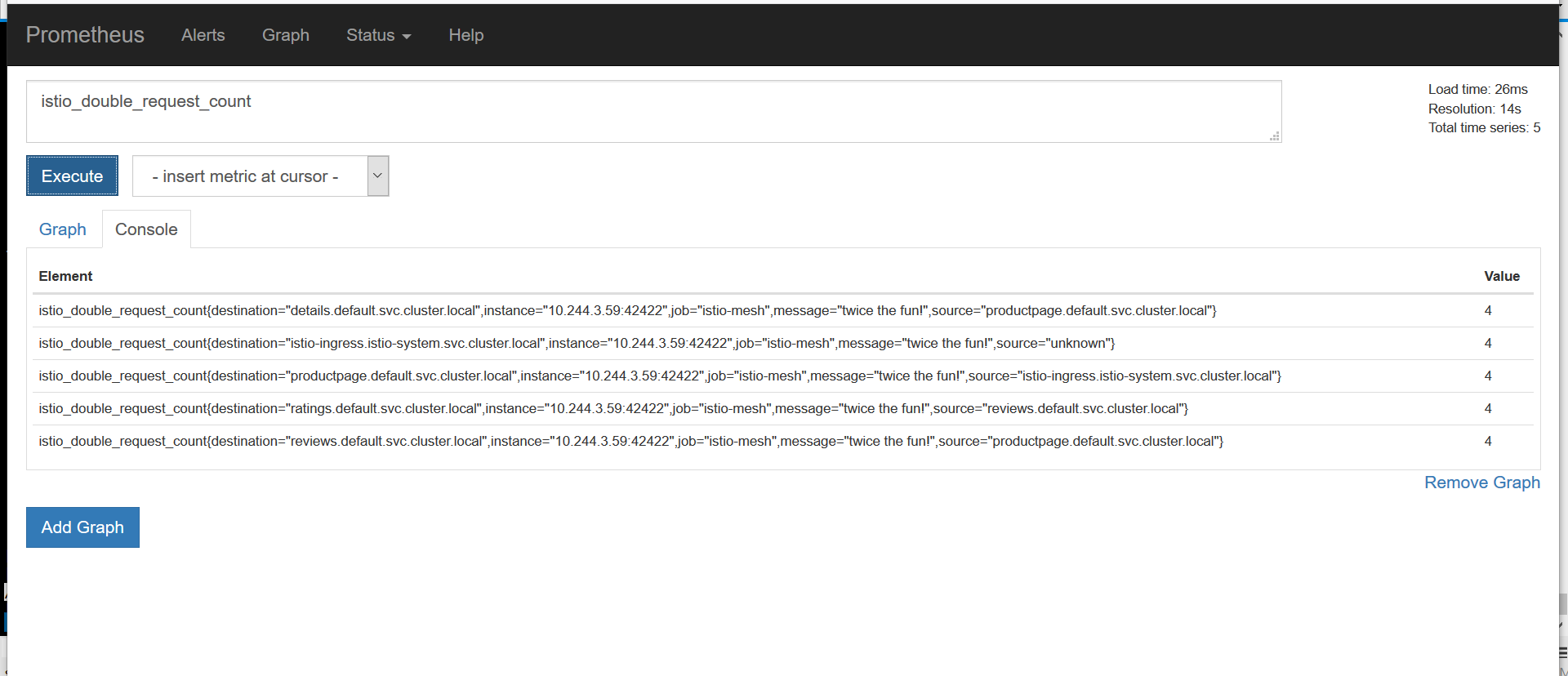
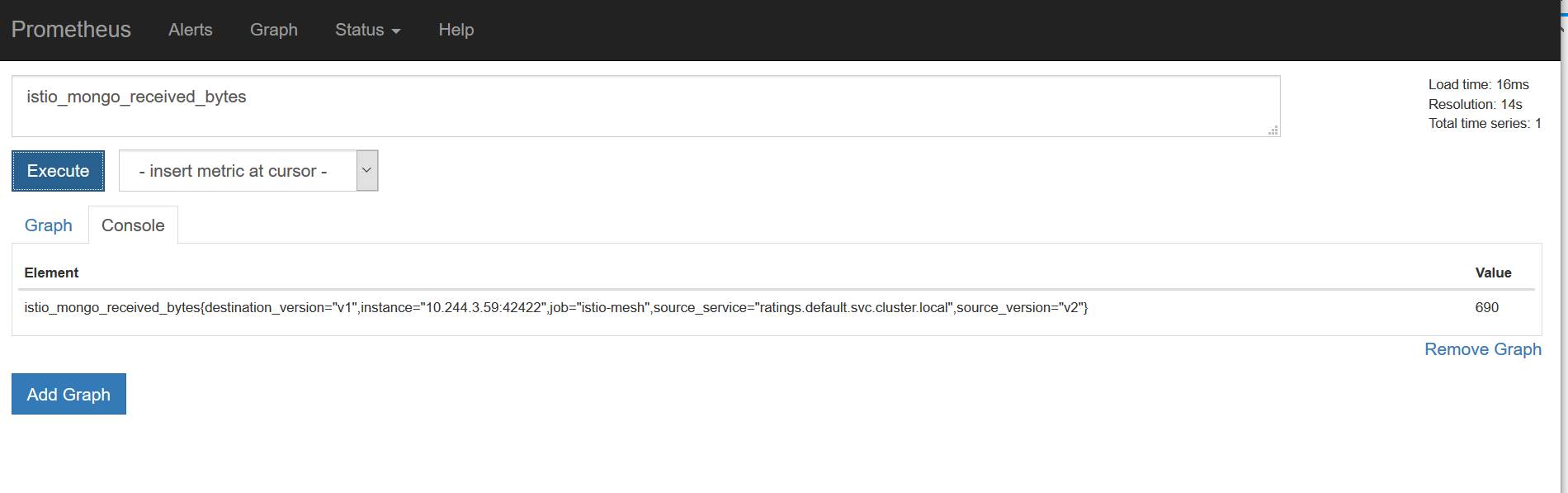
istio收集Metrics和日志信息的更多相关文章
- 【MySQL】关于MySQL错误日志信息的收集
为方便维护MySQL,写了个脚本用以提供收集错误信息的接口.这些错误信息来自与MySQL错误日志,而 通过grep mysql可以获取error-log的路径. #!/usr/bin/env pyth ...
- idou老师教你学Istio :如何用istio实现监控和日志采集
大家都知道istio可以帮助我们实现灰度发布.流量监控.流量治理等功能.每一个功能都帮助我们在不同场景中实现不同的业务.那Istio是如何帮助我们实现监控和日志采集的呢? 这里我们依然以Bookinf ...
- idou老师教你学Istio 25:如何用istio实现监控和日志采集
大家都知道istio可以帮助我们实现灰度发布.流量监控.流量治理等功能.每一个功能都帮助我们在不同场景中实现不同的业务.那Istio是如何帮助我们实现监控和日志采集的呢? 这里我们依然以Bookinf ...
- ASP.NET Core 实战:使用 NLog 将日志信息记录到 MongoDB
一.前言 在项目开发中,日志系统是系统的一个重要组成模块,通过在程序中记录运行日志.错误日志,可以让我们对于系统的运行情况做到很好的掌控.同时,收集日志不仅仅可以用于诊断排查错误,由于日志同样也是大量 ...
- 带你了解zabbix整合ELK收集系统异常日志触发告警~
今天来了解一下关于ELK的“L”-Logstash,没错,就是这个神奇小组件,我们都知道,它是ELK不可缺少的组件,完成了输入(input),过滤(fileter),output(输出)工作量,也是我 ...
- ELK收集Nginx自定义日志格式输出
1.ELK收集日志的有两种常用的方式: 1.1:不修改源日志格式,简单的说就是在logstash中转通过 grok方式进行过滤处理,将原始无规则的日志转换为规则日志(Logstash自定义日志格式) ...
- Flume 概述+环境配置+监听Hive日志信息并写入到hdfs
Flume介绍Flume是Apache基金会组织的一个提供的高可用的,高可靠的,分布式的海量日志采集.聚合和传输的系统,Flume支持在日志系统中定制各类数据发送方,用于收集数据:同时,Flume提供 ...
- svn log — 显示提交日志信息
http://www.cnblogs.com/eoiioe/archive/2009/01/06/1370580.html 概要svn log [PATH]svn log URL [PATH...]描 ...
- Android将日志信息自动发送到指定的邮箱中 邮件的内容以附件形式发送
今日整合了网上一些大神的例子(具体看了那些大神的?这个真不好意思我忘记了.下次再整合一定给大家补上,这次也只有默默的给那几个大神说声抱歉了.)做了一个“记录android项目中的日志信息,并将日志信息 ...
随机推荐
- javascript综合小案例,校验用户注册信息提交
完成这个综合小案例,对于html.css.javascript的大部分内容复习快结束了. 这里做一个小案例--要实现的功能,以一张图片的形式给出: 首先,写出提交数据之后进入的页面代码: <!D ...
- JAVA集合类——难得的总结
本文是在学习中的总结,欢迎转载但请注明出处:http://blog.csdn.net/pistolove/article/details/41346969 以下资料是在学习中总结出来的,希望对你有所帮 ...
- 【Unity Shaders】Diffuse Shading——使用2D ramp texture来创建一个假的BRDF(双向反射分布函数)
本系列主要参考<Unity Shaders and Effects Cookbook>一书(感谢原书作者),同时会加上一点个人理解或拓展. 这里是本书所有的插图.这里是本书所需的代码和资源 ...
- 【Unity Shaders】Diffuse Shading——漫反射光照改善技巧
本系列主要参考<Unity Shaders and Effects Cookbook>一书(感谢原书作者),同时会加上一点个人理解或拓展. 这里是本书所有的插图.这里是本书所需的代码和资源 ...
- javascript概要学习
Javascript是一种由Netscape的LiveScript发展而来的原型化继承的面向对象的动态类型的区分大小写的客户端脚本语言,主要目的是为了解决服务器端语言,比如Perl,遗留的速度问题,为 ...
- saiku 网站简介
Saiku web:http://docs.analytical-labs.com/saiku/documentation/2013/08/15/datasources.html Click &quo ...
- Boosting 和梯度Boosting
Boosting方法: Boosting这其实思想相当的简单,大概是,对一份数据,建立M个模型(比如分类),一般这种模型比较简单,称为弱分类器(weak learner)每次分类都将上一次分错的数据权 ...
- SpriteBuilder修改CCB文件中的子CCB文件需要注意的一个地方
在SpriteBuilder中如果一个CCB(比如一个场景)中嵌入了另一个子CCB文件(比如一个player),那么当给该子CCB中的root对象添加若干属性的时候,必须注意到这个并没有应用到父CCB ...
- Java-HttpServlet
/** * * Provides an abstract class to be subclassed to create * an HTTP servlet suitable for a Web s ...
- Android Bootloader LittleKernel的两篇文章
Android 开发之 ---- bootloader (LK) LK是什么 LK 是 Little Kernel 它是 appsbl (Applications ARM Boot Loader)流程 ...