
stm32+lwip(三):TCP测试
我是卓波,很高兴你来看我的博客。
系列文章:
stm32+lwip(一):使用STM32CubeMX生成项目
ST官方有lwip的例程,下载地址如下:
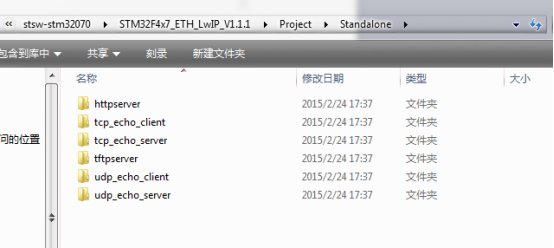
本文例子参考ST官方给出的例程。
一、准备
ST例程文档关于lwip的介绍如下:
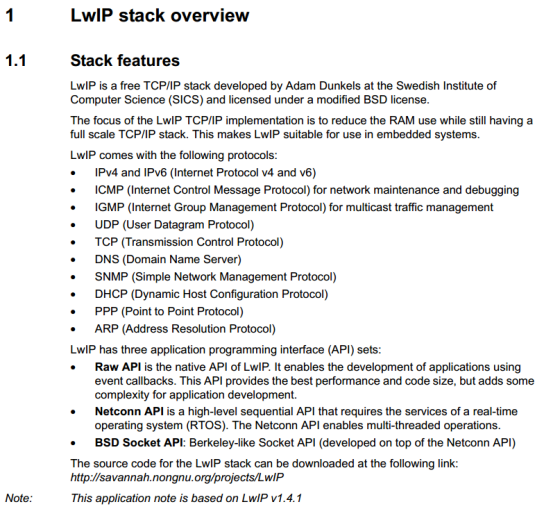
由此可以看到LWIP有三种API,在本文中,使用Raw API。
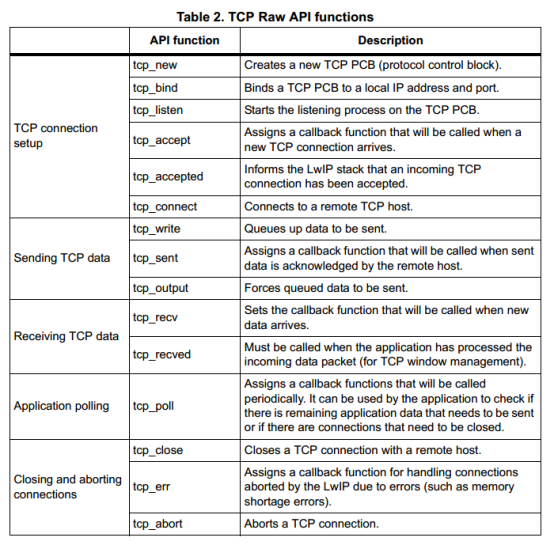
本文用到的TCP Raw API如下:
二、tcp client
 /**

   *****************************************************************************

   * @file    tcp_client.c

   * @author  Zorb

   * @version V1.0.0

   * @date    2018-09-04

   * @brief   tcp客户端的实现

   *****************************************************************************

   * @history

   *

   * 1. Date:2018-09-04

   *    Author:Zorb

   *    Modification:建立文件

   *

   *****************************************************************************

   */

 #include "stm32f4xx_hal.h"

 #include "lwip.h"

 #include "tcp.h"

 #include "string.h"

 /* 定义端口号 */

 #define TCP_REMOTE_PORT    8881 /* 远端端口 */

 #define TCP_LOCAL_PORT     8880 /* 本地端口 */

 /******************************************************************************

  * 描述  : 数据接收回调函数

  * 参数  : -

  * 返回  : -

 ******************************************************************************/

 static err_t tcp_client_recv(void *arg, struct tcp_pcb *tpcb,

                              struct pbuf *p, err_t err)

 {

     uint32_t i;

     /* 数据回传 */

     //tcp_write(tpcb, p->payload, p->len, 1);

     if (p != NULL)

     {

         struct pbuf *ptmp = p;

         /* 打印接收到的数据 */

         printf("get msg from %d:%d:%d:%d port:%d:\r\n",

             *((uint8_t *)&tpcb->remote_ip.addr),

             *((uint8_t *)&tpcb->remote_ip.addr + ),

             *((uint8_t *)&tpcb->remote_ip.addr + ),

             *((uint8_t *)&tpcb->remote_ip.addr + ),

             tpcb->remote_port);

         while(ptmp != NULL)

         {

             for (i = ; i < p->len; i++)

             {

                 printf("%c", *((char *)p->payload + i));

             }

             ptmp = p->next;

         }

         printf("\r\n");

         tcp_recved(tpcb, p->tot_len);

         /* 释放缓冲区数据 */

         pbuf_free(p);

     }

     else if (err == ERR_OK)

     {

         printf("tcp client closed\r\n");

         tcp_recved(tpcb, p->tot_len);

         return tcp_close(tpcb);

     }

     return ERR_OK;

 }

 /******************************************************************************

  * 描述  : 连接服务器回调函数

  * 参数  : -

  * 返回  : -

 ******************************************************************************/

 static err_t tcp_client_connected(void *arg, struct tcp_pcb *tpcb, err_t err)

 {

     printf("tcp client connected\r\n");

     tcp_write(tpcb, "tcp client connected", strlen("tcp client connected"), );

     /* 注册接收回调函数 */

     tcp_recv(tpcb, tcp_client_recv);

     return ERR_OK;

 }

 /******************************************************************************

  * 描述  : 创建tcp客户端

  * 参数  : 无

  * 返回  : 无

 ******************************************************************************/

 void tcp_client_init(void)

 {

     struct tcp_pcb *tpcb;

     ip_addr_t serverIp;

     /* 服务器IP */

     IP4_ADDR(&serverIp, , , , );

     /* 创建tcp控制块 */

     tpcb = tcp_new();

     if (tpcb != NULL)

     {

         err_t err;

         /* 绑定本地端号和IP地址 */

         err = tcp_bind(tpcb, IP_ADDR_ANY, TCP_LOCAL_PORT);

         if (err == ERR_OK)

         {

             /* 连接服务器 */

             tcp_connect(tpcb, &serverIp, TCP_REMOTE_PORT, tcp_client_connected);

         }

         else

         {

             memp_free(MEMP_TCP_PCB, tpcb);

             printf("can not bind pcb\r\n");

         }

     }

 }

 /******************************** END OF FILE ********************************/
本例用到的上位机IP为192.168.2.194,开放端口为8881
STM32的IP为192.168.2.8,开放端口为8880
先将网络调试助手的TCP Server打开,然后给STM32上电。
网络调试助手将会收到如下信息:
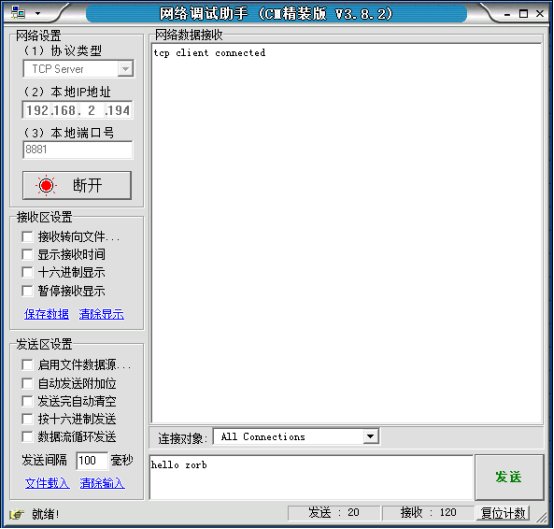
然后点击网络调试助手的发送,STM32调试串口输出以下信息:
get msg from ::: port::

hello zorb
三、tcp server
 /**

   *****************************************************************************

   * @file    tcp_server.c

   * @author  Zorb

   * @version V1.0.0

   * @date    2018-09-04

   * @brief   tcp服务端的实现

   *****************************************************************************

   * @history

   *

   * 1. Date:2018-09-04

   *    Author:Zorb

   *    Modification:建立文件

   *

   *****************************************************************************

   */

 #include "stm32f4xx_hal.h"

 #include "lwip.h"

 #include "tcp.h"

 #include "string.h"

 /* 定义端口号 */

 #define TCP_REMOTE_PORT    8881 /* 远端端口 */

 #define TCP_LOCAL_PORT     8880 /* 本地端口 */

 /******************************************************************************

  * 描述  : 接收回调函数

  * 参数  : -

  * 返回  : -

 ******************************************************************************/

 static err_t tcp_server_recv(void *arg, struct tcp_pcb *tpcb,

                              struct pbuf *p, err_t err)

 {

     uint32_t i;

     /* 数据回传 */

     //tcp_write(tpcb, p->payload, p->len, 1);

     if (p != NULL)

     {

         struct pbuf *ptmp = p;

         /* 打印接收到的数据 */

         printf("get msg from %d:%d:%d:%d port:%d:\r\n",

             *((uint8_t *)&tpcb->remote_ip.addr),

             *((uint8_t *)&tpcb->remote_ip.addr + ),

             *((uint8_t *)&tpcb->remote_ip.addr + ),

             *((uint8_t *)&tpcb->remote_ip.addr + ),

             tpcb->remote_port);

         while(ptmp != NULL)

         {

             for (i = ; i < p->len; i++)

             {

                 printf("%c", *((char *)p->payload + i));

             }

             ptmp = p->next;

         }

         printf("\r\n");

         tcp_recved(tpcb, p->tot_len);

         /* 释放缓冲区数据 */

         pbuf_free(p);

     }

     else if (err == ERR_OK)

     {

         printf("tcp client closed\r\n");

         tcp_recved(tpcb, p->tot_len);

         return tcp_close(tpcb);

     }

     return ERR_OK;

 }

 /******************************************************************************

  * 描述  : 客户端接入回调函数

  * 参数  : -

  * 返回  : -

 ******************************************************************************/

 static err_t tcp_server_accept(void *arg, struct tcp_pcb *newpcb, err_t err)

 {

     printf("tcp client connected\r\n");

     printf("ip %d:%d:%d:%d port:%d\r\n",

         *((uint8_t *)&newpcb->remote_ip.addr),

         *((uint8_t *)&newpcb->remote_ip.addr + ),

         *((uint8_t *)&newpcb->remote_ip.addr + ),

         *((uint8_t *)&newpcb->remote_ip.addr + ),

         newpcb->remote_port);

     tcp_write(newpcb, "tcp client connected", strlen("tcp client connected"), );

     /* 注册接收回调函数 */

     tcp_recv(newpcb, tcp_server_recv);

     return ERR_OK;

 }

 /******************************************************************************

  * 描述  : 创建tcp服务器

  * 参数  : 无

  * 返回  : 无

 ******************************************************************************/

 void tcp_server_init(void)

 {

     struct tcp_pcb *tpcb;

     /* 创建tcp控制块 */

     tpcb = tcp_new();

     if (tpcb != NULL)

     {

         err_t err;

         /* 绑定端口接收,接收对象为所有ip地址 */

         err = tcp_bind(tpcb, IP_ADDR_ANY, TCP_LOCAL_PORT);

         if (err == ERR_OK)

         {

             /* 监听 */

             tpcb = tcp_listen(tpcb);

             /* 注册接入回调函数 */

             tcp_accept(tpcb, tcp_server_accept);

             printf("tcp server listening\r\n");

             printf("tcp server ip:%d:%d:%d:%d prot:%d\r\n",

                 *((uint8_t *)&ipaddr.addr),

                 *((uint8_t *)&ipaddr.addr + ),

                 *((uint8_t *)&ipaddr.addr + ),

                 *((uint8_t *)&ipaddr.addr + ),

                 tpcb->local_port);

         }

         else

         {

             memp_free(MEMP_TCP_PCB, tpcb);

             printf("can not bind pcb\r\n");

         }

     }

 }

 /******************************** END OF FILE ********************************/
本例用到的上位机IP为192.168.2.194,开放端口为8881
STM32的IP为192.168.2.8,开放端口为8880
先将STM32上电,STM32调试串口输出以下信息:
tcp server listening

tcp server ip:::: prot:
然后通过网络调试助手连接到STM32的tcp服务器:
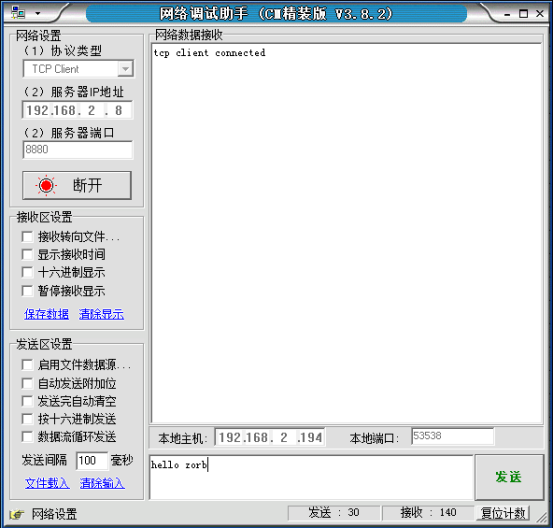
STM32调试串口输出以下信息:
tcp client connected

ip ::: port:
在网络调试助手发送信息”hello zorb”,STM32调试串口输出以下信息:
get msg from ::: port::

hello zorb
四、最后
本文测试了lwip的tcp功能,能正常连接并收发数据,撒花。
github:https://github.com/54zorb/stm32-lwip
版权所有,转载请打赏哟
如果你喜欢我的文章,可以通过微信扫一扫给我打赏哟

stm32+lwip(三):TCP测试的更多相关文章
- stm32+lwip(二):UDP测试
我是卓波,很高兴你来看我的博客. 系列文章: stm32+lwip(一):使用STM32CubeMX生成项目 stm32+lwip(二):UDP测试 stm32+lwip(三):TCP测试 stm32 ...
- stm32+lwip(五):以太网帧发送测试
我是卓波,很高兴你来看我的博客. 系列文章: stm32+lwip(一):使用STM32CubeMX生成项目 stm32+lwip(二):UDP测试 stm32+lwip(三):TCP测试 stm32 ...
- stm32+lwip(四):网页服务器测试
我是卓波,很高兴你来看我的博客. 系列文章: stm32+lwip(一):使用STM32CubeMX生成项目 stm32+lwip(二):UDP测试 stm32+lwip(三):TCP测试 stm32 ...
- stm32+lwip(一):使用STM32CubeMX生成项目
我是卓波,很高兴你来看我的博客. 系列文章: stm32+lwip(一):使用STM32CubeMX生成项目 stm32+lwip(二):UDP测试 stm32+lwip(三):TCP测试 stm32 ...
- 免花生壳 TCP测试 DTU测试 GPRS测试TCP服务器
通常在学习GPRS或者DTU的时候,往往没有自己的服务器,很多时候我们只能用这个模块打个电话发个短信,但是随着移动互联的兴起,各行各业大家都开始弄移动接入.为了这个需求,这里提供TCP移动接入. 工作 ...
- 2018.10.2浪在ACM 集训队第三次测试赛
2018.10.26 浪在ACM 集训队第三次测试赛 今天是暴力场吗???????可怕 题目一览表 来源 考察知识点 完成时间 A 1275 珠心算测试 NOIP 普及组 2014 暴力??? 201 ...
- 两款JSON类库Jackson与JSON-lib的性能对比(新增第三款测试)
本篇文章主要介绍了"两款JSON类库Jackson与JSON-lib的性能对比(新增第三款测试)",主要涉及到两款JSON类库Jackson与JSON-lib的性能对比(新增第三款 ...
- 2018.11.2浪在ACM集训队第三次测试赛
2018.11.2 浪在ACM 集训队第三次测试赛 整理人:孔晓霞 A 珠心算测试 参考博客:[1]李继朋 B 比例简化 参考博客: [1]李继朋 C 螺旋矩阵 参考博客:[1]朱远迪 D 子矩阵 ...
- Keil MDK STM32系列(三) 基于标准外设库SPL的STM32F407开发
Keil MDK STM32系列 Keil MDK STM32系列(一) 基于标准外设库SPL的STM32F103开发 Keil MDK STM32系列(二) 基于标准外设库SPL的STM32F401 ...
随机推荐
- oracle数据库建表设置自增主键
create sequence userlogin_ID increment by 1 start with 1 minvalue 1 maxvalue 9999999999999999 nocach ...
- 安装字体或直接调用非注册字体 z
1.安装字体//程序直接将字体文件安装的系统中.函数声明:[DllImport("kernel32.dll", SetLastError = true)] static exter ...
- pl/sql中的一种链接数据库方式
今天看开发人员如此连接数据库:
- 用trie树实现输入提示功能,输入php函数名,提示php函数
参照刘汝佳的trie树 结构体 #include "stdio.h" #include "stdlib.h" #include "string.h&q ...
- typescript import需要注意的地方以及一点疑问
在使用 import {XXX} from './xxx'的时候,到浏览器上会报错,提示找不到xxx文件,原因在于没有加入后缀,这时候要写成import {XXX} from './xxx.js'注意 ...
- Spring3+Struts2+Hibernate4+Mybatis整合的一个maven例子
说明: 1.用了maven去搞这个demo,懒得去导jar包... 2.这个demo用了spring去做Ioc,事务的aop:用了struts2去做“MVC”(没有用到任何UI技术,有点对不起这个MV ...
- React简介
React JS:可以用react的语法,来编写网页的交互效果 React Native:可以让我们借用react的语法来编写原生的app应用 React VR:在react的基础上去开发VR,或者说 ...
- VOJ1067 【矩阵经典7 构造矩阵】
任意门:https://vijos.org/records/5be95b65d3d8a1366270262b 背景 守望者-warden,长期在暗夜精灵的的首都艾萨琳内担任视察监狱的任务,监狱是成长条 ...
- git bush 代码提交
# git add . # git commit -m"init project" # git push
- hbase 数据拷贝
由于运营数据太大,另外避免影响正常访问,所以需要临时拷贝部分数据到临时表中. bin/hbase org.apache.hadoop.hbase.mapreduce.CopyTable [--star ...