
解决Spring Boot(2.1.3.RELEASE)整合spring-data-elasticsearch3.1.5.RELEASE报NoNodeAvailableException[None of the configured nodes are available
Spring Boot(2.1.3.RELEASE)整合spring-data-elasticsearch3.1.5.RELEASE报NoNodeAvailableException[None of the configured nodes are available问题:
具体异常消息:
 NoNodeAvailableException[None of the configured nodes are available: [{#transport#-1}{NoI2lKCmTa2aqX7uIYaVGg}{172.27.73.28}{172.27.73.28:9301}]

 ]

     at org.elasticsearch.client.transport.TransportClientNodesService.ensureNodesAreAvailable(TransportClientNodesService.java:349)

     at org.elasticsearch.client.transport.TransportClientNodesService.execute(TransportClientNodesService.java:247)

     at org.elasticsearch.client.transport.TransportProxyClient.execute(TransportProxyClient.java:60)

     at org.elasticsearch.client.transport.TransportClient.doExecute(TransportClient.java:381)

     at org.elasticsearch.client.support.AbstractClient.execute(AbstractClient.java:407)

     at org.elasticsearch.client.support.AbstractClient.execute(AbstractClient.java:396)

     at org.elasticsearch.action.ActionRequestBuilder.execute(ActionRequestBuilder.java:46)

     at org.springframework.data.elasticsearch.core.ElasticsearchTemplate.doCount(ElasticsearchTemplate.java:501)

     at org.springframework.data.elasticsearch.core.ElasticsearchTemplate.count(ElasticsearchTemplate.java:466)

     at org.springframework.data.elasticsearch.repository.query.ElasticsearchPartQuery.execute(ElasticsearchPartQuery.java:72)

     at org.springframework.data.repository.core.support.RepositoryFactorySupport$QueryExecutorMethodInterceptor.doInvoke(RepositoryFactorySupport.java:605)

     at org.springframework.data.repository.core.support.RepositoryFactorySupport$QueryExecutorMethodInterceptor.lambda$invoke$3(RepositoryFactorySupport.java:595)

     at org.springframework.data.repository.core.support.RepositoryFactorySupport$QueryExecutorMethodInterceptor.invoke(RepositoryFactorySupport.java:595)

     at org.springframework.aop.framework.ReflectiveMethodInvocation.proceed(ReflectiveMethodInvocation.java:186)

     at org.springframework.data.projection.DefaultMethodInvokingMethodInterceptor.invoke(DefaultMethodInvokingMethodInterceptor.java:59)

     at org.springframework.aop.framework.ReflectiveMethodInvocation.proceed(ReflectiveMethodInvocation.java:186)

     at org.springframework.aop.interceptor.ExposeInvocationInterceptor.invoke(ExposeInvocationInterceptor.java:93)

     at org.springframework.aop.framework.ReflectiveMethodInvocation.proceed(ReflectiveMethodInvocation.java:186)

     at org.springframework.data.repository.core.support.SurroundingTransactionDetectorMethodInterceptor.invoke(SurroundingTransactionDetectorMethodInterceptor.java:61)

     at org.springframework.aop.framework.ReflectiveMethodInvocation.proceed(ReflectiveMethodInvocation.java:186)

     at org.springframework.aop.framework.JdkDynamicAopProxy.invoke(JdkDynamicAopProxy.java:212)

     at com.sun.proxy.$Proxy70.findByNameLike(Unknown Source)

     at com.practice.elasticsearch.SpringBoot02ElasticsearchApplicationTests.test1(SpringBoot02ElasticsearchApplicationTests.java:38)

     at sun.reflect.NativeMethodAccessorImpl.invoke0(Native Method)

     at sun.reflect.NativeMethodAccessorImpl.invoke(NativeMethodAccessorImpl.java:62)

     at sun.reflect.DelegatingMethodAccessorImpl.invoke(DelegatingMethodAccessorImpl.java:43)

     at java.lang.reflect.Method.invoke(Method.java:498)

     at org.junit.runners.model.FrameworkMethod$1.runReflectiveCall(FrameworkMethod.java:50)

     at org.junit.internal.runners.model.ReflectiveCallable.run(ReflectiveCallable.java:12)

     at org.junit.runners.model.FrameworkMethod.invokeExplosively(FrameworkMethod.java:47)

     at org.junit.internal.runners.statements.InvokeMethod.evaluate(InvokeMethod.java:17)

     at org.springframework.test.context.junit4.statements.RunBeforeTestExecutionCallbacks.evaluate(RunBeforeTestExecutionCallbacks.java:74)

     at org.springframework.test.context.junit4.statements.RunAfterTestExecutionCallbacks.evaluate(RunAfterTestExecutionCallbacks.java:84)

     at org.springframework.test.context.junit4.statements.RunBeforeTestMethodCallbacks.evaluate(RunBeforeTestMethodCallbacks.java:75)

     at org.springframework.test.context.junit4.statements.RunAfterTestMethodCallbacks.evaluate(RunAfterTestMethodCallbacks.java:86)

     at org.springframework.test.context.junit4.statements.SpringRepeat.evaluate(SpringRepeat.java:84)

     at org.junit.runners.ParentRunner.runLeaf(ParentRunner.java:325)

     at org.springframework.test.context.junit4.SpringJUnit4ClassRunner.runChild(SpringJUnit4ClassRunner.java:251)

     at org.springframework.test.context.junit4.SpringJUnit4ClassRunner.runChild(SpringJUnit4ClassRunner.java:97)

     at org.junit.runners.ParentRunner$3.run(ParentRunner.java:290)

     at org.junit.runners.ParentRunner$1.schedule(ParentRunner.java:71)

     at org.junit.runners.ParentRunner.runChildren(ParentRunner.java:288)

     at org.junit.runners.ParentRunner.access$000(ParentRunner.java:58)

     at org.junit.runners.ParentRunner$2.evaluate(ParentRunner.java:268)

     at org.springframework.test.context.junit4.statements.RunBeforeTestClassCallbacks.evaluate(RunBeforeTestClassCallbacks.java:61)

     at org.springframework.test.context.junit4.statements.RunAfterTestClassCallbacks.evaluate(RunAfterTestClassCallbacks.java:70)

     at org.junit.runners.ParentRunner.run(ParentRunner.java:363)

     at org.springframework.test.context.junit4.SpringJUnit4ClassRunner.run(SpringJUnit4ClassRunner.java:190)

     at org.junit.runner.JUnitCore.run(JUnitCore.java:137)

     at com.intellij.junit4.JUnit4IdeaTestRunner.startRunnerWithArgs(JUnit4IdeaTestRunner.java:68)

     at com.intellij.rt.execution.junit.IdeaTestRunner$Repeater.startRunnerWithArgs(IdeaTestRunner.java:47)

     at com.intellij.rt.execution.junit.JUnitStarter.prepareStreamsAndStart(JUnitStarter.java:242)

     at com.intellij.rt.execution.junit.JUnitStarter.main(JUnitStarter.java:70)
我在docker上安装的elasticsearch是latest,也就是最高版。
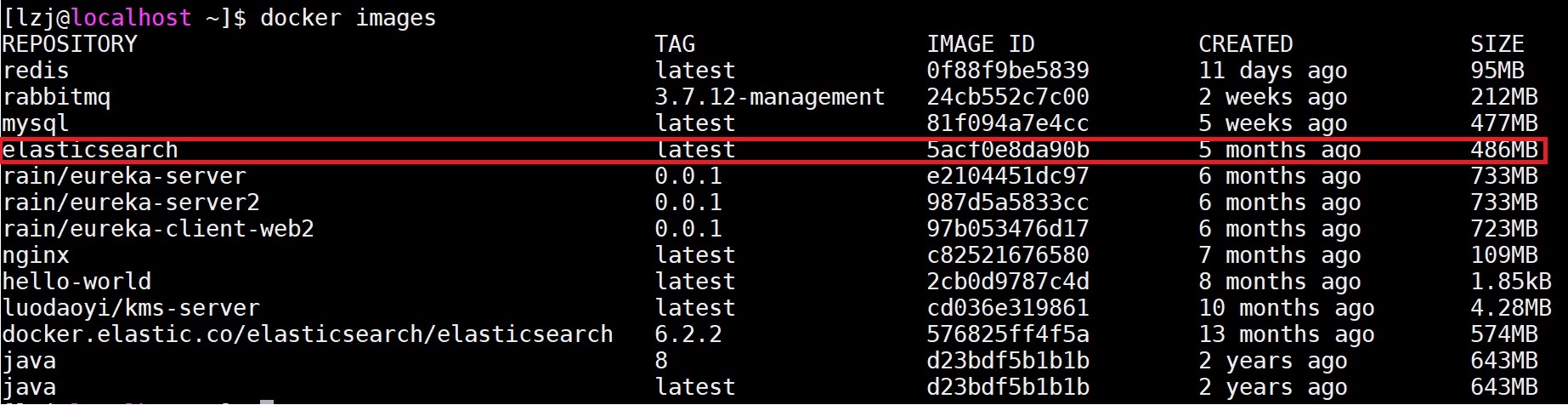
下面的6.2.2是我后安的。
项目中引用的spring-data-elasticsearch是3.1.5.RELEASE版的。

在的github地址上:https://github.com/spring-projects/spring-data-elasticsearch,由如下说明:
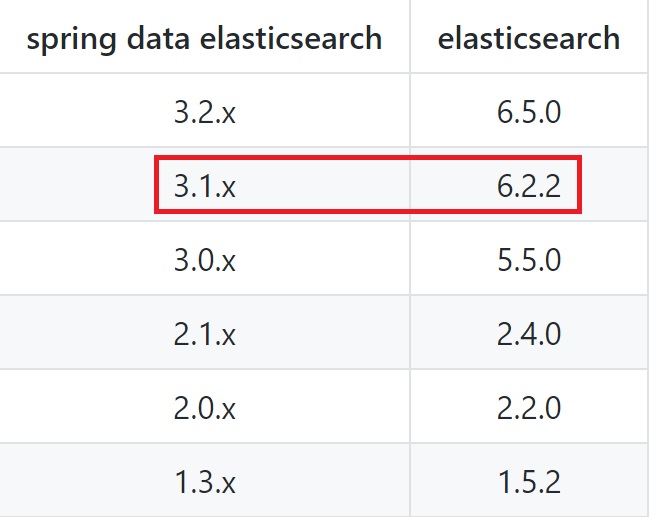
说明,我们使用的elasticsearch是6.2.2版本。
关键是在docker hub elasticsearch上并没有6.2.2版,或者相邻的版本。
所以我们上elasticsearch官网上下载,直接在docker中下载镜像:
docker pull docker.elastic.co/elasticsearch/elasticsearch:6.2.2
运行
docker run -p 9200:9200 -p 9300:9300 -e "discovery.type=single-node" docker.elastic.co/elasticsearch/elasticsearch:6.2.4
发现,运行了,马上就停止了。报以下错误:
[2019-03-16T11:34:18,203][INFO ][o.e.n.Node               ] [qWS8p_Y] starting ...

[2019-03-16T11:34:18,428][INFO ][o.e.t.TransportService   ] [qWS8p_Y] publish_address {172.17.0.2:9300}, bound_addresses {0.0.0.0:9300}

[2019-03-16T11:34:18,474][INFO ][o.e.b.BootstrapChecks    ] [qWS8p_Y] bound or publishing to a non-loopback address, enforcing bootstrap checks

ERROR: [1] bootstrap checks failed

[1]: max virtual memory areas vm.max_map_count [65535] is too low, increase to at least [262144]

[2019-03-16T11:34:18,545][INFO ][o.e.n.Node               ] [qWS8p_Y] stopping ...

[2019-03-16T11:34:18,637][INFO ][o.e.n.Node               ] [qWS8p_Y] stopped

[2019-03-16T11:34:18,637][INFO ][o.e.n.Node               ] [qWS8p_Y] closing ...

[2019-03-16T11:34:18,652][INFO ][o.e.n.Node               ] [qWS8p_Y] closed
在elasticsearch6.2的docker安装页面上,地址:https://www.elastic.co/guide/en/elasticsearch/reference/6.2/docker.html,由如下说明:
The vm.max_map_count setting should be set permanently in /etc/sysctl.conf:

$ grep vm.max_map_count /etc/sysctl.conf

vm.max_map_count=262144

To apply the setting on a live system type: sysctl -w vm.max_map_count=262144
我们设定vm.max_map_count的值>262144即可。
使用:sysctl -a | grep "vm.max_map_count"查看修改的值。
再重启,OK。
注意的是,在配置文件中,配置
data:

    elasticsearch:

      cluster-name: docker-cluster
不是最新版的:elasticsearch
解决Spring Boot(2.1.3.RELEASE)整合spring-data-elasticsearch3.1.5.RELEASE报NoNodeAvailableException[None of the configured nodes are available的更多相关文章
- Spring Boot + MyBatis + Druid + Redis + Thymeleaf 整合小结
Spring Boot + MyBatis + Druid + Redis + Thymeleaf 整合小结 这两天闲着没事想利用**Spring Boot**加上阿里的开源数据连接池**Druid* ...
- Spring Boot 2.0 快速集成整合消息中间件 Kafka
欢迎关注个人微信公众号: 小哈学Java, 每日推送 Java 领域干货文章,关注即免费无套路附送 100G 海量学习.面试资源哟!! 个人网站: https://www.exception.site ...
- Spring Boot中文文档(官方文档翻译 基于1.5.2.RELEASE)
作者:Phillip Webb, Dave Syer, Josh Long, Stéphane Nicoll, Rob Winch, Andy Wilkinson, Marcel Overdijk, ...
- spring boot: 热部署(一) run as – java application (spring-loader-1.2.4.RELEASE.jar)
spring boot: 热部署(一) run as – java application (spring-loader-1.2.4.RELEASE.jar) 如果使用的run as – java a ...
- 曹工说Spring Boot源码(29)-- Spring 解决循环依赖为什么使用三级缓存,而不是二级缓存
写在前面的话 相关背景及资源: 曹工说Spring Boot源码(1)-- Bean Definition到底是什么,附spring思维导图分享 曹工说Spring Boot源码(2)-- Bean ...
- Spring Boot系列(三):Spring Boot整合Mybatis源码解析
一.Mybatis回顾 1.MyBatis介绍 Mybatis是一个半ORM框架,它使用简单的 XML 或注解用于配置和原始映射,将接口和Java的POJOs(普通的Java 对象)映射成数据库中的记 ...
- spring boot 2.0(一)权威发布spring boot2.0
Spring Boot2.0.0.RELEASE正式发布,在发布Spring Boot2.0的时候还出现一个小插曲,将Spring Boot2.0同步到Maven仓库的时候出现了错误,然后Spring ...
- Spring Boot的前世今生以及它和Spring Cloud的关系详解。
要了解Spring Boot的发展背景,还得从2004年Spring Framework1.0版本发布开始说起,不过大家都是从开始学习Java就使用Spring Framework了,所以就不做过多展 ...
- Spring Boot入门教程2-1、使用Spring Boot+MyBatis访问数据库(CURD)注解版
一.前言 什么是MyBatis?MyBatis是目前Java平台最为流行的ORM框架https://baike.baidu.com/item/MyBatis/2824918 本篇开发环境1.操作系统: ...
随机推荐
- ORACLE 11G负载均衡测试
Oracle 11g R2中,引入了SCAN(Single Client Access Name)的特性.该特性的好处在于,在数据库与客户端之间,添加了一层虚拟的服务层,就是所谓的SCAN IP以及S ...
- PHP数组排序和按数量分割
用PHP自带array_multisort函数排序 <?php $data = array(); $data[] = array('volume' => 67, 'editi ...
- 关于app集成支付宝应用内支付的问题总结
pem文件生成,将合作伙伴密钥复制到notepad++中,每45个字符回车,去除空格,头尾加上标题,文件需保存为无BOM的UTF8格式,就OK. 可以每行64个字符,共216个字符. 近来处理了 ...
- spring mvc处理http请求报错:java.lang.IllegalStateException: getInputStream() has already been called for this request
发送post请求到controller处理失败,报错日志如下: java.lang.IllegalStateException: getInputStream() has already been c ...
- 一键获取 所有连接过的WIFI密码
使用方法 一.运行CMD (以及 开启无线网卡.最好是笔记本) 二.输入命令: for /f "skip=9 tokens=1,2 delims=:" %i in ('netsh ...
- 让你的 Nginx 的 RTMP 直播具有统计某频道在线观看用户数量的功能
你的 Nginx 已经有了 RTMP 直播功能的话,如果你还想统计某直播频道当前观看用户量的话,可以加入 with-http_xslt_module 模块.具体步骤如下: 1.查看原来的 ...
- expected_conditions 库的使用方法
from selenium.webdriver.support import expected_conditions as EC 例子一: 例子二:(判断元素存在文本"糯米")
- NOIP 2008 立体图 (字符串+模拟)
立体图 时间限制: 1 Sec 内存限制: 50 MB提交: 2 解决: 0[提交][状态][讨论版][命题人:外部导入] 题目描述 小渊是个聪明的孩子,他经常会给周围的小朋友们讲些自己认为有趣的 ...
- 23 mysql怎么保证数据不丢失?
MySQL的wal机制,得到的结论是:只要redo log和binlog 持久化到磁盘,就能确保mysql异常重新启动后,数据是可以恢复的. binlog的写入机制 其实,binlog的写入逻辑比较简 ...
- RPC框架简易实现
RPC(Remote Procedure Call Protocol)——远程过程调用协议,它是一种通过网络从远程计算机程序上请求服务,而不需要了解底层网络技术的协议.RPC协议假定某些 ...