
Keystone集成LDAP
转自 http://wsfdl.com/openstack/2016/01/13/Keystone%E9%9B%86%E6%88%90LDAP.html
得益于 Keystone 优良的架构,它允许 Service 适配多种 Backend。Keystone 目前有 Identity, Resource, Assigment, Token, Policy, Catatlog 等 service,在 K 版本中,Identity, Resource, Assigment 都支持 LDAP 作为其 Backend,但是因为 Resource 和 Assigment 中的某些属性在 LDAP 并不能很好的支持,因此从 M 版本后,只有 Idendity 支持 LDAP 作为 Backend。本文的例子也仅将 Identity 的数据存储在 LDAP 中,其它 Services 的数据依旧存储在 SQL 里。
- Identity: User and Group
- Resource: Project and Domain
- Assigment: Role and Role Assigment
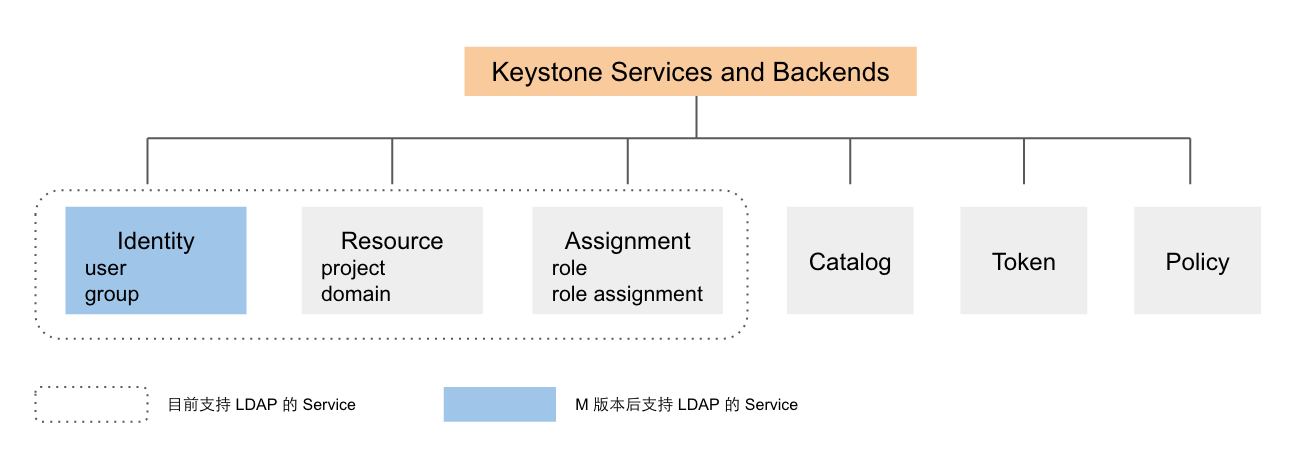
基本配置如下:
- Linux: Ubuntu 14.04 LTS
- OpenStack: Kilo
- LDAP: slapd 2.4.31
LDAP 的 DN(Distinguished Names) 默认由主机域名生成,本地的 DNS 设置如下:
root@ubuntu:~# cat /etc/hosts

10.10.1.100    keystone.com

127.0.0.1   localhost
Install LDAP
sudo apt-get install slapd ldap-utils
安装完成后可通过以下命令和步骤完成 LDAP 的基本配置:
sudo dpkg-reconfigure slapd

* Omit OpenLDAP server configuration? No

* DNS domain name?  keystone.com

* Organization name?  admin

* Administrator password? YourPassword

* Use the password you configured during installation, or choose another one

  Database backend to use? HDB

* Remove the database when slapd is purged? No

* Move old database? Yes

* Allow LDAPv2 protocol? No
Configure LDAP
由于 LDAP 的用户属性和 Keystone 默认的用户属性有所差异,所以 LDAP 需生成与 Keystone 中的 User 和 Group 相匹配的对象,可通过以下脚本(add_user_group.ldif)添加该对象,并生成 demo 和 admin 两个用户。
# Users

dn: ou=users,dc=keystone,dc=com

ou: users

objectClass: organizationalUnit

# Group

dn: ou=groups,dc=keystone,dc=com

objectClass: organizationalUnit

ou: groups

# demo user

dn: cn=demo,ou=users,dc=keystone,dc=com

cn: demo

displayName: demo

givenName: demo

mail: demo@example.com

objectClass: inetOrgPerson

objectClass: top

sn: demo

uid: demo

userPassword: 123456

# admin user

dn: cn=admin,ou=users,dc=keystone,dc=com

cn: admin

displayName: admin

givenName: admin

mail: admin@example.com

objectClass: inetOrgPerson

objectClass: top

sn: admin

uid: admin

userPassword: 123456
由以下命令把上述配置文件内容更新至 LDAP:
ldapadd -x -W -D "cn=admin,dc=example,dc=com" -f add_user_group.ldif
Keystone 的配置文件如下:
[identity]

driver = keystone.identity.backends.ldap.Identity

[assignment]

driver = keystone.assignment.backends.sql.Assignment

[ldap]

# LDAP 服务器地址,tree_dn 目录下管理员的账号和密码等

url = ldap://keystone.com

query_scope = sub

user = "cn=admin,dc=keystone,dc=com"

password = 123456

tree_dn = "dc=keystone,dc=com"

# 以下配置定义 Keystone 和 LDAP 二者的属性的 mapping 关系。

user_tree_dn = "ou=users,dc=keystone,dc=com"

user_objectclass = inetOrgPerson

user_id_attribute = cn

user_name_attribute = cn

user_mail_attribute = mail

user_pass_attribute = userPassword

user_enabled_attribute = enabled

group_tree_dn = "ou=groups,dc=keystone,dc=com"

group_objectclass = groupOfUniqueNames

group_id_attribute = cn

group_name_attribute = cn

group_member_attribute = uniquemember

group_desc_attribute = description

user_allow_create = true

user_allow_update = true

user_allow_delete = true

group_allow_create = true

group_allow_update = true

group_allow_delete = true
Test
用 admin_token 创建 project 和 role,并赋予 demo 和 admin 用户在 project 中的 role 后,即可使用该用户获得 scope token 访问 Keystone 的 API。
root@ubuntu:~# openstack user list

+--------------------+--------------------+

| ID                 | Name               |

+--------------------+--------------------+

| demo               | demo               |

| admin              | admin              |

+--------------------+--------------------+

root@ubuntu:~# openstack user show demo

+-----------+------------------+

| Field     | Value            |

+-----------+------------------+

| domain_id | default          |

| email     | demo@example.com |

| id        | demo             |

| name      | demo             |

+-----------+------------------+

root@ubuntu:~# openstack user create hello --password 123456

+-----------+----------------------------------+

| Field     | Value                            |

+-----------+----------------------------------+

| domain_id | default                          |

| enabled   | True                             |

| id        | hello                            |

| name      | hello                            |

+-----------+----------------------------------+

root@ubuntu:~# openstack project create test_project

+-------------+----------------------------------+

| Field       | Value                            |

+-------------+----------------------------------+

| description |                                  |

| domain_id   | default                          |

| enabled     | True                             |

| id          | cbdf05b17cf54587b3b58a11f49252e7 |

| name        | test_project                     |

+-------------+----------------------------------+
Keystone集成LDAP的更多相关文章
- hive、impala集成ldap
1.概要 1.1 环境信息 hadoop:cdh5.10 os:centos6.7 user:root hive.impala已集成sentry 1.2 访问控制权限 这里通过使用openldap来控 ...
- ldap配置系列二:jenkins集成ldap
ldap配置系列二:jenkins集成ldap jenkins简介 jenkins是一个独立的.开放源码的自动化服务器,它可以用于自动化与构建.测试.交付或部署软件相关的各种任务. jenkins官方 ...
- ldap配置系列三:grafana集成ldap
ldap配置系列三:grafana集成ldap grafana的简介 grafana是一个类似kibana的东西,是对来自各种数据源的数据进行实时展示的平台,拥有这牛逼的外观.给一个官方的demo体验 ...
- Mongodb集成LDAP授权
一.环境简介 Mongodb enterprise v4.0.16 OpenLDAP v2.4.44 二.Mongodb集成LDAP的授权过程 客户端指定某种外部验证方式链接Mongodb: Mong ...
- Xpack集成LDAP
支持两种配置方式: The ldap realm supports two modes of operation, a user search mode and a mode with specifi ...
- Mantis集成 LDAP 认证
mantis的用户认证函数Authentication中相关有 $g_login_method MD5 LDAP PLAIN CRYPT CRYPT_FULL_SALT BASIC_AUTH Some ...
- CAS与LDAP集成
参考文献: CAS集成ldap:https://wiki.jasig.org/display/CASUM/LDAP CAS集成restful api:https://wiki.jasig.org/di ...
- LDAP落地实战(四):Jenkins集成OpenLDAP认证
前几篇分文章分别介绍了OpenLDAP的部署管理和维护以及svn.git的接入,今天我们再下一城接入jenkins. 前情提要:LDAP系列文章 LDAP落地实战(一):OpenLDAP部署及管理维护 ...
- LDAP落地实战(三):GitLab集成OpenLDAP认证
上一篇文章介绍了svn集成OpenLDAP认证,版本控制除了svn外,git目前也被越来越多的开发者所喜爱,本文将介绍GitLab如何集成openldap实现账号认证 GitLab集成OpenLDAP ...
随机推荐
- Jquery Ajax Json ashx 实现前后台数据传输
经过一个多星期的研究,各种查找资料终于自己实现了Jquery Ajax Json ashx 的前后台数据交流功能 首先一点,Ajax只能对应一个ashx文件,多余两个,如果打开异步传输的async: ...
- <mvc:view-controller path=""/>标签的作用
<mvc:view-controller path=""/>标签的作用 对应WEB-INF目录下面的JSP页面,我们知道是不能直接使用URL访问到.需要通过转发的方式, ...
- Difference between .classpath and MANIFEST.MF
What is the difference between adding a dependency jar to the .classpath file in a RAD project and a ...
- python列表和元组相互转换
# 将列表转化为元组 lst=[11,22,33] t=tuple(lst) print(t,type(t)) # 打印结果:(11, 22, 33) <class 'tuple'> tu ...
- CSS让一个元素一闪一闪的
.heart{ animation:heart 1s ease infinite; } @keyframes heart { 0% {opacity:0.1;} 100%{;} }
- 转载:Linux下查看/修改系统时区、时间
一.查看和修改Linux的时区 1. 查看当前时区 命令 : "date -R" 2. 修改设置Linux服务器时区 方法 A 命令 : "tzselect" ...
- Android学习笔记之AndroidManifest.xml文件解析(详解)
一.关于AndroidManifest.xml AndroidManifest.xml 是每个android程序中必须的文件.它位于整个项目的根目录,描述了package中暴露的组件(activiti ...
- Hexo+yilia博客添加背景音乐
个人主页:https://www.yuehan.online 现在博客:www.wangyurui.top 第一步: 打开网易云音乐的官网:https://music.163.com/ 第二步: 搜索 ...
- (扫盲)DTO数据传输对象
DTO即数据传输对象.但从定义上看就是简单的用来传递数据的.主要用途是在框架中定义DTO来绑定表现层中的数据.学过MVC.EF实体模型的都应该知道,我们可以定义一个Model实体来实现前后台数据的交互 ...
- 2.2 使用ARDUINO控制MC20发短信
需要准备的硬件 MC20开发板 1个 https://item.taobao.com/item.htm?id=562661881042 GSM/GPRS天线 1根 https://item.taoba ...