
web.xml里报错:Multiple annotations found at this line:
在web.xml 中添加错误页面配置,出现了这个报错
具体情况是这样的:
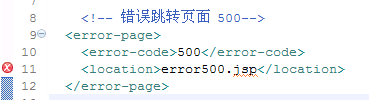

错误信息:
Multiple annotations found at this line:
- cvc-complex-type.2.2: Element 'location' must have no element [children], and
the value must be valid.
- cvc-pattern-valid: Value 'error.jsp' is not facet-valid with respect to pattern
'/.*' for type 'null'.
——解决方法:这是
因为文件的路径有误,缺少斜杆“/”,添上这个就好。
——修改后的效果: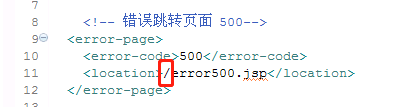
web.xml里报错:Multiple annotations found at this line:的更多相关文章
- 异常-----web.xml文件报错 Multiple annotations found at this line: - cvc-complex-type.2.4.b: The content of element 'welcome-file-list' is not complete. One of '{"http://java.sun.c
1,检查抬头是不是有问题. <?xml version="1.0" encoding="UTF-8"?><web-app version=&q ...
- hibernate和mybatis出现配置文件xml的文件报错Multiple annotations found at this line(转)
hibernate中的xml配置文件Multiple annotations found at this line,出现这个红叉报错,直接是把 <?xml version="1.0&q ...
- eclipse导入项目报错multiple annotations found at this line
eclipsewindow-->preference-->Valdation-->将Manual和Build下复选框全部取消选择
- web.xml文件报错:cvc-complex-type.2.4.a: Invalid content was found starting with element 'init-param'.
<?xml version="1.0" encoding="UTF-8"?> <web-app version="3.0" ...
- web.xml文件报错:The processing instruction target matching "[xX][mM][lL]" is not allowed.
昨晚把我的项目上传到了gitlab,然后今天在公司从gitlab下载下来, 发现web.xml报错.
- 新导入的eclipse项目报错,找不到java包,找不到web.xml文件报错。
新导入的项目可能会出现报错,特别是web项目.我这里提供一种解决方法: 1.右击项目,选择“属性” 2.选择 Resource->java build path->libraries 图中 ...
- 【web.xml】报错java.lang.ClassNotFoundException: org.springframework.web.context.ContextLoaderListener
今天搭建新的项目,虽然在web.xml中配置了ContextLoaderListener以及IntrospectorCleanupListener 如下: web.xml中部分代码: <!-- ...
- Myeclipse10编写jsp时出现 Multiple annotations found at this line:
今天,老师讲完课做了一个小练习,就是编写一个jsp页面.写完后,我发现少些了点东西,我准备使用<% %>添加是发现,报错了 Multiple annotations found at th ...
- eclipse报错:Multiple annotations found at this line: - String cannot be resolved to a type解决方法实测
Multiple annotations found at this line:- String cannot be resolved to a type- The method getContext ...
随机推荐
- Android无线测试之—Genymotion配置过程中常见问题
一.前提条件: 已经部署好了Android UiAutomator测试环境. 二.在部署Genymotion时遇到了两类问题: 1.通过eclipse打开一个模拟设备,然后将编译好的jar包push到 ...
- pycharn设置git提交代码
1.设置pycharm的git地址 2.设置git地址及本地路径 3.提交代码
- Eclipse: Android Device Chooser - Unknown Target
公司最近所有的项目都使用到了Android开发手机(或PDA)应用.所需要的Android开发技术并不是非常复杂,因为我们的底层方法全部使用WebServcie写好了,做Android开发的人员只需要 ...
- 《从零开始学Swift》学习笔记(Day 47)——final关键字
原创文章,欢迎转载.转载请注明:关东升的博客 在类的定义中使用final关键字声明类.属性.方法和下标.final声明的类不能被继承,final声明的属性.方法和下标不能被重写. 下面看一个示例: f ...
- influxDB 变换类函数
1.DERIVATIVE()函数 作用:返回一个字段在一个series中的变化率. InfluxDB会计算按照时间进行排序的字段值之间的差异,并将这些结果转化为单位变化率.其中,单位可以指定,默认为1 ...
- Sublime Text 3如何快速生成HTML5的头部信息和常用的快捷键
一.快速生成HTML5的头部信息的步骤: 1.Ctrl + N,新建一个文档: 2.Ctrl + Shift + P,打开命令模式,再输入 sshtml 进行模糊匹配,将语法切换到html模式: 3. ...
- The JVM found at JAVA_HOME is damaged.Please reinstall or define EXE4J_JAVA_HOME to point to an installed 32-bit JDK or JRE
一.介绍 exe4j是一个很棒的工具,可以把jar包打包成exe进行运行.他可以把jre环境和打包的exe进行集成,使得打包后的exe应用程序可以在没有安装java的机器上运行(前提是要把exe和jr ...
- 解决 request.getInputStream() 只能获取一次body的问题
问题: 在使用HTTP协议实现应用间接口通信时,服务端读取客户端请求过来的数据,会用到request.getInputStream(),第一次读取的时候可以读取到数据,但是接下来的读取操作都读取不到数 ...
- 【转】@javax.ws.rs Webservice注解
用于webservice. 1.路径 @javax.ws.rs.Path 标识要请求的资源类或资源方法的uri路径. 例,@Path("animal"),表示下一层路径是anima ...
- python的文件处理学习笔记
python的文件处理函数是open() 以下主要是关于这个函数的一些学习笔记 1.文件处理离不开编码 要注意的是文件打开时的编码和文件保存时的编码的统一,这样才能保证你打开的文件不会存在乱码 总结: ...