
Scrum生命周期
Recently while cleaning up my photo albums I found some interesting old pictures which were captured while I was leading a Scrum project. These white board pictures illustrate how we incrementally deliver from scratch. Looking at these pictures I really enjoy recollecting the days when I was working together with my team; days we spent suffering, learning and growing together.
Sprint # 0.
At that time the team was just busy like crazy. We got all infrastructure stuff ready in this period of time (we call it Sprint 0). The team also made some smart decisions; one of those was that we use a white board as our User Story completion tracking system, and use different color sticky notes for different types of User Stories.

Sprint # 1.
This picture was taken in the middle of our first Sprint. We got our Product Backlog prioritized and started from some foundational technical tasks. Fortunately, my team was strong enough so that we also delivered some of the highest priority (which also happened to be some of the simplest) User Stories.

Sprint # 2.
This picture was taken on the last day of our second Sprint. Things were just going smoothly. We delivered all the planned User Stories and had a very successfully Sprint Review meeting to our client. The client was happy and we did the Sprint planning for the next Sprint right after the Sprint Review meeting. The team was excited and confident that we can deliver more story points in the next Sprint.

Sprint # 3.
Maybe the team was too excited in Sprint # 2 to realize life never becomes easy. Looking at the picture we took in the middle of Sprint # 3, I can still feel the pain the team was suffering at that time when we had to admit we could not deliver all the planned work.

Sprint # 4.
Things were becoming even worse. This picture was taken the last day of Sprint # 4. That day the team was really frustrated because we were hit by a significant failure: we failed to deliver most of the planned stories. For two consecutive Sprints that the team had missed our commitments. We spent 2 hours having a serious retrospective meeting to decide how we can adjust and catch up with the plan in the next Sprint.
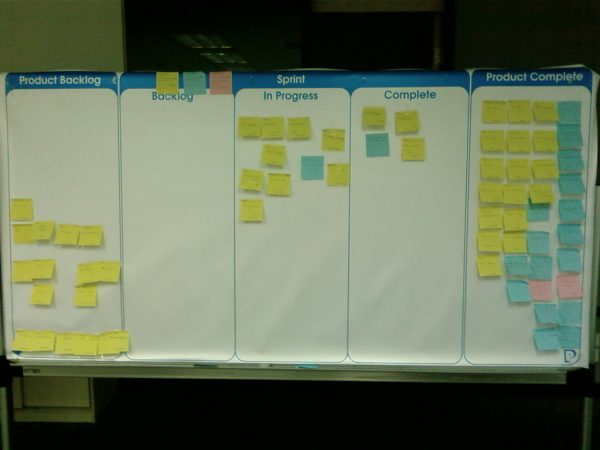
Sprint # 5.
One action the team took was to communicate with our client honestly about the current problems the team was having. The client re-prioritized our Product Backlog so that we got extra time to clean up our technical debts in our Sprint # 5. Thankfully our client understood the team needed more time to learn and grow, although they might not have been that happy. Anyway the team learned from the failure and got extra time to fix the issues.

Sprint # 6.
The team worked extremely hard in Sprint # 5 and 6. Sprint # 5 was a milestone – we not only cleaned up our technical debt but also delivered several additional User Stories. By the end of that Sprint we were finally feeling that we were taking back control.

Sprint # 7.
I lost the picture of that Sprint.
Sprint # 8.
We were getting closer to the end of the project. As we often experience requirement changes started coming into our backlog. All the high priority User Stories on our Product Backlog have been delivered, now the client was adding changes almost every day. Managing those changes became the biggest headache for the Sprint.

Sprint # 9.
The additions in Spring 8 had been implemented. Only a few low priority stories left on our To-do list. The client was planning to throw them away directly and the team started doing regression testing again and again to make sure we deliver fewer bugs. The biggest lesson we learned in Sprint 9 was that we should have written enough automated functional test scripts so that we don’t need to be working over time until mid-night that Sprint.

Sprint # 10.
This was the last Sprint of this project. We’ve done enough tests, and we were very confident about the quality we delivered. The client was also satisfied. They were ready to do the big final Demo to the sponsor. Several key team members started taking vacation. They needed to compensate their families for those crazy days and nights they were staying in the office.

That is the typical life inside Perficient China office, full of happiness of experiencing new things every day, full of pain of dealing with different challenges and issues all the time, full of excitements of continuously learning and growing. I’m feeling lucky that these happen all the time in my life in this office.
Scrum生命周期的更多相关文章
- react组件的生命周期
写在前面: 阅读了多遍文章之后,自己总结了一个.一遍加强记忆,和日后回顾. 一.实例化(初始化) var Button = React.createClass({ getInitialState: f ...
- 浅谈 Fragment 生命周期
版权声明:本文为博主原创文章,未经博主允许不得转载. 微博:厉圣杰 源码:AndroidDemo/Fragment 文中如有纰漏,欢迎大家留言指出. Fragment 是在 Android 3.0 中 ...
- C# MVC 5 - 生命周期(应用程序生命周期&请求生命周期)
本文是根据网上的文章总结的. 1.介绍 本文讨论ASP.Net MVC框架MVC的请求生命周期. MVC有两个生命周期,一为应用程序生命周期,二为请求生命周期. 2.应用程序生命周期 应用程序生命周期 ...
- UIViewController生命周期-完整版
一.UIViewController 的生命周期 下面带 (NSObject)的方法是NSObject提供的方法.其他的都是UIViewController 提供的方法. load (NSObje ...
- angular2系列教程(十一)路由嵌套、路由生命周期、matrix URL notation
今天我们要讲的是ng2的路由的第二部分,包括路由嵌套.路由生命周期等知识点. 例子 例子仍然是上节课的例子:
- Spring中Bean的作用域、生命周期
Bean的作用域.生命周期 Bean的作用域 Spring 3中为Bean定义了5中作用域,分别为singleton(单例).protot ...
- Autofac - 生命周期
实例生命周期决定在同一个服务的每个请求的实例是如何共享的. 当请求一个服务的时候,Autofac会返回一个单例 (single instance作用域), 一个新的对象 (per lifetime作用 ...
- 【微信小程序开发•系列文章六】生命周期和路由
这篇文章理论的知识比较多一些,都是个人观点,描述有失妥当的地方希望读者指出. [微信小程序开发•系列文章一]入门 [微信小程序开发•系列文章二]视图层 [微信小程序开发•系列文章三]数据层 [微信小程 ...
- Xamarin.Android活动的生命周期
一.前言 用过Android手机的人一定会发现一种现象,当你把一个应用置于后台后,一段时间之后在打开就会发现应用重新打开了,但是之前的相关的数据却没有丢失.可以看出app的“生命”是掌握在系统手上的, ...
随机推荐
- poj 2378 Tree Cutting 树形dp
After Farmer John realized that Bessie had installed a "tree-shaped" network among his N ( ...
- APP兼容性测试
一.APP兼容性范围以及问题 1.硬件 各个硬件结构 2.软硬件之间 硬件dll库(C++) 软硬件之间的通信,各个厂商提供的ROM 3.软件 浏览器.操作系统.数据库.手机.功能兼容性(功能修改,二 ...
- ContenOS 安装配置 rpm 版本 Jenkins
软件准备: jenkins-2.7.4-1.1.noarch.rpm java环境 安装jenkins: [root@localhost modules]# rpm -ih jenkins-2.7.4 ...
- -webkit-overflow-scrolling:touch;
-webkit-overflow-scrolling建了带有硬件加速的系统级控件,所以效率很高.但是这相对是耗更多内存的,最好在产生了非常大面积的overflow时才应用. 而且在 ios8 里有b ...
- Python基础(5)_文件操作
一.文件处理流程 打开文件,得到文件句柄并赋值给一个变量 通过句柄对文件进行操作 关闭文件 二.文件打开模式 打开文件时,需要指定文件路径和以何等方式打开文件,打开后,即可获取该文件句柄,日后通过此文 ...
- RPC-Thrift(二)
TTransport TTransport负责数据的传输,先看类结构图. 阻塞Server使用TServerSocket,它封装了ServerSocket实例,ServerSocket实例监听到客户端 ...
- final 的作用
1.修饰类 类不能被继承 2.修饰方法 目的有二: 1)禁止子类重写该方法 2)执行效率(JVM相关的东西,不用太关注) 3.修饰变量 final修饰原始类型的变量,该变量不能被修改 final修饰引 ...
- 2017年上海金马五校程序设计竞赛:Problem E : Find Palindrome (字符串处理)
Description Given a string S, which consists of lowercase characters, you need to find the longest p ...
- Linux环境下通过ODBC访问MSSql Server
为了解决Linux系统连接MSSql Server的问题,微软为Linux系统提供了连接MSSql Server的ODBC官方驱动.通过官方驱动,Linux程序可以方便地对MSSql Server进行 ...
- 【luogu2574】xor的艺术
一道无聊的线段树题,写着玩玩而已…… #include<bits/stdc++.h> #define N 1000010 #define lson (o<<1) #define ...