
Android-LinearLayout布局技巧(一)
先看2张图
一、5.1寸
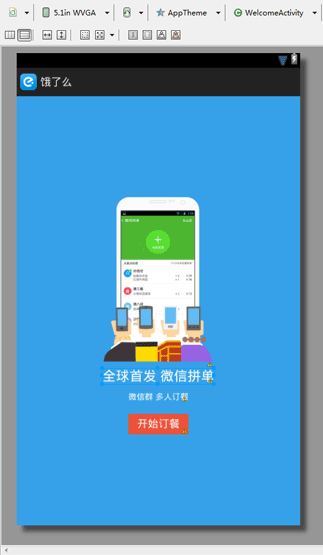
二、3.7寸
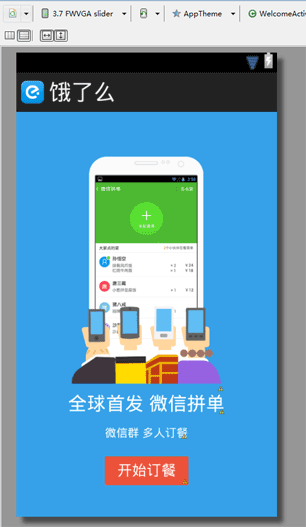
三、代码
 <?xml version="1.0" encoding="utf-8"?>

 <LinearLayout xmlns:android="http://schemas.android.com/apk/res/android"

     android:layout_width="fill_parent"

     android:layout_height="fill_parent"

     android:background="#ff36a1e9"

     android:gravity="center"

     android:orientation="vertical" >

     <ImageView

         android:layout_width="wrap_content"

         android:layout_height="wrap_content"

         android:focusable="true"

         android:src="@drawable/welcome" />

     <TextView

         android:layout_width="wrap_content"

         android:layout_height="wrap_content"

         android:text="全球首发 微信拼单"

         android:textColor="@color/white"

         android:textSize="23.0sp" />

     <TextView

         android:layout_width="wrap_content"

         android:layout_height="wrap_content"

         android:layout_marginTop="13dp"

         android:text="微信群 多人订餐"

         android:textColor="@color/white"

         android:textSize="14.0sp" />

     <TextView

         android:id="@id/welcome_start_order"

         android:layout_width="wrap_content"

         android:layout_height="35.0dip"

         android:layout_marginTop="20.0dip"

         android:background="@drawable/selector_red_corners_start_button"

         android:gravity="center"

         android:paddingLeft="15.0dip"

         android:paddingRight="15.0dip"

         android:text="开始订餐"

         android:textColor="@color/white"

         android:textSize="18.0sp" />

 </LinearLayout>
这里主要是LinearLayout 和 android:gravity="center" android:orientation="vertical"
Android-LinearLayout布局技巧(一)的更多相关文章
- android界面布局技巧(一)
(1)//得到手机的宽高 Display display = getWindowManager().getDefaultDisplay(); int screenWidth = display.get ...
- Android学习笔记之布局技巧以及布局中的细节介绍....
PS:休息两天,放一放手上的东西,做做总结... 学习内容: 1.Android中LinearLayout布局技巧... 2.layout中drawable属性的区别... 先简单的介绍一下dra ...
- Android开发——布局性能优化的一些技巧(一)
0. 前言 上一篇我们分析了为什么LinearLayout会比RelativeLayout性能更高,意义在于分析了这两种布局的实现源码,算是对一个小结论的证明过程,但是对布局性能的优化效果,对这两种布 ...
- 关于android LinearLayout的比例布局(转载)
关于android LinearLayout的比例布局,主要有以下三个属性需要设置: 1,android:layout_width,android:layout_height,android:layo ...
- Android UI -- 布局介绍(布局包括FrameLayout, LinearLayout, RelativeLayout, GridLayout)
首先介绍常用布局类 FrameLayout 最简单的布局管理器. 这个布局管理类有几个特性: 添加组件默认在左上角的. 如果添加多个组件会叠加到一起,并且都在左上角.(可以通过一gravity属性改变 ...
- Android 五大布局(LinearLayout、FrameLayout、AbsoulteLayout、RelativeLayout、TableLayout )
前言 欢迎大家我分享和推荐好用的代码段~~ 声明 欢迎转载,但请保留文章原始出处: CSDN:http://www.csdn.net ...
- 一步一步学android之布局管理器——LinearLayout
线性布局是最基本的一种布局,在基本控件篇幅中用到的都是LinearLayout,线性布局有两种方式,前面也有用到,一种是垂直的(vertical),一种是水平的(horizontal).我们同样来看下 ...
- [转]浅谈Android五大布局(一)——LinearLayout、FrameLayout和AbsoulteLayout
Android的界面是有布局和组件协同完成的,布局好比是建筑里的框架,而组件则相当于建筑里的砖瓦.组件按照布局的要求依次排列,就组成了用户所看见的界面.Android的五大布局分别是LinearLay ...
- Android 线性布局(LinearLayout)相关官方文档 - 指南部分
Android 线性布局(LinearLayout)相关官方文档 - 指南部分 太阳火神的漂亮人生 (http://blog.csdn.net/opengl_es) 本文遵循"署名-非商业用 ...
- Android 线性布局(LinearLayout)相关官方文档 - 布局參数部分
Android 线性布局(LinearLayout)相关官方文档 - 布局參数部分 太阳火神的漂亮人生 (http://blog.csdn.net/opengl_es) 本文遵循"署名-非商 ...
随机推荐
- ORM-班级信息系统
ORM版学员管理系统 班级表 表结构 class Class(models.Model): id = models.AutoField(primary_key=True) # 主键 cname = m ...
- hdu 5172(线段树||HASH)
GTY's gay friends Time Limit: 6000/3000 MS (Java/Others) Memory Limit: 65536/65536 K (Java/Others ...
- MATLAB二维插值和三维插值
插值问题描述:已知一个函数上的若干点,但函数具体表达式未知,现在要利用已知的若干点求在其他点处的函数值,这个过程就是插值的过程. 1.一维插值 一维插值就是给出y=f(x)上的点(x1,y1),(x2 ...
- [BZOJ2667][cqoi2012]模拟工厂 贪心
2667: [cqoi2012]模拟工厂 Time Limit: 3 Sec Memory Limit: 128 MBSubmit: 367 Solved: 184[Submit][Status] ...
- Codeforces 776 A.Serial Killer-String直接比较是否相同
A Serial Killer time limit per test 2 seconds memory limit per test 256 megabytes input standard inp ...
- 【树链剖分】【函数式权值分块】bzoj1146 [CTSC2008]网络管理Network
裸题,直接上.复杂度O(n*sqrt(n)*log(n)). //Num[i]表示树中的点i在函数式权值分块中对应的点 //Map[i]表示函数式权值分块中的点i在树中对应的点 #include< ...
- FireDac Pooling
1.建立FDManager的ConnectionDef.并设置此Pooling为True. 2.建立Thread类进行多个FDConnection连接DB. 3.本列是oracle远程数据.如下图: ...
- Scala学习总结
1)将Array转化为String,toStrings()方法应该是序列化了的. scala> val args = Array("Hello", "world&q ...
- 使用jQuery操作dom(追加和删除样式-鼠标移入移出)练习
1.实现鼠标移入则添加背景色,鼠标移出则删除背景色 <!DOCTYPE html> <html> <head> <title>test1.html< ...
- python中单星号(*)和双星号(**)的使用
1.单星号*:对元组解包:接收可变参数 2.双星号**:对字典解包:接收可变参数 python函数的五类参数类型及出现顺序:必选参数.默认参数.可变参数.命名关键字参数.关键字参数 参考: https ...