
使用 TListView 控件(2)
本例效果图:
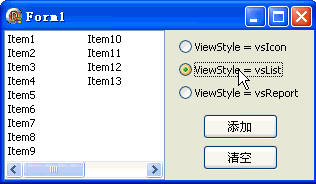
代码文件:
unit Unit1;

interface

uses

  Windows, Messages, SysUtils, Variants, Classes, Graphics, Controls, Forms,

  Dialogs, StdCtrls, ComCtrls;

type

  TForm1 = class(TForm)

    ListView1: TListView;

    Button1: TButton;

    Button2: TButton;

    RadioButton1: TRadioButton;

    RadioButton2: TRadioButton;

    RadioButton3: TRadioButton;

    procedure FormCreate(Sender: TObject);

    procedure Button1Click(Sender: TObject);

    procedure Button2Click(Sender: TObject);

    procedure RadioButton1Click(Sender: TObject);

    procedure RadioButton2Click(Sender: TObject);

    procedure RadioButton3Click(Sender: TObject);

  end;

var

  Form1: TForm1;

implementation

{$R *.dfm}

procedure TForm1.FormCreate(Sender: TObject);

begin

  ListView1.Align := alLeft;

  Button1.Caption := '添加';

  Button2.Caption := '清空';

  RadioButton1.Caption := 'ViewStyle = vsIcon';

  RadioButton2.Caption := 'ViewStyle = vsList';

  RadioButton3.Caption := 'ViewStyle = vsReport';

  RadioButton1.Checked := True;

end;

procedure TForm1.Button1Click(Sender: TObject);

var

  item: TListItem;

begin

  item := ListView1.Items.Add;

  item.Caption := 'Item' + IntToStr(ListView1.Items.Count);

end;

procedure TForm1.Button2Click(Sender: TObject);

begin

  ListView1.Clear;

end;

procedure TForm1.RadioButton1Click(Sender: TObject);

begin

  ListView1.ViewStyle := vsIcon; {这是默认值}

end;

procedure TForm1.RadioButton2Click(Sender: TObject);

begin

  ListView1.ViewStyle := vsList;

end;

procedure TForm1.RadioButton3Click(Sender: TObject);

begin

  ListView1.ViewStyle := vsReport;

  if ListView1.Columns.Count =  then ListView1.Columns.Add.Caption := '标题';

end;

end.
窗体文件:
object Form1: TForm1

  Left =

  Top =

  Caption = 'Form1'

  ClientHeight =

  ClientWidth =

  Color = clBtnFace

  Font.Charset = DEFAULT_CHARSET

  Font.Color = clWindowText

  Font.Height = -

  Font.Name = 'Tahoma'

  Font.Style = []

  OldCreateOrder = False

  OnCreate = FormCreate

  PixelsPerInch =

  TextHeight =

  object ListView1: TListView

    Left =

    Top =

    Width =

    Height =

    Columns = <>

    TabOrder =

  end

  object Button1: TButton

    Left =

    Top =

    Width =

    Height =

    Caption = 'Button1'

    TabOrder =

    OnClick = Button1Click

  end

  object Button2: TButton

    Left =

    Top =

    Width =

    Height =

    Caption = 'Button2'

    TabOrder =

    OnClick = Button2Click

  end

  object RadioButton1: TRadioButton

    Left =

    Top =

    Width =

    Height =

    Caption = 'RadioButton1'

    TabOrder =

    OnClick = RadioButton1Click

  end

  object RadioButton2: TRadioButton

    Left =

    Top =

    Width =

    Height =

    Caption = 'RadioButton2'

    TabOrder =

    OnClick = RadioButton2Click

  end

  object RadioButton3: TRadioButton

    Left =

    Top =

    Width =

    Height =

    Caption = 'RadioButton3'

    TabOrder =

    OnClick = RadioButton3Click

  end

end
使用 TListView 控件(2)的更多相关文章
- Delphi的TListView控件拖放选定行操作
http://www.tansoo.cn/?p=401 Delphi的TListView控件拖放选定行操作的例子,效果图如下:TListView控件拖动选定行到指定位置 具体实现步骤: 一.新建一个D ...
- c++ builder TListView控件按字符串排序(根据网上代码亲测ok)
//--------------------------------------------------------------------------- /* 首先将一个列表框控件安放在Form上, ...
- 使用 TListView 控件(4)
本例效果图: 代码文件: unit Unit1; interface uses Windows, Messages, SysUtils, Variants, Classes, Graphics, ...
- TListView控件的ReadOnly属性的一个Bug
不知道是不是ListView的 ReadOnly属性的一个bug 1.Form上一个ListView,如图设置 2.在FormCreate事件中写如下代码: ListView1->Rea ...
- 教程-Delphi第三方控件安装卸载指南
1 只有一个DCU文件的组件.DCU文件是编译好的单元文件,这样的组件是作者不想把源码公布.一般来说,作者必须说明此组件适合Delphi的哪种版本,如果版本不对,在安装时就会出现错误.也正是因为没有源 ...
- Delphi 7 里没有加载的控件
在原来版本如D5.D6中使用的控件如Quickrep,FastNet等,在D7中仍然是保留的.只是Delphi没有将他们默认的安装到组件面版中来.这些控件包全部保存在Delphi目录的bin下,文件扩 ...
- 教程-Delphi7 自带控件安装对应表
原来的控件delphi7里何处寻? 经常有朋友提这样的问题,“我原来在delphi5或者delphi6中用的很熟的控件到哪里去了?是不是在delphi7中没有了呢?这是不是意味着我以前写的代码全都不能 ...
- Delphi中解析Xml的控件-SimDesign NativeXml
Delphi中解析Xml的控件-SimDesign NativeXml 正在学习,感觉应用很方便.无源代码的版本还是免费的. SimDesign.NativeXml是一个delphi和bcb的XML控 ...
- Delphi在Listview中加入Edit控件
原帖 : http://www.cnblogs.com/hssbsw/archive/2012/06/03/2533092.html Listview是一个非常有用的控件,我们常常将大量的数据(如数据 ...
随机推荐
- HDFS的存储策略
本文介绍hdfs的存储策略 内容译自:http://hadoop.apache.org/docs/r2.8.0/hadoop-project-dist/hadoop-hdfs/ArchivalStor ...
- 42-EF Core Migration
1-常用命令 1-由于2.1版本有点不一样,不会自动创建ApplicationUser类,发现合并没效果.暂时略 增加一个字段 E:\coding\netcore\IdentitySample> ...
- CDSビュー新規作成
CDSビューの追加文書いついては以下の内容も参照してください. ABAP keyword documentation SAP Community. Step 1: CDSビュー作成 Favorite ...
- 【娱乐向】制作Chrome天气预报扩展程序
1.什么是Chrome扩展程序 Chrome扩展程序是一个用Web技术开发,用来扩展增强浏览器功能的软件.和一般的网页一样,Chrome扩展程序由html.js.css和图片等部分组成.Chrome插 ...
- 对工具的反思 & deadlines与致歉
人和动物最大的区别就是使用工具的水平. 有些人只凭着对工具的熟练掌握便成了牛人. 工具,到底应该以何种态度去看待? 在我小的时候,工具仅仅是指树枝.线.粉笔,可以让自己有更多游戏可玩:上学之后,便又有 ...
- windows10安装liux系统
1.前言 因为大部分服务器都是linux系统,需要掌握linux命令行和熟悉linux环境,所以自己用为数不多的工资买了新电脑,就是为了学习linux系统,此文是为了记载自己在windows系统上安装 ...
- CSP201512-1: 数位之和
引言:CSP(http://www.cspro.org/lead/application/ccf/login.jsp)是由中国计算机学会(CCF)发起的"计算机职业资格认证"考试, ...
- 剑指offer-二进制中1的个数11
题目描述 输入一个整数,输出该数二进制表示中1的个数.其中负数用补码表示. class Solution: def NumberOf1(self, n): # write code here coun ...
- Visual Studio 2012安装包
点击下载
- 机器学习 (二) 多变量线性回归 Linear Regression with Multiple Variables
文章内容均来自斯坦福大学的Andrew Ng教授讲解的Machine Learning课程,本文是针对该课程的个人学习笔记,如有疏漏,请以原课程所讲述内容为准.感谢博主Rachel Zhang 的个人 ...