
django内置组件——ContentTypes
一、什么是Django ContentTypes?
Django ContentTypes是由Django框架提供的一个核心功能,它对当前项目中所有基于Django驱动的model提供了更高层次的抽象接口。主要用来创建模型间的通用关系(generic relation)。
进一步了解ContentTypes可以直接查阅以下这两个链接:
- Django official documentation:The contenttypes framework
- stackoverflow: How exactly do Django content types work?
二、Django ContentTypes做了什么?
当创建一个django项目时,可以看到在默认的INSTALL_APPS已经包含了django.contrib.contenttypes。
# Application definition

INSTALLED_APPS = [

    'django.contrib.admin',

    'django.contrib.auth',

    'django.contrib.contenttypes',

    'django.contrib.sessions',

    'django.contrib.messages',

    'django.contrib.staticfiles',

    'app01.apps.App01Config',

]
注意:django.contrib.contenttypes是在django.contrib.auth之后,这是因为auth中的permission系统是根据contenttypes来实现的。
导入contenttypes组件:
from django.contrib.contenttypes.models import ContentType
查看django.contrib.contenttypes.models.ContentType类的内容:
class ContentType(models.Model):

    app_label = models.CharField(max_length=100)

    model = models.CharField(_('python model class name'), max_length=100)

    objects = ContentTypeManager()

    class Meta:

        verbose_name = _('content type')

        verbose_name_plural = _('content types')

        db_table = 'django_content_type'

        unique_together = (('app_label', 'model'),)

    def __str__(self):

        return self.name
可以看到ContentType就是一个简单的django model,而且它在数据库中的表的名字为django_content_type。
在第一次对Django的model进行migrate之后,就可以发现在数据库中出现了一张默认生成的名为django_content_type的表。
如果没有建立任何的model,默认django_content_type是前六项:
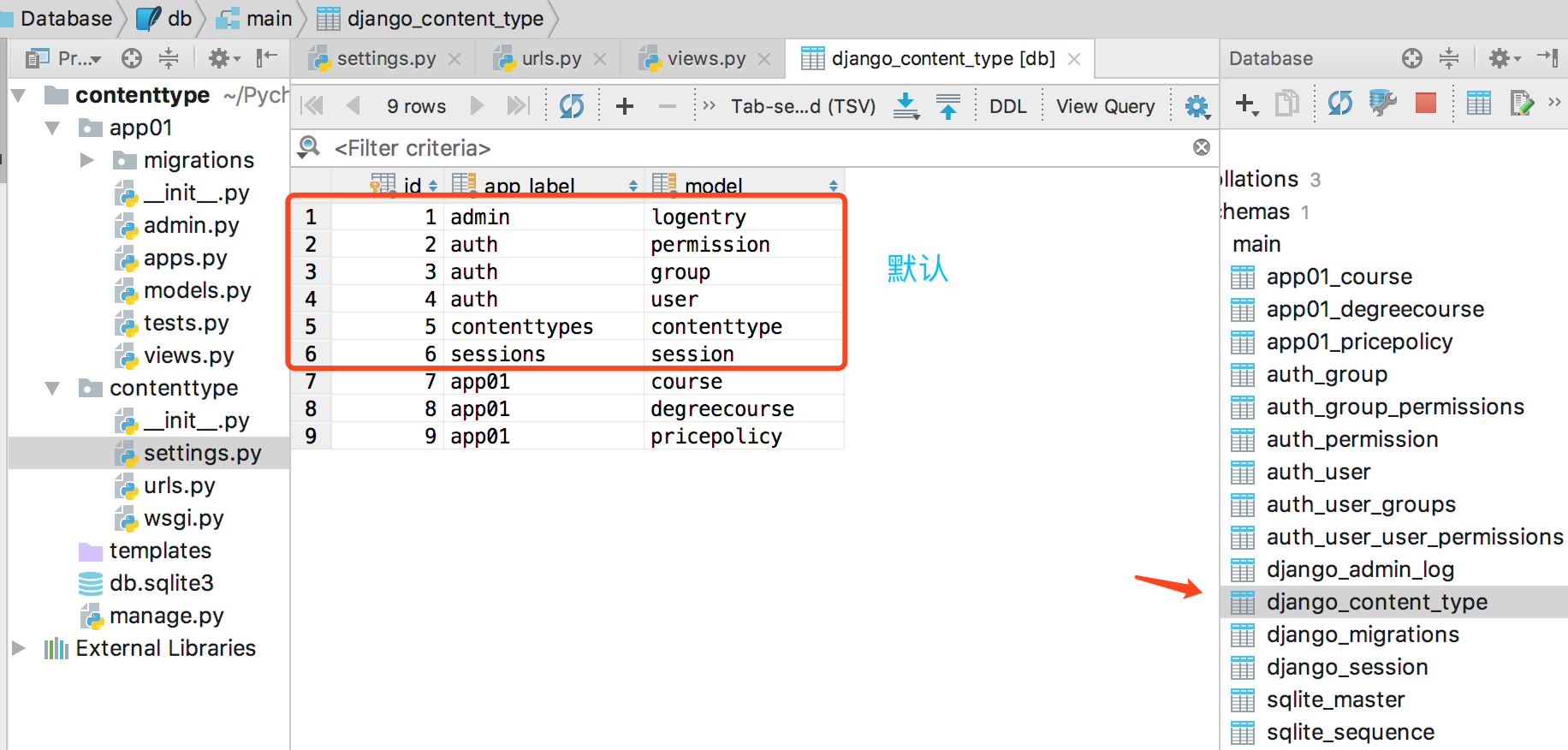
django_content_type记录了当前的Django项目中所有model所属的app(即app_label属性)以及model的名字(即model属性)。
django_content_type并不只是记录属性这么简单.了contenttypes是对model的一次封装,因此可以通过contenttypes动态的访问model类型,而不需要每次import具体的model类型。
1、ContentType实例提供的接口
- ContentType.model_class()
获取当前ContentType类型所代表的模型类
- ContentType.get_object_for_this_type()
使用当前ContentType类型所代表的模型类做一次get查询
2、ContentType管理器(manager)提供的j接口
- ContentType.objects.get_for_id()
- 通过id寻找ContentType类型,这个跟传统的get方法的区别就是它跟get_for_model共享一个缓存,因此更为推荐。
- ContentType.objects.get_for_model()
- 通过model或者model的实例来寻找ContentType类型
三、Django ContentTypes框架使用场景
1、设计模型(创建表结构)
假设我们创建如下模型,里面包含学位课程、专题课程、价格策略。
价格策略既可以是专题课程的价格策略,也可以是学位课程的价格策略。需要在pricepolicy对象里添加非常多的ForeignKey。示例如下所示:
class Food(models.Model):

    """

    id      title

    1       面包

    2       牛奶

    """

    title = models.CharField(max_length=32)

    # 不会生成字段 只用于反向查询

    coupons = GenericRelation(to="Coupon")

class Fruit(models.Model):

    """

    id      title

    1       苹果

    2       香蕉

    """

    title = models.CharField(max_length=32)

# 如果有40张表,则每一个都要建立外键关系

class Coupon(models.Model):

    """

    id      title          food_id    fruit_id

    1       面包九五折         1         null

    2       香蕉满10元减5元    null       2

    """

    title = models.CharField(max_length=32)

    food = models.ForeignKey(to="Food")

    fruit = models.ForeignKey(to="Fruit")
这样做很傻,会造成代码重复和字段浪费。有一种优化的方案是:用两个字段去定位对象不用去创建多个外键关系。
# 方法二:用两个字段去定位对象不用去创建多个外键关系

class Coupon(models.Model):

    """

    id      title          table_id      object_id(对应表对应对象的ID)

    1       面包九五折          1             1

    2       香蕉满10元减5元     2             2

    """

    title = models.CharField(max_length=32)

    table = models.ForeignKey(to="Table")    # 与table表建立外键关系

    object_id = models.IntegerField()        # 由object_id定位到表中的某一个对象,但没有建立外键关系

class Table(models.Model):

    """

    id      app_name       table_name

    1       demo            food

    2       demo            fruit

    """

    app_name = models.CharField(max_length=32)

    table_name = models.CharField(max_length=32)
最好的方式是,只有当你需要对某个对象或模型进行评论时,才创建pricepolicy与那个模型的关系。示例如下所示:
# 方法三:基于ContentTypes创建表结构

class Coupon(models.Model):

    title = models.CharField(max_length=32)   # 优惠券名称

    # 第一步:与ContentType表绑定外键关系

    content_type = models.ForeignKey(to=ContentType, on_delete=None)

    # 第二步:建立对象id

    object_id = models.IntegerField()

    # 第三步:content_type和object_id绑定外键关系

    content_object = GenericForeignKey("content_type", "object_id")
学位课程、专题课程、价格策略基于django contenttypes创建表结构如下所示:
from django.db import models

from django.contrib.contenttypes.models import ContentType

from django.contrib.contenttypes.fields import GenericForeignKey, GenericRelation

class DegreeCourse(models.Model):

    """学位课程"""

    name = models.CharField(max_length=128, unique=True)

    course_img = models.CharField(max_length=255, verbose_name="缩略图")

    brief = models.TextField(verbose_name="学位课程简介", )

class Course(models.Model):

    """专题课程"""

    name = models.CharField(max_length=128, unique=True)

    course_img = models.CharField(max_length=255)

    # 不会在数据库生成列,只用于帮助你进行查询

    policy_list = GenericRelation("PricePolicy")

class PricePolicy(models.Model):

    """价格策略表"""

    content_type = models.ForeignKey(ContentType, on_delete=models.CASCADE)  # 关联course or degree_course

    object_id = models.PositiveIntegerField()   # 正整数PositiveInteger

    # GenericForeignKey不会在数据库生成列,只用于帮助你进行添加和查询

    content_object = GenericForeignKey('content_type', 'object_id')   # 将两个字段放在这个对象中

    # 周期

    valid_period_choices = (

        (1, '1天'),

        (3, '3天'),

        (7, '1周'), (14, '2周'),

        (30, '1个月'),

        (60, '2个月'),

        (90, '3个月'),

        (180, '6个月'), (210, '12个月'),

        (540, '18个月'), (720, '24个月'),

    )

    # 价格

    valid_period = models.SmallIntegerField(choices=valid_period_choices)

    price = models.FloatField()
(1)GenericForeignKey
Django ContentType提供了一种GenericForeignKey的类型,通过这种类型可以指定content_object。
GenericForeignKey不会在数据库生成列,只用于帮助你进行添加和查询。
(2)GenericRelation
GenericRelation不会在数据库生成列,只用于帮助你进行查询。
(3)pricepolicy里有三个重要字段
content_type: 内容类型,代表了模型的名字(比如Course,DegreeCourse)
object_id: 传入对象的id
content_object: 传入的实例化对象,其包含两个属性content_type和object_id。
2、视图操作
(1)在价格策略表(pricepolicy)中添加数据
from django.shortcuts import render, HttpResponse

from app01 import models

from django.contrib.contenttypes.models import ContentType

def test(request):
  # 方法一:

    models.PricePolicy.objects.create(

        valid_period=7,

        price=6.6,

        content_type=ContentType.objects.get(model="course"),

        object_id=1

    )

  # 方法二:

    models.PricePolicy.objects.create(

        valid_period=14,

        price=9.9,

        content_object=models.Course.objects.get(id=1)  # 'content_type', 'object_id'

    )

    return HttpResponse("...")
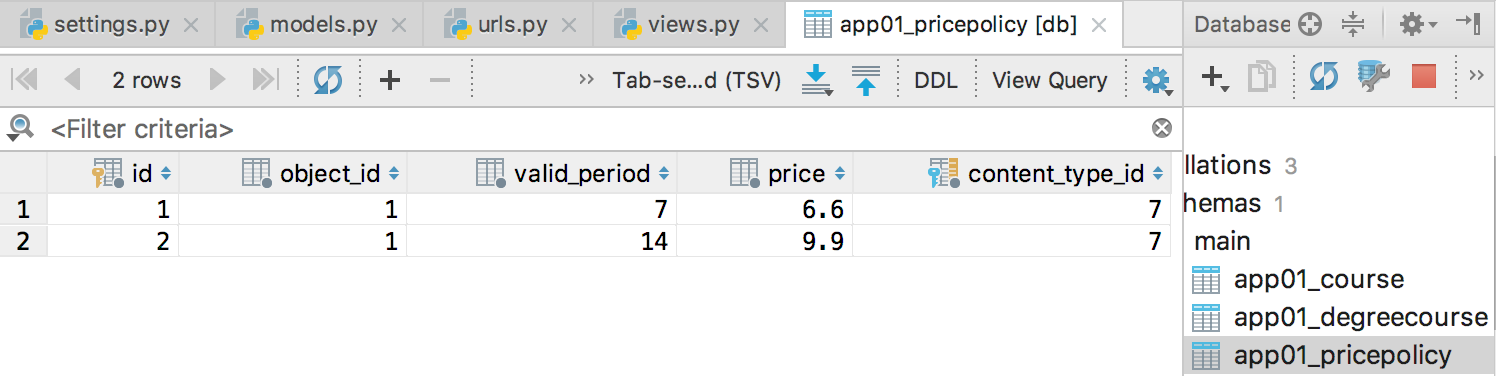
访问http://127.0.0.1:8000/test/ 后,查看价格策略表保存的数据:
(2)根据某个价格策略对象,找到其对应的表和数据
这里以查看管理课程名称为例:
from django.shortcuts import render, HttpResponse

from app01 import models

from django.contrib.contenttypes.models import ContentType

def test(request):

    price = models.PricePolicy.objects.get(id=2)

    print(price.content_object.name)   # 21天入门python  即自动帮忙找到对应的对象

    return HttpResponse("...")
(3)找到某个课程关联的所有价格策略
注意这里需要利用到GenericRelation。
from django.shortcuts import render, HttpResponse

from app01 import models

from django.contrib.contenttypes.models import ContentType

def test(request):

    obj = models.Course.objects.get(id=1)

    print(obj.policy_list.all())   # <QuerySet [<PricePolicy: PricePolicy object (1)>, <PricePolicy: PricePolicy object (2)>]>

    return HttpResponse("...")
查询结果是一个QuerySet对象,如果想让查询结果更加清楚:
from django.shortcuts import render, HttpResponse

from app01 import models

from django.contrib.contenttypes.models import ContentType

def test(request):

    obj = models.Course.objects.get(id=1)

    for item in obj.policy_list.all():

        print(item.id, item.valid_period, item.price)

        """

        1 7 6.6

        2 14 9.9

        """

    return HttpResponse("...")
四、总结ContentType
如果一张表与N张表动态地要创建Foreign Key关系,如果创建 Foreign key 将生成很多列,这样很多都是空的,造成严重浪费空间。只要是一张表要和多张表建立外键关系的情况,都可以考虑使用django的ContentType组件来帮助实现,以简化表结构的设计。
ContentType组件的作用:可以通过两个字段(GenericForeignKey, GenericRelation),在保证列数不变的情况下,让一张表和N张表做Foreign Key关系。
django内置组件——ContentTypes的更多相关文章
- Django:内置组件Content-Type
12.Django组件之Content_Type 1.帮助我们生成了一张表,里面有所有表名.这样不再自建表在表中填表名,用Foreignkey获取 2.为了让我们快速进入插入数据,填写一个字段Gene ...
- Django内置Admin
Django内置的Admin是对于model中对应的数据表进行增删改查提供的组件,使用方式有: 依赖APP: django.contrib.auth django.contrib.contenttyp ...
- 框架----Django内置Admin
Django内置的Admin是对于model中对应的数据表进行增删改查提供的组件,使用方式有: 依赖APP: django.contrib.auth django.contrib.contenttyp ...
- Django内置Admin解析
Django 内置的admin是对于model中对应的数据表进行增删改查提供的组建 一.Django admin的内部依赖: 依赖的app django.contrib.auth django.con ...
- Django学习——ajax发送其他请求、上传文件(ajax和form两种方式)、ajax上传json格式、 Django内置序列化(了解)、分页器的使用
1 ajax发送其他请求 1 写在form表单 submit和button会触发提交 <form action=""> </form> 注释 2 使用inp ...
- Vue基础(环境配置、内部指令、全局API、选项、内置组件)
1.环境配置 安装VsCode 安装包管理工具:直接下载 NodeJS 进行安装即可,NodeJS自带 Npm 包管理工具,下载地址:https://nodejs.org/en/download/安装 ...
- Django内置分页
一.django内置分页 from django.shortcuts import render from django.core.paginator import Paginator, EmptyP ...
- Django 内置分页器
先导入Django内置的分页器 在商品列表页或者购物车列表页导入 在渲染list.html导入 然后在views后台渲染方法写入 打开list页面结果
- Django内置权限扩展案例
当Django的内置权限无法满足需求的时候就自己扩展吧~ 背景介绍 overmind项目使用了Django内置的权限系统,Django内置权限系统基于model层做控制,新的model创建后会默认新建 ...
随机推荐
- java学习笔记之位运算符
java的位运算符主要针对二进制数的位进行逻辑运算,主要包括以下几种的位运算符 1.与运算符(&) 与运算符的使用规律是两个操作数中位为1的时候结果为1,否则都是0,例如 3&5=1 ...
- 【python跨目录调用】结合自己遇到的问题到解决问题,作个记录
写PO的时候,想把page和case 文件分开存不同的文件夹,但是在调用模块的时候就出现了问题.后来终于解决了,记录下 ---------------------------------------- ...
- 开启HTML5之旅。。。
学习大纲: 一.了解HTML 1.什么是HTML? HTML是用来描述网页的一种语言 HTML是一种超文本标记语言 Hyper Text Markap Language HTML不是一种编程语言,是一 ...
- mac 配置charles
从官网下载链接http://www.charlesproxy.com/download 附上注册码: Registered Name: https://zhile.io License Key: 48 ...
- quill 设置 初始值...
1down voteaccepted For your first issue change this: text.value = JSON.stringify(quill.root.innerHTM ...
- python学习,day1:循环判断基本语句的几个代码
# coding=utf-8 # Author: RyAn Bi count = 0 '''while True : print('count:',count) count = count + 1 i ...
- python之读取文件的测试数据
假设我们有一个叫testdata.txt的文件,现在在这个文件里面有测试数据,我们怎么利用前2小章学习的知识,读取测试数据呢? 测试数据如下: url:https://www.cnblogs.com/ ...
- 24个常用 Python 实现
24个常用 Python 实现 1.冒泡排序 lis = [56,12,1,8,354,10,100,34,56,7,23,456,234,-58] def sortport(): for i in ...
- [转] Java8 日期/时间(Date Time)API指南
[From] http://www.importnew.com/14140.html Java 8日期/时间( Date/Time)API是开发人员最受追捧的变化之一,Java从一开始就没有对日期时间 ...
- openssl-devel和openssl 是什么具体关系
[转自] https://zhidao.baidu.com/question/919579491101051499.html Redhat在封装openssl的时候,把openssl分成了几个部分,执 ...