
clientWidth、clientHeight、offsetWidth、offsetHeight以及scrollWidth、scrollHeight
clientWidth、clientHeight、offsetWidth、offsetHeight以及scrollWidth、scrollHeight是几个困惑了好久的元素属性,趁着有时间整理一下
1. clientWidth 和 clientHeight
网页中的每个元素都具有 clientWidth 和 clientHeight 属性,表示可视区域的宽高,即元素内容加上padding以后的大小,而不包括border值和滚动条的大小,
如下图所示:
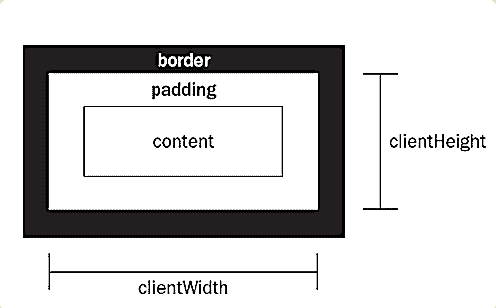
示例代码如下:
HTML代码:
<div id="demo">

    <p></p>

</div>
CSS代码:
div{

    width: 100px;

    height: 100px;

    overflow: scroll;

    border:20px solid #7b7676;

    padding: 30px;

    margin: 60px;

}

p{

    width: 180px;

    height: 160px;

    background: #aac7aa;

}
如下图:
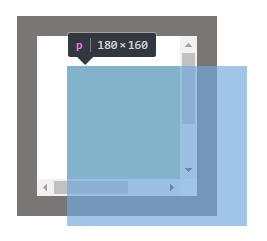
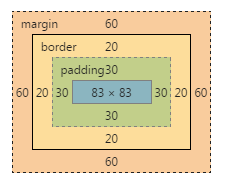
从上图得出:
clientWidth = 内容 + padding 即 83+30*2 = 143
clientHeight = 内容 + padding 即 83+30*2 = 143
2. scrollWidth 、scrollHeight 、scrollLeft、scrollTop
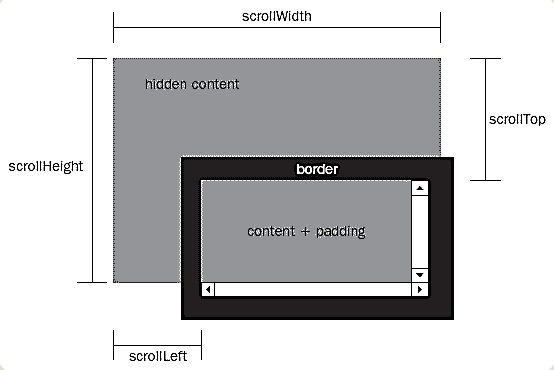
scrollWidth 和 scrollHeight 表示内容的完整宽高,包括padding以及没有完全显示出来的部分,不包括滚动条
scrollWidth = padding+包含内容的完全宽度
scrollHeight = padding+包含内容的完全高度
scrollLeft和scrollTop都表示滚动条滚动的部分
如下图:
依然利用上面的例子:
scrollWidth:160 + 30 = 190
scrollHeight:180 + 30 = 210
至于为什么padding只加30而不是30*2呢,如上图所示,超出隐藏部分距离父元素边框是没有padding的,所以只加一个
3. offsetWidth 和 offsetHeight
如下图所示:
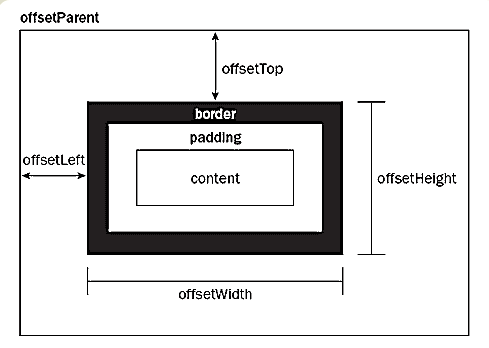
offsetWidth表示元素本身的宽度,包括滚动条和padding,border
offsetHeight表示元素本身的高度,包括滚动条和padding,border
所以例子中的offsetWidth = 100 + 20 * 2 + 30 * 2 = 200
offsetHeight = 100 + 20 * 2 + 30 *2 = 200
offsetTop 和 offsetLeft 表示该元素的左上角与父容器(offsetParent对象)左上角的距离
参考链接:http://www.ruanyifeng.com/blog/2009/09/find_element_s_position_using_javascript.html
by新手小白的记录
clientWidth、clientHeight、offsetWidth、offsetHeight以及scrollWidth、scrollHeight的更多相关文章
- JS中的offsetWidth/offsetHeight/offsetTop/offsetLeft、clientWidth/clientHeight/clientTop/clientLeft、scrollWidth/scrollHeight/scrollTop/scrollLeft
这是一组非常容易弄混的参数!都是描述某个盒子元素的宽度.高度以及上或左的距离偏移量. 1. offsetWidth / offsetHeight(不包括外边距) offsetWidth:返回元素的宽度 ...
- innerHeight,clientHeight,offsetHeight,scrollWidth等的区别和用法
要理解这几个属性,首先要搞明白body,documentElement的区别 1.body是DOM对象里的body子节点,即<body>标签2.documentElement是整个节点树的 ...
- 四种浏览器对 clientHeight、offsetHeight、scrollHeight、clientWidth、offsetWidth 和 scrollWidth 的解释差异
网页可见区域宽:document.body.clientWidth 网页可见区域高:document.body.clientHeight 网页可见区域宽:document.body.offsetWid ...
- offsetWidth/offsetHeight,clientWidth/clientHeight与scrollWidth/scrollHeight的区别
offsetWidth/offsetHeight返回值包含content + padding + border,效果与e.getBoundingClientRect()相同 clientWidth/c ...
- JavaScript--clientX,clientY、pageX,pageY、offsetLeft,offsetTop/offsetWidth,offsetHeight、scrollLeft,scrollTop/scrollWidth,scrollHeight、clientHeight,clientWidth区别
/*在事件的内部console.dir(event)*/ /** * 事件对象event * clientX/clientY 获取鼠标基于浏览器窗口(可视区域的坐标位置)全兼容 * * pageX/p ...
- offsetWidth, offsetHeight, offsetLeft, offsetTop,clientWidth, clientHeight,clientX,pageX,screenX
offsetWidth: 元素在水平方向上占用的空间大小.包括元素的宽度,内边距,(可见的)垂直滚动条的宽度,左右边框的宽度. offsetHeight:元素在垂直方向上占用的空间大小,包括元素的高度 ...
- 浏览器中如何获取想要的offsetwidth、、、clientwidth、、offsetheight、、、clientheight。。。
clientWidth是对象看到的宽度(不含边线,即border)scrollWidth是对象实际内容的宽度(若无padding,那就是边框之间距离,如有padding,就是左padding和右pad ...
- 详解clientHeight、offsetHeight、scrollHeight
关于clientHeight.offsetHeight.scrollHeight window.screen.availWidth 返回当前屏幕宽度(空白空间) window.screen.av ...
- js获取浏览器基本信息:document.body.clientWidth/clientHeight/scrollWidth/scrollTop。(转)
js获取浏览器基本信息:document.body.clientWidth/clientHeight/scrollWidth/scrollTop. 分类: js.jquery.ext.js技术2011 ...
随机推荐
- LINUX SSH 建立密钥对
配置私钥和公钥 先检查一下服务器的ssh配置文件 /etc/ssh/sshd_config RSAAuthentication yes # 启用 RSA 认证 默认为 yes PubkeyAuthen ...
- 记一次防火墙导致greenplum装机失败及定位修复过程
一.问题现象 20180201:15:06:25:028653 gpinitsystem:sdw1-2:gpadmin-[INFO]:--------------------------------- ...
- zookeeper环境搭建(Linux)
安装zookeeper 安装jdk(此处省略) 解压tar包并配置变量环境 配置文件修改 将/usr/local/src/zookeeper-3.4.5/conf这个路径下的zoo_sample.cf ...
- LEAVE TO LIST-PROCESSING
LEAVE SCREEN 現在の画面の処理を中止し.次の画面を呼び出す - LEAVE TO SCREEN 現在の画面の処理を中止し.動的に定義された次の画面を呼び出す - LEAVE [PROGRA ...
- CSS3实现3D球体旋转动画
html <div class="ball-box"> <div class="ball"> <div class="l ...
- UVA 1175 - Ladies' Choice
1175 - Ladies' Choice 链接 稳定婚姻问题. 代码: #include<bits/stdc++.h> using namespace std; typedef long ...
- 使用sqoop将mysql中表导入hive中报错
[hdfs@node1 root]$ sqoop import --connect jdbc:mysql://node2:3306/cm?charset-utf8 --username root -- ...
- Hibernate-ORM:03.Hibernate主键生成策略
------------吾亦无他,唯手熟尔,谦卑若愚,好学若饥------------- 此篇博客简单记录五种常用的主键生成策咯: 不同的主键生成策略,生成的sql语句,以及hibernate的操作都 ...
- RTSC和XDCTool的理解
1. 在使用TI的开发工具CCS中,里面有几个重要的概念,一直不太清晰,RTSC是什么,XDCTool是什么?包是什么?包的版本为啥都是4位的(比如mathlib_c66x_3_0_1_1)?star ...
- ubuntu apt-get 使用代理设置,坑爹。。
网上流传的export http_proxy=http://yourproxyaddress:proxyport是行不通的,虽然改了之后wget一类的可以用.当然去改.bashrc也不会有效果. 真正 ...