
clientWidth、clientHeight、offsetWidth、offsetHeight以及scrollWidth、scrollHeight
clientWidth、clientHeight、offsetWidth、offsetHeight以及scrollWidth、scrollHeight是几个困惑了好久的元素属性,趁着有时间整理一下
1. clientWidth 和 clientHeight
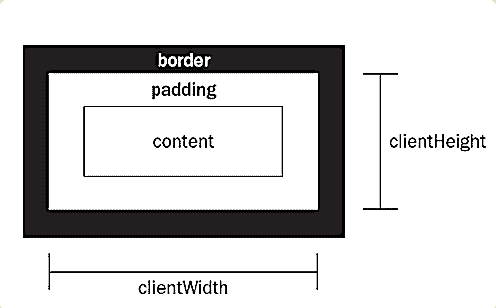
网页中的每个元素都具有 clientWidth 和 clientHeight 属性,表示可视区域的宽高,即元素内容加上padding以后的大小,而不包括border值和滚动条的大小,
如下图所示:
示例代码如下:
HTML代码:
<div id="demo">

    <p></p>

</div>
CSS代码:
div{

    width: 100px;

    height: 100px;

    overflow: scroll;

    border:20px solid #7b7676;

    padding: 30px;

    margin: 60px;

}

p{

    width: 180px;

    height: 160px;

    background: #aac7aa;

}
如下图:
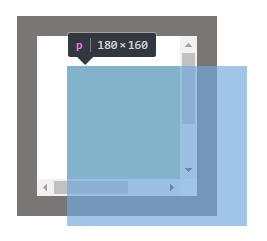
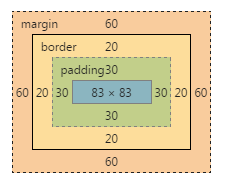
从上图得出:
clientWidth = 内容 + padding 即 83+30*2 = 143
clientHeight = 内容 + padding 即 83+30*2 = 143
2. scrollWidth 、scrollHeight 、scrollLeft、scrollTop
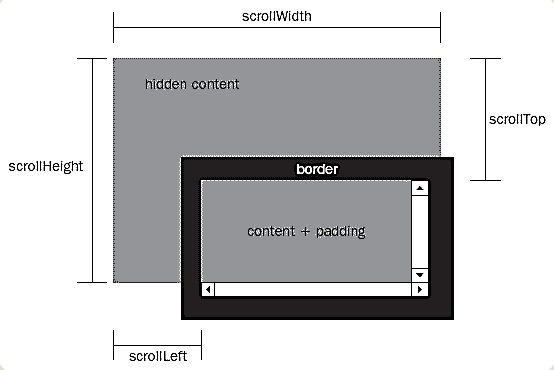
scrollWidth 和 scrollHeight 表示内容的完整宽高,包括padding以及没有完全显示出来的部分,不包括滚动条
scrollWidth = padding+包含内容的完全宽度
scrollHeight = padding+包含内容的完全高度
scrollLeft和scrollTop都表示滚动条滚动的部分
如下图:
依然利用上面的例子:
scrollWidth:160 + 30 = 190
scrollHeight:180 + 30 = 210
至于为什么padding只加30而不是30*2呢,如上图所示,超出隐藏部分距离父元素边框是没有padding的,所以只加一个
3. offsetWidth 和 offsetHeight
如下图所示:
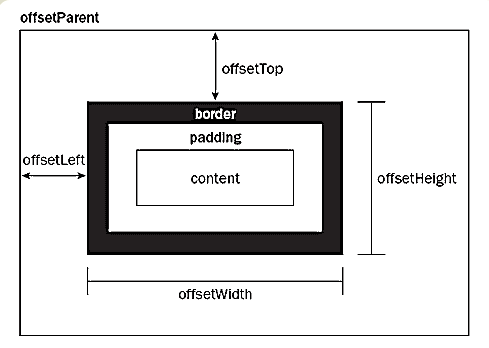
offsetWidth表示元素本身的宽度,包括滚动条和padding,border
offsetHeight表示元素本身的高度,包括滚动条和padding,border
所以例子中的offsetWidth = 100 + 20 * 2 + 30 * 2 = 200
offsetHeight = 100 + 20 * 2 + 30 *2 = 200
offsetTop 和 offsetLeft 表示该元素的左上角与父容器(offsetParent对象)左上角的距离
参考链接:http://www.ruanyifeng.com/blog/2009/09/find_element_s_position_using_javascript.html
by新手小白的记录
clientWidth、clientHeight、offsetWidth、offsetHeight以及scrollWidth、scrollHeight的更多相关文章
- JS中的offsetWidth/offsetHeight/offsetTop/offsetLeft、clientWidth/clientHeight/clientTop/clientLeft、scrollWidth/scrollHeight/scrollTop/scrollLeft
这是一组非常容易弄混的参数!都是描述某个盒子元素的宽度.高度以及上或左的距离偏移量. 1. offsetWidth / offsetHeight(不包括外边距) offsetWidth:返回元素的宽度 ...
- innerHeight,clientHeight,offsetHeight,scrollWidth等的区别和用法
要理解这几个属性,首先要搞明白body,documentElement的区别 1.body是DOM对象里的body子节点,即<body>标签2.documentElement是整个节点树的 ...
- 四种浏览器对 clientHeight、offsetHeight、scrollHeight、clientWidth、offsetWidth 和 scrollWidth 的解释差异
网页可见区域宽:document.body.clientWidth 网页可见区域高:document.body.clientHeight 网页可见区域宽:document.body.offsetWid ...
- offsetWidth/offsetHeight,clientWidth/clientHeight与scrollWidth/scrollHeight的区别
offsetWidth/offsetHeight返回值包含content + padding + border,效果与e.getBoundingClientRect()相同 clientWidth/c ...
- JavaScript--clientX,clientY、pageX,pageY、offsetLeft,offsetTop/offsetWidth,offsetHeight、scrollLeft,scrollTop/scrollWidth,scrollHeight、clientHeight,clientWidth区别
/*在事件的内部console.dir(event)*/ /** * 事件对象event * clientX/clientY 获取鼠标基于浏览器窗口(可视区域的坐标位置)全兼容 * * pageX/p ...
- offsetWidth, offsetHeight, offsetLeft, offsetTop,clientWidth, clientHeight,clientX,pageX,screenX
offsetWidth: 元素在水平方向上占用的空间大小.包括元素的宽度,内边距,(可见的)垂直滚动条的宽度,左右边框的宽度. offsetHeight:元素在垂直方向上占用的空间大小,包括元素的高度 ...
- 浏览器中如何获取想要的offsetwidth、、、clientwidth、、offsetheight、、、clientheight。。。
clientWidth是对象看到的宽度(不含边线,即border)scrollWidth是对象实际内容的宽度(若无padding,那就是边框之间距离,如有padding,就是左padding和右pad ...
- 详解clientHeight、offsetHeight、scrollHeight
关于clientHeight.offsetHeight.scrollHeight window.screen.availWidth 返回当前屏幕宽度(空白空间) window.screen.av ...
- js获取浏览器基本信息:document.body.clientWidth/clientHeight/scrollWidth/scrollTop。(转)
js获取浏览器基本信息:document.body.clientWidth/clientHeight/scrollWidth/scrollTop. 分类: js.jquery.ext.js技术2011 ...
随机推荐
- MIP组件开发 自定义js组件开发步骤
什么是百度MIP? MIP(Mobile Instant Pages - 移动网页加速器)主要用于移动端页面加速 官网参考:https://www.mipengine.org/doc/00-mip-1 ...
- 神级编辑器 sublime text 和 神级插件 emmet
h1{foo}和a[href=#] 生成如下代码 <h1>foo</h1> <a href="#"></a> 嵌套的使用 > ...
- JDK8新垃圾回收机制--G1垃圾回收机制
G1全称是Garbage First Garbage Collector,使用G1的目的是简化性能优化的复杂性.例如,G1的主要输入参数是初始化和最大Java堆大小.最大GC中断时间. G1 GC由Y ...
- 学习python第一天 pycharm设置
print(“hello,world”) pycharm设置 1. 选择python 解析器,目的是确定pycharm 的运行环境. 方法: File-->Settings-->Proje ...
- Leecode刷题之旅-C语言/python-1.两数之和
开学后忙的焦头烂额(懒得很),正式开始刷leecode的题目了. 想了想c语言是最最基础的语言,虽然有很多其他语言很简单,有更多的函数可以用,但c语言能煅炼下自己的思考能力.python则是最流行的语 ...
- bootstrap重新设计checkbox样式
文章采集于: https://www.cnblogs.com/GumpYan/p/7845445.html#undefined 在原文基础上修改了勾勾的内容,直接采用bootstrap字体库.修改了横 ...
- ubuntu设置ssh登陆
转: 默认请况下,ubuntu是不允许远程登陆的.(因为服务没有开,可以这么理解.) 想要用ssh登陆的话,要在需要登陆的系统上启动服务.即,安装ssh的服务器端 $ sudo apt-get ins ...
- 近期准备发布我的asp.net框架
此框架为超轻量级架构,适合做中小型的b/s项目
- TW实习日记:第15天
今天又是修修补补的一天,不过最开心的是因为项目比较特殊,有自己的后端服务器,有一些接口相关的bug可以让我直接写Java代码,终于可以碰一碰Java了哈哈.有好几个bug都是之前的人粗心设置了多余或者 ...
- python学习总结----内置函数及数据持久化
抽象基类(了解) - 说明: - 抽象基类就是为了统一接口而存在的 - 它不能进行实例化 - 继承自抽象类的子类必须实现抽象基类的抽象方法 - 示例: from abc import ABC, abs ...