
Android 图片Bitmap,drawable,res资源图片之间转换
一、知识介绍
①res资源图片是放在项目res文件下的资源图片
②BitMap位图,一般文件后缀为BMP,需要编码器编码,如RGB565,RGB8888等。一种逐像素的显示对象,其执行效率高,但缺点也很明显,存储效率低。
③Drawable,通用的图形对象,它可以装载常用的图像,GIF,PNG,JPG,也支持BMP,提供一些高级的可视化的对象,如渐变,图形等。
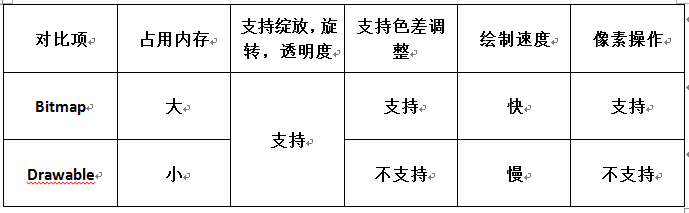
二、项目案例
【步骤】
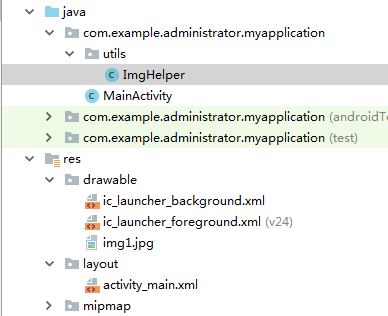
①将图片放入res/drawable文件夹中,这里面的图片属于res资源图片
②将图片处理定义成工具类,方便使用,也可以不这么做。
③点击按钮,获取图片,显示出来。
【项目结构】
【ImgHelper】
 import android.content.Context;

 import android.graphics.Bitmap;

 import android.graphics.BitmapFactory;

 import android.graphics.Canvas;

 import android.graphics.PixelFormat;

 import android.graphics.drawable.BitmapDrawable;

 import android.graphics.drawable.Drawable;

 public class ImgHelper {

     public static Bitmap getBitmapFormResources(Context context,int resId){

         return BitmapFactory.decodeResource(context.getResources(),resId);

     }

     public static Drawable getDrawableFromResources(Context context,int resId){

         return context.getResources().getDrawable(resId);

     }

     public static Drawable getDrawbleFormBitmap(Context context,Bitmap bitmap){

         return new BitmapDrawable(context.getResources(),bitmap);

     }

     public static Bitmap getBitmapFormDrawable(Context context,Drawable drawable){

         Bitmap bitmap = Bitmap.createBitmap(drawable.getIntrinsicWidth(),

                 drawable.getIntrinsicHeight(),drawable.getOpacity()!= PixelFormat.OPAQUE

                         ?Bitmap.Config.ARGB_8888:Bitmap.Config.RGB_565);

         Canvas canvas = new Canvas(bitmap);

         drawable.setBounds(0,0,drawable.getIntrinsicWidth(),drawable.getIntrinsicHeight());

         //设置绘画的边界,此处表示完整绘制

         drawable.draw(canvas);

         return bitmap;

     }

 }
【提示】drawable转化成Bitmap时需要用到canvas(画布)进行绘制。设置绘制的大小,绘制的边界。
【layout_main】
 <android.support.constraint.ConstraintLayout xmlns:android="http://schemas.android.com/apk/res/android"

     xmlns:app="http://schemas.android.com/apk/res-auto"

     xmlns:tools="http://schemas.android.com/tools"

     android:layout_width="match_parent"

     android:layout_height="match_parent"

     android:orientation="vertical"

     tools:context=".MainActivity">

     <Button

         android:id="@+id/btnBitmapFormRes"

         android:text="Bitmap  form res"

         android:layout_width="match_parent"

         android:layout_height="wrap_content" />

     <ImageView

         android:id="@+id/iv"

         android:layout_width="match_parent"

         android:layout_height="wrap_content"

         android:layout_marginEnd="8dp"

         android:layout_marginLeft="8dp"

         android:layout_marginRight="8dp"

         android:layout_marginStart="8dp"

         android:layout_marginTop="8dp"

         app:layout_constraintEnd_toEndOf="parent"

         app:layout_constraintStart_toStartOf="parent"

         app:layout_constraintTop_toBottomOf="@+id/btnBitmapFormRes" />

 </android.support.constraint.ConstraintLayout>
【提示】可以看到这里ImageView没有设置图片
【Main_Activity】
 import android.graphics.Bitmap;

 import android.graphics.drawable.Drawable;

 import android.support.v7.app.AppCompatActivity;

 import android.os.Bundle;

 import android.view.View;

 import android.widget.Button;

 import android.widget.ImageView;

 import com.example.administrator.myapplication.utils.ImgHelper;

 public class MainActivity extends AppCompatActivity {

     Button btnBitmapFormRes;

     ImageView iv;

     @Override

     protected void onCreate(Bundle savedInstanceState) {

         super.onCreate(savedInstanceState);

         setContentView(R.layout.activity_main);

         btnBitmapFormRes = findViewById(R.id.btnBitmapFormRes);

         iv = findViewById(R.id.iv);

         btnBitmapFormRes.setOnClickListener(new View.OnClickListener() {

             @Override

             public void onClick(View view) {

                 Bitmap bitmapFormResources = ImgHelper.getBitmapFormResources(MainActivity.this, R.drawable.img1);

 //                iv.setImageBitmap(bitmapFormResources);     //资源图片转BitMap

                 Drawable drawableFromResources = ImgHelper.getDrawableFromResources(MainActivity.this, R.drawable.img1);

 //                iv.setImageDrawable(drawableFromResources); //资源图片转drawable

                 Bitmap bitmapFormDrawable = ImgHelper.getBitmapFormDrawable(MainActivity.this, drawableFromResources);

                 iv.setImageBitmap(bitmapFormDrawable);      ////drawable转BitMap

                 Drawable drawbleFormBitmap = ImgHelper.getDrawbleFormBitmap(MainActivity.this, bitmapFormResources);

 //                iv.setImageDrawable(drawbleFormBitmap);      //BitMap转drawable

             }

         });

     }

 }
【提示】为了方便我这里就写了一个按钮,四种方式,相互配合,三种形式相互转化
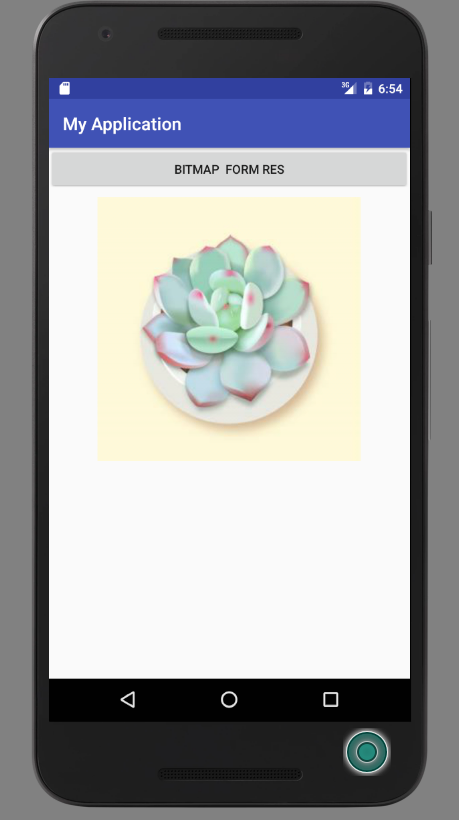
【效果】点击按钮后都将显示如下效果
Android 图片Bitmap,drawable,res资源图片之间转换的更多相关文章
- Android中 Bitmap Drawable Paint的获取、转换以及使用
比如Drawable中有一系列连续的图片,img_0.png, img_1.png, img_2.png ... 如果要动态获取这些图片,通过"R.drawable.img_x"的 ...
- Android中Bitmap, Drawable, Byte,ID之间的转化
Android中Bitmap, Drawable, Byte,ID之间的转化 1. Bitmap 转化为 byte ByteArrayOutputStream out = new ByteArray ...
- Android中Bitmap, Drawable, Byte之间的转化
1. Bitmap 转化为 byte ByteArrayOutputStream out = new ByteArrayOutputStream(); bitmap.compress(Bitmap. ...
- WPF调用图片路径,或资源图片
一.加载本项目的图片WPF引入了统一资源标识Uri(Unified Resource Identifier)来标识和访问资源.其中较为常见的情况是用Uri加载图像.Uri表达式的一般形式为:协议+授权 ...
- Android 控件背景选择图片还是drawable XML资源
决定一个控件应该是否用Drawable XML渲染,应考虑以下几个因素: * App是否要支持多分辨率: * App是否有瘦身的需要: * 图案是否足够简单: * 图案需要自由缩放: * 设计开发工作 ...
- Android实战简易教程-第九枪(BitmapFactory.Options对资源图片进行缩放)
我们知道,我们编写的应用程序都是有一定内存限制的.程序占用了过高的内存就easy出现OOM(OutOfMemory)异常.因此在展示高分辨率图片的时候,最好先将图片进行压缩,压缩后的图片大小应该和用来 ...
- Android 将drawable下的图片转换成bitmap、Drawable
将drawable下的图片转换成bitmap . Bitmap bitmap = BitmapFactory.decodeResource(getResources(), R.drawable.xxx ...
- android将drawable下的图片转换成bitmap
将drawable下的图片转换成bitmap 1. Bitmap bitmap = BitmapFactory.decodeResource(getResources(), R.drawable.xx ...
- 【Android 界面效果30】Android中ImageSwitcher结合Gallery展示SD卡中的资源图片
本文主要是写关于ImageSwitcher结合Gallery组件如何展示SDCard中的资源图片,相信大家都看过API Demo 中也有关于这个例子的,但API Demo 中的例子是展示工程中Draw ...
随机推荐
- WinRAR存在严重的安全漏洞影响5亿用户
WinRAR可能是目前全球用户最多的解压缩软件,近日安全团队发现并公布了WinRAR中存在长达19年的严重安全漏洞,这意味着有可能超过5亿用户面临安全风险. 该漏洞存在于所有WinRAR版本中包含的U ...
- ubuntu系统界面改变
主题:https://gitzab.com/Anduin/GNOME-OSX-II-Theme.git图标:https://github.com/keeferrourke/la-capitaine-i ...
- [Swift]LeetCode992. K 个不同整数的子数组 | Subarrays with K Different Integers
Given an array A of positive integers, call a (contiguous, not necessarily distinct) subarray of A g ...
- HBase篇--搭建HBase完全分布式集群
一.前述. 完全分布式基于hadoop集群和Zookeeper集群.所以在搭建之前保证hadoop集群和Zookeeper集群可用.可参考本人博客地址 https://www.cnblogs.com/ ...
- Socket.io发送消息含义
仅作收藏:转自博客园 若相忆; // send to current request socket client socket.emit('message', "this is a test ...
- linux-centerOs6.8安装nginx与配置
一:安装nginx 1.安装gcc(命令:yum install gcc)备注:可以输入gcc -v查询版本信息,查看是否自带安装 2.安装pcre(命令:yum install pcre-devel ...
- 『Pushing Boxes 双重bfs』
Pushing Boxes Description Imagine you are standing inside a two-dimensional maze composed of square ...
- C#版(击败100.00%的提交) - Leetcode 151. 翻转字符串里的单词 - 题解
版权声明: 本文为博主Bravo Yeung(知乎UserName同名)的原创文章,欲转载请先私信获博主允许,转载时请附上网址 http://blog.csdn.net/lzuacm. C#版 - L ...
- Android--操作图片Exif信息
前言 在Android系统中,图片文件在内存中以像素点的二维数组加载,存放像素信息,还会在开头加上一些额外的照片拍摄参数信息,这些信息就是Exif.Android2.0之后,媒体库加入了操作图片Exi ...
- peewee insert 数据时报错:'buffer' object has no attribute 'translate'
错误信息: "'buffer' object has no attribute 'translate'" 场景:使用peewee insert 数据时,BlobField 字段存储 ...