
EF Core 2.2 对多个 DbContext 单个数据库的情况进行迁移的示例
场景
在一个项目中,使用了多个 DbContext 且使用同一个数据库的情况
创建新项目
打开 Visual Studio 2017
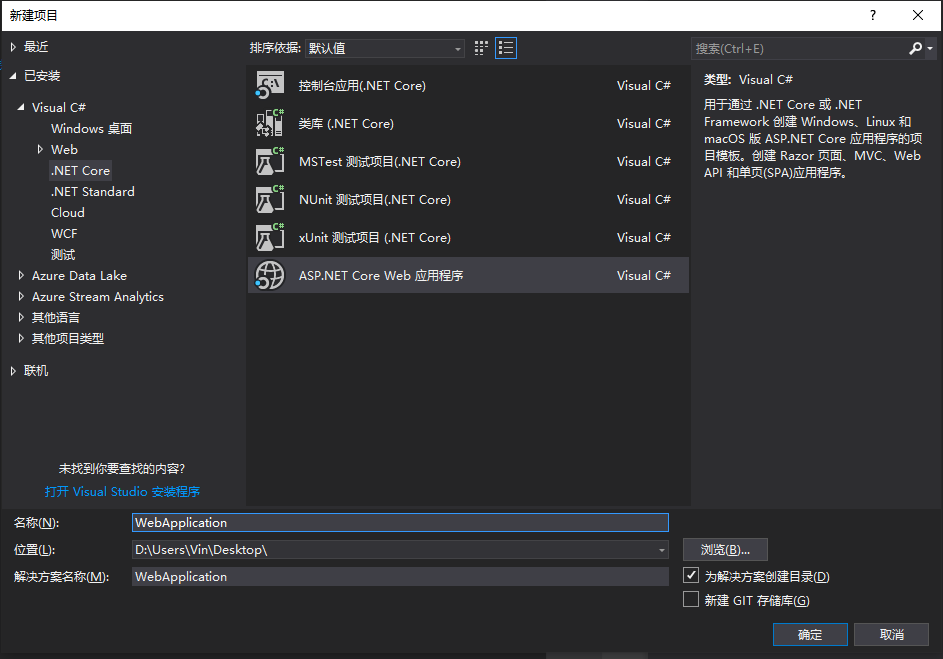
“文件”>“新建”>“项目”
从左菜单中选择“已安装”>“Visual C#”>“.NET Core”。
选择“ASP.NET Core Web 应用程序”。
输入“WebApplication”作为名称,然后单击“确定”。
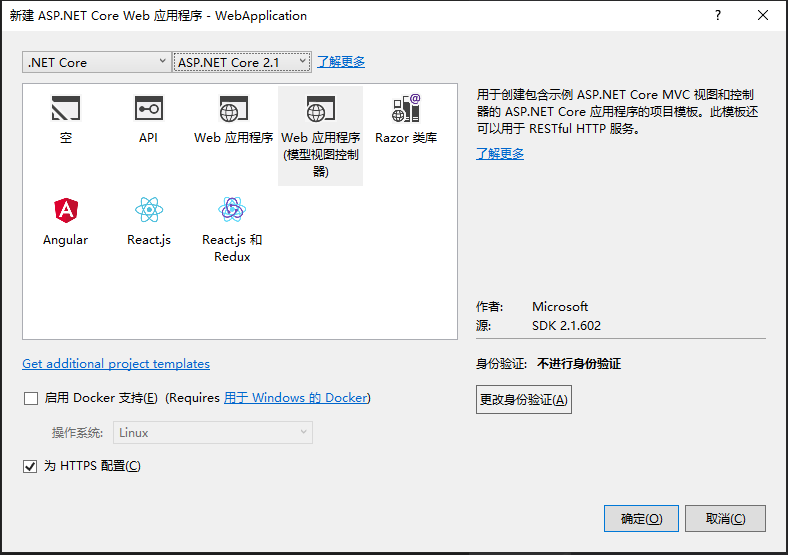
在“新建 ASP.NET Core Web 应用程序”对话框中:
确保在下拉列表中选择“.NET Core”和“ASP.NET Core 2.1”
选择“Web 应用程序(模型视图控制器)”项目模板
确保将“身份验证”设置为“无身份验证”
单击“确定”
创建第一个模型
右键单击“Models”文件夹,然后选择“添加”>“类”。
输入“FirstModel.cs”作为名称,然后单击“确定”。
将此文件的内容替换为以下代码:
using System.Collections.Generic;

using Microsoft.EntityFrameworkCore;

namespace WebApplication.Models

{

    public class FirstDbContext : DbContext

    {

        public FirstDbContext(DbContextOptions<FirstDbContext> options)

            : base(options)

        { }

        public DbSet<Blog> Blogs { get; set; }

        public DbSet<Post> Posts { get; set; }

    }

    public class Blog

    {

        public int BlogId { get; set; }

        public string Url { get; set; }

        public ICollection<Post> Posts { get; set; }

    }

    public class Post

    {

        public int PostId { get; set; }

        public string Title { get; set; }

        public string Content { get; set; }

        public int BlogId { get; set; }

        public Blog Blog { get; set; }

    }

}
生产应用通常会将每个类放在单独的文件中。 为简单起见,本教程将这些类放在一个文件中。
创建第二个模型
右键单击“Models”文件夹,然后选择“添加”>“类”。
输入“SecondModel.cs”作为名称,然后单击“确定”。
将此文件的内容替换为以下代码:
using Microsoft.EntityFrameworkCore;

namespace WebApplication.Models

{

    public class SecondDbContext : DbContext

    {

        public SecondDbContext(DbContextOptions<SecondDbContext> options)

            : base(options)

        { }

        public DbSet<Student> Students { get; set; }

    }

    public class Student

    {

        public int Id { get; set; }

        public string Name { get; set; }

    }

}
生产应用通常会将每个类放在单独的文件中。 为简单起见,本教程将这些类放在一个文件中。
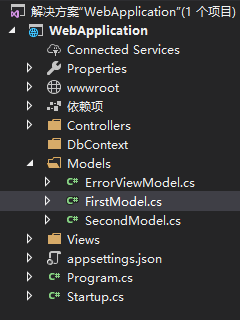
至此,项目的目录结构如下:
使用依赖注入注册上下文
若要使 FirstDbContext 和 SecondDbContext 可用于 MVC 控制器,请在 Startup.cs 中将其注册为服务。
在应用程序启动过程中,通过依赖关系注入 注册服务(如 FirstDbContext),以便能够通过构造函数的参数和属性向使用服务的组件(如 MVC 控制器)自动提供该服务。
在 Startup.cs 中,添加以下 using 语句:
using WebApplication.Models;

using Microsoft.EntityFrameworkCore;
将以下
手动高亮的代码添加到ConfigureServices方法:public void ConfigureServices(IServiceCollection services)
{
services.Configure<CookiePolicyOptions>(options =>
{
// This lambda determines whether user consent for non-essential cookies is needed for a given request.
options.CheckConsentNeeded = context => true;
options.MinimumSameSitePolicy = SameSiteMode.None;
}); services.AddMvc().SetCompatibilityVersion(CompatibilityVersion.Version_2_1); var connection = @"Server=你的数据库地址;Database=MultipleDbContext;User Id=你的数据库账号;Password=你的数据库密码;"; // 手动高亮
services.AddDbContext<FirstDbContext> // 手动高亮
(options => options.UseSqlServer(connection, x => x.MigrationsHistoryTable("__FirstDbMigrationsHistory"))); // 手动高亮 services.AddDbContext<SecondDbContext> // 手动高亮
(options => options.UseSqlServer(connection, x => x.MigrationsHistoryTable("__SecondDbMigrationsHistory"))); // 手动高亮
}
生产应用通常会将连接字符串放在配置文件或环境变量中。 为简单起见,本教程在代码中定义它。
创建数据库
以下步骤使用迁移创建数据库。
“工具”>“NuGet 包管理器”>“包管理器控制台”
运行以下命令创建
FirstDbContext的迁移:Add-Migration InitialCreate -Context FirstDbContext -OutputDir Migrations\FirstDbContextMigrations
Update-Database -Context FirstDbContext
-Context 参数表示要使用的
DbContext类,请参阅这里了解详细信息。“工具”>“NuGet 包管理器”>“包管理器控制台”
运行以下命令创建
SecondDbContext的迁移:Add-Migration InitialCreate -Context SecondDbContext -OutputDir Migrations\SecondDbContextMigrations
Update-Database -Context SecondDbContext
至此,项目的目录结构如下:

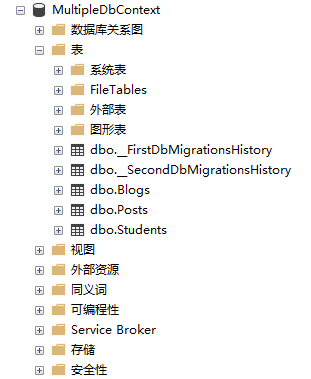
数据库如下:
需要注意的情况
请避免两个 DBContext 内的实体有互相主外键连接的情况
示例
// FirstDbContext

public class FirstDbContext : DbContext

{

    public FirstDbContext(DbContextOptions<FirstDbContext> options)

        : base(options)

    { }

    public DbSet<Blog> Blogs { get; set; }

    public DbSet<Post> Posts { get; set; }

}

public class Blog

{

    public int BlogId { get; set; }

    public string Url { get; set; }

    public ICollection<Post> Posts { get; set; }

    public int StudentId { get; set; }

    public Student Student { get; set; }

}

public class Post

{

    public int PostId { get; set; }

    public string Title { get; set; }

    public string Content { get; set; }

    public int BlogId { get; set; }

    public Blog Blog { get; set; }

}

// SecondDbContext

public class SecondDbContext : DbContext

{

    public SecondDbContext(DbContextOptions<SecondDbContext> options)

        : base(options)

    { }

    public DbSet<Student> Students { get; set; }

}

public class Student

{

    public int Id { get; set; }

    public string Name { get; set; }

    public ICollection<Blog> Blogs { get; set; }

}
EF Core 2.2 对多个 DbContext 单个数据库的情况进行迁移的示例的更多相关文章
- EF Core 2.2 对多个 DbContext 多个数据库的情况进行迁移的示例
目录 场景 创建新项目 创建第一个模型 创建第二个模型 使用依赖注入注册上下文 创建数据库 场景 在一个项目中,使用了多个 DbContext 且每个 DbContext 对应一个数据库的情况 创建新 ...
- EF Core 快速上手——创建应用的DbContext
系列文章 EF Core 快速上手--EF Core 入门 EF Core 快速上手--EF Core的三种主要关系类型 本节导航 定义应用的DbContext 创建DbContext的一个实例 创建 ...
- [.NET Core] - 使用 EF Core 的 Scaffold-DbContext 脚手架命令创建 DbContext
Scaffold-DbContext 命令 参数 Scaffold-DbContext [-Connection] <String> [-Provider] <String> ...
- [翻译 EF Core in Action 1.7] MyFirstEfCoreApp访问的数据库
Entity Framework Core in Action Entityframework Core in action是 Jon P smith 所著的关于Entityframework Cor ...
- EF Core使用CodeFirst在MySql中创建新数据库以及已有的Mysql数据库如何使用DB First生成域模型
官方教程:https://docs.microsoft.com/en-us/aspnet/core/data/?view=aspnetcore-2.1 使用EF CodeFirst在MySql中创建新 ...
- 第三节:EF Core上下文DbContext相关配置和生命周期
一. 配置相关 1. 数据库连接字符串的写法 (1).账号密码:Server=localhost;Database=EFDB01;User ID=sa;Password=123456; (2).win ...
- EF Core 2.0 新特性
前言 目前 EF Core 的最新版本为 2.0.0-priview1-final,所以本篇文章主要是针对此版本的一些说明. 注意:如果你要在Visual Studio 中使用 .NET Core 2 ...
- asp.net core系列 30 EF管理数据库架构--必备知识 迁移
一.管理数据库架构概述 EF Core 提供两种主要方法来保持 EF Core 模型和数据库架构同步.一是以 EF Core 模型为基准,二是以数据库为基准. (1)如果希望以 EF Core 模型为 ...
- EF Core使用笔记(基于MySql数据库)
一.什么是EF Entity Framework 是适用于.NET 的对象关系映射程序 (O/RM). 二.比较 EF Core 和 EF6 1.Entity Framework 6 Entity F ...
随机推荐
- 清北学堂4.28Day1(重大更新详见贪心例一)
枚举 用题目中给定的检验条件判定哪些是无用的,哪些是有用 的.能使命题成立的即为其解 . 例一 一棵苹果树上有n个苹果,每个苹果长在高度为Ai的地方.小明的身高为x 他想知道他最多能摘到多少苹果 数据 ...
- 输入法无法切换 win10
https://jingyan.baidu.com/article/e2284b2b6ea3f8e2e6118d38.html https://jingyan.baidu.com/article/ce ...
- 第一周java学习总结
学号 20175206 <Java程序设计>第一周学习总结 教材学习内容总结 第一章是关于JAVA入门的注意事项: 第一章主要按照顺序讲了JAVA的地位,诞生,特点,JDK的安装,一些ja ...
- 分类器的评价指标-ROC&AUC
ROC 曲线:接收者操作特征曲线(receiver operating characteristic curve),是反映敏感性和特异性连续变量的综合指标,roc 曲线上每个点反映着对同一信号刺激的感 ...
- Tomcat系列(6)——Tomcat处理一个HTTP请求的过程
Tomcat的架构图 图三:Tomcat Server处理一个HTTP请求的过程 处理HTTP请求过程 假设来自客户的请求为:http://localhost:8080/test/index.js ...
- 实验一 Java环境的搭建&Eclipse的安装
本次实验为在自己电脑上搭建Java环境,熟悉Java的编译和运行环境并安装Eclipse 一.JAVA环境的搭建 1.从Oracle网站上下载Java的jdk [https://www.oracle. ...
- 【ShaderToy】画一个球体
嗯,其实渲染球体,可以看做就是一个2d圆形图案+渲染光泽的函数. 定义球体结构——半径,球心坐标 struct Sphere { vec3 center; float radius; };edzx- ...
- 开发一个项目之ES2015+
变量的解构赋值 任何部署了 Iterator 的对象都可 for of 循环(数组.Set.Map.某些类似数组的对象(arguments对象.DOM NodeList 对象).Generator 对 ...
- 多个Fragment在一个activity中通过按钮的展示方法
fragment使用方法 1. 创建主Mainactivity extends AppCompatActivity 2. Oncreate & setContentView 3. 完成XML的 ...
- github 远程库
一.在 Github 创建 django 项目时:先在本地创建项目,然后设置为本地仓库,再与远程仓库关联 在 Git Bash 进入django项目目录,输入命令git init,此时这个目录变成Gi ...