
Maven中基于POM.xml的Profile来动态切换配置信息
【转载:https://blog.csdn.net/blueheart20/article/details/52838093】
1. Maven中的profile设置
Maven是目前主流的项目代码结构管理工具和打包发布工具,在其中提供了profile方式,可以将不同的环境下的信息,基于profile来进行管理,所有的配置信息放入profile之内;
大家可以把profile当作一套环境下的独立一套配置来理解。
示例如下, pom.xml中的配置部分内容:
<project>

   <!--  省略其他部分内容 --->

   <profiles>

        <profile>

            <id>dev</id>

            <activation>

                <activeByDefault>true</activeByDefault>

            </activation>

            <properties>

                <ab.key>testkey</ab.key>

            </properties>

            <build>

                <filters>

                    <filter>src/main/resources/config/db.properties</filter>

                    <filter>src/main/resources/config/test.xml</filter>

                </filters>

            </build>

        </profile>

        <profile>

            <id>test</id>

            <properties>

               <ab.key>anothertestkey</ab.key>

            </properties>

            <build>

                <filters>

                    <filter>src/main/resources/config/db.properties</filter>

                    <filter>src/main/resources/config/test.xml</filter>

                </filters>

            </build>

        </profile>

    </profiles>

</project>
这里使用了ab.key来表示不同环境下的配置信息,大家可以看到不同配置环境下的拥有相同key的值是各不相同的, testkey和anothertestkey.
<activation>标签下的内容标识为在基于mvn的命令操作情况下,默认的profile指定,在命令行如果没有指定profile,则默认使用activeByDefault中设定的profile值。
2. Profile实现配置信息动态过滤的依赖包
主要的plugins如下所示:
  <project>

     <!--这里省略其他部分的内容 -->

     <build>

        <plugins>

            <plugin>

                <groupId>org.apache.maven.plugins</groupId>

                <artifactId>maven-surefire-plugin</artifactId>

                <version>2.19.1</version>

                <configuration>

                    <skipTests>true</skipTests>

                </configuration>

            </plugin>

            <plugin>

                <groupId>org.apache.maven.plugins</groupId>

                <artifactId>maven-resources-plugin</artifactId>

                <version>3.0.1</version>

                <configuration>

                    <encoding>UTF-8</encoding>

                </configuration>

            </plugin>

        </plugins>

         <resources>

            <resource>

                <directory>src/main/resources</directory>

                <!-- <includes>

                    <include>**/*</include>

                </includes> -->

                <filtering>true</filtering>

            </resource>

        </resources>

    </build>
maven-surefire-plugin, 可选组件, 插件用来在maven构建生命周期的test phase执行一个应用的单元测试。它会产生两种不同形式的测试结果报告。
使用方式: 使用该插件很简单,使用mvn surefire:test或者mvn test都可以运行工程下的单元测试。
结果信息: 在工程的${basedir}/target/surefire-reports,目录下(basedir指的是pom文件所在的目录)
主页地址: http://maven.apache.org/components/plugins/maven-surefire-plugin/
maven-resources-plugin: 必选组件, 基于profile指定动态过滤配置信息
使用方式: mvn package -P profileName (or mvn deploy etc)
结果信息: 将src/main/resources下的配置信息占位符替换为profile中指定的值
主页地址: http://maven.apache.org/components/plugins/maven-resources-plugin/
关于resources节点下的信息作用,这里是整个resources的总开关,filtering这里指定启用过滤功能,否则该功能将无法正常使用。 <directory>节点设定了扫描的目录,includes节点主要是从整体的角度设定具体的扫描目录或者文件;如果这里不指定的话,可以在各个profile之中指定具体需要扫描的配置文件,在build->filters->filter中指定特定的配置文件, 具体信息可以参照#1中的pom.xml示例。
#1中的resources filter设置如下:
   ............

    <profile>

            <id>test</id>

            <properties>

               <ab.key>anothertestkey</ab.key>

            </properties>

            <build>

                <filters>

                    <filter>src/main/resources/config/db.properties</filter>

                    <filter>src/main/resources/config/test.xml</filter>

                </filters>

            </build>

        </profile>

     ...............
3. profile文件使用示例
3.1 创建maven项目
打开Eclipse, 打开File--> New--> Maven Project, 创建maven项目:
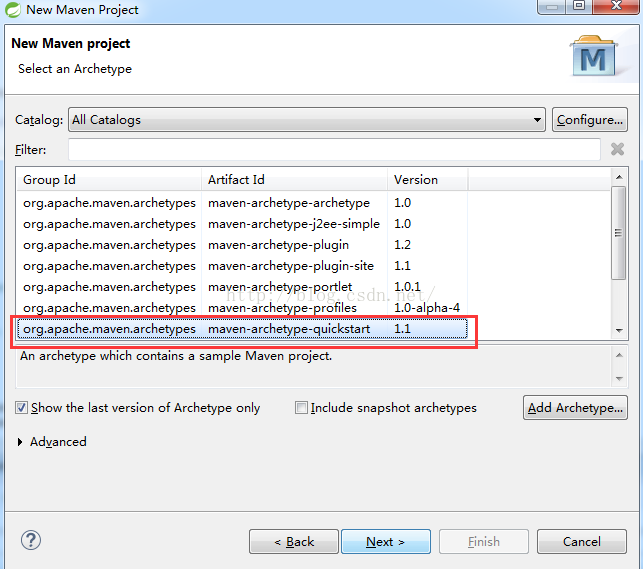
填写相应的项目groupId和artifactId信息:
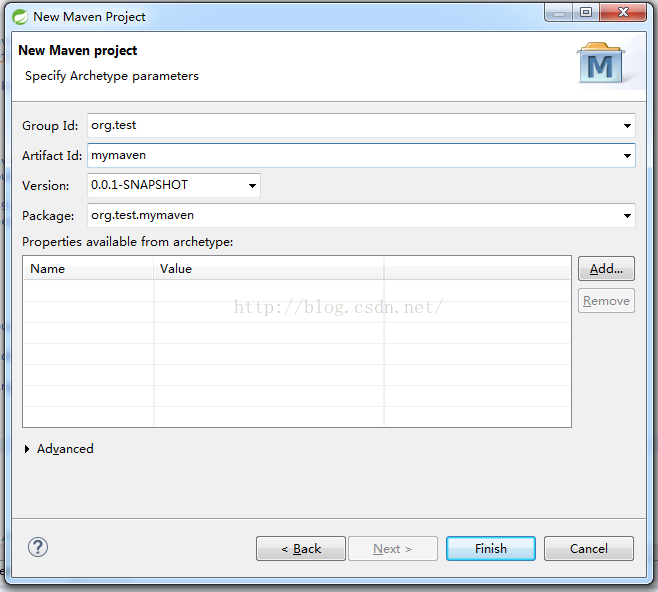
点击Finish按钮之后,创建项目成功
3.2 项目结构以及相应的配置文件信息
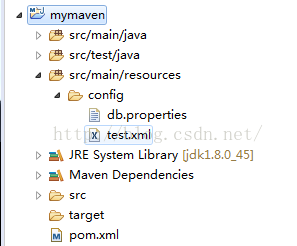
这里我们将配置文件test.xml和db.properties放入了src/main/resources目录下的config中。
同时将maven的plugins按照#1的要求配置进入pom.xml文件中。pom.xml的具体信息如下:
<project xmlns="http://maven.apache.org/POM/4.0.0" xmlns:xsi="http://www.w3.org/2001/XMLSchema-instance"

    xsi:schemaLocation="http://maven.apache.org/POM/4.0.0 http://maven.apache.org/xsd/maven-4.0.0.xsd">

    <modelVersion>4.0.0</modelVersion>

    <groupId>org.test</groupId>

    <artifactId>mymaven</artifactId>

    <version>0.0.1-SNAPSHOT</version>

    <packaging>jar</packaging>

    <name>mymaven</name>

    <url>http://maven.apache.org</url>

    <properties>

        <project.build.sourceEncoding>UTF-8</project.build.sourceEncoding>

    </properties>

    <dependencies>

        <dependency>

            <groupId>junit</groupId>

            <artifactId>junit</artifactId>

            <version>3.8.1</version>

            <scope>test</scope>

        </dependency>

    </dependencies>

    <build>

        <plugins>

            <plugin>

                <groupId>org.apache.maven.plugins</groupId>

                <artifactId>maven-surefire-plugin</artifactId>

                <version>2.19.1</version>

                <configuration>

                    <skipTests>true</skipTests>

                </configuration>

            </plugin>

            <plugin>

                <groupId>org.apache.maven.plugins</groupId>

                <artifactId>maven-resources-plugin</artifactId>

                <version>3.0.1</version>

                <configuration>

                    <encoding>UTF-8</encoding>

                </configuration>

            </plugin>

        </plugins>

         <resources>

            <resource>

                <directory>src/main/resources</directory>

                <!-- <includes>

                    <include>**/*</include>

                </includes> -->

                <filtering>true</filtering>

            </resource>

        </resources>

    </build>

    <profiles>

        <profile>

            <id>dev</id>

            <activation>

                <activeByDefault>true</activeByDefault>

            </activation>

            <properties>

                <ab.key>testkey</ab.key>

            </properties>

            <build>

                <filters>

                    <filter>src/main/resources/config/db.properties</filter>

                    <filter>src/main/resources/config/test.xml</filter>

                </filters>

            </build>

        </profile>

        <profile>

            <id>test</id>

            <properties>

               <ab.key>anothertestkey</ab.key>

            </properties>

            <build>

                <filters>

                    <filter>src/main/resources/config/db.properties</filter>

                    <filter>src/main/resources/config/test.xml</filter>

                </filters>

            </build>

        </profile>

    </profiles>

</project>
配置文件中的信息如下, test.xml中的内容:
<?xml version="1.0" encoding="UTF-8"?>

<info>${ab.key}</info>
db.properties中的内容如下:
my.key2=${ab.key}
ab.key在pom.xml中的不同profile中设定的相应值。
在pom.xml中设定了2个profile, test和dev, dev做为缺省的profile。
4. 执行打包或者发布操作,查看打包结果
>> mvn clean # 清理上次打包的结果和临时文件
>> mvn package -P dev -Dmaven.test.skip=true # 打包,忽略测试部分
然后接入生成的target目录,查看classes目录下的config, 查看db.properties和test.xml中的内容:
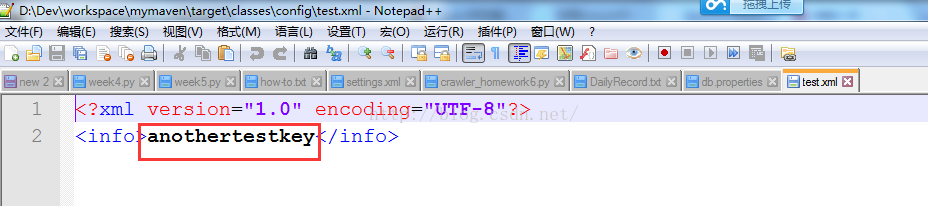
maven的命令运行过程信息:
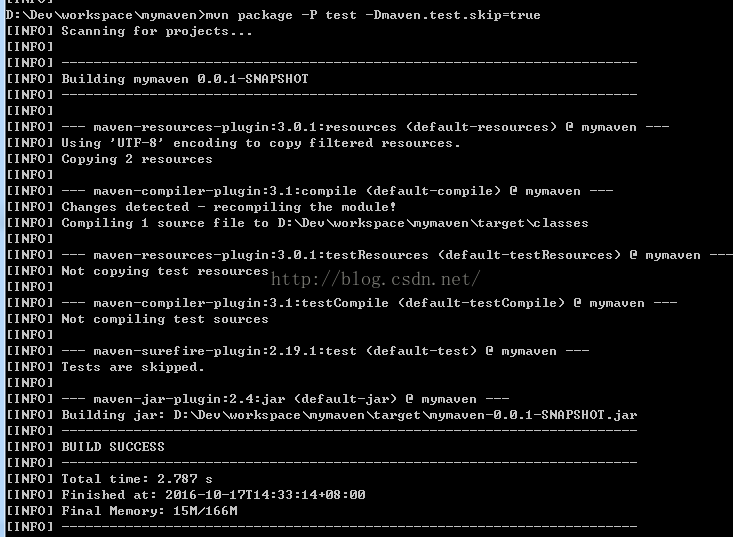
然后我们就可以在打包之后的结果中,看到过滤之后的信息了。
在Maven中-DskipTests和-Dmaven.test.skip=true的区别如下:
- -DskipTests,不执行测试用例,但编译测试用例类生成相应的class文件至target/test-classes下。
- -Dmaven.test.skip=true,不执行测试用例,也不编译测试用例类。
5. 在过程中碰到的问题以及解决办法
Q1: 在打包过程中,发现配置信息,并未被正确的profile下的信息替换掉
How to fix it?
a. 检查maven中的resources plugin是否被正确的引入, 在全局的filtering设置是否被打开,在build节点中的directory目录设置是否正确。另外,在特定的profile中设置的filter路径以及文件是否正确等
Q2: 在打包过程中,配置文件被正确过滤替换了,但是配置文件不是被复制到特定的目录,比如config下,而是被放入了classes下的根目录了,为什么?
How to fix it ?
此类情况应是build-->resources下设置了includes信息,include了所有的文件或者include文件路径为缺省值,比如下面的设置:
  .....................

  <resources>

            <resource>

                <directory>src/main/resources</directory>

                <includes>

                    <include>**/*</include>

                </includes>

                <filtering>true</filtering>

            </resource>

        </resources>

    </build>

</project>
这种情况下,将includes节点去掉,在profile中进行配置filter即可。
Q3: 我的配置都是没有问题,但是依然发现配置文件中的占位符,没有被正确替换,问题在哪里?
How to fix it ?
请检查maven-resources-plugin是否被正确的引入到plugins的列表中。
Maven中基于POM.xml的Profile来动态切换配置信息的更多相关文章
- Maven中的pom.xml配置文件详解
原文:http://blog.csdn.net/u012152619/article/details/51485297 <project xmlns="http://maven.apa ...
- maven中的pom.xml解析
pom.xml用于项目描述,组织管理,依赖管理和构件信息的管理. <project>是pom.xml的一些约束信息: <modelVersion>指定了当前pom的版本: 坐标 ...
- maven中的pom.xml中的scope的作用
pom.xml配置文件中, <dependency>中的<scope>,它主要管理依赖的生效范围.目前<scope>可以使用5个值: * compile,缺省值,适 ...
- Maven快速入门(四)Maven中的pom.xml文件详解
上一章,我们讲了Maven的坐标和仓库的概念,介绍了Maven是怎么通过坐标找到依赖的jar包的.同时也介绍了Maven的中央仓库.本地仓库.私服等概念及其作用.这些东西都是Maven最基本.最核心的 ...
- Maven中的pom.xml详解
<project xmlns="http://maven.apache.org/POM/4.0.0" xmlns:xsi="http://www.w3.org/20 ...
- hibernate4+spring4+struts2的Maven中的pom.xml文件的配置
<project xmlns="http://maven.apache.org/POM/4.0.0" xmlns:xsi="http://www.w3.org/20 ...
- 创建maven项目时pom.xml报错的解决方法
创建maven项目时pom.xml时: 出现如下报错信息: Failure to transfer commons-lang:commons-lang:jar:2.1 from https://rep ...
- 【转】maven核心,pom.xml详解
感谢如下博主: http://www.cnblogs.com/qq78292959/p/3711501.html maven核心,pom.xml详解 什么是pom? pom作为项目对象模型.通过 ...
- Maven的配置文件pom.xml
Maven的配置文件pom.xml 简介: 什么是POM? POM是项目对象模型(Project Object Model)的简称,它是Maven项目中的文件,使用XML表示,名称叫做pom.xml. ...
随机推荐
- 用Python3实现的Mycin专家系统简单实例
from sys import stderr ######################### TRUE = 1 #定义返回值 FALSE = 0 FACT_LENGTH = 9 #'''前提与结论 ...
- Typescript 和 Javascript之间的区别
TypeScript 和 JavaScript 是目前项目开发中较为流行的两种脚本语言,我们已经熟知 TypeScript 是 JavaScript 的一个超集,但是 TypeScript 与 Jav ...
- 基于PLC1850平台的ARP包请求与响应
一.以太网ARP报文格式 ①.以太网目的地址:占6个字节(接收方的MAC地址,不清楚时发广播地址:FF-FF-FF-FF-FF-FF) ②.以太网源地址:占6个字节(发送方的MAC地址) ③.帧类型: ...
- 目标URL存在跨站漏洞和目标URL存在http host头攻击漏洞处理方案
若需要学习技术文档共享(请关注群公告的内容)/讨论问题 请入QQ群:668345923 :若无法入群,请在您浏览文章下方留言,至于答复,这个看情况了 目录 HTTP协议详解 引言 一.HTTP协议详解 ...
- python3 error 机器学习 错误
AttributeError: 'NoneType' object has no attribute 'sqrt' 这个错误其实是因为 plt.scatter(x[:,0],x[:,1],x[:,2] ...
- PreparedStatement传进null值报错
最近在测试jdbc数据导入大量数据的性能,发现PreparedStatement传进null值会报错. 解决方法: setObject(int parameterIndex, Object x, in ...
- C语言解析WAV音频文件
C语言解析WAV音频文件 代码地址: Github : https://github.com/CasterWx/c-wave-master 目录 前言 了解WAV音频文件 什么是二进制文件 WAV的二 ...
- docker17.03.2安装
之前安装过docker 卸载 yum -y remove docker docker-common docker-selinux docker-engine docker-engine-selinux ...
- GPIO8种方式小总结
在输出3时写1时上反向为0,下为1,1时MOS不接通,0接通 为1时上导通输出高电平1: 为0时下导通输出低电平0: VDD为逻辑电源正 VSS为逻辑地 若为输出状态则施密特触发器总为开 然后经过上拉 ...
- IDEA上的项目托管到码云步骤
IDEA上的项目托管到码云步骤:1.安装Git2.idea上配置Git Setting-Version Control-Git 把git.exe改为安装的Git的执行路径如:D:\Prog ...