
Spring Boot 项目实战(五)集成 Dubbo
一、前言
上篇介绍了 Redis 的集成过程,可用于解决热点数据访问的性能问题。随着业务复杂度的提高,单体应用越来越庞大,就好比一个类的代码行数越来越多,分而治之,切成多个类应该是更好的解决方法,所以一个庞大的单体应用分出多个小应用也更符合这种分治的思想。于是乎微服务化的概念油然而生,微服务化的第一步就是选择适用的分布式服务框架,基于团队成员有使用过「 Dubbo 」的经验,我们放弃了完全陌生的「 Spring Cloud 」。本篇将主要介绍在 Spring Boot 中集成 Dubbo 的过程。
二、集成 Dubbo
2.1 引入 Dubbo 依赖包
① 首先在项目父 pom 文件中声明 Dubbo 依赖。
<dependencyManagement>

    <dependencies>

    	...省略其余部分...

        <dependency>

            <groupId>com.alibaba.boot</groupId>

            <artifactId>dubbo-spring-boot-starter</artifactId>

            <version>0.2.0</version>

        </dependency>

    </dependencies>

</dependencyManagement>
② 其次在 demo-biz 层中的 pom 文件添加上述 Dubbo 依赖。
<dependencies>

    ...省略其余部分...

    <dependency>

        <groupId>com.alibaba.boot</groupId>

        <artifactId>dubbo-spring-boot-starter</artifactId>

    </dependency>

</dependencies>
2.2 添加 Dubbo 常用配置项
在 application.properties 文件中的添加 Dubbo 相关的配置项:
# 当前应用名称,用于注册中心计算应用间依赖关系

dubbo.application.name = demo

# 组织名称,用于注册中心区分服务来源

dubbo.application.organization = example

# 应用负责人,用于服务治理

dubbo.application.owner = linjian

# 注册中心地址协议

dubbo.registry.protocol = zookeeper

# 注册中心服务器地址

dubbo.registry.address = 127.0.0.1:2181

# 协议名称

dubbo.protocol.name = dubbo

# 服务端口

dubbo.protocol.port = 20880

# 服务版本

dubbo.provider.version = 1.0.0.dev

# 远程服务调用超时时间(毫秒)

dubbo.provider.timeout = 60000

# 启动时检查提供者是否存在

dubbo.consumer.check = false
注:详细配置见 官方配置参考手册
三、接口服务化
3.1 Dubbo 接口编程规约
- Dubbo 接口类以 Rpc 为前缀命名并剥离出一个单独的模块,称之为远程服务层
- 请求参数类以 Param 为后缀命名并统一存放于「 param 」目录
- 返回结果类以 DTO 为后缀命名并统一存放于「 result 」目录
还有一条重要规则下篇「统一接口返回值」再说明
3.2 创建远程服务层
① 首先按照该篇博客 Spring Boot 项目实战(一)Maven 多模块项目搭建 中的「4.2 创建子模块」一节添加「 demo-remote 」子模块。
② 其次在项目父 pom 文件的 dependencyManagement 标签中声明 demo-remote 子模块的依赖。
<dependency>

    <groupId>com.example.demo</groupId>

    <artifactId>demo-remote</artifactId>

    <version>${demo.version}</version>

</dependency>
③ 然后在 demo-biz 层中的 pom 文件中添加 demo-remote 依赖。
<dependencies>

    ...省略其余部分...

    <dependency>

        <groupId>com.example.demo</groupId>

        <artifactId>demo-remote</artifactId>

    </dependency>

</dependencies>
由于 demo-remote 层最终是要打成一个 JAR 包供外部引入,而其接口的内部实现还是需要写在 demo-biz 层,所以我们将这两个模块之间建立了依赖关系,并在 demo-biz 层 com.example.demo.biz.service.impl 包中,新建 remote 目录存放 demo-remote 层远程服务接口的具体实现。
④ 在 DemoWebApplication 入口类中增加 Dubbo 接口实现类包扫描,设置 @DubboComponentScan 注解中的 basePackages 值为 com.example.demo.biz.service.impl.remote
@DubboComponentScan(basePackages = "com.example.demo.biz.service.impl.remote")
3.3 简易 Dubbo 接口测试
配置完模块间的依赖关系后,我们通过一个简易的 Dubbo 接口测试是否可用。
① 首先在 demo-remote 层的 pom 文件中添加必要的 lombok 依赖
<dependencies>

    <dependency>

        <groupId>org.projectlombok</groupId>

        <artifactId>lombok</artifactId>

    </dependency>

</dependencies>
① 其次在该层创建 com.example.demo.remote 包,添加 param 目录并在其中创建 DemoParam 请求参数类,添加 result 目录并在其中创建 DemoDTO 返回结果类,添加 service 目录并在其中创建 RpcDemoService 接口类。
package com.example.demo.remote.model.param;

import lombok.Data;

import java.io.Serializable;

/**

 * @author linjian

 * @date 2019/3/15

 */

@Data

public class DemoParam implements Serializable {

    private Integer id;

}
package com.example.demo.remote.model.result;

import lombok.Data;

import java.io.Serializable;

/**

 * @author linjian

 * @date 2019/3/15

 */

@Data

public class DemoDTO implements Serializable {

    private Integer id;

    private String name;

}
package com.example.demo.remote.service;

import com.example.demo.remote.model.param.DemoParam;

import com.example.demo.remote.model.result.DemoDTO;

/**

 * @author linjian

 * @date 2019/3/15

 */

public interface RpcDemoService {

    /**

     * Dubbo 接口测试

     *

     * @param param DemoParam

     * @return DemoDTO

     */

    DemoDTO test(DemoParam param);

}
② 在 demo-biz 层 com.example.demo.biz.service.impl.remote 包中新建 RpcDemoServiceImpl 接口实现类。
package com.example.demo.biz.service.impl.remote;

import com.alibaba.dubbo.config.annotation.Service;

import com.example.demo.biz.service.DemoService;

import com.example.demo.remote.model.param.DemoParam;

import com.example.demo.remote.model.result.DemoDTO;

import com.example.demo.remote.service.RpcDemoService;

import org.springframework.beans.factory.annotation.Autowired;

/**

 * @author linjian

 * @date 2019/3/15

 */

@Service

public class RpcDemoServiceImpl implements RpcDemoService {

    @Autowired

    private DemoService demoService;

    @Override

    public DemoDTO test(DemoParam param) {

        DemoDTO demo = new DemoDTO();

        demo.setId(1);

        demo.setName(demoService.test());

        return demo;

    }

}
③ 运行 DemoWebApplication 启动类的 main 方法,查看控制台打印日志可以得到如下结果:
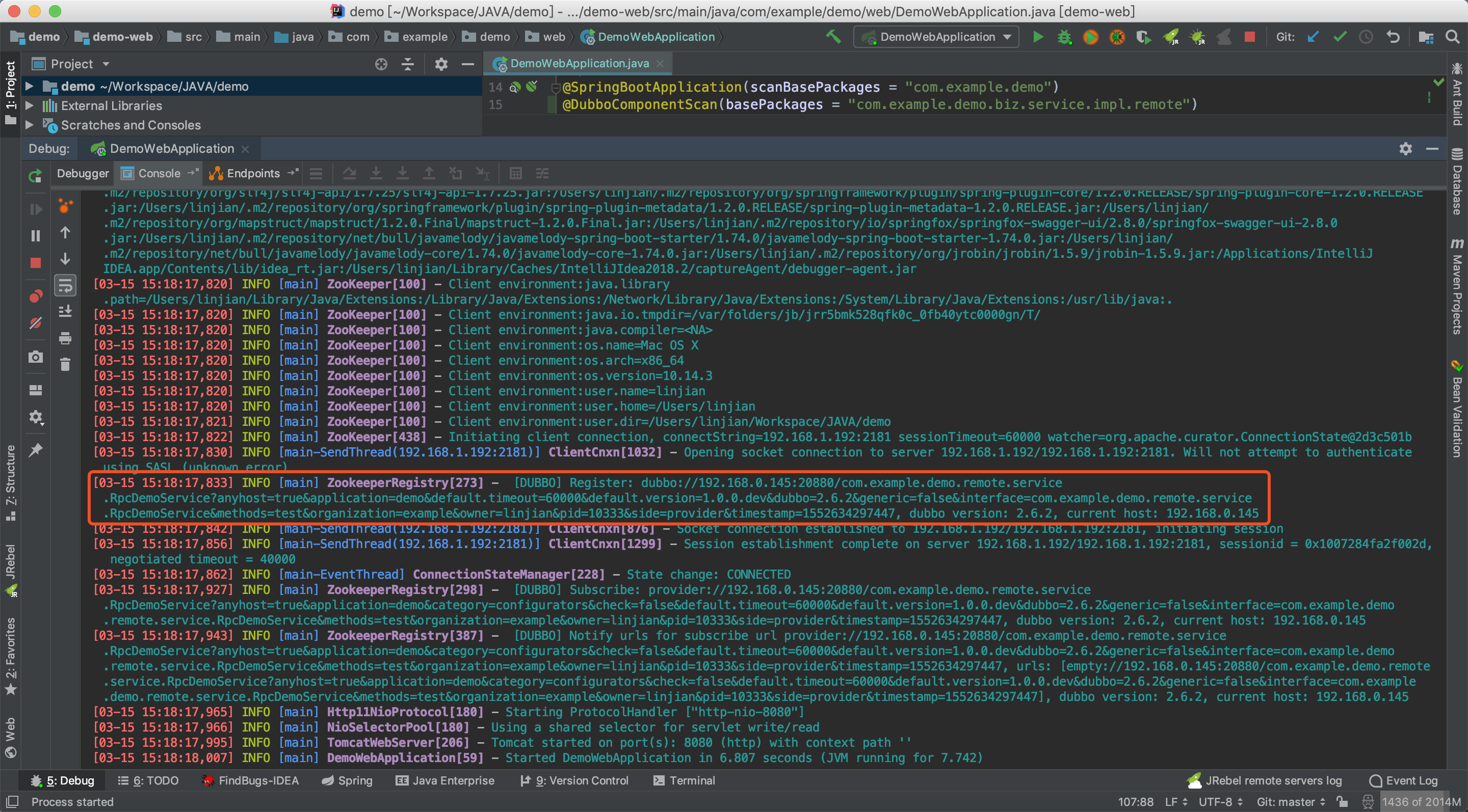
从上图可以看出服务已经注册成功
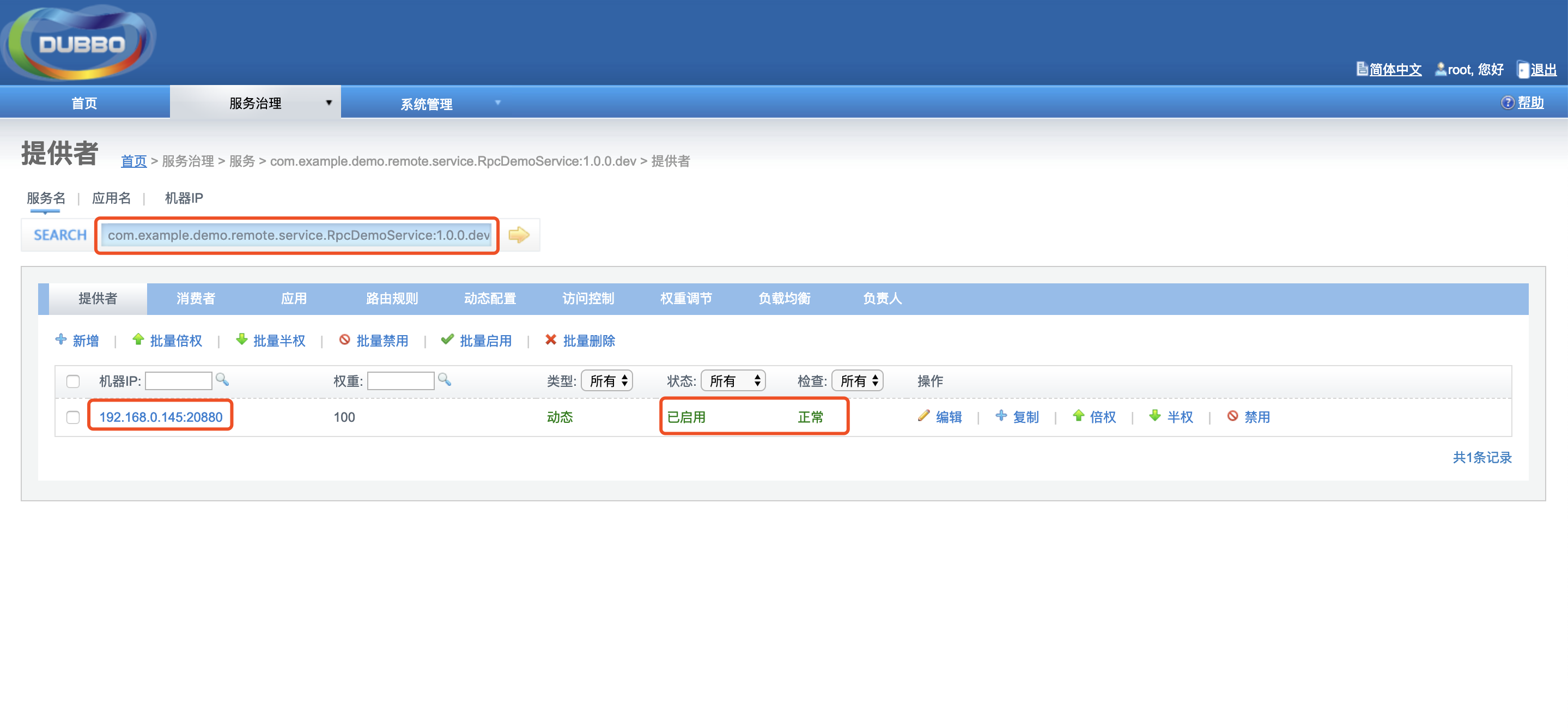
④ 同时通过 Dubbo Admin 管理控制台也可以看到刚注册的服务:
3.4 暴露远程服务
① 在 demo-remote 层的 pom 文件中添加 distributionManagement 标签并在其中配置 Nexus 私服的 snapshot 快照库及 release 发布库。
<distributionManagement>

    <repository>

        <id>yibao-releases</id>

        <url>http://127.0.0.1:8081/nexus/content/repositories/releases/</url>

    </repository>

    <snapshotRepository>

        <id>yibao-snapshots</id>

        <url>http://127.0.0.1:8081/nexus/content/repositories/snapshots/</url>

    </snapshotRepository>

</distributionManagement>
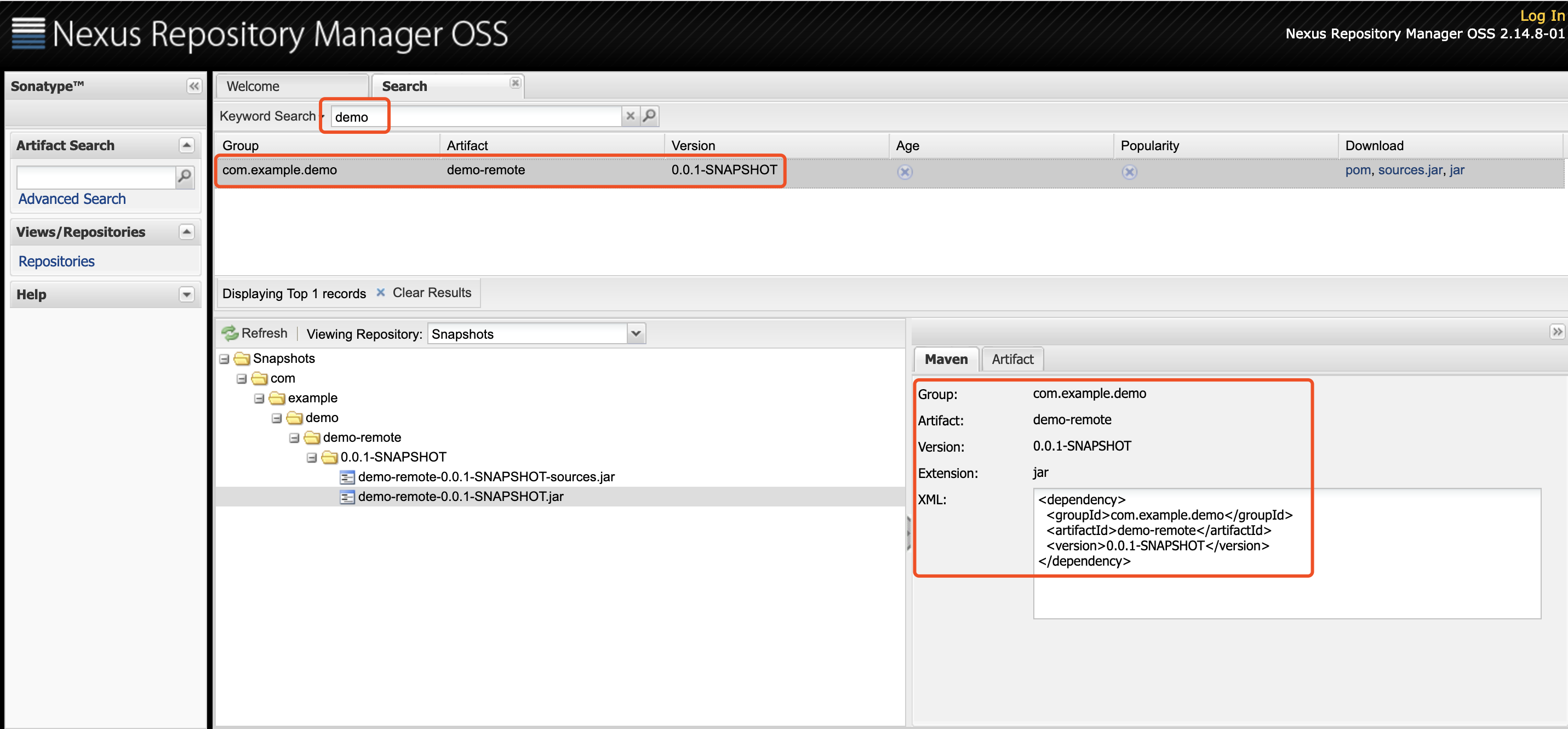
② cd 到 demo-remote 目录,执行 mvn deploy 命令打包,完成后可在 Nexus 私服看到刚打的依赖包。
③ 搭建一个测试项目并引入 demo-remote 依赖包,新建 TestController 类测试 Dubbo 接口。
注:该测试项目也需集成 Dubbo
package com.example.dawn.web.controller;

import com.alibaba.dubbo.config.annotation.Reference;

import com.example.demo.remote.model.param.DemoParam;

import com.example.demo.remote.model.result.DemoDTO;

import com.example.demo.remote.service.RpcDemoService;

import com.yibao.dawn.web.annotation.LoginIgnore;

import org.springframework.web.bind.annotation.GetMapping;

import org.springframework.web.bind.annotation.RequestMapping;

import org.springframework.web.bind.annotation.RestController;

/**

 * @author linjian

 * @date 2019/3/7

 */

@RestController

@RequestMapping("test")

public class TestController {

    @Reference(version = "1.0.0.dev")

    private RpcDemoService rpcDemoService;

    @GetMapping("dubbo")

    public DemoDTO test() {

        DemoParam param = new DemoParam();

        param.setId(1);

        return rpcDemoService.test(param);

    }

}
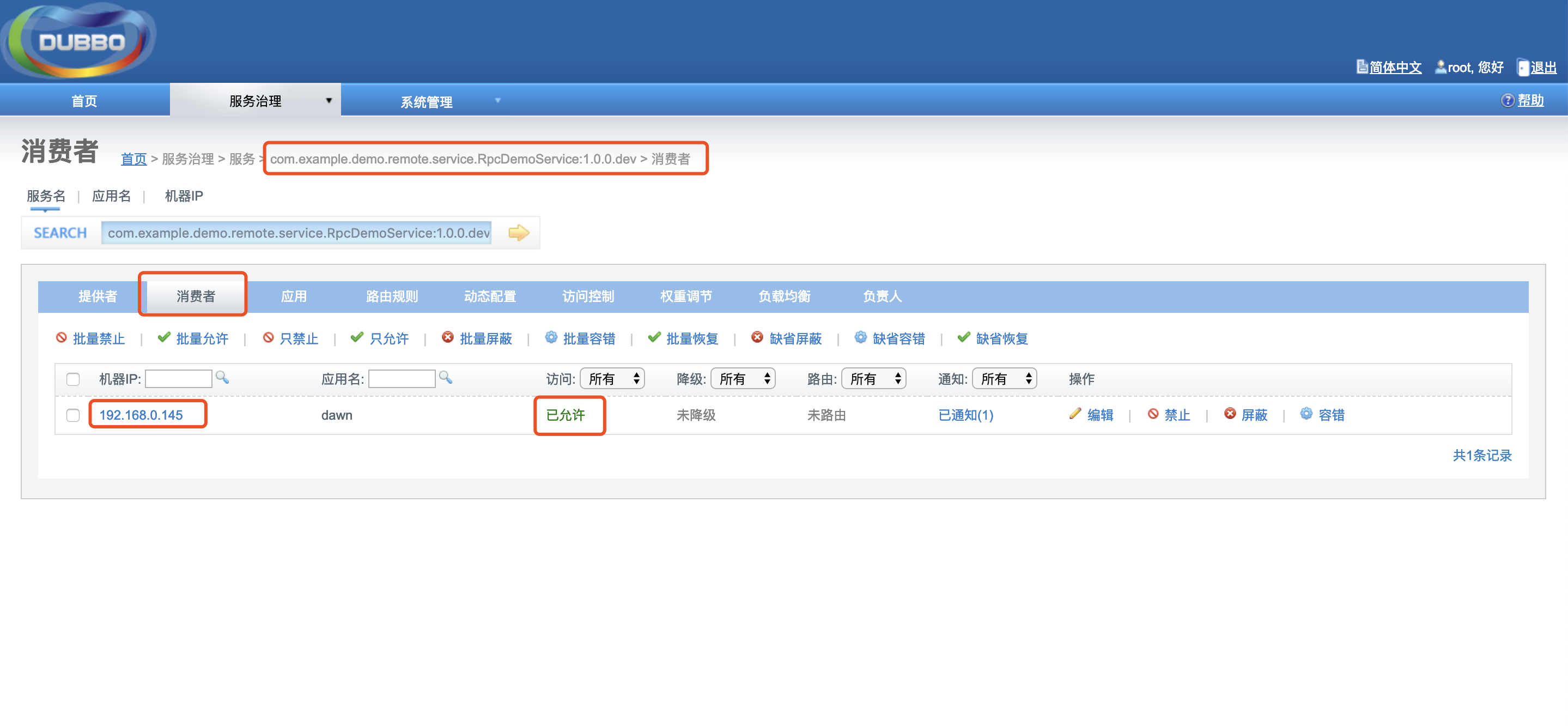
③ 启动测试项目,观察 Dubbo Admin 管理控制台消费者一栏,可以看到测试项目已经作为一个消费者调用 RpcDemoService 接口类。
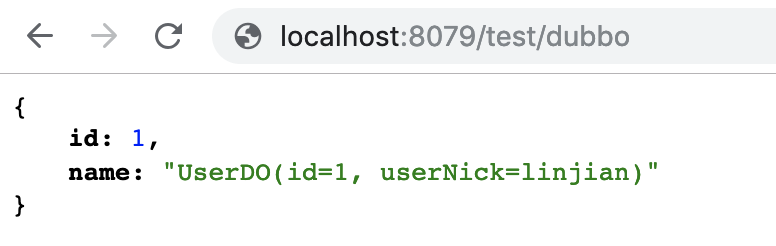
④ 访问 http://localhost:8079/test/dubbo 查看接口返回结果。
四、结语
至此 Spring Boot 集成 Dubbo 的过程介绍完毕,我们通过一个简易的 Dubbo 接口测试其可用性,下篇我们将介绍 HTTP 接口及 Dubbo 接口的一个重要编程规约 — 统一返回值
注:相关代码已同步至 GitHub
Spring Boot 项目实战(五)集成 Dubbo的更多相关文章
- Spring Boot 项目实战(六)集成 Apollo
一.前言 上篇介绍了 Spring Boot 集成 Dubbo,使我们的系统打下了分布式的基础.随着程序功能的日益复杂,程序的配置日益增多:各种功能开关.参数配置.服务器地址等:对程序配置的期望值也越 ...
- Spring Boot 项目实战(四)集成 Redis
一.前言 上篇介绍了接口文档工具 Swagger 及项目监控工具 JavaMelody 的集成过程,使项目更加健壮.在 JAVA Web 项目某些场景中,我们需要用缓存解决如热点数据访问的性能问题,业 ...
- Spring Boot 项目实战(三)集成 Swagger 及 JavaMelody
一.前言 上篇介绍了 Logback 的集成过程,总体已经达到了基本可用的项目结构.本篇主要介绍两个常用工具,接口文档工具 Swagger .项目监控工具 JavaMelody 的集成步骤. 二.Sw ...
- Spring Boot 项目实战(二)集成 Logback
一.前言 上篇介绍了 Spring Boot Maven 多模块项目的搭建方法以及 MyBatis 的集成.通常在调试接口或者排查问题时我们主要借助于日志,一个设计合理的日志文件配置能大大降低我们的排 ...
- Spring Boot 项目实战(一)Maven 多模块项目搭建
一.前言 最近公司项目准备开始重构,框架选定为 Spring Boot ,本篇主要记录了在 IDEA 中搭建 Spring Boot Maven 多模块项目的过程. 二.软件及硬件环境 macOS S ...
- Github 上热门的 Spring Boot 项目实战推荐
最近经常被读者问到有没有 Spring Boot 实战项目可以学习,于是,我就去 Github 上找了 10 个我觉得还不错的实战项目.对于这些实战项目,有部分是比较适合 Spring Boot 刚入 ...
- 携程Apollo(阿波罗)配置中心在Spring Boot项目快速集成
前提:先搭建好本地的单机运行项目:http://www.cnblogs.com/EasonJim/p/7643630.html 说明:下面的示例是基于Spring Boot搭建的,对于Spring项目 ...
- Gitlab CI 集成 Kubernetes 集群部署 Spring Boot 项目
在上一篇博客中,我们成功将 Gitlab CI 部署到了 Docker 中去,成功创建了 Gitlab CI Pipline 来执行 CI/CD 任务.那么这篇文章我们更进一步,将它集成到 K8s 集 ...
- [转帖]spring boot项目集成jacoco
小试牛刀:spring boot项目集成jacoco 2019-03-28 20:14:36 zyq23333 阅读数 509 版权声明:本文为博主原创文章,遵循CC 4.0 BY-SA版权协议, ...
随机推荐
- emwin 之模态窗口
@2019-02-27 [小记] emwin 窗口被模态之后,创建子窗口则原模态窗口变为非模态
- BZOJ2616PERIODNI
题目描述 给定一个N列的表格,每列的高度各不相同,但底部对齐,然后向表格中填入K个相同的数,填写时要求不能有两个数在同一列,或同一行,下图中b是错误的填写,a是正确的填写,因为两个a虽然在同一行,但它 ...
- GWAS: 曼哈顿图,QQ plot 图,膨胀系数( manhattan、Genomic Inflation Factor)
画曼哈顿图和QQ plot 首推R包“qqman”,简约方便.下面具体介绍以下. 一.画曼哈顿图 install.packages("qqman") library(qqman) ...
- <五>企业级开源仓库nexus3实战应用–使用nexus3配置npm私有仓库
一两个星期之前,你如果在我跟前说起私服的事情,我大概会绕着你走,因为我对这个东西真的一窍不通.事实上也正如此,开发同学曾不止一次的跟我说公司的私服版本太旧了,许多新的依赖编译之后不会从远程仓库自动缓存 ...
- Python【pyyaml】模块
pyyaml模块安装: pip install pyyaml pyyaml导入: import yaml pyyaml使用: 1.使用前,在pycharm中新建一个以yaml或yml结尾的文件,保存为 ...
- Linux性能优化实战:系统的swap变高(08)
一.Swap 原理 前面提到,Swap 说白了就是把一块磁盘空间或者一个本地文件(以下讲解以磁盘为例),当成内存来使用.它包括换出和换入两个过程 1.所谓换出 就是把进程暂时不用的内存数据存储到磁盘中 ...
- Makefile 使用总结(转)
Makefile 使用总结 转自 https://www.cnblogs.com/wang_yb/p/3990952.html 1. Makefile 简介 Makefile 是和 make 命令一 ...
- [物理学与PDEs]第2章习题2 质量力有势时的能量方程
试证明: 如果质量力有势, 即存在 $\phi$ 使 ${\bf F}=-\n \phi$, 那么理想流体的能量守恒方程的微分形式可写为 $$\bex \cfrac{\rd}{\rd t}\sex{e ...
- [物理学与PDEs]第2章习题1 无旋时的 Euler 方程
试证明: 当流场为无旋, 即 $\rot{\bf u}={\bf 0}$ 时, 理想流体的 Euler 方程可写为如下形式: $$\bex \cfrac{\p {\bf u}}{\p t}+\n \c ...
- Git——如何将本地项目提交至远程仓库(第一次)
1.(先进入项目文件夹)通过命令 git init 把这个目录变成git可以管理的仓库. git init 2.把文件添加到版本库中,使用命令 git add .添加到暂存区里面去,不要忘记后面的小数 ...