
Mybatis+Mysql逆向工程
目录结构:

pom文件:
<?xml version="1.0" encoding="UTF-8"?>

<project xmlns="http://maven.apache.org/POM/4.0.0" xmlns:xsi="http://www.w3.org/2001/XMLSchema-instance"

         xsi:schemaLocation="http://maven.apache.org/POM/4.0.0 http://maven.apache.org/xsd/maven-4.0.0.xsd">

    <modelVersion>4.0.0</modelVersion>

    <parent>

        <groupId>org.springframework.boot</groupId>

        <artifactId>spring-boot-starter-parent</artifactId>

        <version>1.5.18.RELEASE</version>

        <relativePath/> <!-- lookup parent from repository -->

    </parent>

    <groupId>com.atyss</groupId>

    <artifactId>springboot-mybatis</artifactId>

    <version>0.0.1-SNAPSHOT</version>

    <name>springboot-mybatis</name>

    <description>Demo project for Spring Boot</description>

    <properties>

        <java.version>1.8</java.version>

    </properties>

    <dependencies>

        <dependency>

            <groupId>org.springframework.boot</groupId>

            <artifactId>spring-boot-starter-jdbc</artifactId>

        </dependency>

        <dependency>

            <groupId>org.springframework.boot</groupId>

            <artifactId>spring-boot-starter-web</artifactId>

        </dependency>

        <dependency>

            <groupId>org.mybatis.spring.boot</groupId>

            <artifactId>mybatis-spring-boot-starter</artifactId>

            <version>1.3.2</version>

        </dependency>

        <dependency>

            <groupId>mysql</groupId>

            <artifactId>mysql-connector-java</artifactId>

            <scope>runtime</scope>

        </dependency>

        <!--引入druid-->

        <!-- https://mvnrepository.com/artifact/com.alibaba/druid -->

        <dependency>

            <groupId>com.alibaba</groupId>

            <artifactId>druid</artifactId>

            <version>1.1.8</version>

        </dependency>

        <dependency>

            <groupId>org.springframework.boot</groupId>

            <artifactId>spring-boot-starter-test</artifactId>

            <scope>test</scope>

        </dependency>

    </dependencies>

    <build>

        <plugins>

            <plugin>

                <groupId>org.springframework.boot</groupId>

                <artifactId>spring-boot-maven-plugin</artifactId>

            </plugin>

        </plugins>

    </build>

</project>
yml配置文件:
spring:

  datasource:

#   数据源基本配置

    username: root

    password: 123456

    driver-class-name: com.mysql.jdbc.Driver

    url: jdbc:mysql://localhost:3306/mybatis

    type: com.alibaba.druid.pool.DruidDataSource

#   数据源其他配置

    initialSize: 5

    minIdle: 5

    maxActive: 20

    maxWait: 60000

    timeBetweenEvictionRunsMillis: 60000

    minEvictableIdleTimeMillis: 300000

    validationQuery: SELECT 1 FROM DUAL

    testWhileIdle: true

    testOnBorrow: false

    testOnReturn: false

    poolPreparedStatements: true

#   配置监控统计拦截的filters,去掉后监控界面sql无法统计,'wall'用于防火墙

    filters: stat,wall,log4j

    maxPoolPreparedStatementPerConnectionSize: 20

    useGlobalDataSourceStat: true

    connectionProperties: druid.stat.mergeSql=true;druid.stat.slowSqlMillis=500

mybatis:

  # 指定全局配置文件位置

  config-location: classpath:mybatis/mybatis-config.xml

  # 指定sql映射文件位置

  mapper-locations: classpath:mybatis/mapper/*.xml
druid配置文件:
package com.mybatisbgm.demo.config;

import com.alibaba.druid.pool.DruidDataSource;
import com.alibaba.druid.support.http.StatViewServlet;
import com.alibaba.druid.support.http.WebStatFilter;
import org.springframework.boot.context.properties.ConfigurationProperties;
import org.springframework.boot.web.servlet.FilterRegistrationBean;
import org.springframework.boot.web.servlet.ServletRegistrationBean;
import org.springframework.context.annotation.Bean;
import org.springframework.context.annotation.Configuration;

import javax.sql.DataSource;
import java.util.Arrays;
import java.util.HashMap;
import java.util.Map;

@Configuration
public class DruidConfig {

    @ConfigurationProperties(prefix = "spring.datasource")
    @Bean
    public DataSource druid(){
        return  new DruidDataSource();
    }

    //配置Druid的监控
    //1、配置一个管理后台的Servlet
    @Bean
    public ServletRegistrationBean statViewServlet(){
        ServletRegistrationBean bean = new ServletRegistrationBean(new StatViewServlet(), "/druid/*");
        Map<String,String> initParams = new HashMap<>();

        initParams.put("loginUsername","admin");
        initParams.put("loginPassword","123456");
        //initParams.put("allow","");//默认就是允许所有访问
        //initParams.put("deny","192.168.56.1");

        bean.setInitParameters(initParams);
        return bean;
    }

    //2、配置一个web监控的filter
    @Bean
    public FilterRegistrationBean webStatFilter(){
        FilterRegistrationBean bean = new FilterRegistrationBean();
        bean.setFilter(new WebStatFilter());

        Map<String,String> initParams = new HashMap<>();
        initParams.put("exclusions","*.js,*.css,/druid/*");

        bean.setInitParameters(initParams);

        bean.setUrlPatterns(Arrays.asList("/*"));

        return  bean;
    }
}
最主要的bgm.xml
<?xml version="1.0" encoding="UTF-8"?>

<!DOCTYPE generatorConfiguration

  PUBLIC "-//mybatis.org//DTD MyBatis Generator Configuration 1.0//EN"

  "http://mybatis.org/dtd/mybatis-generator-config_1_0.dtd">

<generatorConfiguration>

    <!-- context:环境

        id="DB2Tables":唯一标示

        MyBatis3Simple:生成的简单版

     -->

  <context id="DB2Tables" targetRuntime="MyBatis3Simple">

      <!-- jdbcConnection:jdbc连接 -->

    <jdbcConnection driverClass="com.mysql.jdbc.Driver"

        connectionURL="jdbc:mysql://localhost:3306/javabean"

        userId="root"

        password="123456">

    </jdbcConnection>

    <javaTypeResolver >

      <property name="forceBigDecimals" value="false" />

    </javaTypeResolver>

    <!--javaModelGenerator:生成java模型的配置。(javaBean)

    targetPackage:生成的javaBean放在哪个包下

    targetProject:放在哪个工程下

      -->

    <javaModelGenerator targetPackage="com.mybatisbgm.demo.bean"

        targetProject=".\src\main\java">

      <property name="enableSubPackages" value="true" />

      <property name="trimStrings" value="true" />

    </javaModelGenerator>

    <!-- sqlMapGenerator:SQL映射生成器(UserDao.xml  mapper文件) -->

    <sqlMapGenerator targetPackage="mybatis.mapper"

        targetProject=".\src\main\resources">

      <property name="enableSubPackages" value="true" />

    </sqlMapGenerator>

    <!-- javaClientGenerator:java客户端生成:

        UserDao接口 -->

    <javaClientGenerator type="XMLMAPPER"

        targetPackage="com.mybatisbgm.demo.mapper"

        targetProject=".\src\main\java">

      <property name="enableSubPackages" value="true" />

    </javaClientGenerator>

    <!--  数据库表

    tableName:表、名

    domainObjectName:对应javaBean名

    -->

    <table tableName="animals" domainObjectName="Animal"></table>

  </context>

</generatorConfiguration>
test运行文件:
public static void main(String[] args) throws Exception {

        List<String> warnings = new ArrayList<String>();

        boolean overwrite = true;

        //1、获取mbg文件

        File configFile = new File("mbg.xml");

        ConfigurationParser cp = new ConfigurationParser(warnings);

        Configuration config = cp.parseConfiguration(configFile);

        DefaultShellCallback callback = new DefaultShellCallback(overwrite);

        MyBatisGenerator myBatisGenerator = new MyBatisGenerator(config,

                callback, warnings);

        myBatisGenerator.generate(null);

        System.out.println("运行完成....");

    }
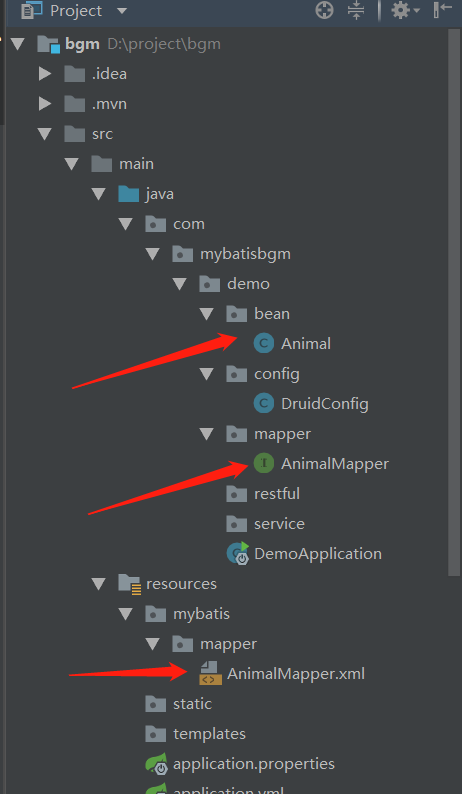
生成的文件:
Mybatis+Mysql逆向工程的更多相关文章
- SpringBoot+Mybatis+Maven+MySQL逆向工程实现增删改查
SpringBoot+Mybatis+MySQL+MAVEN逆向工程实现增删改查 这两天简单学习了下SpringBoot,发现这玩意配置起来是真的方便,相比于SpringMVC+Spring的配置简直 ...
- mybatis的逆向工程
mybatis的逆向工程是很大的减少了程序员对代码的编写工作,由于mybatis是半自动的sql语句使用,我们在项目中一般都是采用逆向工程来生成mybatis的文件,mapper接口相当于我们平常所说 ...
- Mybatis(七) mybatis的逆向工程的配置详解
还是觉得看书学习有意思~嘿嘿.今天把mybatis给结束掉. --WH 一.什么是逆向工程? 简单点说,就是通过数据库中的单表,自动生成java代码. Mybatis官方提供了逆向工程,可以针对单表自 ...
- SpringMVC+Mybatis+MySQL配置Redis缓存
SpringMVC+Mybatis+MySQL配置Redis缓存 1.准备环境: SpringMVC:spring-framework-4.3.5.RELEASE-dist Mybatis:3.4.2 ...
- Mybatis【逆向工程,缓存,代理】知识要点
前言 本文主要讲解Mybatis的以下知识点: Mybatis缓存 一级缓存 二级缓存 与Ehcache整合 Mapper代理 使用Mapper代理就不用写实现类了 逆向工程 自动生成代码 Mybat ...
- Mybatis学习(七)————— mybatis的逆向工程的配置详解
一.什么是逆向工程? 简单点说,就是通过数据库中的单表,自动生成java代码. Mybatis官方提供了逆向工程,可以针对单表自动生成mybatis代码(mapper.java\mapper.xml\ ...
- SpringBoot+Mybatis+Generator 逆向工程使用(二)
Mybatis-Genarator 逆向工程使用 个人开发环境 java环境:Jdk1.8.0_60 编译器:IntelliJ IDEA 2017.1.4 mysql驱动:mysql-connecto ...
- 【MyBatis学习15】MyBatis的逆向工程生成代码
1. 什么是逆向工程 mybatis的一个主要的特点就是需要程序员自己编写sql,那么如果表太多的话,难免会很麻烦,所以mybatis官方提供了一个逆向工程,可以针对单表自动生成mybatis执行所需 ...
- 利用Intellij+MAVEN搭建Spring+Mybatis+MySql+SpringMVC项目详解
http://blog.csdn.net/noaman_wgs/article/details/53893948 利用Intellij+MAVEN搭建Spring+Mybatis+MySql+Spri ...
随机推荐
- Linux Vi 的使用
进入vi的命令 vi filename :打开或新建文件,并将光标置于第一行首 vi +n filename :打开文件,并将光标置于第n行首 vi + filename :打开文件,并将光标置于最后 ...
- Mac下mongodb connect failed 连接错误解决方法
查看elm 后台node 代码 一直连不上mongodb,报错 MongoDB shell version v3.6.0 connecting to: mongodb://127.0.0.1:2701 ...
- selenium+python-unittest多线程生成报告
前言 selenium多线程跑用例,这个前面一篇已经解决了,如何生成一个测试报告这个是难点,刚好在github上有个大神分享了BeautifulReport,完美的结合起来,就能生成报告了. 环境必备 ...
- jQuery的下拉选select2插件用法
1转自:https://www.jb51.net/article/95561.htm 用了这么久的Select2插件,也该写篇文章总结总结.当初感觉Select2不是特别好用,但又找不到比它更好的下拉 ...
- JavaScript我学之一变量类型
本文是网易云课堂金旭亮老师的课程笔记,记录下来,以供备忘. 变量类型 只有6种 : 四种原始数据类型boolean , number, string , undefine, 其他object,fun ...
- Taro覆盖iview样式
/* CustomComp.js */ export default CustomComp extends Component { static options = { addGlobalClass: ...
- lxml.etree.HTML(text) 解析HTML文档
0.参考 http://lxml.de/tutorial.html#the-xml-function There is also a corresponding function HTML() for ...
- [转]Windows下安装storm-0.9.1
来源:https://www.cnblogs.com/liuruitao/p/4669657.html Windows下安装storm-0.9.1的详细步骤如下: 1.确定已经正确安装JDK1.6或J ...
- Android-SD卡相关操作
SD卡相关操作 1.获取 App 文件目录 //获取 当前APP 文件路径 String path1 = this.getFilesDir().getPath(); 当前APP目录也就是应用的这个目录 ...
- es6中的...三个点
...是es6中新添加的操作符,可以称为spread或rest 定义一个数组 let name=['小红','小明','小白']; 我们在控制台输出 console.log(name); 结果: ...