
build.xml编译报错Specified VM install not found: type Standard VM, name jdk1.7.0_45
build.xml编译打包时报错:
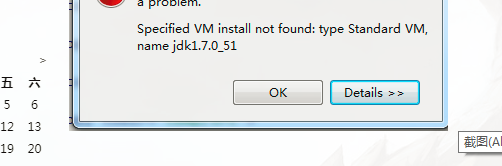
解决方法:
build.xml —— 右键 —— Run As —— External Tools Configuration
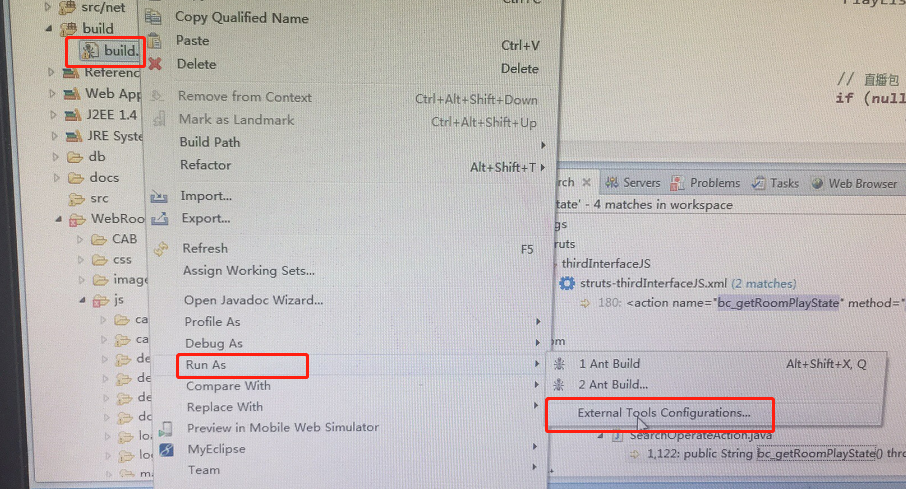
在这个页面的顶端就会看到有红叉叉的报错,报错信息就是Specified VM install not found: type Standard VM。
然后选择JRE tab页
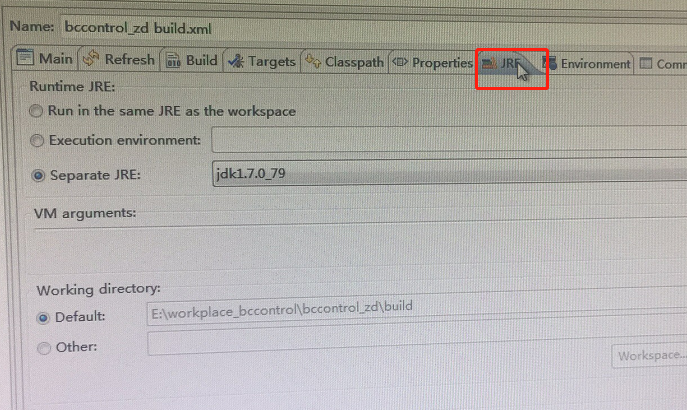
在这里可以重新指定所使用的JRE

选定使用的jdk,这样就完成了。
build.xml编译报错Specified VM install not found: type Standard VM, name jdk1.7.0_45的更多相关文章
- ant 错误 Specified VM install not found: type Standard VM, name jdk1.6.0_27
ant 错误 ant Specified VM install not found: type Standard VM, name jdk1.6.0_27 原因: 安装了新的jdk, 在workspa ...
- Specified VM install not found: type Standard VM, name jdk1.6.0_05
重装系统换了jdk,之前jdk用的1.6,现在改成1.7了.但是更新之后发现ant打包用不了了,报错 Specified VM install not found: type Standard VM, ...
- Specified VM install not found: type Standard VM, name Java
Specified VM install not found: type Standard VM, name Java 下了一个新项目,使用SpringSource中执行ant脚本时,莫名提示以下错误 ...
- Specified VM install not found: type Standard VM, name jdk1.7
网上抄袭来抄袭去,都说是将“workspace /.metadata/.plugins/org.eclipse.debug.core/.launches/”下的文件都删除掉. 的确,删除了解决问题了, ...
- Specified VM install not found: type Standard VM, name JDK1.8
真正的问题解决方法在这里:在项目中,右键点击ant文件,选择Run As -- External Tools Configuration,在这个页面的顶端就会看到有红叉叉的报错,报错信息就是Speci ...
- eclipse Specified VM install not found: type Standard VM, name
运行ant的时候出现 Specified VM install not found: type Standard VM, name.... 尝试删除这些文件: ... / .metadata / .p ...
- Specified VM install not found: type Standard VM, name jdk1.6...
运行ant的时候出现 Specified VM install not found: type Standard VM, name.... 搞了好久..汗汗 尝试删除这些文件: ... / .meta ...
- 关于出现Specified VM install not found: type Standard VM, name jdk1.5.0_04问题的解决办法
问题出现背景: 今天把原来电脑中的jdk版本由1.7换到了1.8,,重新在Eclipse中配置环境后出现了此问题 问题解决办法: 在你的项目中,选中ant文件,右键>>Run As > ...
- VC中编译报错:error C2011: 'fd_set' : 'struct' type redefinition
这是头文件包含顺序的问题,原因与解决办法见下面代码的注释. /* 包含下面这两个头文件时,必须把winsock2.h放在前面 否则编译报错,N多的重定义错误:例如 error C2011: 'fd_s ...
随机推荐
- 51nod--1174 区间中最大的数 (RMQ)
题目: 1174 区间中最大的数 基准时间限制:1 秒 空间限制:131072 KB 分值: 0 难度:基础题 收藏 关注 给出一个有N个数的序列,编号0 - N - 1.进行Q次查询,查询编号i至j ...
- Nginx配置https证书
目前的大趋势是升级HTTP为HTTPS 本章介绍怎样实装HTTPS证书 # 如果报 ssl 错误是Nginx安装时未安装ssl 请重新编译nginx 可以参考我之前的博客 申请/获取https 这里就 ...
- Centos 7 telnet 详解
telnet命令 telnet命令用于登录远程主机,对远程主机进行管理.telnet因为采用明文传送报文,安全性不好,很多Linux服务器都不开放telnet服务,而改用更安全的ssh方式了.但仍然有 ...
- Java的家庭记账本程序(L)
日期:2019.3.13 博客期:044 星期三 整理了两天,我终于也是把微信小程序平台的记账本软件完全开发出来了,并将我的微信账号与GitHub账号完成了绑定,那么我就先展示一部分作品,还有一部分代 ...
- laravel 黑名单功能实现
创建黑名单表迁移:php artisan make:model Models/BlackFeeds -m (生成模型和迁移文件) 迁移文件中创建如下字段: public function up( ...
- postgresql :: FATAL: could not write init file
出现此错误,原因是磁盘空间被用尽.需要清理磁盘空间即可.
- ubuntu的磁盘扩容
前言:以前项目的人给ubuntu虚拟机分配磁盘空间走的默认,导致后期/根和swap空间跟不上需求,需要扩容 流程如下: 1.先添加块硬盘,命令行输入fdisk -l,会发现多了个/dev/sdb(vd ...
- Jmeter性能测试之分布式(五)
Jmeter是纯Java开发的开源性能测试工具, Java程序是很吃内存的, 有时候一台负载机给服务器的压力是不够的, 需要很多台同时负载, 这个时候就需要用到分布式了. 1. 组网图大概就是这样的 ...
- eclipse查看一个方法被谁引用(调用)的快捷键四种方式
1.(首推)双击选中该方法,Ctrl+Alt+H 如果你想知道一个类的方法到底被那些其他的类调用,那么请选中这个方法名,然后按“Ctrl+Alt+H”, Eclipse就会显示出这个方法被哪些方法调用 ...
- C++线程中的几种锁
线程之间的锁有:互斥锁.条件锁.自旋锁.读写锁.递归锁.一般而言,锁的功能越强大,性能就会越低. 1.互斥锁 互斥锁用于控制多个线程对他们之间共享资源互斥访问的一个信号量.也就是说是为了避免多个线程在 ...