
Vue Baidu Map局部注册实现和地图绘点
需求:在vue项目中,实现用户选择地图绘点或者通过搜索关键字选点
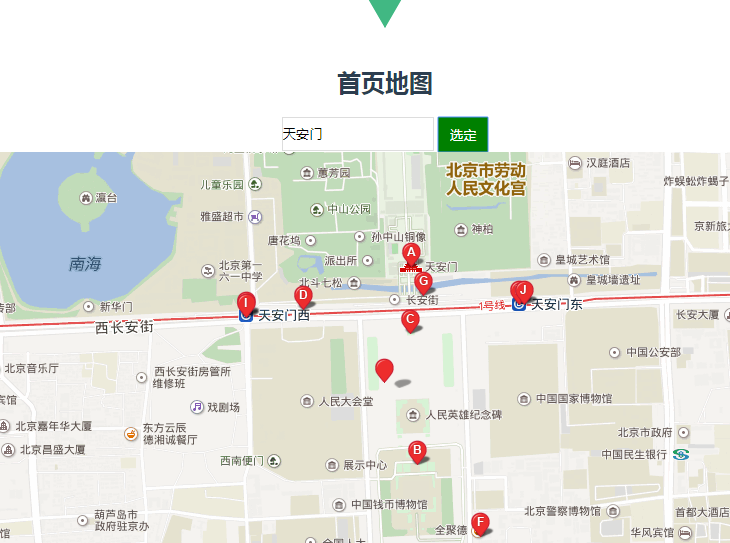
<template>

    <div id="home">

        <h2>首页地图</h2>

        <div>

          <input type="text" v-model="city" class="city">

          <input type="button" v-model="cityBtn" class="cityBtn" value="选定" @click="mapBtn">

        </div>

        <div id="allmap">

          <baidu-map v-bind:style="mapStyle" class="bm-view" ak="GPO8jLk2SoDXF5nnaOdDudHxIsMVEK6V"

          :center="center" :zoom="zoom" :scroll-wheel-zoom="true" @click="getClickInfo"

          @moving="syncCenterAndZoom"

          @moveend="syncCenterAndZoom"

          @zoomend="syncCenterAndZoom">

            <bm-view style="width: 100%; height:500px;"></bm-view>

            <bm-marker :position="{lng: center.lng, lat: center.lat}" :dragging="true"

            animation="BMAP_ANIMATION_BOUNCE"></bm-marker>  <!-- 红点 -->

            <bm-control :offset="{width: '10px', height: '10px'}">

              <bm-auto-complete v-model="keyword" :sugStyle="{zIndex: 999999}">

                <!-- <input type="text" placeholder="请输入搜索关键字" class="serachinput"> -->

              </bm-auto-complete>

            </bm-control>

            <bm-local-search :keyword="keyword" :auto-viewport="true" style="width:0px;height:0px;overflow: hidden;"></bm-local-search>

          </baidu-map>

        </div>

    </div>

</template>

<script>

import {BaiduMap, BmControl, BmView, BmAutoComplete, BmLocalSearch, BmMarker} from 'vue-baidu-map'

export default {

  components: {

    BaiduMap,

    BmControl,

    BmView,

    BmAutoComplete,

    BmLocalSearch,

    BmMarker

  },

  data() {

    return {

      city:'',

      cityBtn:'选定',

      keyword: '',//填写选择的地址

      mapStyle: {

          width: '100%',

          height: this.mapHeight + 'px'

        },

      center: {lng: 110, lat: 39.915},

      zoom: 11

    };

  },

  methods:{

    getClickInfo(e){

      // debugger

      this.center.lng = e.point.lng

      this.center.lat = e.point.lat

      console.log(e.point.lng,e.point.lat)

    },

    syncCenterAndZoom (e) {

      // debugger

        const {lng, lat} = e.target.getCenter()//地图当前的经纬度

        this.center.lng = lng

        this.center.lat = lat

        this.zoom = e.target.getZoom()//地图当前的缩放比例

    },

    mapBtn(){

      this.keyword = this.city

    }

  }

};

</script>

<style>

.bm-view {

  margin: 0 auto;

  width: 800px;

  height: 500px;

}

.city{

    width: 150px;

    height: 30px;

    border: 1px solid #dddddd;

}

.cityBtn{

  width: 50px;

  height: 35px;

  background-color:green;

  color: #ffffff;

  border:1px solid green;

  vertical-align: top;

}

</style>
Vue Baidu Map局部注册实现和地图绘点的更多相关文章
- vue2.0之Vue Baidu Map 局部注册使用
文档地址:https://dafrok.github.io/vue-baidu-map/#/zh/start/usage 局部注册 <template> <baidu-map id= ...
- vue Baidu Map --- vue百度地图插件
vue Baidu Map 官网:https://dafrok.github.io/vue-baidu-map/#/zh/start/installation javascript 官网:http:/ ...
- Vue组件全局/局部注册
全局注册 main.js中创建 Vue.component('button-counter', { data: function () { return { count: 0 } }, templat ...
- Vue Baidu Map 插件的使用
最近在做一个项目,技术采用的是Vue.js套餐,有个百度地图的需求,当时,大脑宕机,立马去引入百度地图API,当时想到两种方法,一种是在index.html中全局引入js,此法吾不喜,就采用了第二种异 ...
- 使用Vue Baidu Map对百度地图实现输入框搜索定位
前端时间需要在页面的输入框输入地址,搜索并在百度地图上获取选定结果的坐标,前端使用了Vue + Element-ui,地图方面直接使用了封装好的百度地图vue组件-vue-baidu-map ...
- Vue 全局注册逐渐 和 局部注册组件
//定义一个名为 button-counter 的新组件 Script: Vue.component('button-counter',{//button-counter 这个是组件的名字 data: ...
- vue 组件 全局注册和局部注册
全局注册,注册的组件需要在初始化根实例之前注册了组件: 局部注册,通过使用组件实例选项注册,可以使组件仅在另一个组件或者实例的作用域中可用: 全局组件 js Vue.component('tab-ti ...
- vue全局注册与局部注册的写法
vue全局注册是每个实例化的vue都可以使用,而局部则是实例化注册的那个可以用.举个例子,看看写法: <div id="app"> <p>页面载入时,inp ...
- 百度地图实现车辆轨迹移动播放(baidu map api)
开发技术:jquery,js baidu map api,json,ajax QQ1310651206
随机推荐
- play framework 笔记
@main("Hello")调用 main.scala.hmtl,页面名称 Hello conf/routes 文件定义了映射规则 参数的传递入口在 controller 的方法中 ...
- Windows编译安装使用cephfs客户端
本文介绍如何将cephfs映射到windows的一个盘上,以磁盘映射的方式访问cephfs. 1.下载必要安装包 tdm-gcc:(安装时选32位)https://sourceforge.net/pr ...
- Java基本类型内存字节数
基本类型 字节数 位(bit) 取值范围 byte 1 1*8 -128~127 short 2 2*8 int 4 4*8 long 8 8*8 float 4 4*8 double ...
- asp.net IHttpModule浅析
在asp.net程序中,我们除了使用系统自带的HttpModule模块,还可以自己定义一些自己的HttpModule接口模块.一个asp.net程序可以接收多个HttpModule模块. 众所周知,a ...
- SSM连接数据库自动生成问题
错误的结果为: 程序里面写的sql语句放在数据库里面去查询能查询到数据,但是程序里面查询时候,返回的结果为null 记录一下 我出现的原因是: 数据库的字段 account_id accoun ...
- RN开发第二天
今天上午配置了windows的Android的环境,下载node,Python,安装Android SDK和Android studio,JSK,然后配置用户变量和系统变量,然后npm install ...
- oralce执行计划
看懂Oracle执行计划 最近一直在跟Oracle打交道,从最初的一脸懵逼到现在的略有所知,也来总结一下自己最近所学,不定时更新ing… 一:什么是Oracle执行计划? 执行计划是一条查询语句在 ...
- SQL-55 分页查询employees表,每5行一页,返回第2页的数据
题目描述 分页查询employees表,每5行一页,返回第2页的数据CREATE TABLE `employees` (`emp_no` int(11) NOT NULL,`birth_date` d ...
- Python之字典方法
def clear(self): # 清除所有内容 """ D.clear() -> None. Remove all items from D. "&q ...
- bit、byte、与字符
bit bit是计算机中最小的传输单元 是计算机晶体管的一种状态(通电与断电).就是0与1,真与假. 示例: 2bit : 10; 4bit : 1111; 8bit : 1111 1111; byt ...