
Saiku数据库迁移H2迁移到Mysql(二十二)
Saiku数据库迁移H2迁移到Mysql
Saiku默认使用H2数据库来存储saiku的用户与角色信息,我们可以根据角色来做saiku的权限控制,然后将角色分配给用户 ,该用户就会有对应的约束了!
由于项目即将上线,所以需要将数据库从H2迁移到公司的mysql数据库中。
需要更改的源码文件如下:
saiku-webapp项目下的配置文件:
/saiku-webapp/src/main/webapp/WEB-INF/web.xml
/saiku-webapp/src/main/webapp/WEB-INF/applicationContext-spring-security-jdbc.properties
/saiku-webapp/src/main/webapp/WEB-INF/saiku-beans.properties
saiku-service项目下的Java类:
/saiku-service/src/main/java/org/saiku/database/Database.java
1.更改 /saiku-webapp/src/main/webapp/WEB-INF/web.xml 文件中的参数
db.url db.user db.password
记得在10.22.33.44中新建数据库 saiku 哦!
  <context-param>

        <param-name>db.url</param-name>

        <param-value>jdbc:mysql://10.22.33.44:3306/saiku</param-value>

    </context-param>

    <context-param>

        <param-name>db.user</param-name>

        <param-value>root</param-value>

    </context-param>

    <context-param>

        <param-name>db.password</param-name>

        <param-value>root</param-value>

    </context-param>
2.更改 /saiku-webapp/src/main/webapp/WEB-INF/applicationContext-spring-security-jdbc.properties 文件中的参数
jdbcauth.driver jdbcauth.url jdbcauth.username jdbcauth.password
jdbcauth.authoritiesquery=select username, role from user_roles where username =? UNION select '?', \

  'ROLE_USER'

jdbcauth.usernamequery=select u.username,u.password, u.enabled from users u inner join ( \

                   select MAX(USERS.USER_ID) ID, USERS.USERNAME from USERS group by USERS.USERNAME) tm on u.USER_ID =\

                   tm.ID where u.username = ? GROUP BY u.USER_ID

#jdbcauth.driver=org.h2.Driver

#jdbcauth.url=jdbc:h2:../../data/saiku;MODE=MySQL

#jdbcauth.username=sa

#jdbcauth.password=

jdbcauth.driver=com.mysql.jdbc.Driver

jdbcauth.url=jdbc:mysql://10.22.33.44:3306/saiku?autoReconnect=true&useUnicode=true&characterEncoding=utf8

jdbcauth.username=root

jdbcauth.password=root
3.更改 /saiku-webapp/src/main/webapp/WEB-INF/saiku-beans.properties 文件中的参数
userdao.driverclass userdao.url userdao.username userdao.password
default.role=ROLE_USER

external.properties.file=${catalina.base}/conf/Catalina/localhost/datasources.properties

webdav.password=sa!kuanalyt!cs

#userdao.driverclass=org.h2.Driver

#userdao.url=jdbc:h2:../../data/saiku;MODE=MySQL

#userdao.username=sa

#userdao.password=

userdao.driverclass=com.mysql.jdbc.Driver

userdao.url=jdbc:mysql://10.22.33.44:3306/saiku?autoReconnect=true&useUnicode=true&characterEncoding=utf8

userdao.username=root

userdao.password=root

logdir=../logs

repoconfig=../../repository/configuration.xml

repodata=../../repository/data

foodmartrepo=../../data

foodmartschema=../../data/FoodMart4.xml

foodmarturl=jdbc:h2:../../data/foodmart;MODE=MySQL

earthquakerepo=../../data

earthquakeschema=../../data/Earthquakes.xml

earthquakeurl=jdbc:h2:../../data/earthquakes;MODE=MySQL

pluginpath=../webapps/ROOT/js/saiku/plugins/

orbis.auth.enabled=false

workspaces=false

repo.type=jackrabbit

repo.host=localhost

repo.port=8070

repo.username=admin

repo.password=admin

repo.database=saiku
4.更改 /saiku-service/src/main/java/org/saiku/database/Database.java 类中的方法,因为H2与mysql的语法会有些区别
4.1 更改 initDB() 方法
先将 private JdbcDataSource ds; 修改为 private MysqlDataSource ds; //将 JdbcDataSource 改为 MysqlDataSource
//  private JdbcDataSource ds; //comment this line 20190412, for change the default database to mysql

    private MysqlDataSource ds; //add this line 20190412, for change the default database to mysql

 //for change the default database ,change h2 to mysql 2019-04-12

    private void initDB() {

    	 String url = servletContext.getInitParameter("db.url");

         String user = servletContext.getInitParameter("db.user");

         String pword = servletContext.getInitParameter("db.password");

         ds = new MysqlDataSource(); // 这里原来是  new  JdbcDataSource();

         ds.setUrl(url);

         ds.setUser(user);

         ds.setPassword(pword);

     }
4.2 更改 loadUsers() 方法
  //for change the default database ,change h2 to mysql 2019-03-06

    private void loadUsers() throws SQLException {

        Connection c = ds.getConnection();

        Statement statement = c.createStatement();

        statement.execute(" CREATE TABLE IF NOT EXISTS log ( time  TIMESTAMP NOT NULL DEFAULT CURRENT_TIMESTAMP, log  TEXT); ");

        statement.execute(" CREATE TABLE IF NOT EXISTS users(user_id INT(11) NOT NULL AUTO_INCREMENT, " + " username VARCHAR(45) NOT NULL UNIQUE, password VARCHAR(100) NOT NULL, email VARCHAR(100), " + " enabled TINYINT NOT NULL DEFAULT 1, PRIMARY KEY(user_id)); ");

        statement.execute(" CREATE TABLE IF NOT EXISTS user_roles ( " + " user_role_id INT(11) NOT NULL AUTO_INCREMENT,username VARCHAR(45), "  + " user_id INT(11) NOT NULL REFERENCES users(user_id), " + " ROLE VARCHAR(45) NOT NULL, " + " PRIMARY KEY (user_role_id)); ");

        ResultSet result = statement.executeQuery("select count(*) as c from log where log = 'insert users'");

        result.next();

        if (result.getInt("c") == 0) {

            statement.execute("INSERT INTO users (username,password,email, enabled) VALUES ('admin','admin', 'test@admin.com',TRUE);");

            statement.execute("INSERT INTO users (username,password,enabled) VALUES ('smith','smith', TRUE);");

            statement.execute("INSERT INTO user_roles (user_id, username, ROLE) VALUES (1, 'admin', 'ROLE_USER');");

            statement.execute("INSERT INTO user_roles (user_id, username, ROLE) VALUES (1, 'admin', 'ROLE_ADMIN');");

            statement.execute("INSERT INTO user_roles (user_id, username, ROLE) VALUES (2, 'smith', 'ROLE_USER');");

            statement.execute("INSERT INTO log (log) VALUES('insert users');");

        }

        String encrypt = servletContext.getInitParameter("db.encryptpassword");

        if (encrypt.equals("true") && !checkUpdatedEncyption()) {

            updateForEncyption();

        }

    }
4.3 更改 checkUpdatedEncyption() 方法
 //for change the default database ,change h2 to mysql 2019-03-06

    public boolean checkUpdatedEncyption() throws SQLException{

        Connection c = ds.getConnection();

        Statement statement = c.createStatement();

        ResultSet result = statement.executeQuery("select count(*) as c from log where log = 'update passwords'");

        result.next();

        return result.getInt("c") != 0;

    }
4.4 更改 updateForEncyption() 方法
 //for change the default database ,change h2 to mysql 2019-03-06

    public void updateForEncyption() throws SQLException {

        Connection c = ds.getConnection();

        Statement statement = c.createStatement();

        statement.execute("ALTER TABLE users MODIFY COLUMN PASSWORD VARCHAR(100) DEFAULT NULL");

        ResultSet result = statement.executeQuery("select username, password from users");

        while (result.next()) {

            statement = c.createStatement();

            String pword = result.getString("password");

            String hashedPassword = passwordEncoder.encode(pword);

            String sql = "UPDATE users " + "SET password = '" + hashedPassword

                    + "' WHERE username = '" + result.getString("username")

                    + "'";

            statement.executeUpdate(sql);

        }

        statement = c.createStatement();

        statement.execute("INSERT INTO log (log) VALUES('update passwords');");

    }
4.4 更改 init() 方法 注释掉 loadFoodmart() 方法与 loadEarthquakes()方法
    public void init() throws SQLException {

        initDB();

        loadUsers();

       // loadFoodmart();

       // loadEarthquakes();

        loadLegacyDatasources();

        importLicense();

    }
以上修改都完成后,可以重新打包编译Saiku了,启动saiku,访问saiku,再回到数据库中就会看到数据库中已经建好了三张表了
user 存储用户以及密码信息
log 存储日志信息
user_roles 存储用户与角色的关系信息
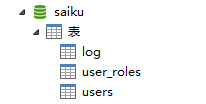
然后接着我们可以试试使用admin登录saiku ,新增用户以及删除用户信息。
不知道为什么第一次我编译成功后,登录saiku想去新增用户,但是新增用户接口没有调通,删除用户接口也报错 NullPointerException
后来我再一次重新打包编译saiku源码,再去访问就又OK了,新增与删除都没有问题!!! 新增的用户也会存到我们定义的saiku库中,删除时数据也会被删除。权限配置好后也是ok的,一切都能正常使用!
至此 saiku数据库从H2到mysql 迁移成功啦!!!
完整的 /saiku-service/src/main/java/org/saiku/database/Database.java 文件如下:
package org.saiku.database; import org.apache.commons.io.FileUtils;
import org.apache.commons.vfs.FileObject;
import org.apache.commons.vfs.FileSystemManager;
import org.apache.commons.vfs.VFS; import org.saiku.datasources.datasource.SaikuDatasource;
import org.saiku.service.datasource.IDatasourceManager;
import org.saiku.service.importer.LegacyImporter;
import org.saiku.service.importer.LegacyImporterImpl;
import org.saiku.service.license.Base64Coder;
import org.saiku.service.license.ILicenseUtils; import org.h2.jdbcx.JdbcDataSource;
import org.slf4j.Logger;
import org.slf4j.LoggerFactory;
import org.springframework.beans.factory.annotation.Autowired;
import org.springframework.security.crypto.bcrypt.BCryptPasswordEncoder; import com.mysql.jdbc.jdbc2.optional.MysqlDataSource; import java.io.ByteArrayOutputStream;
import java.io.File;
import java.io.FileInputStream;
import java.io.IOException;
import java.io.ObjectInputStream;
import java.net.URL;
import java.nio.charset.Charset;
import java.nio.charset.StandardCharsets;
import java.nio.file.Files;
import java.nio.file.Paths;
import java.sql.Connection;
import java.sql.DatabaseMetaData;
import java.sql.ResultSet;
import java.sql.SQLException;
import java.sql.Statement;
import java.util.Iterator;
import java.util.List;
import java.util.Properties; import javax.servlet.ServletContext;
import javax.sql.DataSource; /**
* Created by bugg on 01/05/14.
*/
public class Database { @Autowired
ServletContext servletContext; //add this line 20190412, for change the default database to mysql
private String datasourcetype = "mysql"; private ILicenseUtils licenseUtils; private URL repoURL; public ILicenseUtils getLicenseUtils() {
return licenseUtils;
} public void setLicenseUtils(ILicenseUtils licenseUtils) {
this.licenseUtils = licenseUtils;
} private static final int SIZE = 2048; // private JdbcDataSource ds; //comment this line 20190412, for change the default database to mysql
private MysqlDataSource ds; //add this line 20190412, for change the default database to mysql
private static final Logger log = LoggerFactory.getLogger(Database.class);
private final BCryptPasswordEncoder passwordEncoder = new BCryptPasswordEncoder();
private IDatasourceManager dsm;
public Database() { } public void setDatasourceManager(IDatasourceManager dsm) {
this.dsm = dsm;
} public ServletContext getServletContext() {
return servletContext;
} public void setServletContext(ServletContext servletContext) {
this.servletContext = servletContext;
} public void init() throws SQLException {
initDB();
loadUsers();
// loadFoodmart();
// loadEarthquakes();
loadLegacyDatasources();
importLicense();
} /** comment this code to change h2 to mysql
private void initDB() {
String url = servletContext.getInitParameter("db.url");
String user = servletContext.getInitParameter("db.user");
String pword = servletContext.getInitParameter("db.password");
ds = new JdbcDataSource();
ds.setURL(url);
ds.setUser(user);
ds.setPassword(pword);
}
*/
//for change the default database ,change h2 to mysql 2019-04-12
private void initDB() {
String url = servletContext.getInitParameter("db.url");
String user = servletContext.getInitParameter("db.user");
String pword = servletContext.getInitParameter("db.password"); ds = new MysqlDataSource();
ds.setUrl(url);
ds.setUser(user);
ds.setPassword(pword); } private void loadFoodmart() throws SQLException {
String url = servletContext.getInitParameter("foodmart.url");
String user = servletContext.getInitParameter("foodmart.user");
String pword = servletContext.getInitParameter("foodmart.password");
if(url!=null && !url.equals("${foodmart_url}")) {
JdbcDataSource ds2 = new JdbcDataSource();
ds2.setURL(dsm.getFoodmarturl());
ds2.setUser(user);
ds2.setPassword(pword); Connection c = ds2.getConnection();
DatabaseMetaData dbm = c.getMetaData();
ResultSet tables = dbm.getTables(null, null, "account", null); if (!tables.next()) {
// Table exists
Statement statement = c.createStatement(); statement.execute("RUNSCRIPT FROM '"+dsm.getFoodmartdir()+"/foodmart_h2.sql'"); statement.execute("alter table \"time_by_day\" add column \"date_string\" varchar(30);"
+ "update \"time_by_day\" "
+ "set \"date_string\" = TO_CHAR(\"the_date\", 'yyyy/mm/dd');");
String schema = null;
try {
schema = readFile(dsm.getFoodmartschema(), StandardCharsets.UTF_8);
} catch (IOException e) {
log.error("Can't read schema file",e);
}
try {
dsm.addSchema(schema, "/datasources/foodmart4.xml", null);
} catch (Exception e) {
log.error("Can't add schema file to repo", e);
}
Properties p = new Properties();
p.setProperty("driver", "mondrian.olap4j.MondrianOlap4jDriver");
p.setProperty("location", "jdbc:mondrian:Jdbc=jdbc:h2:"+dsm.getFoodmartdir()+"/foodmart;"+
"Catalog=mondrian:///datasources/foodmart4.xml;JdbcDrivers=org.h2.Driver");
p.setProperty("username", "sa");
p.setProperty("password", "");
p.setProperty("id", "4432dd20-fcae-11e3-a3ac-0800200c9a66");
SaikuDatasource ds = new SaikuDatasource("foodmart", SaikuDatasource.Type.OLAP, p); try {
dsm.addDatasource(ds);
} catch (Exception e) {
log.error("Can't add data source to repo", e);
} } else {
Statement statement = c.createStatement(); statement.executeQuery("select 1");
}
}
} private void loadEarthquakes() throws SQLException {
String url = servletContext.getInitParameter("earthquakes.url");
String user = servletContext.getInitParameter("earthquakes.user");
String pword = servletContext.getInitParameter("earthquakes.password"); if (url != null && !url.equals("${earthquake_url}")) {
JdbcDataSource ds3 = new JdbcDataSource();
ds3.setURL(dsm.getEarthquakeUrl());
ds3.setUser(user);
ds3.setPassword(pword); Connection c = ds3.getConnection();
DatabaseMetaData dbm = c.getMetaData();
ResultSet tables = dbm.getTables(null, null, "earthquakes", null);
String schema = null; if (!tables.next()) {
Statement statement = c.createStatement(); statement.execute("RUNSCRIPT FROM '" + dsm.getEarthquakeDir() + "/earthquakes.sql'");
statement.executeQuery("select 1"); try {
schema = readFile(dsm.getEarthquakeSchema(), StandardCharsets.UTF_8);
} catch (IOException e) {
log.error("Can't read schema file", e);
}
try {
dsm.addSchema(schema, "/datasources/earthquakes.xml", null);
} catch (Exception e) {
log.error("Can't add schema file to repo", e);
}
Properties p = new Properties();
p.setProperty("advanced", "true"); p.setProperty("driver", "mondrian.olap4j.MondrianOlap4jDriver");
p.setProperty("location",
"jdbc:mondrian:Jdbc=jdbc:h2:" + dsm.getEarthquakeDir() + "/earthquakes;MODE=MySQL;" +
"Catalog=mondrian:///datasources/earthquakes.xml;JdbcDrivers=org.h2.Driver");
p.setProperty("username", "sa");
p.setProperty("password", "");
p.setProperty("id", "4432dd20-fcae-11e3-a3ac-0800200c9a67");
SaikuDatasource ds = new SaikuDatasource("earthquakes", SaikuDatasource.Type.OLAP, p); try {
dsm.addDatasource(ds);
} catch (Exception e) {
log.error("Can't add data source to repo", e);
} try {
dsm.saveInternalFile("/homes/home:admin/sample_reports", null, null);
String exts[] = {"saiku"};
Iterator<File> files =
FileUtils.iterateFiles(new File("../../data/sample_reports"), exts, false); while(files.hasNext()){
File f = files.next();
dsm.saveInternalFile("/homes/home:admin/sample_reports/"+f.getName(),FileUtils.readFileToString(f
.getAbsoluteFile()), null);
files.remove();
} } catch (IOException e) {
e.printStackTrace();
} }
else {
Statement statement = c.createStatement(); statement.executeQuery("select 1");
}
}
} private static String readFile(String path, Charset encoding)
throws IOException
{
byte[] encoded = Files.readAllBytes(Paths.get(path));
return new String(encoded, encoding);
} /** comment this for change the default database ,change h2 to mysql
private void loadUsers() throws SQLException { Connection c = ds.getConnection(); Statement statement = c.createStatement();
statement.execute("CREATE TABLE IF NOT EXISTS LOG(time TIMESTAMP AS CURRENT_TIMESTAMP NOT NULL, log CLOB);"); statement.execute("CREATE TABLE IF NOT EXISTS USERS(user_id INT(11) NOT NULL AUTO_INCREMENT, " +
"username VARCHAR(45) NOT NULL UNIQUE, password VARCHAR(100) NOT NULL, email VARCHAR(100), " +
"enabled TINYINT NOT NULL DEFAULT 1, PRIMARY KEY(user_id));"); statement.execute("CREATE TABLE IF NOT EXISTS USER_ROLES (\n"
+ " user_role_id INT(11) NOT NULL AUTO_INCREMENT,username VARCHAR(45),\n"
+ " user_id INT(11) NOT NULL REFERENCES USERS(user_id),\n"
+ " ROLE VARCHAR(45) NOT NULL,\n"
+ " PRIMARY KEY (user_role_id));"); ResultSet result = statement.executeQuery("select count(*) as c from LOG where log = 'insert users'");
result.next();
if (result.getInt("c") == 0) {
dsm.createUser("admin");
dsm.createUser("smith");
statement.execute("INSERT INTO users(username,password,email, enabled)\n"
+ "VALUES ('admin','admin', 'test@admin.com',TRUE);" +
"INSERT INTO users(username,password,enabled)\n"
+ "VALUES ('smith','smith', TRUE);");
statement.execute(
"INSERT INTO user_roles (user_id, username, ROLE)\n"
+ "VALUES (1, 'admin', 'ROLE_USER');" +
"INSERT INTO user_roles (user_id, username, ROLE)\n"
+ "VALUES (1, 'admin', 'ROLE_ADMIN');" +
"INSERT INTO user_roles (user_id, username, ROLE)\n"
+ "VALUES (2, 'smith', 'ROLE_USER');"); statement.execute("INSERT INTO LOG(log) VALUES('insert users');");
} String encrypt = servletContext.getInitParameter("db.encryptpassword");
if(encrypt.equals("true") && !checkUpdatedEncyption()){
log.debug("Encrypting User Passwords");
updateForEncyption();
log.debug("Finished Encrypting Passwords");
} } private boolean checkUpdatedEncyption() throws SQLException{
Connection c = ds.getConnection(); Statement statement = c.createStatement();
ResultSet result = statement.executeQuery("select count(*) as c from LOG where log = 'update passwords'");
result.next();
return result.getInt("c") != 0;
} private void updateForEncyption() throws SQLException {
Connection c = ds.getConnection(); Statement statement = c.createStatement();
statement.execute("ALTER TABLE users ALTER COLUMN password VARCHAR(100) DEFAULT NULL"); ResultSet result = statement.executeQuery("select username, password from users"); while(result.next()){
statement = c.createStatement(); String pword = result.getString("password");
String hashedPassword = passwordEncoder.encode(pword);
String sql = "UPDATE users " +
"SET password = '"+hashedPassword+"' WHERE username = '"+result.getString("username")+"'";
statement.executeUpdate(sql);
}
statement = c.createStatement(); statement.execute("INSERT INTO LOG(log) VALUES('update passwords');"); }
*/ //for change the default database ,change h2 to mysql 2019-03-06
private void loadUsers() throws SQLException { Connection c = ds.getConnection(); Statement statement = c.createStatement(); statement.execute(" CREATE TABLE IF NOT EXISTS log ( time TIMESTAMP NOT NULL DEFAULT CURRENT_TIMESTAMP, log TEXT); ");
statement.execute(" CREATE TABLE IF NOT EXISTS users(user_id INT(11) NOT NULL AUTO_INCREMENT, " + " username VARCHAR(45) NOT NULL UNIQUE, password VARCHAR(100) NOT NULL, email VARCHAR(100), " + " enabled TINYINT NOT NULL DEFAULT 1, PRIMARY KEY(user_id)); ");
statement.execute(" CREATE TABLE IF NOT EXISTS user_roles ( " + " user_role_id INT(11) NOT NULL AUTO_INCREMENT,username VARCHAR(45), " + " user_id INT(11) NOT NULL REFERENCES users(user_id), " + " ROLE VARCHAR(45) NOT NULL, " + " PRIMARY KEY (user_role_id)); "); ResultSet result = statement.executeQuery("select count(*) as c from log where log = 'insert users'"); result.next(); if (result.getInt("c") == 0) { statement.execute("INSERT INTO users (username,password,email, enabled) VALUES ('admin','admin', 'test@admin.com',TRUE);");
statement.execute("INSERT INTO users (username,password,enabled) VALUES ('smith','smith', TRUE);");
statement.execute("INSERT INTO user_roles (user_id, username, ROLE) VALUES (1, 'admin', 'ROLE_USER');");
statement.execute("INSERT INTO user_roles (user_id, username, ROLE) VALUES (1, 'admin', 'ROLE_ADMIN');");
statement.execute("INSERT INTO user_roles (user_id, username, ROLE) VALUES (2, 'smith', 'ROLE_USER');");
statement.execute("INSERT INTO log (log) VALUES('insert users');");
} String encrypt = servletContext.getInitParameter("db.encryptpassword");
if (encrypt.equals("true") && !checkUpdatedEncyption()) {
updateForEncyption();
}
} //for change the default database ,change h2 to mysql 2019-03-06
public boolean checkUpdatedEncyption() throws SQLException{
Connection c = ds.getConnection();
Statement statement = c.createStatement();
ResultSet result = statement.executeQuery("select count(*) as c from log where log = 'update passwords'");
result.next();
return result.getInt("c") != 0;
} //for change the default database ,change h2 to mysql 2019-03-06
public void updateForEncyption() throws SQLException { Connection c = ds.getConnection();
Statement statement = c.createStatement();
statement.execute("ALTER TABLE users MODIFY COLUMN PASSWORD VARCHAR(100) DEFAULT NULL");
ResultSet result = statement.executeQuery("select username, password from users");
while (result.next()) {
statement = c.createStatement();
String pword = result.getString("password");
String hashedPassword = passwordEncoder.encode(pword);
String sql = "UPDATE users " + "SET password = '" + hashedPassword
+ "' WHERE username = '" + result.getString("username")
+ "'";
statement.executeUpdate(sql);
}
statement = c.createStatement();
statement.execute("INSERT INTO log (log) VALUES('update passwords');");
} private void loadLegacyDatasources() throws SQLException {
Connection c = ds.getConnection(); Statement statement = c.createStatement();
ResultSet result = statement.executeQuery("select count(*) as c from LOG where log = 'insert datasources'"); result.next();
if (result.getInt("c") == 0) {
LegacyImporter l = new LegacyImporterImpl(dsm);
l.importSchema();
l.importDatasources();
statement.execute("INSERT INTO LOG(log) VALUES('insert datasources');"); }
} public List<String> getUsers() throws java.sql.SQLException
{
//Stub for EE.
return null;
} public void addUsers(List<String> l) throws java.sql.SQLException
{
//Stub for EE.
} private void setPath(String path) {
FileSystemManager fileSystemManager;
try {
fileSystemManager = VFS.getManager();
FileObject fileObject;
fileObject = fileSystemManager.resolveFile(path);
if (fileObject == null) {
throw new IOException("File cannot be resolved: " + path);
}
if (!fileObject.exists()) {
throw new IOException("File does not exist: " + path);
}
repoURL = fileObject.getURL();
if (repoURL == null) {
throw new Exception(
"Cannot load connection repository from path: " + path);
} else {
//load();
}
} catch (Exception e) {
//LOG_EELOADER.error("Exception", e);
}
}
public void importLicense() {
setPath("res:saiku-license");
try {
if (repoURL != null) {
File[] files = new File(repoURL.getFile()).listFiles();
if (files != null) {
for (File file : files) {
if (!file.isHidden() && file.getName().equals("license.lic")) { ObjectInputStream si = null;
byte[] sig;
byte[] data = null;
try {
si = new ObjectInputStream(new FileInputStream(file));
} catch (IOException e) {
e.printStackTrace();
} try {
int sigLength = si.readInt();
sig = new byte[sigLength];
si.read(sig); ByteArrayOutputStream dataStream = new ByteArrayOutputStream();
byte[] buf = new byte[SIZE];
int len;
while ((len = si.read(buf)) != -1) {
dataStream.write(buf, 0, len);
}
dataStream.flush();
data = dataStream.toByteArray();
dataStream.close();
} catch (IOException e) {
e.printStackTrace();
} finally {
try {
si.close();
} catch (IOException e) {
e.printStackTrace();
}
} licenseUtils.setLicense(new String(Base64Coder.encode(data))); }
}
}
}
} catch (Exception e1) {
e1.printStackTrace();
}
}
}
Saiku数据库迁移H2迁移到Mysql(二十二)的更多相关文章
- 智课雅思词汇---二十二、-al即是名词性后缀又是形容词后缀
智课雅思词汇---二十二.-al即是名词性后缀又是形容词后缀 一.总结 一句话总结: 后缀:-al ②[名词后缀] 1.构成抽象名词,表示行为.状况.事情 refusal 拒绝 proposal 提议 ...
- FreeSql (二十二)Dto 映射查询
适合喜欢使用 dto 的朋友,很多时候 entity 与 dto 属性名相同,属性数据又不完全一致. 有的人先查回所有字段数据,再使用 AutoMapper 映射. 我们的功能是先映射,再只查询映射好 ...
- SQL注入之Sqli-labs系列第二十一关(基于复杂性的cookie POST报错注入)和二十二关(基于双引号的cookie POST报错注入)
开始挑战第二十一关(Cookie Injection- Error Based- complex - string) 和二十二关(Cookie Injection- Error Based- Doub ...
- [分享] IT天空的二十二条军规
Una 发表于 2014-9-19 20:25:06 https://www.itsk.com/thread-335975-1-1.html IT天空的二十二条军规 第一条.你不是什么都会,也不是什么 ...
- Bootstrap <基础二十二>超大屏幕(Jumbotron)
Bootstrap 支持的另一个特性,超大屏幕(Jumbotron).顾名思义该组件可以增加标题的大小,并为登陆页面内容添加更多的外边距(margin).使用超大屏幕(Jumbotron)的步骤如下: ...
- Web 前端开发精华文章推荐(HTML5、CSS3、jQuery)【系列二十二】
<Web 前端开发精华文章推荐>2014年第一期(总第二十二期)和大家见面了.梦想天空博客关注 前端开发 技术,分享各类能够提升网站用户体验的优秀 jQuery 插件,展示前沿的 HTML ...
- 二十二、OGNL的一些其他操作
二十二.OGNL的一些其他操作 投影 ?判断满足条件 动作类代码: ^ $ public class Demo2Action extends ActionSupport { public ...
- WCF技术剖析之二十二: 深入剖析WCF底层异常处理框架实现原理[中篇]
原文:WCF技术剖析之二十二: 深入剖析WCF底层异常处理框架实现原理[中篇] 在[上篇]中,我们分别站在消息交换和编程的角度介绍了SOAP Fault和FaultException异常.在服务执行过 ...
- VMware vSphere 服务器虚拟化之二十二桌面虚拟化之创建View Composer链接克隆的虚拟桌面池
VMware vSphere 服务器虚拟化之二十二桌面虚拟化之创建View Composer链接克隆的虚拟桌面池 在上一节我们创建了完整克隆的自动专有桌面池,在创建过程比较缓慢,这次我们将学习创建Vi ...
随机推荐
- 组装一台PRUSA I3打印机
闲来无事,又搞了台机.这样下去顶不住了.草. 还是咸鱼购买,但是这台收到的时候比我以前任何一台都要散,几乎重新装了一台. 此处省略收到货时候的零件图,省略装机图. 不得不提的是,原机用的山寨melzi ...
- day19
""" time 用于处理时间相关 1.获取时间 2.不同格式的时间转换 3.sleep函数"""import time# 浮点型的时间戳 ...
- 单元测试系列之九:Sonar 常用代码规则整理(一)
更多原创测试技术文章同步更新到微信公众号 :三国测,敬请扫码关注个人的微信号,感谢! 摘要:公司部署了一套sonar,经过一段时间运行,发现有一些问题出现频率很高,因此有必要将这些问题进行整理总结和分 ...
- MySQL explain执行计划优化
https://www.linuxidc.com/Linux/2016-04/129965.htm
- c# linq lambda 去重,排序,取最高纪录。
----------------------------------------------------.对基础类型排序 方法一: 调用sort方法,如果需要降序,进行反转: List<int& ...
- IDLE清屏扩展
新建ClearWindows.py,复制以下代码: class ClearWindow: menudefs = [ ('options', [None, ('Clear Shell Window', ...
- zookeeper图形化的客户端工具
追加一个zookeeper图形化的客户端工具: 1.zookeeper图像化客户端工具的下载地址:https://issues.apache.org/jira/secure/attachment/12 ...
- 常见adb指令
1. adb –-help 查看帮助文档 2. adb start-server 当adb没有启动或被手动杀掉时,可以使用该命令启动服务 3. adb kill-server 杀死adb服务 4. a ...
- Venom- Eminem
I got a song filled with shit for the strong willed. 我写了一首充满戾气的歌献给意志坚强的人. When the world give you a ...
- zoj3223
其实这题不超时完全是因为串长度太小,如果串够长,一次匹配后都要往上跳,复杂度是n^2的. #include <iostream> #include <cstdio> #incl ...