
[转]Understanding OpenStack Authentication: Keystone PKI
The latest stable release of OpenStack, codenamed Grizzly, revolutionizes the way user authentication works. You may have read some of the few articles available on this new authentication scheme. This post attempts to capture the full scope of this new feature. It focuses not on how Keystone issues tokens but rather the later stage, where existing tokens are used by clients to sign their API calls. These requests are later validated by OpenStack API endpoints. You’ll see first why you need tokens and then how PKI tokens can be used by OpenStack API endpoints to conduct user token verification without explicit calls to Keystone. We begin by explaining how clients connect to OpenStack.
OpenStack, APIs, and clients
So where does OpenStack begin and end? The users will say that it’s their cloud GUI or CLI. From the architectural perspective, however, OpenStack middleware ends on its API endpoints: nova-api, glance-api, and so on—they all expose their APIs over http. You can connect to these APIs using different clients. Clients can be either certified by a cloud vendor and deployed on its infrastructure (for example, a Horizon instance) or installed anywhere else (a python-novaclient installed on any laptop, pointing to a remote nova-api).
This boundary implies one important condition. Since the clients can reside anywhere, they cannot be trusted. Any request coming from them to any OpenStack API endpoint needs to be authenticated before it can be processed further.
Tokens—what they are and why you need them
So what do you have to do in this case? Does that mean you should supply each single API request with a username and password? Not so easy. Or maybe store them in some environment variables? Insecure. The answer to this is tokens. Tokens have one significant plus: they are temporary and short lived, which means it is safer to cache them on clients than username/password pairs.
In general, a token is a piece of data given to a user by Keystone upon providing a valid username/password combination. As said above, what is closely related to a token is its expiration date (which typically is hours or even minutes). The user client can cache the token and inject it into an OpenStack API request. The OpenStack API endpoints take the token out of user requests and validate it against the Keystone authentication backend, thereby confirming the legitimacy of the call.
We’ll now turn your attention to two token approaches—Universally Unique IDentifier (UUID) and Public Key Infrastructure (PKI) tokens—and their evolution, so to speak.
UUID tokens (Folsom and older)
The diagram below shows how tokens were originally generated by Keystone and then used by the client to “sign” every subsequent API request.
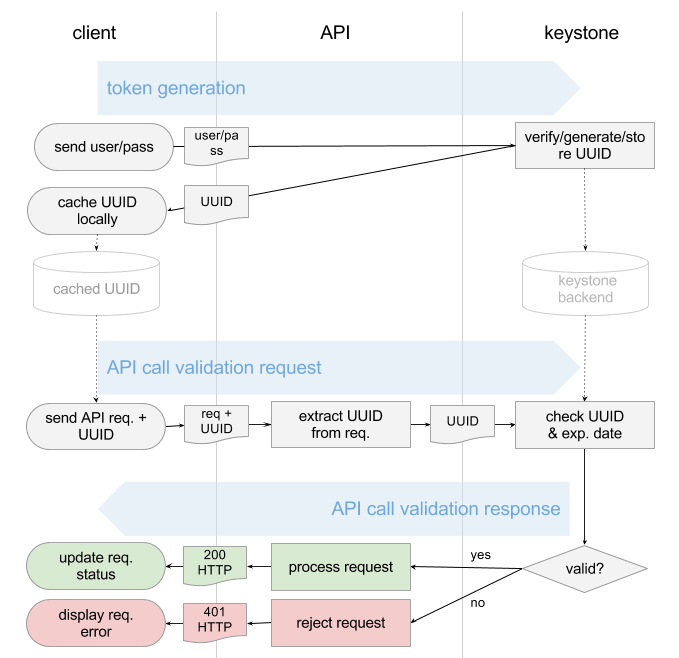
Based on supplied username/password pair (we assume it’s correct in this scenario and on the diagram):
- Keystone would:
- Generate a UUID token.
- Store the UUID token in its backend.
- Send a copy of the UUID token back to the client.
- The client would cache the token.
- The UUID would be then passed along with each API call by the client.
- Upon each user request, the API endpoint would send this UUID back to Keystone for validation.
- Keystone would take the UUID and match it against its auth backend (check UUID string, expiration date).
- Keystone would return “success” or “failure” message to the API endpoint.
As you can see from the above diagram, for each user call the API endpoints need to conduct online verification with the Keystone service. Imagine thousands of clients performing VM listings, network creation, and so on. This activity results in extensive traffic to the Keystone service. In fact, in production, Keystone proves to be one of the most loaded OpenStack services on the network side, but Grizzly gets rid of this problem quite nicely.
Enter PKI tokens.
PKI tokens (Grizzly and on)
The diagram below shows how token validation is performed with the new method introduced in OpenStack’s Grizzly release.
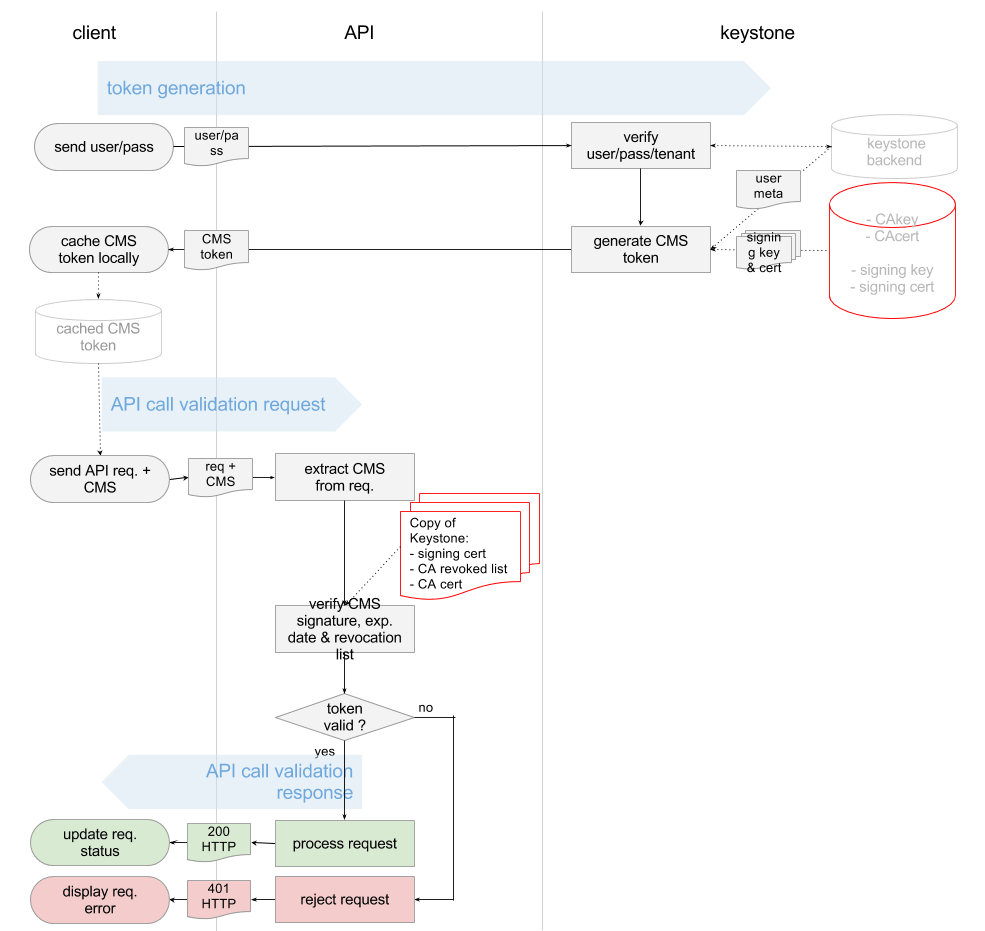
In general terms, with PKI tokens, Keystone is becoming a Certificate Authority (CA). It uses its signing key and certificate to sign (not encrypt) the user token.
On top of that, each API endpoint holds a copy of Keystone’s:
- Signing certificate
- Revocation list
- CA certificate
The API endpoints use these bits to validate the user requests. There is no need for direct request to Keystone with each validation. What is verified instead is the signature Keystone puts on the user token and Keystone’s revocation list. API endpoints use the above data to carry out this process offline.
PKI tokens under the hood
To use PKI tokens in Grizzly, we need to generate all the keys and certs. We can do that using the following command:
keystone-manage pki_setup
This command generates the following files:
- CA private key
openssl genrsa -out /etc/keystone/ssl/certs/cakey.pem 1024 -config /etc/keystone/ssl/certs/openssl.conf
- CA certificate
openssl req -new -x509 -extensions v3_ca -passin pass:None -key /etc/keystone/ssl/certs/cakey.pem -out /etc/keystone/ssl/certs/ca.pem -days 3650 -config /etc/keystone/ssl/certs/openssl.conf -subj /C=US/ST=Unset/L=Unset/O=Unset/CN=www.example.com
- Signing private key
openssl genrsa -out /etc/keystone/ssl/private/signing_key.pem 1024 -config /etc/keystone/ssl/certs/openssl.conf
- Signing certificate
openssl req -key /etc/keystone/ssl/private/signing_key.pem -new -nodes -out /etc/keystone/ssl/certs/req.pem -config /etc/keystone/ssl/certs/openssl.conf -subj /C=US/ST=Unset/L=Unset/O=Unset/CN=www.example.com

openssl ca -batch -out /etc/keystone/ssl/certs/signing_cert.pem -config /etc/keystone/ssl/certs/openssl.conf -infiles /etc/keystone/ssl/certs/req.pem
Token generation and format
With PKI, Keystone now uses Cryptographic Message Syntax (CMS). Keystone produces CMS token out of the following data:
- Service catalog
- User roles
- Metadata
An example of the input data follows:
{

   "access": {

       "metadata": {

           ....metadata goes here....

       },

       "serviceCatalog": [

           ....endpoints goes here....

       ],

       "token": {

           "expires": "2013-05-26T08:52:53Z",

           "id": "placeholder",

           "issued_at": "2013-05-25T18:59:33.841811",

           "tenant": {

               "description": null,

               "enabled": true,

               "id": "925c23eafe1b4763933e08a4c4143f08",

               "name": "user"

           }

       },

       "user": {

           ....userdata goes here....

       }

   }

}
The CMS token is just the above metadata in CMS format, signed with Keystone’s signing key. It typically takes the form of a lengthy, seemingly random string:
MIIDsAYJKoZIhvcNAQcCoIIDoTCCA50CAQExCTAHBgUrDgMCGjCCAokGCSqGSIb3DQEHAaCCAnoEggJ2ew0KICAgICJhY2Nlc3MiOiB7DQogICAgICAgICJtZXRhZGF0YSI6IHsNCiAgICAgICAgICAgIC4uLi5tZXRhZGF0YSBnb2VzIGhlcmUuLi4uDQogICAgICAgIH0sDQogICAgICAgICJzZXJ2aWNlQ2F0YWxvZyI6IFsNCiAgICAgICAgICAgIC4uLi5lbmRwb2ludHMgZ29lcyBoZXJlLi4uLg0KICAgICAgICBdLA0KICAgICAgICAidG9rZW4iOiB7DQogICAgICAgICAgICAiZXhwaXJlcyI6ICIyMDEzLTA1LTI2VDA4OjUyOjUzWiIsDQogICAgICAgICAgICAiaWQiOiAicGxhY2Vob2xkZXIiLA0KICAgICAgICAgICAgImlzc3VlZF9hdCI6ICIyMDEzLTA1LTI1VDE4OjU5OjMzLjg0MTgxMSIsDQogICAgICAgICAgICAidGVuYW50Ijogew0KICAgICAgICAgICAgICAgICJkZXNjcmlwdGlvbiI6IG51bGwsDQogICAgICAgICAgICAgICAgImVuYWJsZWQiOiB0cnVlLA0KICAgICAgICAgICAgICAgICJpZCI6ICI5MjVjMjNlYWZlMWI0NzYzOTMzZTA4YTRjNDE0M2YwOCIsDQogICAgICAgICAgICAgICAgIm5hbWUiOiAidXNlciINCiAgICAgICAgICAgIH0NCiAgICAgICAgfSwNCiAgICAgICAgInVzZXIiOiB7DQogICAgICAgICAgICAuLi4udXNlcmRhdGEgZ29lcyBoZXJlLi4uLg0KICAgICAgICB9DQogICAgfQ0KfQ0KMYH/MIH8AgEBMFwwVzELMAkGA1UEBhMCVVMxDjAMBgNVBAgTBVVuc2V0MQ4wDAYDVQQHEwVVbnNldDEOMAwGA1UEChMFVW5zZXQxGDAWBgNVBAMTD3d3dy5leGFtcGxlLmNvbQIBATAHBgUrDgMCGjANBgkqhkiG9w0BAQEFAASBgEh2P5cHMwelQyzB4dZ0FAjtp5ep4Id1RRs7oiD1lYrkahJwfuakBK7OGTwx26C+0IPPAGLEnin9Bx5Vm4cst/0+COTEh6qZfJFCLUDj5b4EF7r0iosFscpnfCuc8jGMobyfApz/dZqJnsk4lt1ahlNTpXQeVFxNK/ydKL+tzEjg
The command used for this is:
openssl cms -sign -signer /etc/keystone/ssl/certs/signing_cert.pem -inkey /etc/keystone/ssl/private/signing_key.pem -outform PEM -nosmimecap -nodetach -nocerts -noattr
Token verification and expiration
As the diagram shows, PKI tokens enable Openstack API endpoints to conduct offline verification of token validity by checking Keystone’s signature.
Three things should be validated:
- Token signature
- Token expiration date
- Whether the token has been deleted (revoked)
Checking token signature
In order to do check the signature, all of the API endpoints need Keystone certs. These files can be obtained directly from the Keystone Service:
curl http://[KEYSTONE IP]:35357/v2.0/certificates/signing

curl http://[KEYSTONE IP]:35357/v2.0/certificates/ca
If the API service cannot find these files on its local disk, it will automatically download them from Keystone. The following command is used to verify the signature on the token:
openssl cms -verify -certfile /tmp/keystone-signing-nova/signing_cert.pem -CAfile /tmp/keystone-signing-nova/cacert.pem -inform PEM -nosmimecap -nodetach -nocerts -noattr < cms_token
If the signature is valid, the above command returns the metadata contained in CMS, which is further consumed by the API endpoint.
Checking token expiration date
One of the extracted metadata fields is token’s expiration date, which is compared against current time.
Handling deleted tokens
The deletion of tokens is enforced by putting a given token onto a revocation list within the Keystone CA. By default, this list is being updated (pulled from Keystone) by API endpoints every second from the following URL:
curl http://[KEYSTONE IP]:35357/v2.0/tokens/revoked
The form of the list is a plain json file:
{

   "revoked": [

       {

           "expires": "2013-05-27T08:31:37Z",

           "id": "aef56cc3d1c9192b0257fba1a420fc37"

       }

    …

   ]

}
While “expires” field does not need further explanation, the “id” field looks somewhat cryptic. It is the md5 hash calculated out of the CMS user token: md5(cms_token). API endpoints also calculate md5 hashes out of CMS token received with user requests and search the matching md5-s on the “revoked” list. If no match is found, then the token is considered to be valid.
Summary
OpenStack API endpoints can use PKI tokens to conduct user token verification without explicit calls to Keystone. This can positively impact Keystone performance in the case of large installations where the number of user calls to OpenStack APIs can be overwhelming. One caveat, however: PKI does not guarantee privacy of the tokens. It is only used for signing, and not encryption. If you want to prevent tokens from being hijacked, you should secure all of the API endpoints using the HTTPS protocol.
[转]Understanding OpenStack Authentication: Keystone PKI的更多相关文章
- Understanding OpenStack Authentication: Keystone PKI
The latest stable release of OpenStack, codenamed Grizzly, revolutionizes the way user authenticatio ...
- 在安装Openstack的keystone认证服务时,出现The request you have made requires authentication. (HTTP 401) (Request-ID: req-f94bebba-f0c5-4a92-85问题的处理
创建openstack的keystone认证服务器报错: The request you have made requires authentication. (HTTP 401) (Reques ...
- OpenStack之Keystone模块
一.Keystone介绍 OpenStack Identity(Keystone)服务为运行OpenStack Compute上的OpenStack云提供了认证和管理用户.帐号和角色信息服务,并为Op ...
- openstack核心组件——keystone身份认证服务(5)
云计算openstack核心组件——keystone身份认证服务(5) 部署公共环境 ntp openstack mariadb-server rabbitmq-server memcache 1.w ...
- OpenStack:安装Keystone
>安装Keystone1. 安装# apt-get install keystone2. 创建dbcreate database keystone;grant all privileges on ...
- Openstack中keystone与外部LDAP Server的集成
openstack中keystone鉴权的用户user和password信息,通常保存在mysql数据库的keystone库: 表local_user和表password: keystone也支持外部 ...
- 003-官网安装openstack之-keystone身份认证服务
以下操作均在控制节点进行 1.控制节点安装keystone服务 概念理解: Keystone是OpenStack框架中,负责身份验证.服务规则和服务令牌的功能, 它实现了OpenStack的Ident ...
- OpenStack 安装 Keystone
OpenStack 安装 Keystone 本篇主要记录一下 如何安装 openstack的 第一个组件 keystone 认证授权组件 openstack 版本 我选的是queens 版本 1.Op ...
- 理解OpenStack认证:Keystone PKI
原文链接: https://www.mirantis.com/blog/understanding-openstack-authentication-keystone-pki/ The latest ...
随机推荐
- 二, 字符串和编码之 python 格式化
1),在Python中,采用的格式化方式和C语言是一致的,用%实现,看下例: >>> 'Hello, %s' % 'world' 'Hello, world' >>> ...
- ueditor内容带格式回显(html字符串回显)
简单描述:项目里有个地方用到啦ueditor,用来输入XX描述就用电影film代替,保存后,获取到ueditor里的内容(html字符串),保存到数据库. 吐槽:回显的时候,无论怎么处置,就是死活不好 ...
- Revit二次开发 推荐
学习revit二次开发,建议还是先把revit熟悉一下,去建立一下模型,亲自感受一下是如何创建模型的流程,其中会遇到什么问题.这样在自己做二次开发的时候,一些问题自己就能提前想到,规避掉.我大概用了半 ...
- https请求之绕过证书安全校验工具类(原)
package com.isoftstone.core.util; import java.io.BufferedReader; import java.io.ByteArrayOutputStrea ...
- 错误: Cause: java.lang.IllegalArgumentException: Mapped Statements collection does not contain value for studentDao.insert
详细错误信息: org.apache.ibatis.exceptions.PersistenceException: ### Error updating database. Cause: java. ...
- h5调起微信支付
后台需要进行生成签名获取参数. 前台代码: function onBridgeReady(appId,timeStamp,nonceStr,package1,paySign,signType,open ...
- [原创]大数据:布隆过滤器C#版简单实现。
public class BloomFilter { public BitArray _BloomArray; public Int64 BloomArryLength { get; } public ...
- 洛谷评测机BUG(应该是)
此问题由洛谷p1746引出(之前出过类似问题没在意) 传送门 以下是两个差不多的程序,(只有main函数中的输入不同,第一个程序迷之WA,第二个程序AC) #include <bits/stdc ...
- 微服务框架——SpringCloud(四)
1.Spring Cloud Config 分布式配置 a.Config服务器 ①新建springboot项目,依赖选择Config Server ②pom文件关键依赖 <parent> ...
- 关于Selenium3+python3.6自动化测试中iframe切换
本篇内容主要表述以下几个问题: 1.iframe 这个是什么? 2.定位iframe 标签时遇到的几个报错总结. 3.显示等待与隐示等待的原理与优缺点. 4.无name,ID可变情况下的处理方式 5. ...