
Swagger和Postman的配置和使用
Swagger
1. 配置
- pom文件添加swagger依赖,注意版本,2.8.0可以使用
    <dependency>

      <groupId>io.springfox</groupId>

      <artifactId>springfox-swagger2</artifactId>

      <version>2.8.0</version>

    </dependency>

    <dependency>

      <groupId>io.springfox</groupId>

      <artifactId>springfox-swagger-ui</artifactId>

      <version>2.8.0</version>

    </dependency>
- 新建一个配置类,添加以下内容和注解(注意修改相关的内容,比如包)
@Configuration

@EnableSwagger2

public class Swagger2Setting {

    @Bean

    public Docket createRestAPI(){

        return new Docket(DocumentationType.SWAGGER_2)

                //.apiInfo(apiInfo())

                .select()

                .apis(RequestHandlerSelectors.basePackage("com.crab.classfight.controller"))

                .paths(PathSelectors.any())

                .build();

    }

    private ApiInfo apiInfo(){

        return new ApiInfoBuilder()

                .title("classfight项目")

                .description("这里是classfight项目的API列表说明")

                .contact("crab")

                .version("1.0")

                .build();

    }

}
- 开发restful风格的接口,例如:
    @DeleteMapping(value = "/deleteUser/{username}")

    @ApiOperation("删除一个用户")

    public void deleteUser(@PathVariable("username") String username){

        userService.deleteUserByName(username);

    }
- 编写注释文档,例如:
- 在rest接口上使用@Api注解:
    @RestController

    @Api("用户相关的API")

    public class UserController {

    }
- 在方法上使用@ApiOperation注解:

    ` @ApiOperation(value = "添加一个用户")`

- 方法参数注解

@ApiParam或者

    ```

@ApiImplicitParams({

        @ApiImplicitParam(name = "userName", required = true, value = "输入用户名关键字", dataType = "String"),

        @ApiImplicitParam(name = "courseId", required = true, value = "当前报名的课程id", dataType = "String")

})
- 在实体类上使用@ApiModelProperty注解,可选参数(name, value, required, hidden, default value)
还有相关其他的注解,这里不举例了
- 运行项目,进入网址http://localhost:8080/swagger-ui.html查看接口信息文档,测试接口。
### Postman
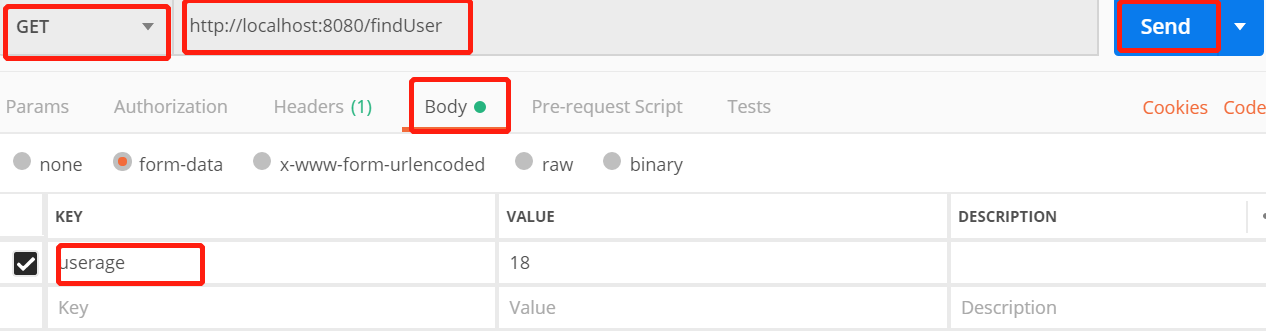
- 去Postman官网下载并安装,运行项目,在Postman中按照请求方式输入网址和请求参数,测试。
- 可以选择相应的请求方式,然后在body中添加相应的参数,点击send查看返回结果。
Swagger和Postman的配置和使用的更多相关文章
- 浅入深出Vue:工具准备之PostMan安装配置及Mock服务配置
浅入深出Vue之工具准备(二):PostMan安装配置 由于家中有事,文章没顾得上.在此说声抱歉,这是工具准备的最后一章. 接下来就是开始环境搭建了~尽情期待 工欲善其事必先利其器,让我们先做好准备工 ...
- swagger的说明、配置及使用
一.What is swagger? 官方介绍:Swagger是一个规范且完整的框架,提供描述.生产.消费和可视化RESTful Web Service.专业角度:Swagger是由庞大工具集合支撑的 ...
- Swagger整合Jwt授权配置
Swagger整合Jwt授权配置 欢迎关注博主公众号「Java大师」, 专注于分享Java领域干货文章http://www.javaman.cn/sb2/swagger-jwt 一.Swagger入门 ...
- swagger的作用和配置使用
纯API项目中 引入swagger可以生成可视化的API接口页面 引入包 nuget包: Swashbuckle.AspNetCore(最新稳定版) 配置 1.配置Startup类Config ...
- Docker镜像仓库Harbor之Swagger REST API整合配置
转载自:https://cloud.tencent.com/developer/article/1010618 1.Swagger 介绍 Swagger 是一个规范和完整的框架,用于生成.描述.调用和 ...
- .net core 配置Swagger 摆脱PostMan,你值得拥有这样的api调试方式
废话不多说直接来看 第一步: 安装nuget包:Swashbuckle.AspNetCore.Swagger Swashbuckle.AspNetCore.SwaggerGen Swashbuckle ...
- Swagger 2.0 集成配置
传统的API文档编写存在以下几个痛点: 对API文档进行更新的时候,需要通知前端开发人员,导致文档更新交流不及时: API接口返回信息不明确 大公司中肯定会有专门文档服务器对接口文档进行更新. 缺乏在 ...
- Swagger与postman使用心得
Swagger接口文档,在线自动生成模板和页面.服务器地址加上swagger-ui.html后缀即可访问到(https://域名:端口号/swagger-ui.html). 使用时在java代码中引用 ...
- SpringBoot集成Swagger,Postman,newman,jenkins自动化测试.
环境:Spring Boot,Swagger,gradle,Postman,newman,jenkins SpringBoot环境搭建. Swagger简介 Swagger 是一款RESTFUL接口的 ...
随机推荐
- html转markdown网站
戳下面的链接,可以直接复制富文本粘贴编程markdown: https://euangoddard.github.io/clipboard2markdown/
- git 环境搭建
1. 生成ssh-key 并上传到 git服务器上 #cd $HOME #ssh-keygen -t rsa -C "youremail@example.com" -t 是类型,- ...
- LAYUI select 下拉框得高度
页面下得select 框 在css页面加样式 .layui-form-select dl { max-height: 152px;}
- SQLServer 大小写敏感配置
设置表内大小写敏感 ALTER TABLE 表名 ) COLLATE Chinese_PRC_CI_AS --不区分大小写 ALTER TABLE tb ) COLLATE Chinese_PRC_C ...
- tar打包
进入到目录里,执行下面的命令,可以把目录内的所有内容打包 tar -cvf 111.tar *
- NodeMan架构
在上一篇文章中我们介绍了NodeMan的基本概念,介绍了这是一套利用NodeJs框架来管理Ubuntu服务器的解决方案,接下来我们会继续介绍关于这样一套解决方案更多细节的内容. 后台: 使用node作 ...
- Java面试宝典(2018版)
置顶 2018年11月10日 23:49:18 我要取一个响亮的昵称 阅读数:8893 版权声明:本文为博主原创文章,未经博主允许不得转载. https://blog.csdn.net/chen ...
- 小程序使用npm
1.cmd进入小程序的目录,cd C:\Users\lenovo\WeChatProjects\SITfu 2.npm install 3.npm init 4.npm install minipro ...
- CentOS 7 安装配置KVM 通过KVM安装CentOS系统
搭建环境 : CentOS 7 [root@KVM ~]# systemctl stop firewalld [root@KVM ~]# systemctl disable firewalld [ro ...
- SQL注入检测方法
private bool CheckParams(params object[] args){ string[] Lawlesses={"=","'"}; if ...