
OpenStack Networking – FlatManager and FlatDHCPManager
最好的分析FlatDHCPManager的源文,有机会把这篇翻译了
===========================
Over time, networking in OpenStack has been evolving from a simple, barely usable model, to one that aims to support full customer isolation. To address different user needs, OpenStack comes with a handful of “network managers”. A network manager defines the network topology for a given OpenStack deployment. As of the current stable “Essex” release of OpenStack, one can choose from three different types of network managers: FlatManager, FlatDHCPManager, VlanManager. I’ll discuss the first two of them here.
FlatManager and FlatDHCPManager have lots in common. They both rely on the concept of bridged networking, with a single bridge device. Let’s consider her the example of a multi-host network; we’ll look at a single-host use case in a subsequent post.
For each compute node, there is a single virtual bridge created, the name of which is specified in the Nova configuration file using this option:
flat_network_bridge=br100
All the VMs spawned by OpenStack get attached to this dedicated bridge.
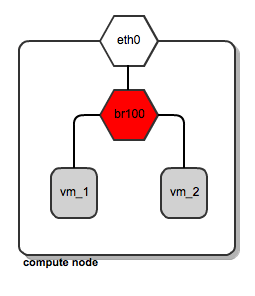
Network bridging on OpenStack compute node
This approach (single bridge per compute node) suffers from a common known limitation of bridged networking: a linux bridge can be attached only to a signle physical interface on the host machine (we could get away with VLAN interfaces here, but this is not supported by FlatDHCPManager and FlatManager). Because of this, there is no L2 isolation between hosts. They all share the same ARP broadcast domain.
The idea behind FlatManager and FlatDHCPManager is to have one “flat” IP address pool defined throughout the cluster. This address space is shared among all user instances, regardless of which tenant they belong to. Each tenant is free to grab whatever address is available in the pool.
FlatManager
FlatManager provides the most primitive set of operations. Its role boils down just to attaching the instance to the bridge on the compute node. By default, it does no IP configuration of the instance. This task is left for the systems administrator and can be done using some external DHCP server or other means.
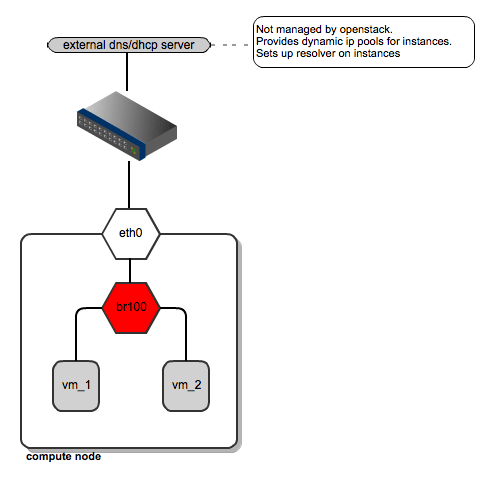
FlatManager network topology
FlatDHCPManager
FlatDHCPManager plugs a given instance into the bridge, and on top of that provides a DHCP server to boot up from.
On each compute node:
- the network bridge is given an address from the “flat” IP pool
- a dnsmasq DHCP server process is spawned and listens on the bridge interface IP
- the bridge acts as the default gateway for all the instances running on the given compute node
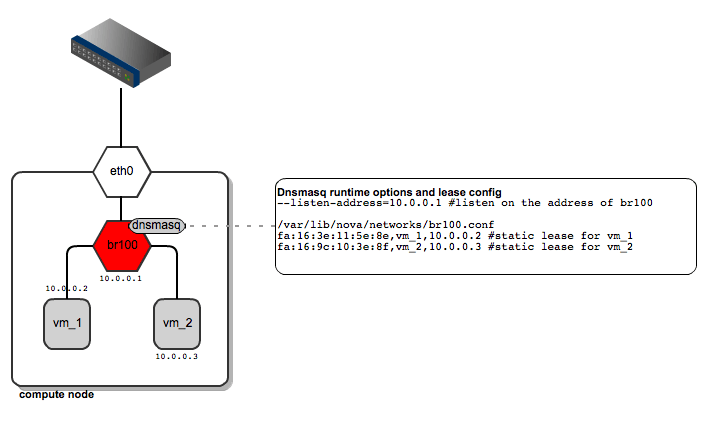
FlatDHCPManager – network topology
As for dnsmasq, FlatDHCPManager creates a static lease file per compute node to guarantee the same IP address for the instance over time. The lease file is constructed based on instance data from the Nova database, namely MAC, IP and hostname. The dnsmasq server is supposed to hand out addresses only to instances running locally on the compute node. To achieve this, instance data to be put into DHCP lease file are filtered by the ‘host’ field from the ‘instances’ table. Also, the default gateway option in dnsmasq is set to the bridge’s IP address. On the diagram below you san see that it will be given a different default gateway depending on which compute node the instance lands.
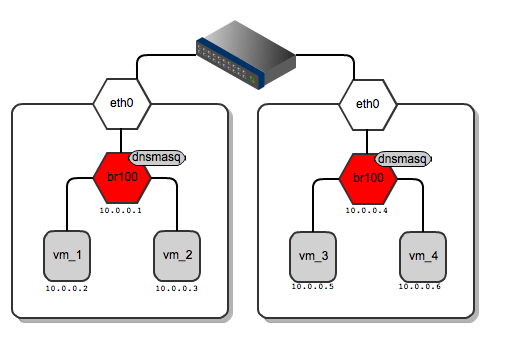
Network gateways for instances running on different compute nodes
Below I’ve shown the routing table from vm_1 and for vm_3 – each of them has a different default gateway:
root@vm_1:~# route -n
Kernel IP routing table
Destination Gateway Genmask Flags Metric Ref Use Iface
0.0.0.0 10.0.0.1 0.0.0.0 UG 0 0 0 eth0
root@vm_3:~# route -n
Kernel IP routing table
Destination Gateway Genmask Flags Metric Ref Use Iface
0.0.0.0 10.0.0.4 0.0.0.0 UG 0 0 0 eth0
By default, all the VMs in the “flat”
network can see one another regardless of which tenant they belong to.
One can enforce instance isolation by applying the following flag in nova.conf:
allow_same_net_traffic=False
This configures IPtables policies to
prevent any traffic between instances (even inside the same tenant),
unless it is unblocked in a security group.
From practical standpoint, “flat”
managers seem to be usable for homogenous, relatively small, internal
corporate clouds where there are no tenants at all, or their number is
very limited. Typically, the usage scenario will be a dynamically
scaled web server farm or an HPC cluster. For this purpose it is usually
sufficient to have a single IP address space where IP address
management is offloaded to some central DHCP server or is managed in a
simple way by OpenStack’s dnsmasq. On the other hand, flat networking
can struggle with scalability, as all the instances share the same L2
broadcast domain.
These issues (scalability +
multitenancy) are in some ways addressed by VlanManager, which will be
covered in an upcoming blog posts.
OpenStack Networking – FlatManager and FlatDHCPManager的更多相关文章
- OpenStack Networking overview
原文地址:http://docs.openstack.org/newton/install-guide-ubuntu/neutron-concepts.html Networking service ...
- OpenStack Networking
今天的数据中心网络比以往不论什么时候包括的设备都要多,比如server.网络设备.存储系统和安全设备等.这当中有非常多被近一步划分为多个虚拟机和虚拟网络.IP地址的数量.路由配置和安全规则能够迅速达到 ...
- gophercloud openstack networking 源码分析
1.network 部分 // Package networks contains functionality for working with Neutron network resources. ...
- Openstack组件部署 — Networking service_安装并配置Controller Node
目录 目录 前文列表 前提条件 网络环境 完成下面的步骤以创建数据库 创建service credentials服务凭证 创建Neutron的API Endpoints 配置自服务网络 安装网络组件 ...
- openstack组件手动部署整合
preface:当你完全且正确的配置好整个OpenStack ENV 你将能看到的和体验到的!!! 我们先来看看简单效果吧,祝君能在这条路上走的更远,更好;
- 8.OpenStack网络组件
添加网络组件 安装和配置控制器节点 创建数据库 mysql -uroot -ptoyo123 CREATE DATABASE neutron; GRANT ALL PRIVILEGES ON neut ...
- 完整部署CentOS7.2+OpenStack+kvm 云平台环境(1)--基础环境搭建
公司在IDC机房有两台很高配置的服务器,计划在上面部署openstack云平台虚拟化环境,用于承载后期开发测试和其他的一些对内业务.以下对openstack的部署过程及其使用做一详细介绍,仅仅依据本人 ...
- CentOS RDO方式快速安装OpenStack
一.了解RDO RDO是什么? RDO是红帽Red Hat Enterprise Linux OpenStack Platform的社区版,类似RHEL和Fedora,RHEV和oVirt这样的关系. ...
- 发现 OpenStack: 架构、功能和交互
原文:http://www.ibm.com/developerworks/cn/cloud/library/cl-openstack-overview/index.html OpenStack 是由 ...
随机推荐
- Spring集成线程池
自己在程序中手动New很容易造成线程滥用,创建线程也是比较消耗资源的操作,所以建议如果有此需求,将线程池统一交给Spring框架进行管理. 如下: <!--Spring 集成线程池,不允许自己开 ...
- Yii2.0 to(), toRoute(), current()区别用法
[Url::current] - 现在测试本地路径(http://daxia.dc.weixin.com/mobile/hmConnections/user/verify-user) a: //获取当 ...
- memcached系列之二
存储命令 1.set命令 语法: set key flags exptime bytes [noreply] value 参数说明: key: flags: exptime: bytes: norep ...
- 移动端网页使用flexible.js加入百度联盟广告样式不一致问题解决
flexible.js是淘宝推出的一款移动端手机自适应的库,源码内容很简洁,当网页使用了该库之后,页面会在head中加入对应的页面响应式的meta标签. 当使用flexible.js的时候,引入百度联 ...
- symfony 命令
1.创建Bundle php bin/console generate:bundle --namespace=Home/IndexBundle --format=yml 创建bundle会更新app ...
- symfony获取POST数据
$request = $this->getRequest(); $messageid = $this->strip_tags($request->get('messageid')); ...
- shell脚本自动清理服务器日志、图片等信息
在做性能测试的时候,linux服务器时常会产生大量数据,如日志信息,图片信息,文件信息等,压测一段时间后,导致服务器磁盘空间暂满而崩溃,每天手动清理比较麻烦, 利用shell脚本自动清理,脚本如下 1 ...
- mysql中json_object函数的使用?
需求说明: 今天看了json_object函数的使用,在此记录下使用过程 操作过程: 1.使用json_object函数将一个键值对列表转换成json对象 mysql> select json_ ...
- nginx配置:location配置方法及实例
转载:https://blog.csdn.net/heiyueya/article/details/70149270 location匹配的是nginx的哪个变量? $request_uri loca ...
- 正则 /\D/g
onKeyUp="this.value=this.value.replace(/\D/g,'');"红色的是什么意识 /g是什么意思 ----------------------- ...