
C# ArcEngine TOCControl上实现右键
第一种方法:使用contextMenuStrip控件
1.新建一个窗体AttributeTable,并定义一个全局变量mLayer,让主窗体里面的axMapControl1的layer传进来,从而获取属性列表!
       ILayer mLayer;

        public AttributeTable(ILayer layer)

        {

            InitializeComponent();

            mLayer = layer;

        }
在AttributteTable窗体的load事件下加载属性表
 private void AttributeTable_Load(object sender, EventArgs e)

        {

            IFeatureLayer pFeatureLayer = mLayer as IFeatureLayer;

            IFeatureClass pFeatureClass = pFeatureLayer.FeatureClass;

            DataTable dt = new DataTable();

            if (pFeatureClass != null)

            {

                DataColumn dc;

                for (int i = 0; i < pFeatureClass.Fields.FieldCount; i++)

                {

                    dc = new DataColumn(pFeatureClass.Fields.get_Field(i).Name);

                    dt.Columns.Add(dc);//获取所有列的属性值

                }

                IFeatureCursor pFeatureCursor = pFeatureClass.Search(null, false);

                IFeature pFeature = pFeatureCursor.NextFeature();

                DataRow dr;

                while (pFeature != null)

                {

                    dr = dt.NewRow();

                    for (int j = 0; j < pFeatureClass.Fields.FieldCount; j++)

                    {

                        //判断feature的形状

                        if (pFeature.Fields.get_Field(j).Name == "Shape")

                        {

                            if (pFeature.Shape.GeometryType == ESRI.ArcGIS.Geometry.esriGeometryType.esriGeometryPoint)

                            {

                                dr[j] = "点";

                            }

                            if (pFeature.Shape.GeometryType == ESRI.ArcGIS.Geometry.esriGeometryType.esriGeometryPolyline)

                            {

                                dr[j] = "线";

                            }

                            if (pFeature.Shape.GeometryType == ESRI.ArcGIS.Geometry.esriGeometryType.esriGeometryPolygon)

                            {

                                dr[j] = "面";

                            }

                        }

                        else

                        {

                            dr[j] = pFeature.get_Value(j).ToString();//增加行

                        }

                    }

                    dt.Rows.Add(dr);

                    pFeature = pFeatureCursor.NextFeature();

                }

                dataGridView1.DataSource = dt;

            }

        }
2.建立右键菜单(本例只是做了打开属性表操作),入下图:
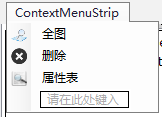
在主窗口内定义一个公共变量:public ILayer layer;
在axTOCControl1_OnMouseDown事件下
private void axTOCControl1_OnMouseDown(object sender, ITOCControlEvents_OnMouseDownEvent e)

        {

            if (e.button == 2)

            {

                esriTOCControlItem item = esriTOCControlItem.esriTOCControlItemNone;

                IBasicMap map = new MapClass();

                layer = new FeatureLayerClass();

                object other = new object();

                object index = new object();

                axTOCControl1.HitTest(e.x, e.y, ref item, ref map, ref layer, ref other, ref index); //实现赋值,ref的参数必须初始化

                if (item == esriTOCControlItem.esriTOCControlItemLayer) ////点击的是图层的话,就显示右键菜单

                {

                    contextMenuStrip1.Show(axTOCControl1, new System.Drawing.Point(e.x, e.y));

                }

            }

        }
3.单击contextMenuStrip1,显示属性表。
 private void contextMenuStrip1_Click(object sender, EventArgs e)

        {

            AttributeTable attributeTable = new AttributeTable(layer);

            attributeTable.Text = "属性表:" + layer.Name;

            attributeTable.ShowDialog();

        }
效果如下:
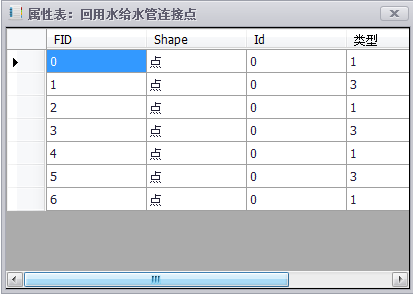
第一种方法:使用Base Command 类
1.新建一个Base Command类OpenAttributeTable,并定义一个全局变量 private ILayer m_layer,代码如下:
        private ILayer m_layer;

        public OpenAttributeTable(ILayer pLayer)

        {

            base.m_category = "";

            base.m_caption = "打开属性表";

            base.m_message = "";

            base.m_toolTip = "";

            base.m_name = "";

            m_layer = pLayer;

            try

            {//加载附加图片

                string bitmapResourceName = GetType().Name + ".bmp";

                base.m_bitmap = new Bitmap(GetType(), bitmapResourceName);

            }

            catch (Exception ex)

            {

                System.Diagnostics.Trace.WriteLine(ex.Message, "Invalid Bitmap");

            }

        }
然后在其单击事件下面加载属性表,代码如下:
public override void OnClick()

        {

            // TODO: Add OpenAttributeTable.OnClick implementation

            IFeatureLayer pFeatureLayer = m_layer as IFeatureLayer;

            IFeatureClass pFeatureClass = pFeatureLayer.FeatureClass;

            DataTable dt = new DataTable();

            if (pFeatureClass != null)

            {

                DataColumn dc;

                for (int i = 0; i < pFeatureClass.Fields.FieldCount; i++)

                {

                    dc = new DataColumn(pFeatureClass.Fields.get_Field(i).Name);

                    dt.Columns.Add(dc);

                }

                IFeatureCursor pFeatureCursor = pFeatureClass.Search(null, false);

                IFeature pFeature = pFeatureCursor.NextFeature();

                DataRow dr;

                while (pFeature != null)

                {

                    dr = dt.NewRow();

                    for (int j = 0; j < pFeatureClass.Fields.FieldCount; j++)

                    {

                        if (pFeature.Fields.get_Field(j).Name == "Shape")

                        {

                            if (pFeature.Shape.GeometryType == ESRI.ArcGIS.Geometry.esriGeometryType.esriGeometryPoint)

                            {

                                dr[j] = "点";

                            }

                            if (pFeature.Shape.GeometryType == ESRI.ArcGIS.Geometry.esriGeometryType.esriGeometryPolyline)

                            {

                                dr[j] = "线";

                            }

                            if (pFeature.Shape.GeometryType == ESRI.ArcGIS.Geometry.esriGeometryType.esriGeometryPolygon)

                            {

                                dr[j] = "面";

                            }

                        }

                        else

                        {

                            dr[j] = pFeature.get_Value(j).ToString();

                        }

                    }

                    dt.Rows.Add(dr);

                    pFeature = pFeatureCursor.NextFeature();

                }

                AttributeTable AT = new AttributeTable();

                AT.Text = "属性表:" + pFeatureLayer.Name;

                AT.Show();

                AT.dataGridView1.DataSource = dt;

            }

        }
2. 在axTOCControl1_OnMouseDown事件下完成单击事件,代码如下:
private void axTOCControl1_OnMouseDown(object sender, ITOCControlEvents_OnMouseDownEvent e)

        {

            if (e.button == 2)

            {

                esriTOCControlItem item = esriTOCControlItem.esriTOCControlItemNone;

                IBasicMap map = new MapClass();

                layer = new FeatureLayerClass();

                object other = new object();

                object index = new object();

                axTOCControl1.HitTest(e.x, e.y, ref item, ref map, ref layer, ref other, ref index);

                if (item == esriTOCControlItem.esriTOCControlItemLayer)

                {

                    m_ToolMenuLayer.AddItem(new Owntolayer(layer, axMapControl1, eve), 0, 0, false, ESRI.ArcGIS.SystemUI.esriCommandStyles.esriCommandStyleIconAndText);

                    m_ToolMenuLayer.AddItem(new FullExtent(axMapControl1), 0, 1, false, ESRI.ArcGIS.SystemUI.esriCommandStyles.esriCommandStyleIconAndText);

                    m_ToolMenuLayer.AddItem(new DeleteLayer(layer), 0, 2, false, ESRI.ArcGIS.SystemUI.esriCommandStyles.esriCommandStyleIconAndText);

                    m_ToolMenuLayer.AddItem(new OpenAttributeTable(layer), 0, 3, false, ESRI.ArcGIS.SystemUI.esriCommandStyles.esriCommandStyleIconAndText);

                    m_ToolMenuLayer.PopupMenu(e.x, e.y, m_TocControl.hWnd);

                    m_ToolMenuLayer.RemoveAll();

                }

            }

        }
效果如下:
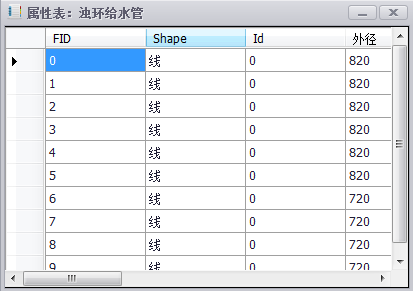
说明:
1.public int AddItem (object item,int SubType,int index,bool beginGroup,esriCommandStyles Style)
第一个参数:菜单项的内容,功能实现。
第二个参数:对于一个工具定义多个 type 的时候,才会用到,每一个 int 代表一个新的实现。
第三个参数:索引值,在菜单项上面显示的位置。默认为 -1,按书写顺序排序。
第四个参数:是否开始一个新组,就是在其上面有一个“——”的效果。
第五个参数:显示样式。
2. axTOCControl1.HitTest()方法
[C#]public void HitTest (

    intX,

    intY,

    ref esriTOCControlItemItemType,

    ref IBasicMapBasicMap,

    ref ILayerLayer,

    ref objectUnk,

    ref objectData);
Product Availability
Description
x is the X coordinate, in pixels, where the mouse button was pressed referenced against the origin (0, 0) of the TOCControl (the top left hand corner).
y is the Y coordinate, in pixels, where the mouse button was pressed referenced against the origin (0, 0) of the TOCControl (the top left hand corner).
ItemType specifies an enumeration indicating the type of item (none, map, layer, heading or legend class).
Map specifies an IMap object.
Layer specifies an ILayer object.
Unk specifies an ILegendGroup object.
Data specifies a long indicating the index of the legend class within the legend group. Use this index in conjunction with the legend group to obtain a particular legend class. An index of -1 refers to the heading if it is present.
注:本文所用的环境:windows7操作系统;VS2010;基于C#语言;ArcEngine版本为10.1。
C# ArcEngine TOCControl上实现右键的更多相关文章
- TOCControl上实现右键
第一步:新建另外一个窗体 首先要定义一个全局变量 ILayer. 窗体要带参数,以便将 ILayer 传递过来. 获取属性列表. using System; using System.Collecti ...
- 在XP、Win7/8上如何右键进入命令行
在Win7/8上特别简单,只需要在按下shift键后,再点击鼠标右键,即可进入命令行界面.
- 如何在Macbook苹果笔记本上按右键点击(适用小米黑苹果)
1.按下Control键.保持按下Control(Ctrl)键,同时点击鼠标. 这一操作相当于在一个双键鼠标上右击. 点击鼠标后,你可以松开Control键. 该方法适用于单键鼠标或者MacBook ...
- DevExpress的TreeList实现节点上添加自定义右键菜单并实现删除节点功能
场景 Winform控件-DevExpress18下载安装注册以及在VS中使用: https://blog.csdn.net/BADAO_LIUMANG_QIZHI/article/details/1 ...
- DevExpress中GridView上的右键菜单
1. 先拖一个PopupMenu和BarManage控件,设置PopupMenu的Manager属性为BarManager. 2. 先选中GridView,不是GridControl,在属性窗口中,选 ...
- 技巧:开启ubuntu系统桌面上的右键进入terminal命令行控制台功能
$ sudo apt-get install nautilus-open-terminal 执行上述命令,重启. 重启命令: $ sudo reboot 注意:需要联网
- Arcengine 二次开发添加右键菜单
最近在搞arcengine 二次开发,遇到了好多问题,也通过网上查资料试着慢慢解决了,把解决的步骤记录下来,有需要帮助的可以看一下,也欢迎各位来批评指正. 想给自己的map application在图 ...
- SkylineGlobe 6.6 三维地图上实现自定义右键菜单示例代码
1.OnRButtonDown.htm <!DOCTYPE html PUBLIC "-//W3C//DTD XHTML 1.0 Transitional//EN" &quo ...
- AE安装部署以及监测ArcEngine runtime 9.3是否安装
目的:用ArcEngine9.3开发项目以后,用Visual Studio2008打包工具打包: 同时监测别的机器上是否有ArcEngine Runtime或者Desktop的支持. 解决方案: 1. ...
随机推荐
- javascript 显示一定范围内的素数(质数)
素数又称质数,是大于1的自然数,并且只有1和它本身两个因数. 具体实现代码如下: 运行代码 <!DOCTYPE HTML> <html> <head lang=" ...
- 【代码审计】TuziCMS_v3.0_任意文件删除漏洞分析
0x00 环境准备 TuziCMS官网:http://www.tuzicms.com/ 网站源码版本:TuziCMS_v3.0_20161220 程序源码下载:http://www.tuzicms ...
- XSS payload 大全
收集的一些XSS payload,主要分为五大类,便于查阅. #第一类:Javascript URL <a href="javascript:alert('test')"&g ...
- NFS 常见报错
问题:客户端挂载共享目录后,不管是root用户还是普通用户,创建新文件时属主属组都为nobody解决方法:这种情况会出现在 centos6 或 NFS 4版本中,只要在挂载的时候加上 -o nfsve ...
- 关于 Handler 与 opener
我们可以使用 urllib.request.Request() 构造请求对象,但是对于一些更高级的操作,比如 Cookies 处理.代理设置 .身份验证等等,Request() 是处理不了的这时就需要 ...
- Theme.AppCompat.Light的解决方法
style name=”AppBaseTheme” parent=”Theme.AppCompat.Light” 改为 改为 style name=”AppBaseTheme” parent=”and ...
- Codeforces Round #363 (Div. 1) B. Fix a Tree 树的拆环
题目链接:http://codeforces.com/problemset/problem/698/B题意:告诉你n个节点当前的父节点,修改最少的点的父节点使之变成一棵有根树.思路:拆环.题解:htt ...
- Linux 下如何安装 .bin 文件
拿到 .bin 文件,在文件所在目录下执行如下命令即可安装, ./your-file-name.bin 如果提示 “没有那个文件或目录” ,给它加上执行权限即可,执行如下命令, chmod +x ./ ...
- SharpGL学习笔记(十一) 光源创建的综合例子:光源参数可调节的测试场景
灯光的测试例子:光源参数可以调节的测试场景 先看一下测试场景和效果. 场景中可以切换视图, 以方便观察三维体和灯光的位置.环境光,漫射光,镜面反射光都可以在四种颜色间切换. 灯光位置和摄像机位置(Lo ...
- Android 控制闪光灯
首先闪光灯可以用android.hardware.camera来控制. 1.添加权限 <uses-permission android:name="android.permission ...