
java mysql大数据量批量插入与流式读取分析
总结下这周帮助客户解决报表生成操作的mysql 驱动的使用上的一些问题,与解决方案。由于生成报表逻辑要从数据库读取大量数据并在内存中加工处理后在
生成大量的汇总数据然后写入到数据库。基本流程是 读取->处理->写入。
1 读取操作开始遇到的问题是当sql查询数据量比较大时候基本读不出来。开始以为是server端处理太慢。但是在控制台是可以立即返回数据的。于是在应用
这边抓包,发现也是发送sql后立即有数据返回。但是执行ResultSet的next方法确实阻塞的。查文档翻代码原来mysql驱动默认的行为是需要把整个结果全部读取到
内存中才开始允许应用读取结果。显然与期望的行为不一致,期望的行为是流的方式读取,当结果从myql服务端返回后立即还是读取处理。这样应用就不需要大量内存
来存储这个结果集。正确的流式读取方式代码示例:
PreparedStatement ps = connection.prepareStatement("select .. from ..",

            ResultSet.TYPE_FORWARD_ONLY, ResultSet.CONCUR_READ_ONLY);
//forward only read only也是mysql 驱动的默认值,所以不指定也是可以的 比如: PreparedStatement ps = connection.prepareStatement("select .. from ..");
ps.setFetchSize(Integer.MIN_VALUE); //也可以修改jdbc url通过defaultFetchSize参数来设置,这样默认所以的返回结果都是通过流方式读取.
ResultSet rs = ps.executeQuery();

while (rs.next()) {
  System.out.println(rs.getString("fieldName"));
}
代码分析:下面是mysql判断是否开启流式读取结果的方法,有三个条件forward-only,read-only,fatch size是Integer.MIN_VALUE
/**

 * We only stream result sets when they are forward-only, read-only, and the

 * fetch size has been set to Integer.MIN_VALUE

 *

 * @return true if this result set should be streamed row at-a-time, rather

 * than read all at once.

 */

protected boolean createStreamingResultSet() {

    try {

        synchronized(checkClosed().getConnectionMutex()) {

            return ((this.resultSetType == java.sql.ResultSet.TYPE_FORWARD_ONLY)

                 && (this.resultSetConcurrency == java.sql.ResultSet.CONCUR_READ_ONLY) && (this.fetchSize == Integer.MIN_VALUE));

        }

    } catch (SQLException e) {

        // we can't break the interface, having this be no-op in case of error is ok

        return false;

    }

}
2 批量写入问题。开始时应用程序是一条一条的执行insert来写入报表结果。写入也是比较慢的。主要原因是单条写入时候需要应用于db之间大量的
请求响应交互。每个请求都是一个独立的事务提交。这样网络延迟大的情况下多次请求会有大量的时间消耗的网络延迟上。第二个是由于每个事务db都会
有刷新磁盘操作写事务日志,保证事务的持久性。由于每个事务只是写入一条数据 所以磁盘io利用率不高,因为对于磁盘io是按块来的,所以连续写入大量数据效率
更好。所以必须改成批量插入的方式,减少请求数与事务数。下面是批量插入的例子:还有jdbc连接串必须加下rewriteBatchedStatements=true
int batchSize = 1000;

PreparedStatement ps = connection.prepareStatement("insert into tb1 (c1,c2,c3...) values (?,?,?...)");

for (int i = 0; i < list.size(); i++) {

    ps.setXXX(list.get(i).getC1());

    ps.setYYY(list.get(i).getC2());

    ps.setZZZ(list.get(i).getC3());

    ps.addBatch();

    if ((i + 1) % batchSize == 0) {

        ps.executeBatch();

    }

}

if (list.size() % batchSize != 0) {

    ps.executeBatch();

}
上面代码示例是每1000条数据发送一次请求。mysql驱动内部在应用端会把多次addBatch()的参数合并成一条multi value的insert语句发送给db去执行
比如insert into tb1(c1,c2,c3) values (v1,v2,v3),(v4,v5,v6),(v7,v8,v9)...
这样可以比每条一个insert 明显少很多请求。减少了网络延迟消耗时间与磁盘io时间,从而提高了tps。
。
代码分析: 从代码可以看出,
1 rewriteBatchedStatements=true,insert是参数化语句且不是insert ... select 或者 insert... on duplicate key update with an id=last_insert_id(...)的话会执行
executeBatchedInserts,也就是muti value的方式
2 rewriteBatchedStatements=true 语句是都是参数化(没有addbatch(sql)方式加入的)的而且mysql server版本在4.1以上 语句超过三条,则执行executePreparedBatchAsMultiStatement
就是将多个语句通过;分隔一次提交多条sql。比如 "insert into tb1(c1,c2,c3) values (v1,v2,v3);insert into tb1(c1,c2,c3) values (v1,v2,v3)..."
3 其余的执行executeBatchSerially,也就是还是一条条处理
public void addBatch(String sql)throws SQLException {

    synchronized(checkClosed().getConnectionMutex()) {

        this.batchHasPlainStatements = true;

        super.addBatch(sql);

    }

}

public int[] executeBatch()throws SQLException {

    //...

    if (!this.batchHasPlainStatements

         && this.connection.getRewriteBatchedStatements()) {

        if (canRewriteAsMultiValueInsertAtSqlLevel()) {

            return executeBatchedInserts(batchTimeout);

        }

        if (this.connection.versionMeetsMinimum(4, 1, 0)

             && !this.batchHasPlainStatements

             && this.batchedArgs != null

             && this.batchedArgs.size() > 3 /* cost of option setting rt-wise */

        )

        {

            return executePreparedBatchAsMultiStatement(batchTimeout);

        }

    }

    return executeBatchSerially(batchTimeout);

    //.....

}
executeBatchedInserts相比executePreparedBatchAsMultiStatement的方式传输效率更好,因为一次请求只重复一次前面的insert table (c1,c2,c3)
mysql server 对请求报文的最大长度有限制,如果batch size 太大造成请求报文超过最大限制,mysql 驱动会内部按最大报文限制查分成多个报文。所以要真正减少提交次数
还要检查下mysql server的max_allowed_packet 否则batch size 再大也没用.
mysql> show VARIABLES like '%max_allowed_packet%';
+--------------------+-----------+
| Variable_name | Value |
+--------------------+-----------+
| max_allowed_packet | 167772160 |
+--------------------+-----------+
1 row in set (0.00 sec)
要想验证mysql 发送了正确的sql 有两种方式
1 抓包,下图是wireshark在 应用端抓包mysql的报文
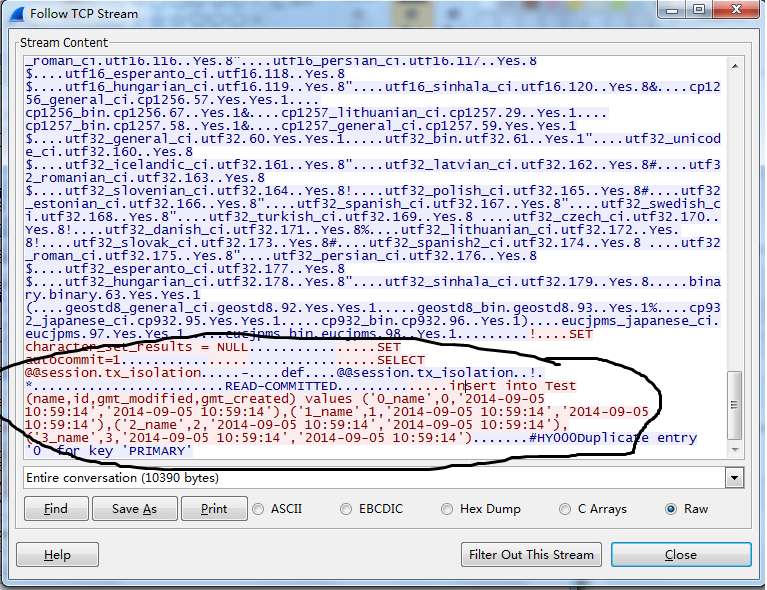
2 另一个办法是在mysql server端开启general log 可以查看mysql收到的所有sql
3 在jdbc url上加上参数traceProtocol=true 或者profileSQL=true or autoGenerateTestcaseScript=true
性能测试对比
import java.sql.Connection;

import java.sql.PreparedStatement;

import java.sql.SQLException;

import com.alibaba.druid.pool.DruidDataSource;

public class BatchInsert {

    public static void main(String[] args) throws SQLException {

        int batchSize = 1000;

        int insertCount = 1000;

        testDefault(batchSize, insertCount);

        testRewriteBatchedStatements(batchSize,insertCount);

    }

    private static void testDefault(int batchSize, int insertCount) throws SQLException {

        long start = System.currentTimeMillis();

        doBatchedInsert(batchSize, insertCount,"");

        long end = System.currentTimeMillis();

        System.out.println("default:" + (end -start) + "ms");

    }

    private static void testRewriteBatchedStatements(int batchSize, int insertCount) throws SQLException {

        long start = System.currentTimeMillis();

        doBatchedInsert(batchSize, insertCount, "rewriteBatchedStatements=true");

        long end = System.currentTimeMillis();

        System.out.println("rewriteBatchedStatements:" + (end -start) + "ms");

    }

    private static void doBatchedInsert(int batchSize, int insertCount, String mysqlProperties) throws SQLException {

        DruidDataSource dataSource = new DruidDataSource();

        dataSource.setUrl("jdbc:mysql://ip:3306/test?" + mysqlProperties);

        dataSource.setUsername("name");

        dataSource.setPassword("password");

        dataSource.init();

        Connection connection = dataSource.getConnection();

        PreparedStatement preparedStatement = connection.prepareStatement("insert into Test (name,gmt_created,gmt_modified) values (?,now(),now())");

        for (int i = 0; i < insertCount; i++) {

            preparedStatement.setString(1, i+" ");

            preparedStatement.addBatch();

            if((i+1) % batchSize == 0) {

                preparedStatement.executeBatch();

            }

        }

        preparedStatement.executeBatch();

        connection.close();

        dataSource.close();

    }

}
网络环境ping测试延迟是35ms ,测试结果:
default:75525ms
rewriteBatchedStatements:914ms
java mysql大数据量批量插入与流式读取分析的更多相关文章
- MySQL 大数据量快速插入方法和语句优化
MySQL大数据量快速插入方法和语句优化是本文我们主要要介绍的内容,接下来我们就来一一介绍,希望能够让您有所收获! INSERT语句的速度 插入一个记录需要的时间由下列因素组成,其中的数字表示大约比例 ...
- SQL Server 大数据量批量插入
private void AddShuJu_Click(object sender, RoutedEventArgs e) { Stopwatch wath = new Stopwatch(); wa ...
- MySQL 大数据量文本插入
导入几万条数据需要等好几分钟的朋友来围观一下! 百万条数据插入,只在一瞬间.呵呵夸张,夸张!! 不到半分钟是真的! 插入指令: load data infile 'c:/wamp/tmp/Data_O ...
- MySQL大数据量分页查询
mysql大数据量使用limit分页,随着页码的增大,查询效率越低下. 测试实验 1. 直接用limit start, count分页语句, 也是我程序中用的方法: select * from p ...
- 【1】MySQL大数据量分页查询方法及其优化
---方法1: 直接使用数据库提供的SQL语句---语句样式: MySQL中,可用如下方法: SELECT * FROM 表名称 LIMIT M,N---适应场景: 适用于数据量较少的情况(元组百/千 ...
- mysql大数据量下的分页
mysql大数据量使用limit分页,随着页码的增大,查询效率越低下. 测试实验 1. 直接用limit start, count分页语句, 也是我程序中用的方法: select * from p ...
- MySQL大数据量分页查询方法及其优化
MySQL大数据量分页查询方法及其优化 ---方法1: 直接使用数据库提供的SQL语句---语句样式: MySQL中,可用如下方法: SELECT * FROM 表名称 LIMIT M,N---适 ...
- MySQL大数据量分页性能优化
mysql大数据量使用limit分页,随着页码的增大,查询效率越低下. 测试实验 1. 直接用limit start, count分页语句, 也是我程序中用的方法: select * from p ...
- Mysql 大数据量导入程序
Mysql 大数据量导入程序<?xml:namespace prefix = o ns = "urn:schemas-microsoft-com:office:office" ...
随机推荐
- Real FFT
[文/告别年代 Email:byeyear@hotmail.com] FFT算法是针对复信号的,而现实场景中很多时候时域是实信号,此时有两种办法加快FFT的速度. 1. 使用一个N点的复FFT同时 ...
- BASIC-11_蓝桥杯_十六进制转十进制
注意事项: 1.长数据注意选择long long类型,用%ldd输出,防止数据溢出; 示例代码: #include <stdio.h>#include <string.h>#i ...
- spring SOA architecture
在谈这个之前,还得再说下SOA和平台.SOA做两件事情,一个是解耦并识别可重用的服务,一个是对服务进行灵活组装和编排满足业务需求,SOA核心是业务和技术的解耦,服务和能力的复用.而在IT领域的平台平台 ...
- 转转转!java继承中的this和super
学习java时看了不少尚学堂马士兵的视频,还是挺喜欢马士兵的讲课步骤的,二话不说,先做实例,看到的结果才是最实际的,理论神马的全是浮云.只有在实际操作过程中体会理论,在实际操作过程中升华理论才是最关键 ...
- DOM操作之属性和样式操作
在DOM操作,除了前面的节点操作以外,常常被用到的操作还有属性操作和节点操作,下面,主要来总结一下jQuery中的属性操作方法和样式操作方法. 在开始操作前,我们需要先在html中添加如下代码,后面所 ...
- [转]NSIS:常量大全
原文链接 http://www.flighty.cn/html/bushu/20140915_251.html ;轻狂志www.flighty.cn ;运行后会在桌面生成NSIS常量大全.txt文件 ...
- Linux下查看某个进程占用的CPU、内存
1.用top命令指定固定的PID top -p 10997 查询指定进程的PID ps -ef | grep zookeeper jim 10997 1959 0 12月14 pts/2 00:00: ...
- 关于跨域读取json数据我的理解
这两天在做关于读取json数据的插件,想用getJSON读取数据: $.getJSON(http://www.xxxx.com/Titles.js, function (data) { console ...
- 原创)CentOS6.4下安装xampp(一定要在linux上下载)
一.xampp下载地址: http://sourceforge.net/projects/xampp/files/XAMPP%20Linux/1.8.3/ 二.我下载的是xampp-linux-x64 ...
- 自己写的jQuery放大镜插件效果(一)(采用一张大图和一张小图片的思路)
这个思路的方法会带来一个小问题,就是当鼠标放到小图上去时,会开始加载大图片,网速不佳的时候,会出现加载慢的情况.但是放大的效果和你所给出的大图片的清晰度是一样的. 先看效果图: html代码: < ...