
elasticsearch 6.0java api的使用
elasticsearch 6.0 中java api的使用
1:使用java api创建elasticsearch客户端
package com.search.elasticsearch;

import org.elasticsearch.client.transport.TransportClient;

import org.elasticsearch.common.settings.Settings;

import org.elasticsearch.common.transport.TransportAddress;

import org.elasticsearch.transport.client.PreBuiltTransportClient;

import java.io.IOException;

import java.io.InputStream;

import java.net.InetAddress;

import java.util.Properties;

public class ElasticsearchConfig {

    private static TransportClient client;

    public TransportClient getElasticsearchClient() {

        try {

            Settings settings = Settings.builder()

                    .put("cluster.name", "my-esLearn")  //连接的集群名

                    .put("client.transport.ignore_cluster_name", true)  //如果集群名不对,也能连接

                    .build();

            //创建client

            client = new PreBuiltTransportClient(settings)

                    .addTransportAddress(new TransportAddress(InetAddress.getByName("127.0.0.1"), 9300));  //主机和端口号

            return client;

        } catch (Exception e) {

            e.printStackTrace();

        }

        return null;

    }

}
2:使用客户端创建索引,索引中 某些字段指定ik分词器等
package com.search.elasticsearch;
import org.elasticsearch.action.DocWriteResponse;

import org.elasticsearch.action.admin.indices.analyze.AnalyzeRequestBuilder;

import org.elasticsearch.action.admin.indices.mapping.put.PutMappingRequest;

import org.elasticsearch.action.bulk.BulkItemResponse;

import org.elasticsearch.action.bulk.BulkRequestBuilder;

import org.elasticsearch.action.bulk.BulkResponse;

import org.elasticsearch.action.get.GetResponse;

import org.elasticsearch.action.index.IndexRequest;

import org.elasticsearch.action.index.IndexResponse;

import org.elasticsearch.action.search.SearchResponse;

import org.elasticsearch.action.search.SearchType;

import org.elasticsearch.action.update.UpdateRequest;

import org.elasticsearch.action.update.UpdateResponse;

import org.elasticsearch.client.IndicesAdminClient;

import org.elasticsearch.client.Requests;

import org.elasticsearch.client.transport.TransportClient;

import org.elasticsearch.common.settings.Settings;

import org.elasticsearch.common.transport.TransportAddress;

import org.elasticsearch.common.xcontent.XContentBuilder;

import org.elasticsearch.common.xcontent.XContentFactory;

import org.elasticsearch.index.query.QueryBuilders;

import org.elasticsearch.transport.client.PreBuiltTransportClient;

import org.springframework.beans.factory.annotation.Autowired;

import org.springframework.beans.factory.annotation.Value;

import java.io.IOException;

import java.io.InputStream;

import java.net.InetAddress;

import java.util.Date;

import java.util.List;

import java.util.Properties;

import java.util.ResourceBundle;

import java.util.concurrent.ExecutionException;

import static org.elasticsearch.common.xcontent.XContentFactory.jsonBuilder;

public class ElasticSearchUtil {

    private static TransportClient client;

    public ElasticSearchUtil() {

        this.client=new ElasticsearchConfig().getElasticsearchClient();  //使用上面创建好的客户端添加到类中。

    }

    //创建索引,并给索引某些字段指定iK分词,以后向该索引中查询时,就会用ik分词。

    public void createIndex() throws IOException {

        //创建映射

        XContentBuilder mapping = XContentFactory.jsonBuilder()

                .startObject()

                .startObject("properties")

                //      .startObject("m_id").field("type","keyword").endObject()
                     //title:字段名,  type:文本类型       analyzer :分词器类型
                .startObject("title").field("type", "text").field("analyzer", "ik_smart").endObject()   //该字段添加的内容,查询时将会使用ik_smart分词

                .startObject("content").field("type", "text").field("analyzer", "ik_max_word").endObject()

                .endObject()

                .endObject();

        //index:索引名   type:类型名(可以自己定义)

        PutMappingRequest putmap = Requests.putMappingRequest("index").type("type").source(mapping);

        //创建索引

        client.admin().indices().prepareCreate("index").execute().actionGet();

        //为索引添加映射

        client.admin().indices().putMapping(putmap).actionGet();

    }

}
这个时候索引就创建好了,mapping不能掉
3: 向上一步创建的索引中添加内容,包括id,id不能重复
    public void createIndex1() throws IOException {

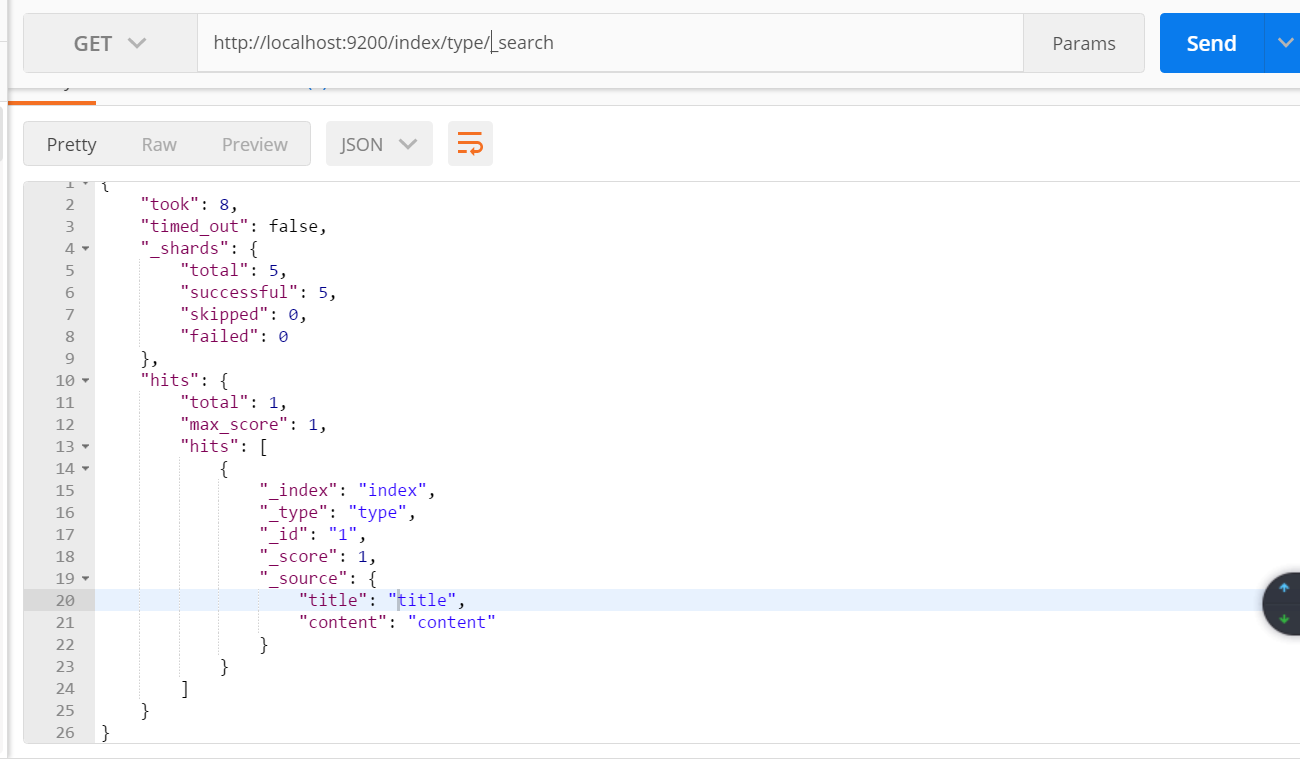
        IndexResponse response = client.prepareIndex("index", "type", "1") //索引,类型,id

                .setSource(jsonBuilder()

                        .startObject()

                        .field("title", "title")   //字段,值

                        .field("content", "content")

                        .endObject()

                ).get();

    }
使用postman查询该索引:
4:更新索引,更新刚才创建的索引,如果id相同将会覆盖掉刚才的内容
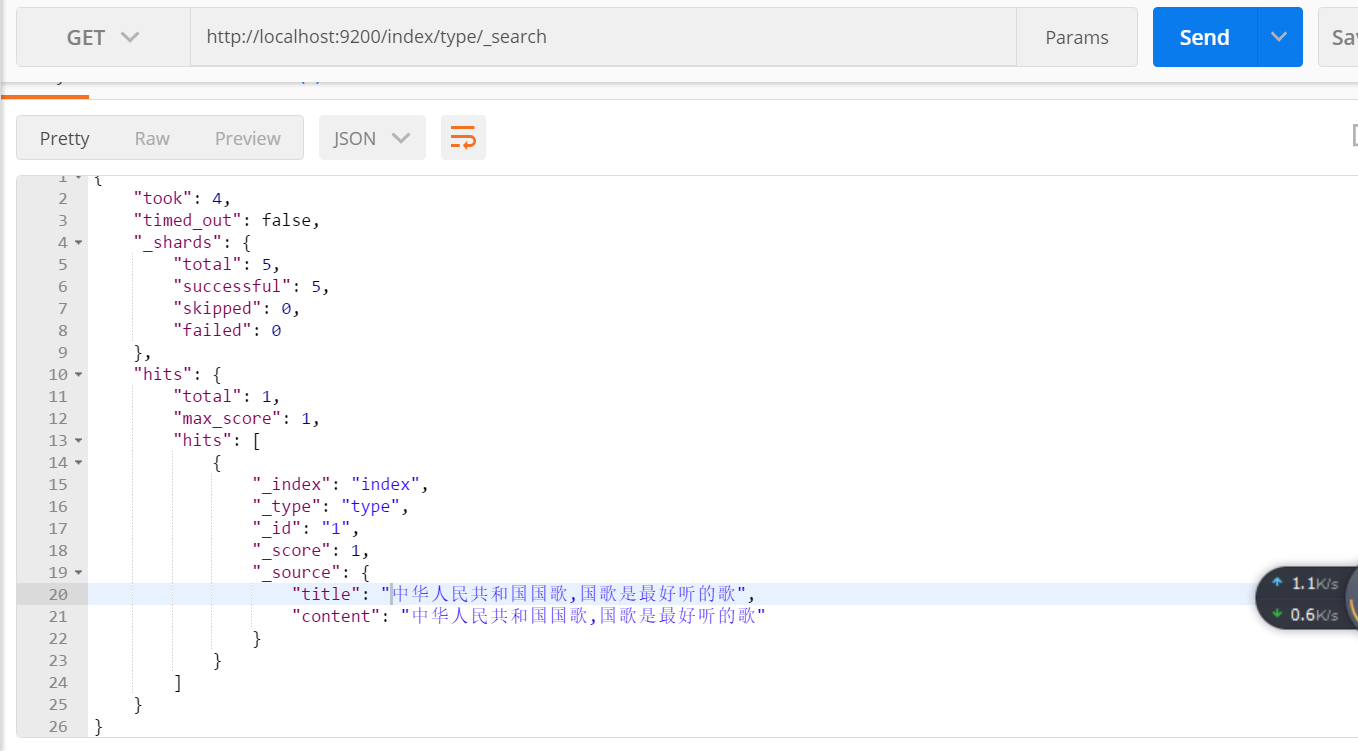
    public void updateByClient() throws IOException, ExecutionException, InterruptedException {

        //每次添加id应该不同,相当于数据表中的主键,相同 的话将会进行覆盖

        UpdateResponse response = client.update(new UpdateRequest("index", "type", "1")

                .doc(XContentFactory.jsonBuilder()

                        .startObject()

                        .field("title", "中华人民共和国国歌,国歌是最好听的歌")

                        .field("content","中华人民共和国国歌,国歌是最好听的歌")

                        .endObject()

                )).get();

    }
使用postman查看该索引的内容
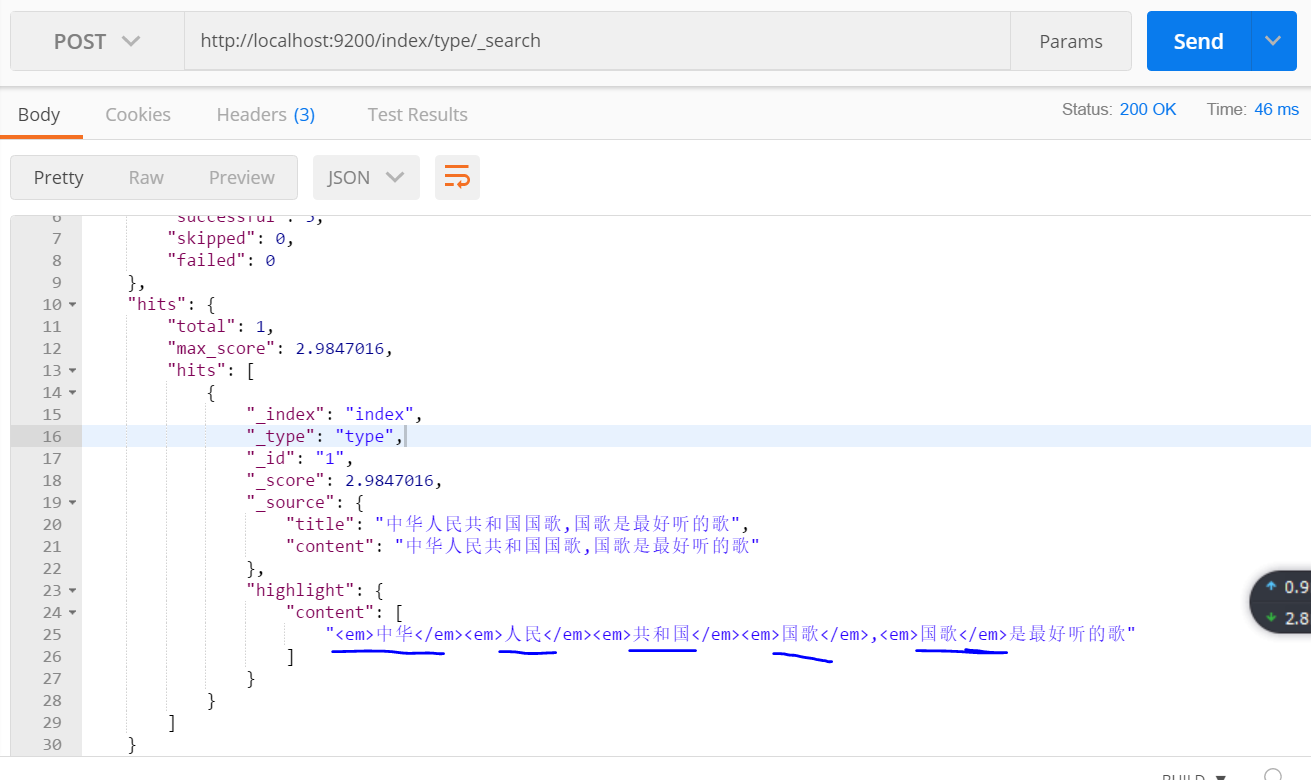
5:对索引进行查询,因为分词不同,分词器将会对要查询的内容先分词,再在子段中查询。
查询 子段 content
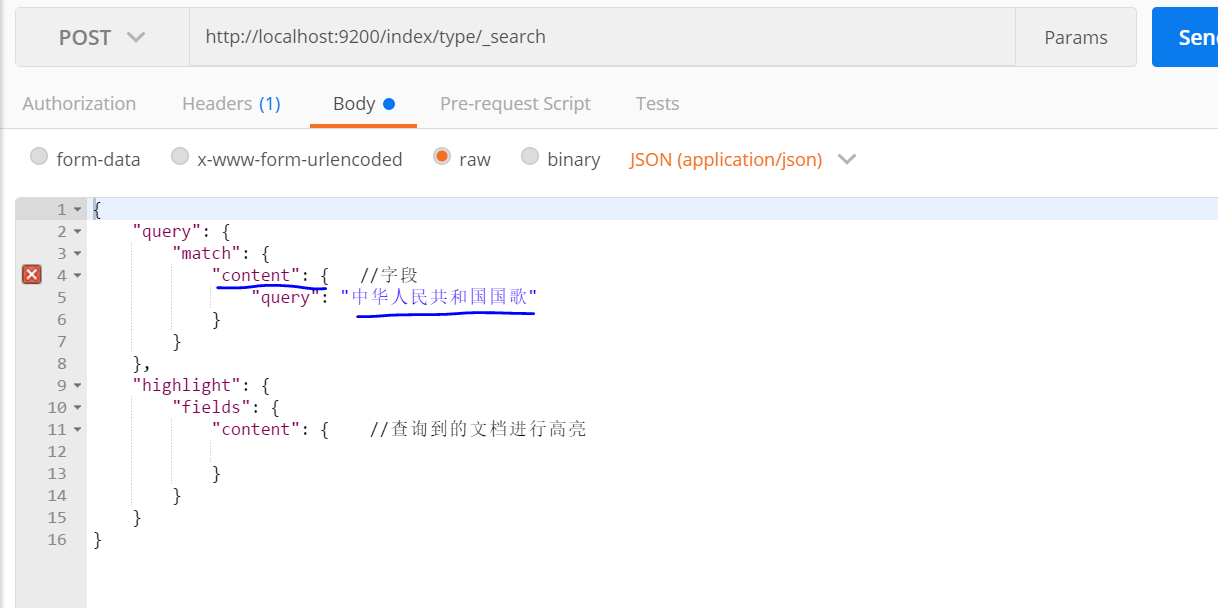
查询结果:
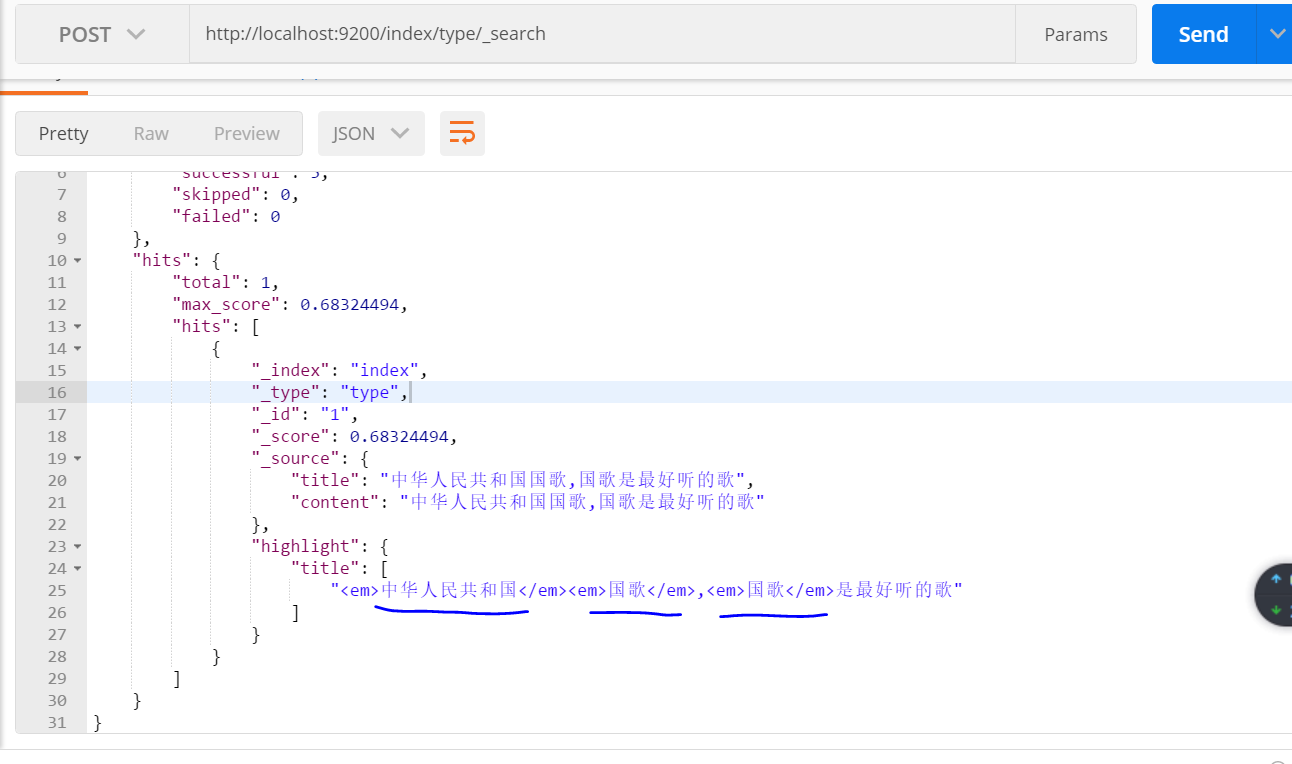
对title子段进行查询:

查询结果:
6:向 索引中再添加一条数据
    public void createIndex2() throws IOException {

        IndexResponse response = client.prepareIndex("index", "type", "2")

                .setSource(jsonBuilder()

                        .startObject()

                        .field("title", "中华民族是伟大的民族")

                        .field("content", "中华民族是伟大的民族")

                        .endObject()

                ).get();

    }
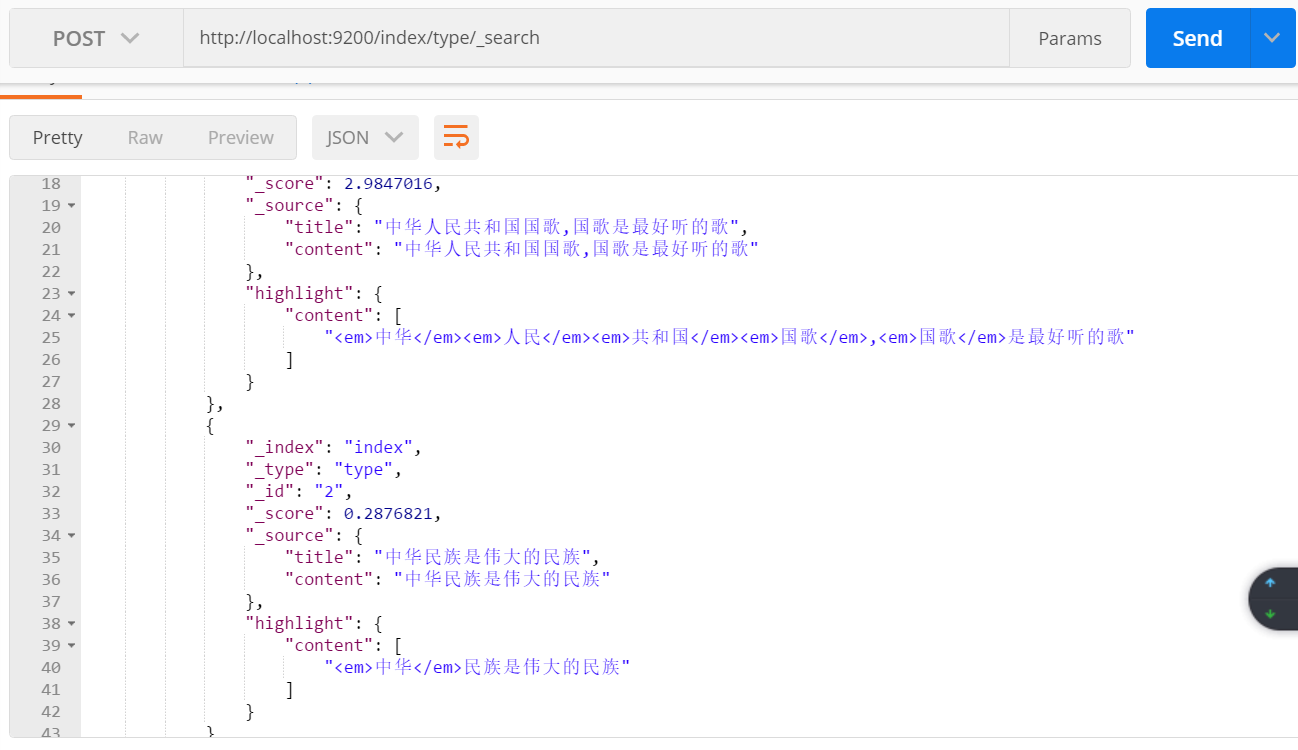
对字段content进行查询:
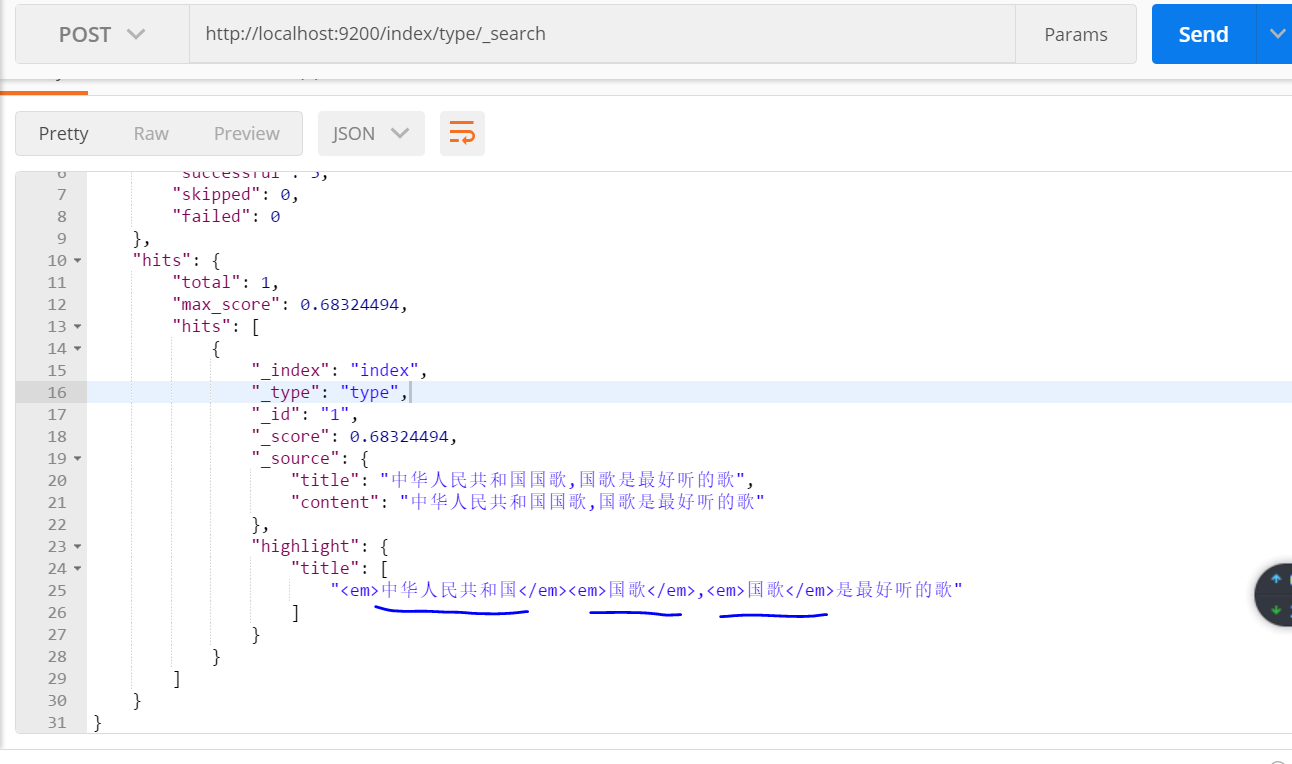
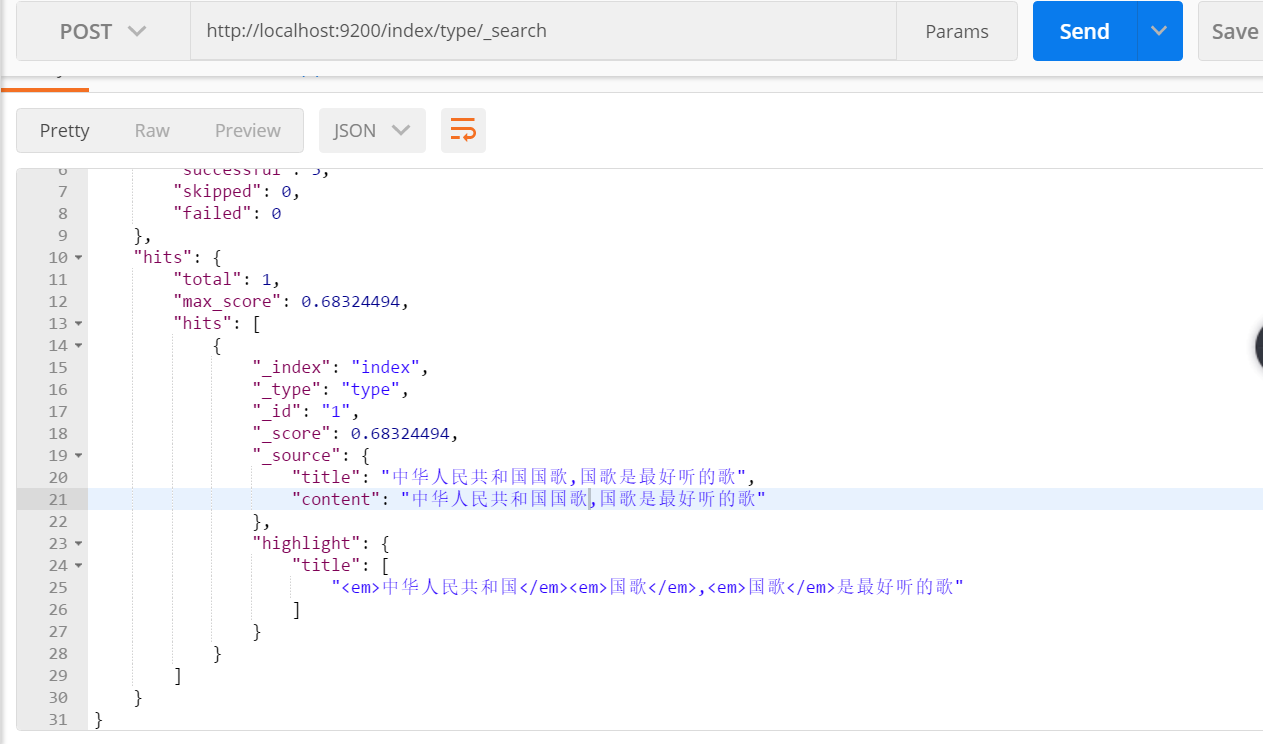
结果:两条数据都能查到,因为对查询内容 “中华人民共和国国歌” 进行细粒度划分,含有“中华” 一词,两条数据中都包含“中华”。
对字段title 进行查询:
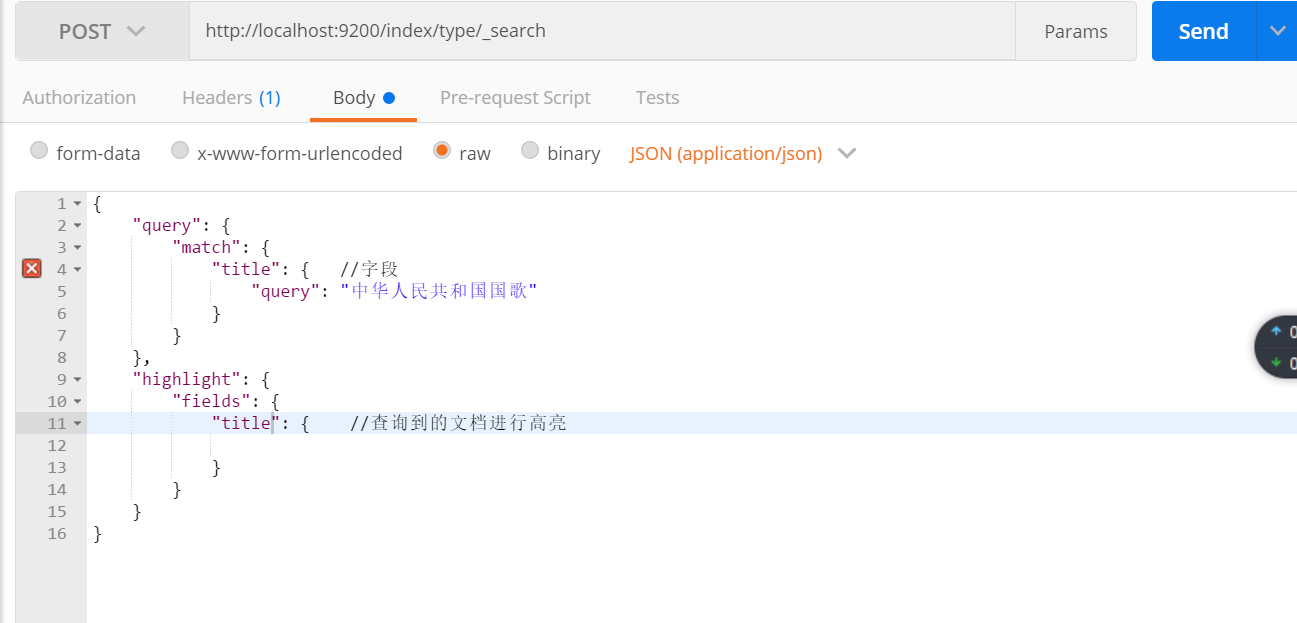
查询结果: 只有一条数据,因为对title 使用的是 粗粒度分词
7:search api的操作:
   public void search() {
        SearchResponse response1 = client.prepareSearch("index1", "index")  //指定多个索引
                .setTypes("type1", "type")  //指定类型
                .setSearchType(SearchType.QUERY_THEN_FETCH)
                .setQuery(QueryBuilders.matchQuery("title", "中华人民共和国国歌"))  // Query
//                .setPostFilter(QueryBuilders.rangeQuery("age").from(12).to(18))     // Filter
                .setFrom(0).setSize(60).setExplain(true)
                .get();
        long totalHits1= response1.getHits().totalHits;  //命中个数
        System.out.println(totalHits1);

        SearchResponse response2 = client.prepareSearch("index1", "index")  //指定多个索引
                .setTypes("type1", "type")  //指定类型
                .setSearchType(SearchType.QUERY_THEN_FETCH)
                .setQuery(QueryBuilders.matchQuery("content", "中华人民共和国国歌"))  // Query
//                .setPostFilter(QueryBuilders.rangeQuery("age").from(12).to(18))     // Filter
                .setFrom(0).setSize(60).setExplain(true)
                .get();
        long totalHits2 = response2.getHits().totalHits;  //命中个数
        System.out.println(totalHits2);
    }
8:Get Api操作:
    public void get() {

        GetResponse response = client.prepareGet("index", "type", "1").get();

        Map<String, Object> source = response.getSource();

        Set<String> strings = source.keySet();

        Iterator<String> iterator = strings.iterator();

        while (iterator.hasNext()) {

            System.out.println(source.get(iterator.next()));

        }

    }
9:bulk api 批量创建索引,并添加数据
    /**

     * 批量创建索引,并添加数据

     * @throws IOException

     */

    public void bulkApi() throws IOException {

        BulkRequestBuilder bulkRequest = client.prepareBulk();

// either use client#prepare, or use Requests# to directly build index/delete requests

        bulkRequest.add(client.prepareIndex("twitter", "tweet", "1")

                .setSource(jsonBuilder()

                        .startObject()

                        .field("user", "kimchy")

                        .field("postDate", new Date())

                        .field("message", "trying out Elasticsearch")

                        .endObject()

                )

        );

        bulkRequest.add(client.prepareIndex("twitter", "tweet", "2")

                .setSource(jsonBuilder()

                        .startObject()

                        .field("user", "kimchy")

                        .field("postDate", new Date())

                        .field("message", "another post")

                        .endObject()

                )

        );

        BulkResponse bulkResponse = bulkRequest.get();

        if (bulkResponse.hasFailures()) {

            // process failures by iterating through each bulk response item

        }

    }
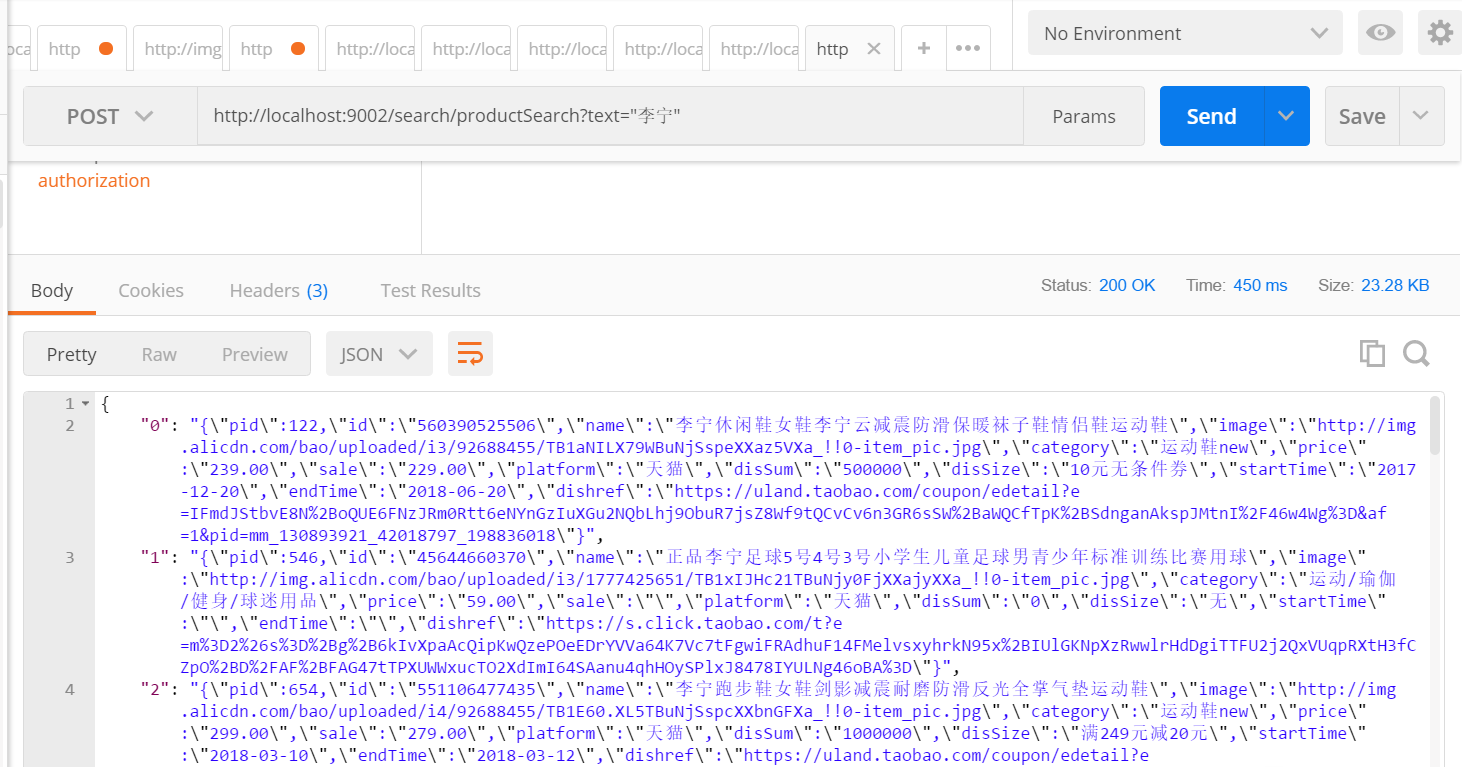
10 将搜索得到的数据以json数据形式返回。
   /**

     * 商品搜索

     */

    @RequestMapping("/productSearch")

    @ResponseBody

    public JSONObject productSearch(String text) {

        SearchResponse response1 = client.prepareSearch("product", "index")  //指定多个索引

                .setTypes("product", "type")  //指定类型

                .setSearchType(SearchType.QUERY_THEN_FETCH)

                .setQuery(QueryBuilders.matchQuery("name", text))  // Query

                .setFrom(0).setSize(60).setExplain(true)

                .get();

        SearchHit[] searchHits = response1.getHits().getHits();//命中个数

            JSONObject jsonObject = new JSONObject();

        for (int i = 0; i < searchHits.length; i++) {

            String sourceAsString = searchHits[i].getSourceAsString();

            jsonObject.put(i+"",sourceAsString);

        }

        return jsonObject;

    }
es比较快的原因:https://www.jianshu.com/p/ed7e1ebb2fb7
java api 官方文档:https://www.elastic.co/guide/en/elasticsearch/client/java-api/6.0/java-docs-index.html
elasticsearch 6.0java api的使用的更多相关文章
- elasticsearch中的API
elasticsearch中的API es中的API按照大类分为下面几种: 文档API: 提供对文档的增删改查操作 搜索API: 提供对文档进行某个字段的查询 索引API: 提供对索引进行操作 查看A ...
- Elasticsearch利用cat api快速查看集群状态、内存、磁盘使用情况
使用场景 当Elasticsearch集群中有节点挂掉,我们可以去查看集群的日志信息查找错误,不过在查找错误日志之前,我们可以通过elasticsearch的cat api简单判断下各个节点的状态,包 ...
- Elasticsearch for python API模块化封装
Elasticsearch for python API模块化封装 模块的具体功能 检测Elasticsearch节点是否畅通 查询Elasticsearch节点健康状态 查询包含的关键字的日志(展示 ...
- Springboot整合elasticSearch的官方API实例
前言:在上一篇博客中,我介绍了从零开始安装ElasticSearch,es是可以理解为一个操作数据的中间件,可以把它作为数据的存储仓库来对待,它具备强大的吞吐能力和计算能力,其基于Lucene服务器开 ...
- Elasticsearch中JAVA API的使用
1.Elasticsearch中Java API的简介 Elasticsearch 的Java API 提供了非常便捷的方法来索引和查询数据等. 通过添加jar包,不需要编写HTTP层的代码就可以开始 ...
- elasticsearch【cat API,系统数据】指令汇总
本博文讲述的ES获取系统数据的API是基于Elasticsearch 2.4.1版本的. 0. overview a. 下面将要介绍的所有的指令,都支持一个查询参数v(verbose),用来显示详细的 ...
- Elasticsearch使用REST API实现全文检索
通过rest api添加检索数据,阅读官方文档可以发现,elasticsearch支持动态映射,但是其中有不少问题,且听慢慢详解. 本文主要讲述三点内容: 1 Elasticsearch常用的rest ...
- 【重新分配分片】Elasticsearch通过reroute api重新分配分片
elasticsearch可以通过reroute api来手动进行索引分片的分配. 不过要想完全手动,必须先把cluster.routing.allocation.disable_allocation ...
- ElasticSearch 2 (4) - API Convention
ElasticSearch 2.1.1 (4) - API Convention The elasticsearch REST APIs are exposed using JSON over HTT ...
随机推荐
- JS-过滤敏感词【RegExp】
来自腾讯课堂笔记:https://ke.qq.com/webcourse/index.html#course_id=152997&term_id=100174752&taid=8010 ...
- thinkphp3.2 实现上一篇和下一篇
现在在做一个能够在内容页点击上一篇可以看到上一篇,点击下一篇可以看到下一篇. 首先http://www.mmkb.com/zhendao/index/news_show?code=98 现在code= ...
- git 命令自动补全
下载 Git 的源代码 使用如下命令即可下载: git clone https://github.com/git/git 复制 git-completion.bash 源代码下有个 contrib/c ...
- openstack-networking-neutron(三)---用户态和内核态的区别
究竟什么是用户态,什么是内核态,这两个基本概念以前一直理解得不是很清楚,根本原因个人觉得是在于因为大部分时候我们在写程序时关注的重点和着眼的角度放在了实现的功能和代码的逻辑性上,先看一个例子: 1)例 ...
- nginx fastcgi配置
1.1 nginx概述nginx简介Nginx是俄罗斯人编写的十分轻量级的HTTP服务器,Nginx,它的发音为“engine X”, 是一个高性能的HTTP和反向代理服务器,同时也是一个IMAP/P ...
- C语言qsort用法
一.对int类型数组排序 int num[100]; Sample: int cmp ( const void *a , const void *b ) { return *(int *)a - *( ...
- MVC @RenderBody、@RenderSection、@RenderPage、@Html.RenderPartial、@Html.RenderAction
1.@RenderBody() 作用和母版页中的服务器控件类似,当创建基于此布局页面的视图时,视图的内容会和布局页面合并,而新创建视图的内容会通过布局页面的@RenderBody()方法呈现在标签之间 ...
- Unity3D笔记 愤怒的小鸟<二> 实现Play界面
创建Play界面.能个把各个图片组合成一个场景,场景组成后背景能够不停的滚动,当鼠标单击时显示图片手型鼠标 一.GUI Texture 1.创建背景.地面.树木.草 ,这里注意Z轴的排序,一层一层则第 ...
- react+babel+webpack初试
在上一篇,我们简单学习了webpack学习,现在这里我们简单学习一下react+babel+webpack,进行编译react语法jsx以及结合es6写法. 这里我就简单的直接上demo: packa ...
- ABP之应用服务(2)
在上一篇的笔记中,已经大致对Application层的使用作了简要的使用说明,感觉还是有些东西需要研究一下,所以承接上文,对AutoMapper这个方便的东西,稍微研究一下. 一.初识AutoMapp ...