
elasticsearch 6.0java api的使用
elasticsearch 6.0 中java api的使用
1:使用java api创建elasticsearch客户端
package com.search.elasticsearch;

import org.elasticsearch.client.transport.TransportClient;

import org.elasticsearch.common.settings.Settings;

import org.elasticsearch.common.transport.TransportAddress;

import org.elasticsearch.transport.client.PreBuiltTransportClient;

import java.io.IOException;

import java.io.InputStream;

import java.net.InetAddress;

import java.util.Properties;

public class ElasticsearchConfig {

    private static TransportClient client;

    public TransportClient getElasticsearchClient() {

        try {

            Settings settings = Settings.builder()

                    .put("cluster.name", "my-esLearn")  //连接的集群名

                    .put("client.transport.ignore_cluster_name", true)  //如果集群名不对,也能连接

                    .build();

            //创建client

            client = new PreBuiltTransportClient(settings)

                    .addTransportAddress(new TransportAddress(InetAddress.getByName("127.0.0.1"), 9300));  //主机和端口号

            return client;

        } catch (Exception e) {

            e.printStackTrace();

        }

        return null;

    }

}
2:使用客户端创建索引,索引中 某些字段指定ik分词器等
package com.search.elasticsearch;
import org.elasticsearch.action.DocWriteResponse;

import org.elasticsearch.action.admin.indices.analyze.AnalyzeRequestBuilder;

import org.elasticsearch.action.admin.indices.mapping.put.PutMappingRequest;

import org.elasticsearch.action.bulk.BulkItemResponse;

import org.elasticsearch.action.bulk.BulkRequestBuilder;

import org.elasticsearch.action.bulk.BulkResponse;

import org.elasticsearch.action.get.GetResponse;

import org.elasticsearch.action.index.IndexRequest;

import org.elasticsearch.action.index.IndexResponse;

import org.elasticsearch.action.search.SearchResponse;

import org.elasticsearch.action.search.SearchType;

import org.elasticsearch.action.update.UpdateRequest;

import org.elasticsearch.action.update.UpdateResponse;

import org.elasticsearch.client.IndicesAdminClient;

import org.elasticsearch.client.Requests;

import org.elasticsearch.client.transport.TransportClient;

import org.elasticsearch.common.settings.Settings;

import org.elasticsearch.common.transport.TransportAddress;

import org.elasticsearch.common.xcontent.XContentBuilder;

import org.elasticsearch.common.xcontent.XContentFactory;

import org.elasticsearch.index.query.QueryBuilders;

import org.elasticsearch.transport.client.PreBuiltTransportClient;

import org.springframework.beans.factory.annotation.Autowired;

import org.springframework.beans.factory.annotation.Value;

import java.io.IOException;

import java.io.InputStream;

import java.net.InetAddress;

import java.util.Date;

import java.util.List;

import java.util.Properties;

import java.util.ResourceBundle;

import java.util.concurrent.ExecutionException;

import static org.elasticsearch.common.xcontent.XContentFactory.jsonBuilder;

public class ElasticSearchUtil {

    private static TransportClient client;

    public ElasticSearchUtil() {

        this.client=new ElasticsearchConfig().getElasticsearchClient();  //使用上面创建好的客户端添加到类中。

    }

    //创建索引,并给索引某些字段指定iK分词,以后向该索引中查询时,就会用ik分词。

    public void createIndex() throws IOException {

        //创建映射

        XContentBuilder mapping = XContentFactory.jsonBuilder()

                .startObject()

                .startObject("properties")

                //      .startObject("m_id").field("type","keyword").endObject()
                     //title:字段名,  type:文本类型       analyzer :分词器类型
                .startObject("title").field("type", "text").field("analyzer", "ik_smart").endObject()   //该字段添加的内容,查询时将会使用ik_smart分词

                .startObject("content").field("type", "text").field("analyzer", "ik_max_word").endObject()

                .endObject()

                .endObject();

        //index:索引名   type:类型名(可以自己定义)

        PutMappingRequest putmap = Requests.putMappingRequest("index").type("type").source(mapping);

        //创建索引

        client.admin().indices().prepareCreate("index").execute().actionGet();

        //为索引添加映射

        client.admin().indices().putMapping(putmap).actionGet();

    }

}
这个时候索引就创建好了,mapping不能掉
3: 向上一步创建的索引中添加内容,包括id,id不能重复
    public void createIndex1() throws IOException {

        IndexResponse response = client.prepareIndex("index", "type", "1") //索引,类型,id

                .setSource(jsonBuilder()

                        .startObject()

                        .field("title", "title")   //字段,值

                        .field("content", "content")

                        .endObject()

                ).get();

    }
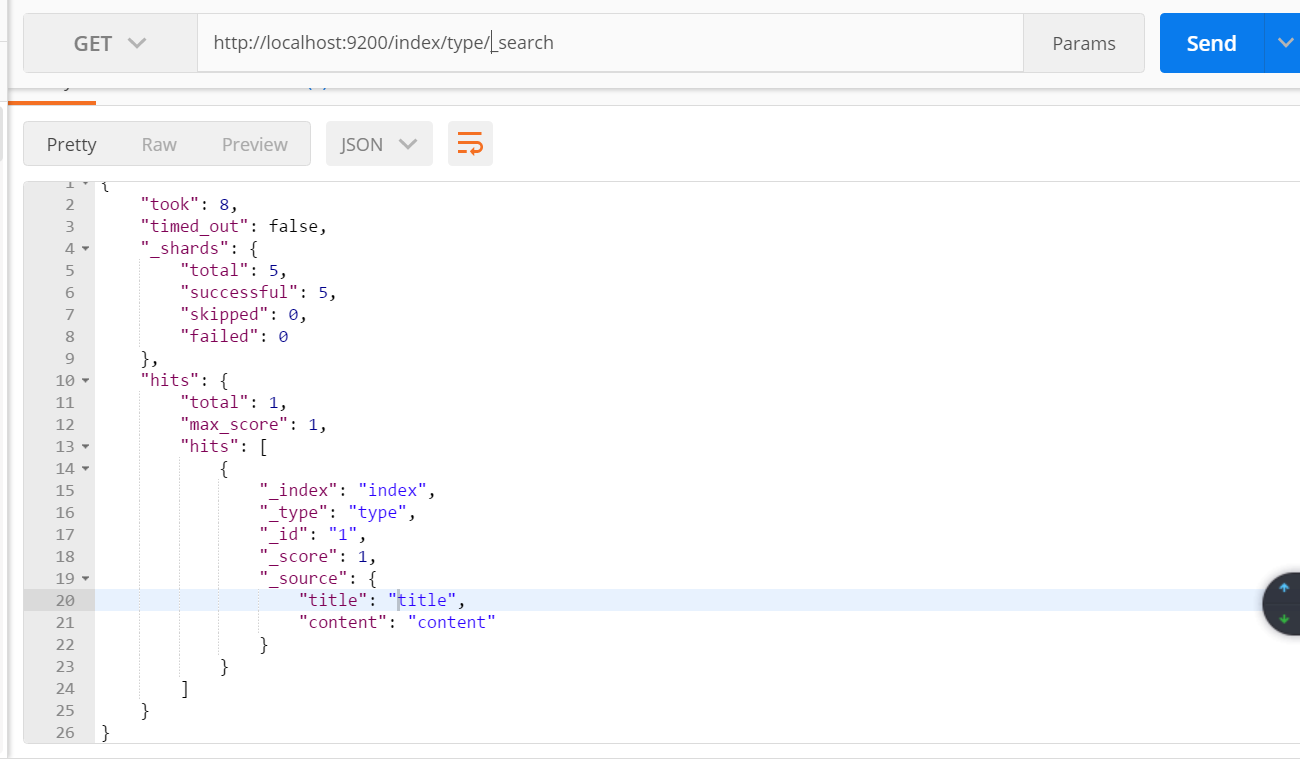
使用postman查询该索引:
4:更新索引,更新刚才创建的索引,如果id相同将会覆盖掉刚才的内容
    public void updateByClient() throws IOException, ExecutionException, InterruptedException {

        //每次添加id应该不同,相当于数据表中的主键,相同 的话将会进行覆盖

        UpdateResponse response = client.update(new UpdateRequest("index", "type", "1")

                .doc(XContentFactory.jsonBuilder()

                        .startObject()

                        .field("title", "中华人民共和国国歌,国歌是最好听的歌")

                        .field("content","中华人民共和国国歌,国歌是最好听的歌")

                        .endObject()

                )).get();

    }
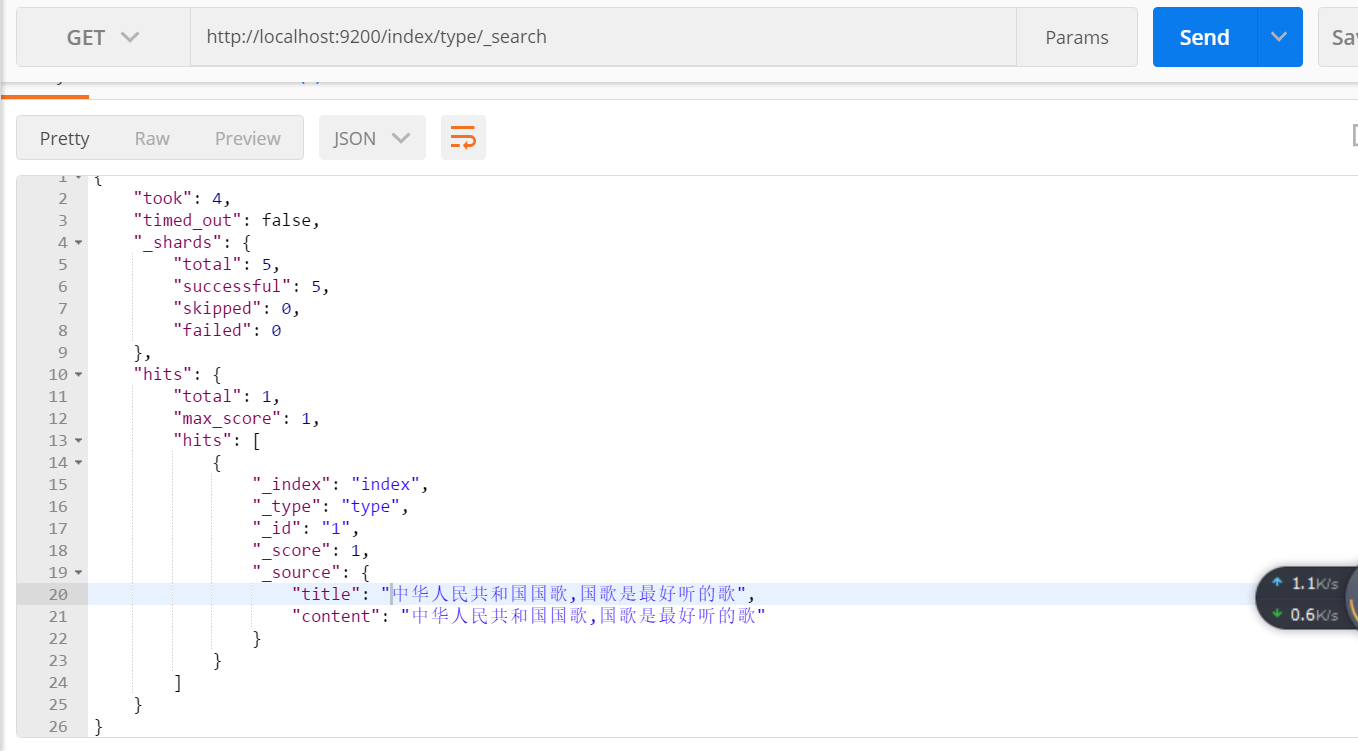
使用postman查看该索引的内容
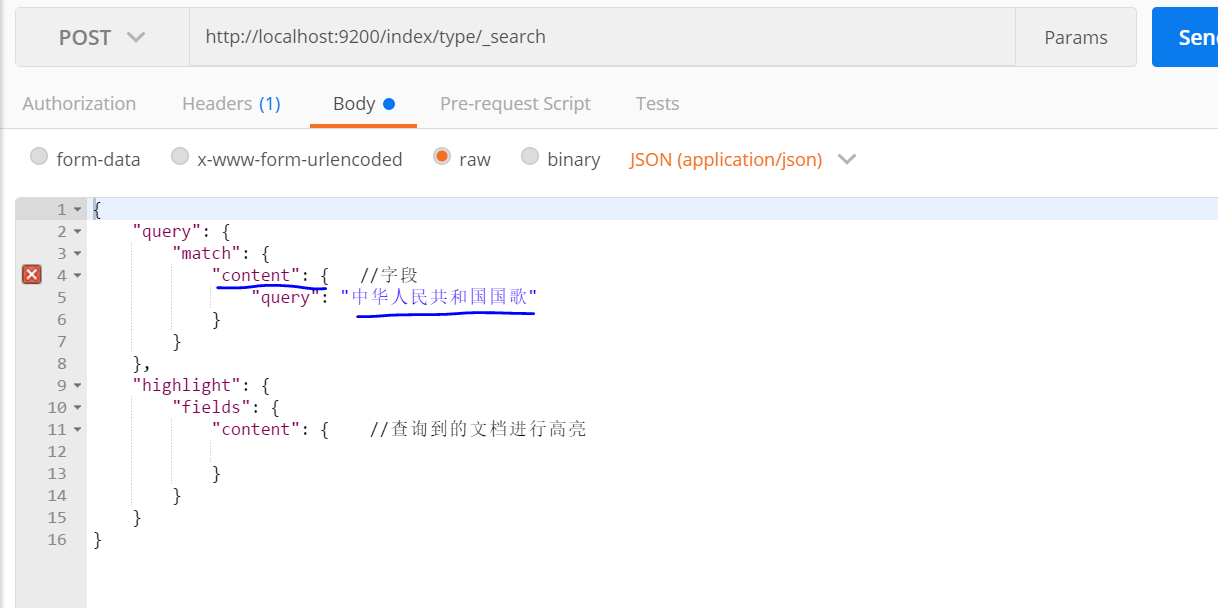
5:对索引进行查询,因为分词不同,分词器将会对要查询的内容先分词,再在子段中查询。
查询 子段 content
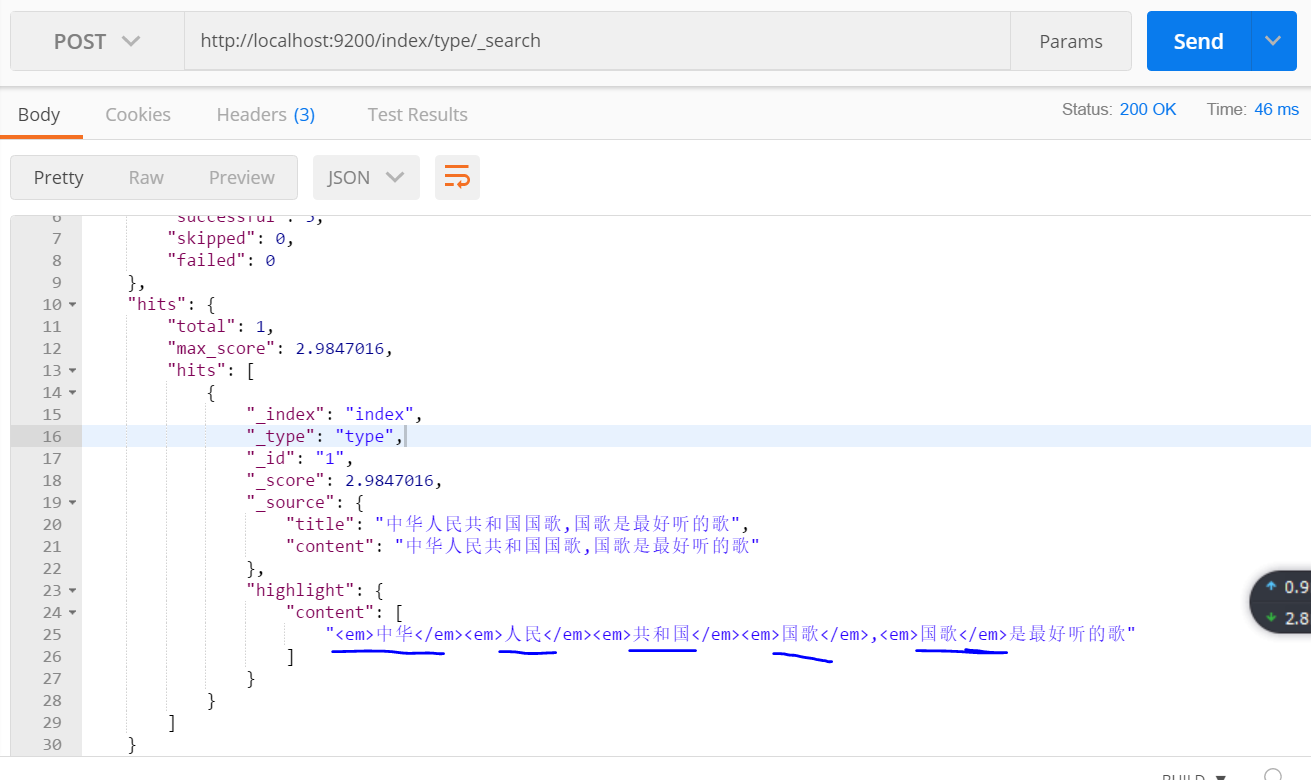
查询结果:
对title子段进行查询:

查询结果:
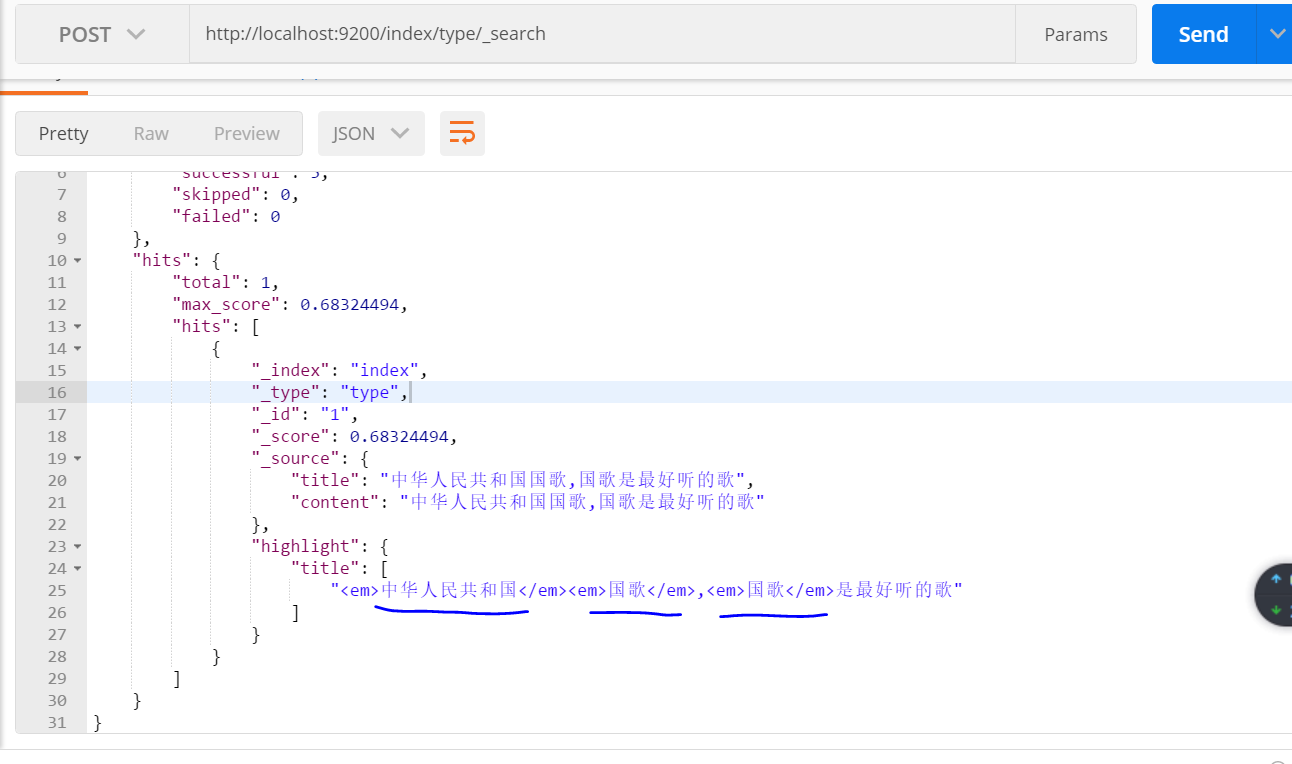
6:向 索引中再添加一条数据
    public void createIndex2() throws IOException {

        IndexResponse response = client.prepareIndex("index", "type", "2")

                .setSource(jsonBuilder()

                        .startObject()

                        .field("title", "中华民族是伟大的民族")

                        .field("content", "中华民族是伟大的民族")

                        .endObject()

                ).get();

    }
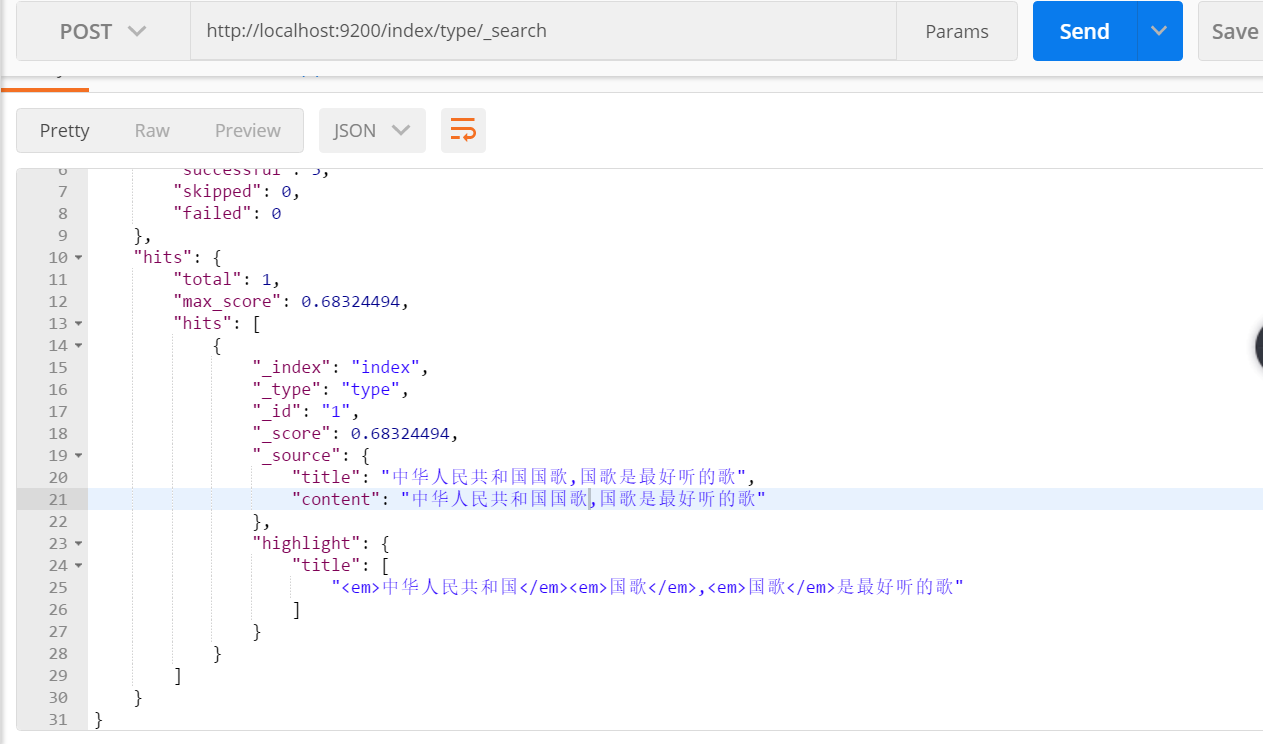
对字段content进行查询:
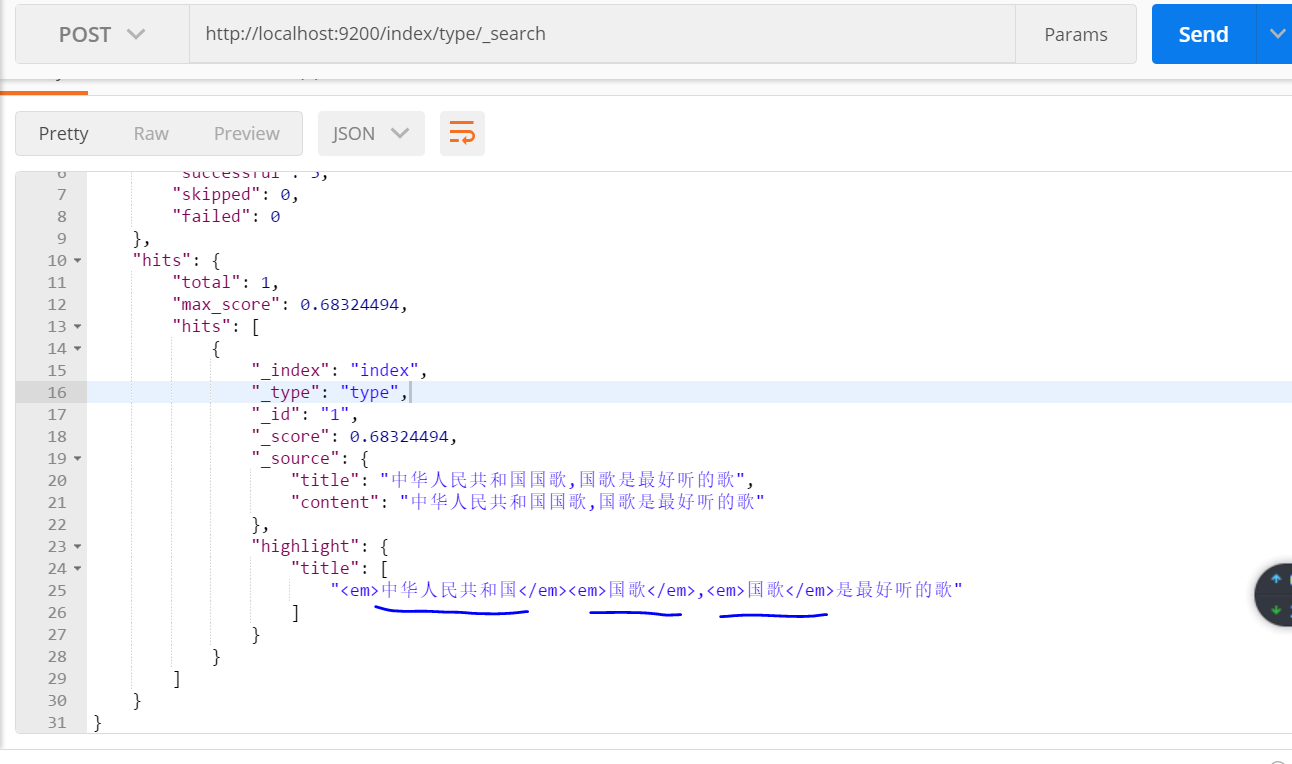
结果:两条数据都能查到,因为对查询内容 “中华人民共和国国歌” 进行细粒度划分,含有“中华” 一词,两条数据中都包含“中华”。
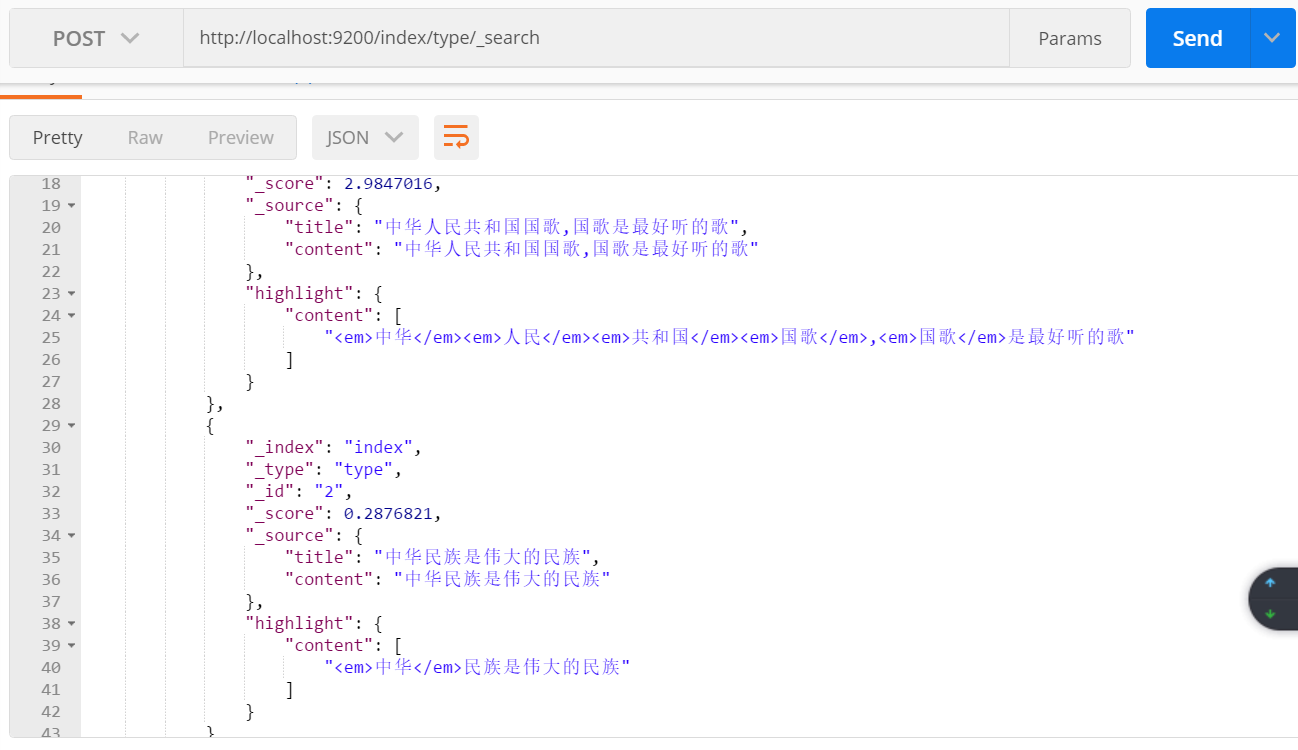
对字段title 进行查询:
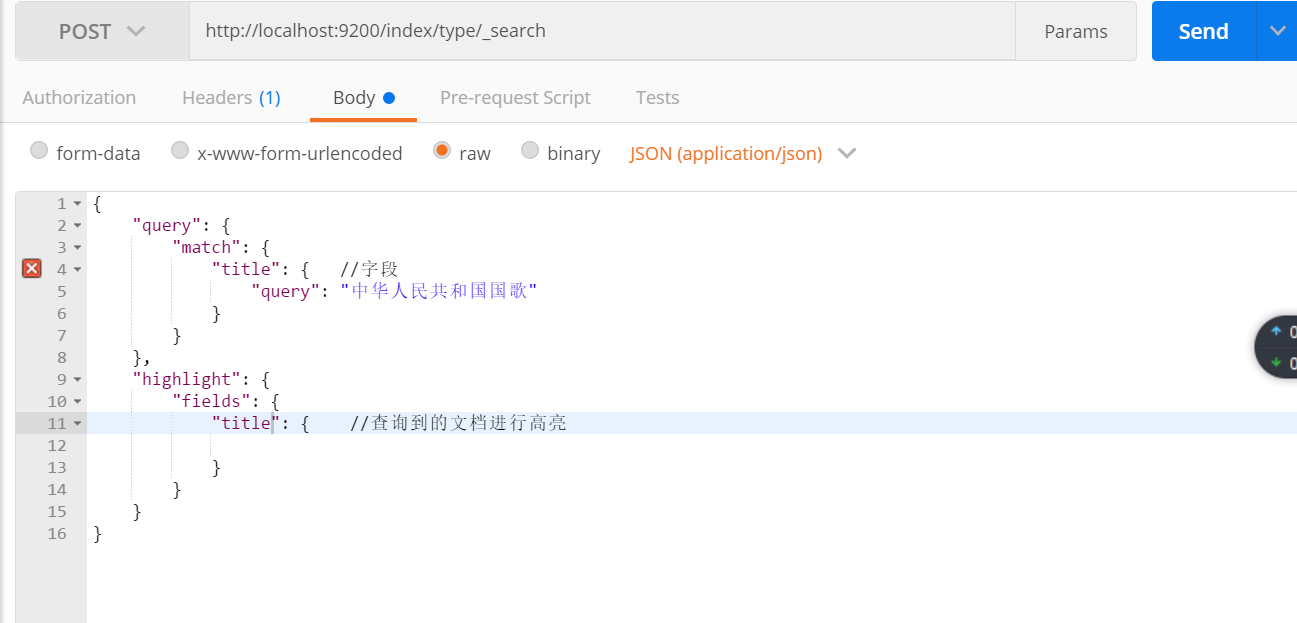
查询结果: 只有一条数据,因为对title 使用的是 粗粒度分词
7:search api的操作:
   public void search() {
        SearchResponse response1 = client.prepareSearch("index1", "index")  //指定多个索引
                .setTypes("type1", "type")  //指定类型
                .setSearchType(SearchType.QUERY_THEN_FETCH)
                .setQuery(QueryBuilders.matchQuery("title", "中华人民共和国国歌"))  // Query
//                .setPostFilter(QueryBuilders.rangeQuery("age").from(12).to(18))     // Filter
                .setFrom(0).setSize(60).setExplain(true)
                .get();
        long totalHits1= response1.getHits().totalHits;  //命中个数
        System.out.println(totalHits1);

        SearchResponse response2 = client.prepareSearch("index1", "index")  //指定多个索引
                .setTypes("type1", "type")  //指定类型
                .setSearchType(SearchType.QUERY_THEN_FETCH)
                .setQuery(QueryBuilders.matchQuery("content", "中华人民共和国国歌"))  // Query
//                .setPostFilter(QueryBuilders.rangeQuery("age").from(12).to(18))     // Filter
                .setFrom(0).setSize(60).setExplain(true)
                .get();
        long totalHits2 = response2.getHits().totalHits;  //命中个数
        System.out.println(totalHits2);
    }
8:Get Api操作:
    public void get() {

        GetResponse response = client.prepareGet("index", "type", "1").get();

        Map<String, Object> source = response.getSource();

        Set<String> strings = source.keySet();

        Iterator<String> iterator = strings.iterator();

        while (iterator.hasNext()) {

            System.out.println(source.get(iterator.next()));

        }

    }
9:bulk api 批量创建索引,并添加数据
    /**

     * 批量创建索引,并添加数据

     * @throws IOException

     */

    public void bulkApi() throws IOException {

        BulkRequestBuilder bulkRequest = client.prepareBulk();

// either use client#prepare, or use Requests# to directly build index/delete requests

        bulkRequest.add(client.prepareIndex("twitter", "tweet", "1")

                .setSource(jsonBuilder()

                        .startObject()

                        .field("user", "kimchy")

                        .field("postDate", new Date())

                        .field("message", "trying out Elasticsearch")

                        .endObject()

                )

        );

        bulkRequest.add(client.prepareIndex("twitter", "tweet", "2")

                .setSource(jsonBuilder()

                        .startObject()

                        .field("user", "kimchy")

                        .field("postDate", new Date())

                        .field("message", "another post")

                        .endObject()

                )

        );

        BulkResponse bulkResponse = bulkRequest.get();

        if (bulkResponse.hasFailures()) {

            // process failures by iterating through each bulk response item

        }

    }
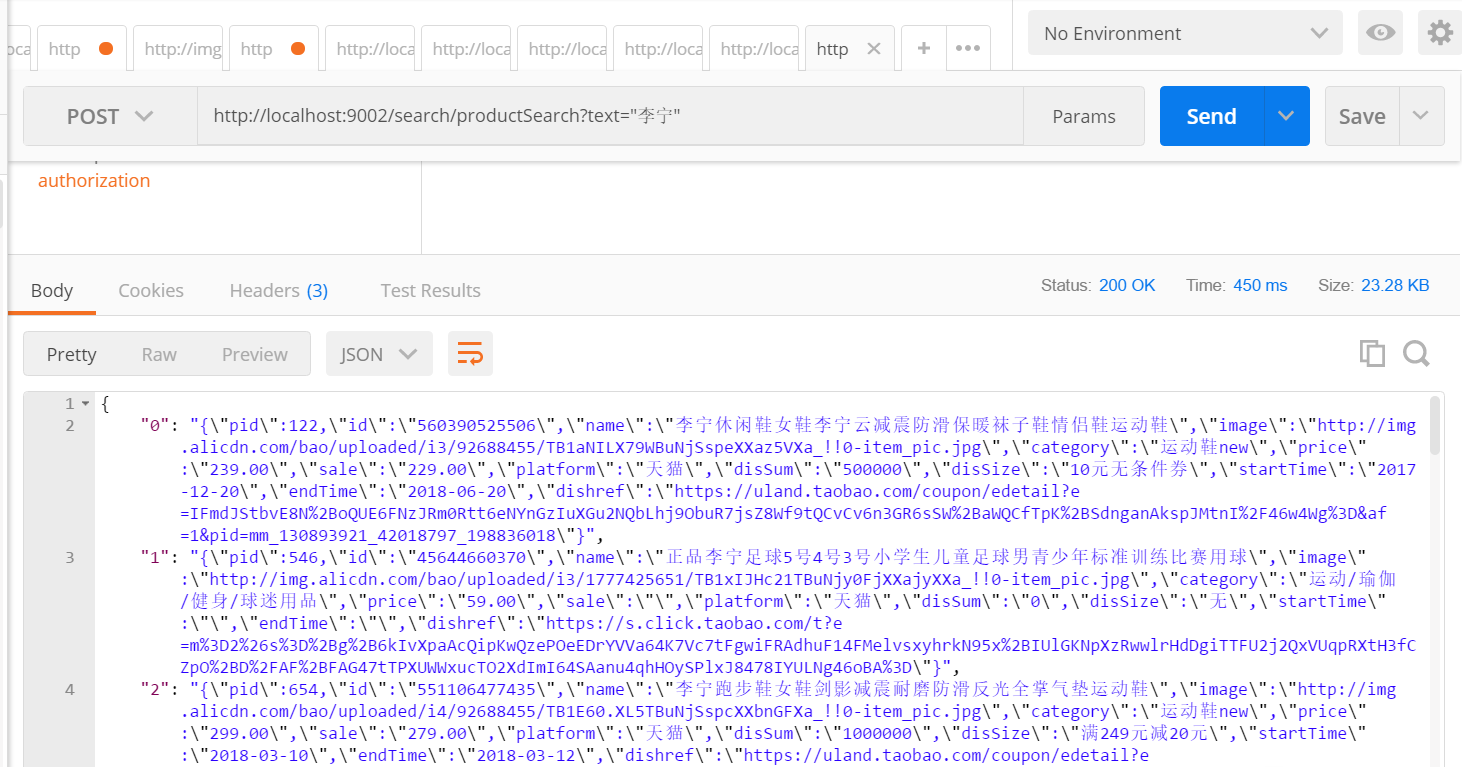
10 将搜索得到的数据以json数据形式返回。
   /**

     * 商品搜索

     */

    @RequestMapping("/productSearch")

    @ResponseBody

    public JSONObject productSearch(String text) {

        SearchResponse response1 = client.prepareSearch("product", "index")  //指定多个索引

                .setTypes("product", "type")  //指定类型

                .setSearchType(SearchType.QUERY_THEN_FETCH)

                .setQuery(QueryBuilders.matchQuery("name", text))  // Query

                .setFrom(0).setSize(60).setExplain(true)

                .get();

        SearchHit[] searchHits = response1.getHits().getHits();//命中个数

            JSONObject jsonObject = new JSONObject();

        for (int i = 0; i < searchHits.length; i++) {

            String sourceAsString = searchHits[i].getSourceAsString();

            jsonObject.put(i+"",sourceAsString);

        }

        return jsonObject;

    }
es比较快的原因:https://www.jianshu.com/p/ed7e1ebb2fb7
java api 官方文档:https://www.elastic.co/guide/en/elasticsearch/client/java-api/6.0/java-docs-index.html
elasticsearch 6.0java api的使用的更多相关文章
- elasticsearch中的API
elasticsearch中的API es中的API按照大类分为下面几种: 文档API: 提供对文档的增删改查操作 搜索API: 提供对文档进行某个字段的查询 索引API: 提供对索引进行操作 查看A ...
- Elasticsearch利用cat api快速查看集群状态、内存、磁盘使用情况
使用场景 当Elasticsearch集群中有节点挂掉,我们可以去查看集群的日志信息查找错误,不过在查找错误日志之前,我们可以通过elasticsearch的cat api简单判断下各个节点的状态,包 ...
- Elasticsearch for python API模块化封装
Elasticsearch for python API模块化封装 模块的具体功能 检测Elasticsearch节点是否畅通 查询Elasticsearch节点健康状态 查询包含的关键字的日志(展示 ...
- Springboot整合elasticSearch的官方API实例
前言:在上一篇博客中,我介绍了从零开始安装ElasticSearch,es是可以理解为一个操作数据的中间件,可以把它作为数据的存储仓库来对待,它具备强大的吞吐能力和计算能力,其基于Lucene服务器开 ...
- Elasticsearch中JAVA API的使用
1.Elasticsearch中Java API的简介 Elasticsearch 的Java API 提供了非常便捷的方法来索引和查询数据等. 通过添加jar包,不需要编写HTTP层的代码就可以开始 ...
- elasticsearch【cat API,系统数据】指令汇总
本博文讲述的ES获取系统数据的API是基于Elasticsearch 2.4.1版本的. 0. overview a. 下面将要介绍的所有的指令,都支持一个查询参数v(verbose),用来显示详细的 ...
- Elasticsearch使用REST API实现全文检索
通过rest api添加检索数据,阅读官方文档可以发现,elasticsearch支持动态映射,但是其中有不少问题,且听慢慢详解. 本文主要讲述三点内容: 1 Elasticsearch常用的rest ...
- 【重新分配分片】Elasticsearch通过reroute api重新分配分片
elasticsearch可以通过reroute api来手动进行索引分片的分配. 不过要想完全手动,必须先把cluster.routing.allocation.disable_allocation ...
- ElasticSearch 2 (4) - API Convention
ElasticSearch 2.1.1 (4) - API Convention The elasticsearch REST APIs are exposed using JSON over HTT ...
随机推荐
- /etc/fstab文件损坏的补救措施
最近乱搞,把/etc/fstab弄坏了,导致无法进入图形界面,而且所有文件都是只读的(简直郁闷到底啊),查了好多资料什么的终于弄好了,也走了不少弯路 恩,我不喜欢扯太多东西,这个是补救的帖子,还是希望 ...
- .vimrc设置说明
在终端下使用vim进行编辑时,默认情况下, 编辑的界面上是没有显示行号.语法高亮度显示.智能缩进等功能的. 为了更好的在vim下进行工作,需要手动设置一个配置文件:.vimrc. 在启动vim时,当前 ...
- 老树开新花:DLL劫持漏洞新玩法
本文原创作者:丝绸之路 <img src="http://image.3001.net/images/20150921/14428044502635.jpg!small" t ...
- <转>特征工程(二)
出处: http://blog.csdn.net/longxinchen_ml/article/details/50493845, http://blog.csdn.net/han_xiaoyang/ ...
- JUnit —— TestSuite 的使用
首先说一下,suite ,中文是 一套,一组 的意思. 那么,TestSuite,顾名思义,就是用来运行一组测试的. 如何使用呢 ? 假设有个这样的测试类 StudentDAOTest ,代码如下: ...
- scanf printf sprintf fprintf
都是C语言中的函数,但C++保留了这些函数,在头文件iostream中声明了. 1 scanf(格式控制,输出列表) printf (格式控制,输出列表) 举例: #include <iostr ...
- 字符乱码 导致 ORA-12899: value too large
问题场景: 1.创建测试表 create table t01(name varchar2(30)) 2.插入数据 SQL> insert into t01 (name) values('所有分销 ...
- ESlint全局变量报错
场景: 在main.js下申明了全局变量: /* eslint no-undef: "error" */ window.vm = new Vue({ el: '#app', rou ...
- jquery validate使用笔记
1 表单验证的准备工作 在开启长篇大论之前,首先将表单验证的效果展示给大家. 1.点击表单项,显示帮助提示 2.鼠标离开表单项时,开始校验元素 3.鼠标离开后的正确.错误提示及鼠标移入时的帮 ...
- [APP] Android 开发笔记 003-使用Ant Release 打包与keystore加密说明
接上节 [APP] Android 开发笔记 002 5. 使用ant release 打包 1)制作 密钥文件 release.keystore (*.keystore) keytool -genk ...