
uboot命令实现举例
之前一直在想,为什么没有人出一个完全从零写uboot和移植剪裁内核的教程,后来发现,确实这样的教程十分不容易,还有就是我们也没有必要花那么多时间去做别人已经做好的事情,所以,一般而言我们只用管怎么实现功能。(把更多的时间给音频、视频、图像类等的算法去更加符合经济效益)。
我们知道uboot的菜单中是支持很多指令的,我们今天就来增加一条hello指令。分析uboot知道,我们指令依托于一个 run_command函数,而且支持分号,比如 print;ls就会先执行print然后接着执行ls指令。其实uboot的命令和linux内核学习的时候一样,每个指令就是一个可执行程序。
struct cmd_tbl_s {

    char        *name;        /* Command Name            */

    int        maxargs;    /* maximum number of arguments    */

    int        repeatable;    /* autorepeat allowed?        */

                    /* Implementation function    */

    int        (*cmd)(struct cmd_tbl_s *, int, int, char *[]);

    char        *usage;        /* Usage message    (short)    */

#ifdef    CFG_LONGHELP

    char        *help;        /* Help  message    (long)    */

#endif

#ifdef CONFIG_AUTO_COMPLETE

    /* do auto completion on the arguments */

    int        (*complete)(int argc, char *argv[], char last_char, int maxv, char *cmdv[]);

#endif

};
U_BOOT_CMD第一个参数是命令的名字,第二个参数是参数最长数字,第三个参数代表是否可重复,为1表示可重复,可重复就是在输入执行
了一次之后,不用再输入,直接回车就可以达到之前输入指令的效果。第四个参数是一个函数指针,指向要执行命令的函数体。第五个参数是
用法信息的简短说明。第六个参数是命令的长帮助信息。
U_BOOT_CMD(

     bootm,    CFG_MAXARGS,    ,    do_bootm,

     "bootm   - boot application image from memory\n",

     "[addr [arg ...]]\n    - boot application image stored in memory\n"

     "\tpassing arguments 'arg ...'; when booting a Linux kernel,\n"

     "\t'arg' can be the address of an initrd image\n"

#ifdef CONFIG_OF_FLAT_TREE

    "\tWhen booting a Linux kernel which requires a flat device-tree\n"

    "\ta third argument is required which is the address of the of the\n"

    "\tdevice-tree blob. To boot that kernel without an initrd image,\n"

    "\tuse a '-' for the second argument. If you do not pass a third\n"

    "\ta bd_info struct will be passed instead\n"

#endif

);
#define Struct_Section  __attribute__ ((unused,section (".u_boot_cmd")))

#ifdef  CFG_LONGHELP

#define U_BOOT_CMD(name,maxargs,rep,cmd,usage,help) \

cmd_tbl_t __u_boot_cmd_##name Struct_Section = {#name, maxargs, rep, cmd, usage, help}

#else    /* no long help info */

#define U_BOOT_CMD(name,maxargs,rep,cmd,usage,help) \

cmd_tbl_t __u_boot_cmd_##name Struct_Section = {#name, maxargs, rep, cmd, usage}

#endif    /* CFG_LONGHELP */
CFG_LONGHELP 代表是否配置长的帮助消息,在我们的uboot中是支持的。关C语言的#和##就不再赘述了,字符串和连接符。
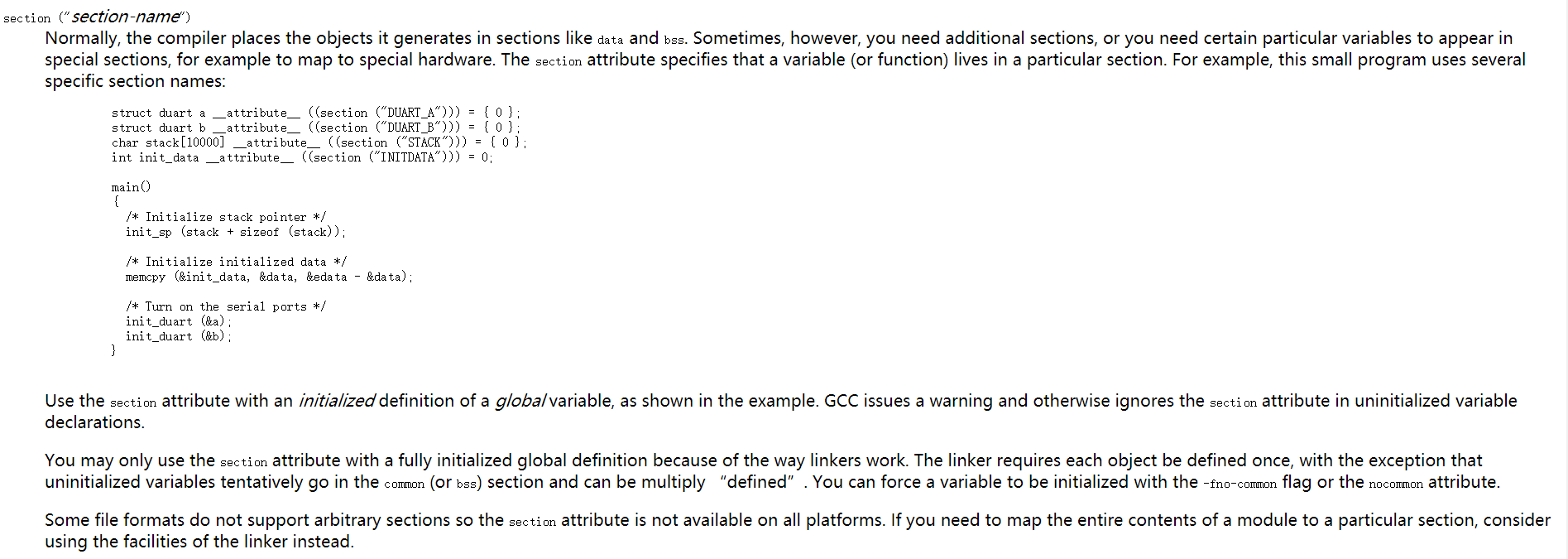
这里说一下:#define Struct_Section __attribute__ ((unused,section (".u_boot_cmd")))unused:This attribute, attached to a variable, means that the variable is meant to be possibly unused. GCC will not produce a warning for this variable.
该属性附加到变量上,意味着该变量可能未被使用。 GCC不会为这个变量产生警告。
参考连接:点击此处
在100ask目录下的lds文件中有:
    . = .;

    __u_boot_cmd_start = .;

    .u_boot_cmd : { *(.u_boot_cmd) }

    __u_boot_cmd_end = .;
其中的u_boot_cmd段就是由上面的__attribute__指定的属性。
如果想实现一个简单的hello命令,只需要新建一个文件比如cmd_hello.c,common目录下的Makefile增加一个cmd_hello.o,
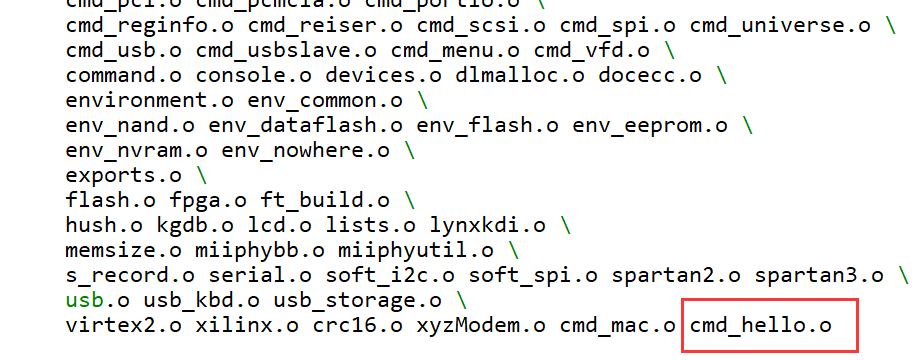
源文件放在common目录下。
cmd_hello.c:
#include <common.h>

#include <watchdog.h>

#include <command.h>

#include <image.h>

#include <malloc.h>

#include <zlib.h>

#include <bzlib.h>

#include <environment.h>

#include <asm/byteorder.h>

int do_hello (cmd_tbl_t *cmdtp, int flag, int argc, char *argv[])

{

    int i;

    printf("hello world!  %d\n",argc);

    for(i-;i<argc;i++)

    {

        printf("argv[%d],%s\n",i,argv[i]);

    }

    return ;

}

U_BOOT_CMD(

     hello,    CFG_MAXARGS,    ,    do_hello,

     "hello-just a test!\n",

     "hello long help\n"

     "do you know how to add a command?\n"

);

就这样,就添加了一个命令了。
一般而言,uboot已经给我们写好了的东西,我们就不再多花时间去了解每一条语句了,先知道怎么用,试想,当初学C语言的时候,我们不也不知道printf怎么实现的吗,还不是能够学到今天这一步,要是当初一来学习就去研究printf怎么实现的输出到屏幕,那么一定坚持不了学习C语言,把时间花在更需要的地方。
uboot命令实现举例的更多相关文章
- U-Boot命令大全(功能参数及用法)
U-Boot上电启动后,按任意键可以退出自动启动状态,进入命令行. U-Boot 2010.03 (Sep 25 2011 - 16:18:50) DRAM: 64 MB Flash: ...
- Uboot mmc命令解析&NAND flash uboot命令详解
转载:http://blog.csdn.net/simonjay2007/article/details/43198353 一:mmc的命令如下: 1:对mmc读操作 mmc read addr bl ...
- uboot命令(1):mmc命令
版权声明 更新:2017-06-07博主:LuckyAlan联系:liuwenvip163@163.com声明:吃水不忘挖井人,转载请注明出处! 1 文章介绍 今天在进行Android分区修改的时候发 ...
- 1.ok6410移植bootloader,移植u-boot,学习u-boot命令
ok6410移植u-boot 既然是移植u-boot当然首先需要u-boot源码,这里的u-boot代码是由国嵌提供的. 一.配置编译u-boot A. 解压 u-boot 压缩文件 B. 进入解压生 ...
- uboot命令分析+实现【转】
转自:http://xouou.iteye.com/blog/2150061 先贴一个重要结构,位于uboot/include/command.h,这个结构代表每个uboot命令 struct cmd ...
- 编译u-boot命令和u-boot常用命令
一.编译u-boot命令 1.配置开发板 #make TQ2440_config 2.编译 #make all 3.交叉编译器是crosstools_3.4.5_softfloat” 使用4.3.3版 ...
- bootargs中的环境变量说明和一些常用的uboot命令
bootargs中的环境变量说明和一些常用的uboot命令 一些常见的uboot命令:Help [command]在屏幕上打印命令的说明Boom [addr]启动在内存储器的内核Tftpboot通过t ...
- securecrt中进入uboot命令行时,出现无法键入任何指令的问题解决方法
securecrt中进入uboot命令行时,出现无法键入任何指令的问题解决方法 可能出现以下几种情况 1.securecrt在创建连接时,忘记取消勾选流控: 2.usb转串口线坏了3.uboot有问题 ...
- Linux Yum 命令使用举例
转自:https://blog.csdn.net/u012359618/article/details/51199309/ 本文给大家讲解Yum的使用15个范例: Yum软件包管理方式,在Red Ha ...
随机推荐
- “医疗信息化行业之中的联发科”- 我们在医疗行业中的定位及目标 想做一个面对中小企业的专业上游软件供应商 台湾联发科技颠覆掉的是一个封闭的手机产业系统 解决方案,即AgileHIS.NET数字化医院基础方案
“医疗信息化行业之中的联发科”- 我们在医疗行业中的定位及目标 我们做中国医疗信息化行业之中的联发科 ---我们在医疗行业中的定位及目标 从我个人来讲,我从2001年到现在这10年之间基本上一直在 ...
- idea 不下载jar包
是因为用的gradle 然后没有设置gradle jvm
- rviz学习笔记(二)——Markers: Points and Lines (C++) 点和线
一.在using_marker/src中编写点和线代码 vim ~/catkin_ws/src/using_marker/src/points_and_lines.cpp 编写代码,其中有注释 #in ...
- 命令行修改MySQL数据库密码
通过MySQL命令行来修改MySQL数据库的密码,下面就为您详细介绍如何使用MySQL命令行来修改密码. 格式:mysqladmin -u用户名 -p旧密码 password 新密码 1.给root加 ...
- UIAlertView 点击按钮后控制其是否消失
新建NotDismissAlertView类,继承UIAlertView. 设置控制是否消失的标示符 重写 在-(void)dismissWithClickedButtonIndex:(NSInte ...
- MongodDB---初识
NoSQL介绍 一.NoSQL简介 NoSQL,全称是”Not Only Sql”,指的是非关系型的数据库. 非关系型数据库主要有这些特点:非关系型的.分布式的.开源的.水平可扩展的. 原始的目的是为 ...
- 使用grep恢复被删文件内容
在Unix/Linux下,最危险的命令恐怕就属rm命令了,每次在root下使用这个命令的时候,我都要盯着命令行看上几分钟才敢把回车敲下去.以前,看到同事在脚本中使用rm命令 —— rm {$App_D ...
- struts2 常量
struts.i18n.encoding 指定web应用的默认编码集
- 不要随便使用 runAllManagedModulesForAllRequests="true" 来解决问题
在 IIS 7.0 中,对于使用 Url 路由 访问页面的 ASP.NET 应用程序,IIS可能会不能出 Url 是对 ASP.NET 的请求. 会显示404啊,403啊之类的错误代码(因为路径不存在 ...
- 《深入理解jvm》笔记---第六章
类文件结构 1. Java一次编写,到处执行的基石: Java编译产生的是字节码(bytecode).sun公司和其它虚拟机提供商公布各个平台上的虚拟机.这些虚拟机能够加载和执行这些与平台无关的 ...